Skip to content
Consultants comparing native Microsoft 365 and third-party SharePoint governance tools in a modern meeting room.

SharePoint Governance Tools: Native vs Third-Party

We open a lot of SharePoint tenants. We rarely find a third-party governance platform in any of them.

That is worth stating plainly, because every comparison article on this topic is published by a company selling one of these platforms, and none of them will tell you that most organizations govern SharePoint with the tools already in their Microsoft 365 subscription. Some do so badly, which is a different problem. But the mid-market and enterprise environments we work in are overwhelmingly governed with native capability, not purchased software.

That does not make the third-party category worthless. It means the buying question is narrower than the marketing suggests, and the honest evaluation starts with what you already own.

What are SharePoint governance tools?

SharePoint governance tools are the software that enforces and reports on how a SharePoint environment is structured, secured, and maintained over time – site provisioning and lifecycle, permissions and external sharing, retention and records, and the reporting that proves any of it is working. They fall into two groups: the native capabilities inside Microsoft 365, and third-party platforms that sit on top of the Microsoft Graph and add automation, deeper reporting, and delegation.

The distinction that matters is scope. Native tools give you the controls and the raw data. Third-party platforms wrap those same controls in workflows, scheduled reporting, and interfaces that non-administrators can use.

What native Microsoft 365 governance already covers

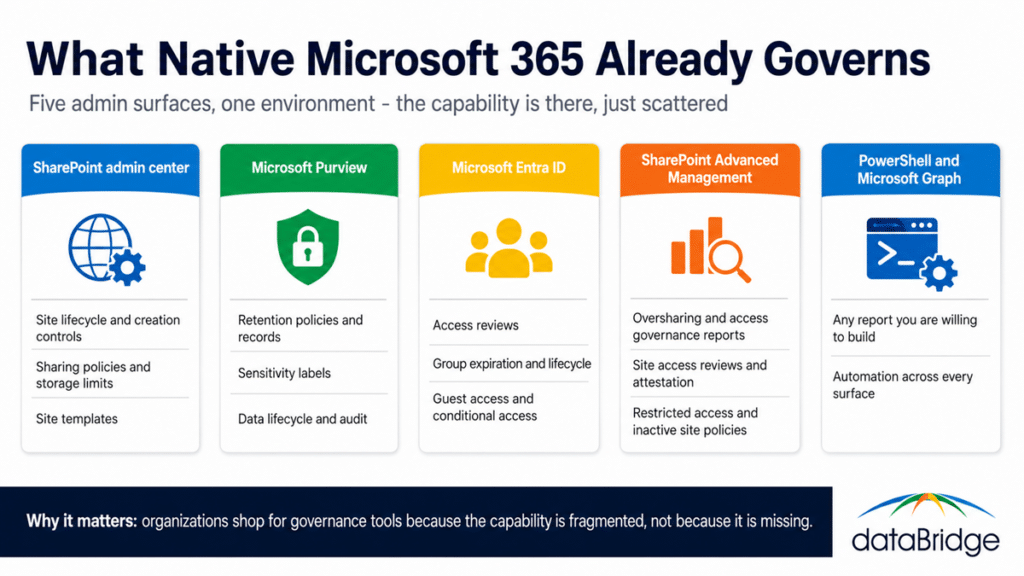
Native Microsoft 365 covers more governance ground than most buyers realize, spread across four admin surfaces rather than one console. That fragmentation, not missing capability, is the most common reason organizations start shopping.

  • SharePoint admin center handles site lifecycle, sharing policies, site creation controls, storage limits, and site templates
  • Microsoft Purview handles retention policies, sensitivity labels, records declaration, data lifecycle management, and audit
  • Microsoft Entra ID handles access reviews, group expiration and lifecycle, guest access controls, and conditional access
  • SharePoint Advanced Management adds oversharing and data access governance reports, site access reviews, restricted access control, inactive site policies, and change history
  • PowerShell and Microsoft Graph give you any report you are willing to build
Map of native Microsoft 365 governance capability across five admin surfaces including SharePoint admin center, Purview, Entra ID, and SharePoint Advanced Management.
What native Microsoft 365 already governs, spread across five separate admin surfaces.

SharePoint Advanced Management is the piece that changed this comparison most. Capabilities that were once the clearest reason to buy a third-party platform – oversharing detection, site-level access reviews, inactive site cleanup – are now available natively. Licensing has shifted more than once, and organizations moving toward Copilot often already have access to these capabilities without a separate purchase – our breakdown of SharePoint Advanced Management for Copilot covers the feature set and the licensing reality in detail. Our guide to Copilot readiness for SharePoint covers where these controls matter most, since oversharing is the failure that surfaces the moment Copilot starts answering questions.

The third-party platforms we see most

Four platforms come up most often in evaluations. Each takes a different angle on the same underlying Graph data, and none of them replaces native controls – they operate through them.

One disclosure before the list: ShareGate is a dataBridge technology partner, primarily on the migration side of its product line. We have no commercial relationship with the other three platforms below, and the descriptions here reflect how each one positions itself rather than any preference of ours.

ShareGate Protect

Positioned around permissions and external sharing risk. Its focus is finding oversharing, tracking sensitivity across sites, and delegating cleanup work to site owners rather than routing everything through IT. Sits alongside ShareGate’s better-known migration tooling.

AvePoint Cloud Governance

The most provisioning-heavy of the four. Built around automated site and team request workflows with approval chains, lifecycle policies, and recertification. Organizations with formal intake processes and a high volume of new site requests are its natural fit, and it comes from the deepest bench in this category.

Syskit Point

Emphasizes inventory, permissions reporting, and scheduled access reviews delivered to content owners in plain language. The recurring-review-cycle model is its distinguishing idea: governance as a repeating operational rhythm rather than a one-time cleanup.

Rencore Governance

The broadest reporting scope of the four, extending past SharePoint and Teams into Power Platform and custom app inventory. Policy-based automation is its core, aimed at organizations that need visibility across the full Microsoft 365 development surface, not just content.

Capabilities in this category change quickly, and every vendor iterates against Microsoft’s roadmap. Treat the descriptions above as orientation, and verify current feature sets directly with each vendor before shortlisting.

What third-party platforms actually add

Third-party platforms rarely add controls that Microsoft lacks. What they add is operational packaging around controls you already have, in four areas:

  • consolidated reporting across surfaces that native tools split between four admin centers
  • automated provisioning workflows with approval chains, which native site creation policies do not provide at the same depth
  • scheduled, recurring access reviews delivered to business owners in an interface built for non-administrators
  • policy enforcement automation that acts on drift rather than reporting it and waiting for someone to act

That last capability is the real differentiator, and it is also the one that exposes the category’s limit. A platform can enforce a policy. It cannot decide what the policy should be.

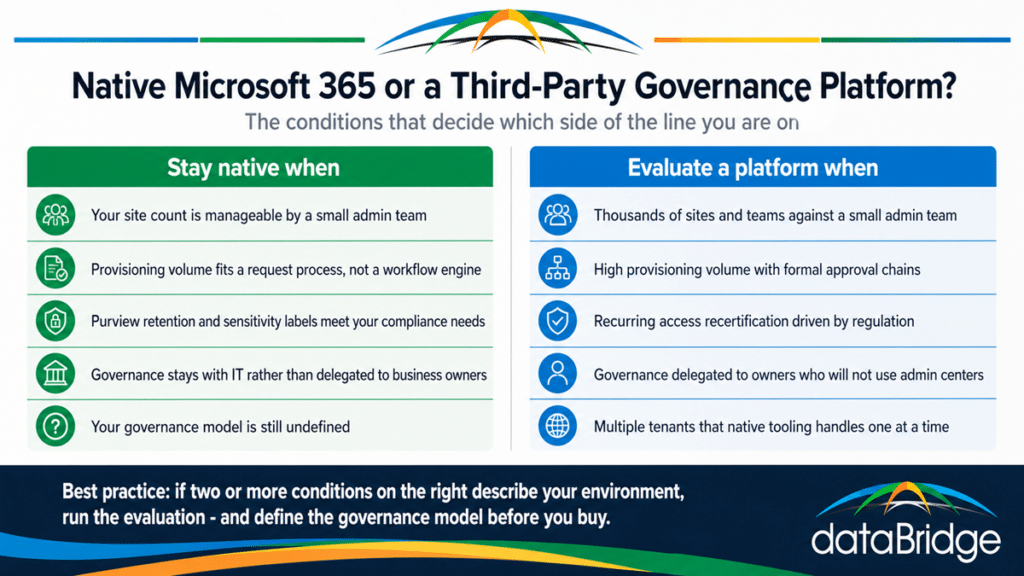
Decision framework comparing when native Microsoft 365 governance is enough against when third-party SharePoint governance tools earn their cost.
The conditions that decide whether native governance is enough or a platform is worth evaluating.

When native Microsoft 365 is enough

For most organizations, native Microsoft 365 governance is enough – and in our experience that describes the large majority of mid-market environments, not a minority of unusually simple ones. Native is sufficient when your site count is manageable by a small admin team, your provisioning volume is low enough to handle through a request process rather than automated workflow, and your compliance requirements are met by Purview retention and sensitivity labels.

The pattern worth watching for is an organization shopping for a governance platform to solve a problem that is not a tooling problem. If nobody owns site provisioning, no platform will create an owner. If there is no agreement on how sites get named, structured, and retired, automating the current confusion produces faster confusion. Buying software before defining the model is the most expensive way we see organizations avoid a decision, and it is why our SharePoint governance framework work almost always precedes any tooling conversation.

When a third-party platform earns its cost

A platform earns its cost when the governance work exceeds what your team can operate manually, which comes down to scale against staffing rather than complexity alone. The clearest cases:

  • thousands of sites and teams against a small administrative team, where manual review cycles cannot keep pace
  • high provisioning volume with a formal approval process, where automated request workflows replace real headcount
  • recurring access recertification driven by regulatory requirement, where the audit trail matters as much as the review
  • governance responsibility genuinely delegated to business owners who will not use PowerShell or the admin centers
  • multi-tenant environments, where native tooling forces you to work tenant by tenant

If two or more of those describe your situation, the evaluation is worth running. If none do, the more productive investment is usually in the model itself rather than software to enforce a model you have not written. Our SharePoint governance maturity model is a reasonable way to judge which side of that line you are on.

Tools enforce a framework, they do not create one

Every platform in this category assumes you have already answered the questions that make governance work: who owns a site, what happens when a project ends, which content requires retention, who approves external sharing, and how any of it gets reviewed. The software enforces those answers at scale. It has no opinion about what they should be.

This is why we see so few of these platforms in client environments and so many governance problems anyway. The organizations struggling most are rarely the ones missing tooling. They are the ones missing decisions, and no purchase substitutes for making them. The SharePoint Governance Center collects our frameworks for ownership, lifecycle, and permissions, and our architecture and governance consulting practice exists to build that model before anyone evaluates software to enforce it.

Frequently asked questions

Do you need a third-party tool to govern SharePoint?

No, for most organizations. Native Microsoft 365 covers site lifecycle, permissions, retention, sensitivity labeling, and access reviews across the SharePoint admin center, Purview, Entra ID, and SharePoint Advanced Management. Third-party platforms add automation and consolidated reporting on top of those controls rather than replacing them.

What do third-party governance platforms do that native tools don’t?

They consolidate reporting that native tools split across several admin centers, automate provisioning with approval workflows, schedule recurring access reviews for business owners in a non-technical interface, and enforce policies automatically rather than reporting drift for someone else to fix.

Which SharePoint governance tool is best?

There is no single best tool, because the four leading platforms optimize for different problems – permissions risk, provisioning workflow, recurring access reviews, and cross-platform reporting. Start by identifying which governance work is actually overwhelming your team, then evaluate against that, not against feature lists.

How do you choose between native and third-party governance tools?

Judge scale against staffing. If your site count, provisioning volume, and review obligations are manageable by your administrative team using native controls, stay native. If manual operation has broken down or governance must be delegated to non-technical owners, a platform is worth evaluating – after the governance model itself is defined.

Reviewed By

Michael Fuchs
Michael FuchsFounder and CEO
Michael is the Founder and CEO of dataBridge, where he helps organizations approach SharePoint and Microsoft 365 with a stronger focus on strategy, governance, architecture, and long-term business value. His consulting-first perspective shapes how clients plan smarter, avoid costly missteps, and build digital workplaces that hold up over time.

Author

  • Ken Lewis Bio Pic square

    Ken helps organizations bring order to complex content, compliance, and records challenges inside SharePoint and Microsoft 365. His work is especially valuable where document management, information control, and defensible structure matter as much as usability.

SHARE ON SOCIAL MEDIA