Skip to content
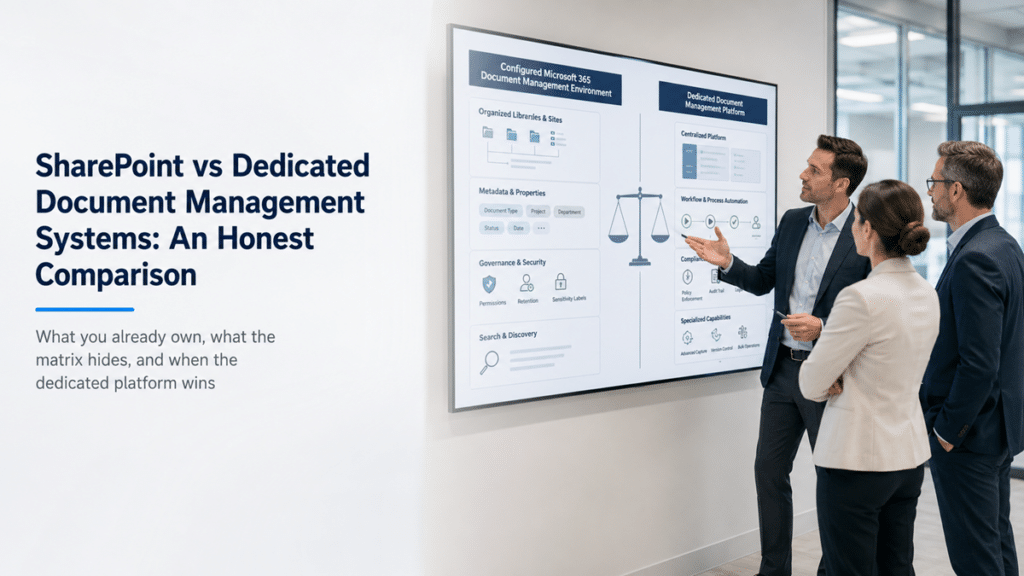
Three business professionals compare a configured Microsoft 365 document management environment with a dedicated document management platform.

SharePoint vs Dedicated Document Management Systems

The quote from the document management vendor reads like a checklist: version control, permission management, retention schedules, audit trails, approval workflows, full-text search. What the quote never mentions is that an organization running Microsoft 365 already licenses every one of those capabilities. The most common mistake we see in these evaluations is comparing feature lists when the real gap is configuration – buyers hold a vendor’s polished matrix up against the SharePoint tenant they never structured, and the vendor wins a comparison that was never fair to either side.

That does not make the dedicated platforms bad products. M-Files, Laserfiche, DocuWare, and OpenText are capable systems, and later in this post we’ll be specific about the situations where one of them is the right call over SharePoint. But the honest starting point for the comparison is this: most mid-market and enterprise buyers already own most of what the vendor is selling, and the decision they are actually facing is whether to configure what they have or pay again for a packaged version of it.

The Comparison Most Buyers Run – and Why It Misleads

The typical evaluation puts a dedicated DMS demo next to the organization’s current SharePoint environment, and the demo wins easily. It wins because the comparison is rigged by accident: the vendor is showing a configured product, and the organization is looking at an unconfigured platform. A demo tenant with prebuilt document types, routing workflows, and a tuned interface will always look better than a SharePoint environment that has been running as a glorified file share since the last migration.

The fair comparison is a configured DMS against a configured SharePoint – and almost nobody runs that version, because the vendor controls the demo and nobody demos the buyer’s own untapped licenses back to them. This is the pattern we walk prospects through constantly: the frustration driving the DMS evaluation (nobody can find anything, versions are chaos, retention is a guess) is a structure problem in their existing environment, and it would follow them into the new platform’s implementation project anyway. The vendors know this too, which is why every dedicated DMS purchase still comes with a professional services line for configuration and migration.

What You Already Own in Microsoft 365

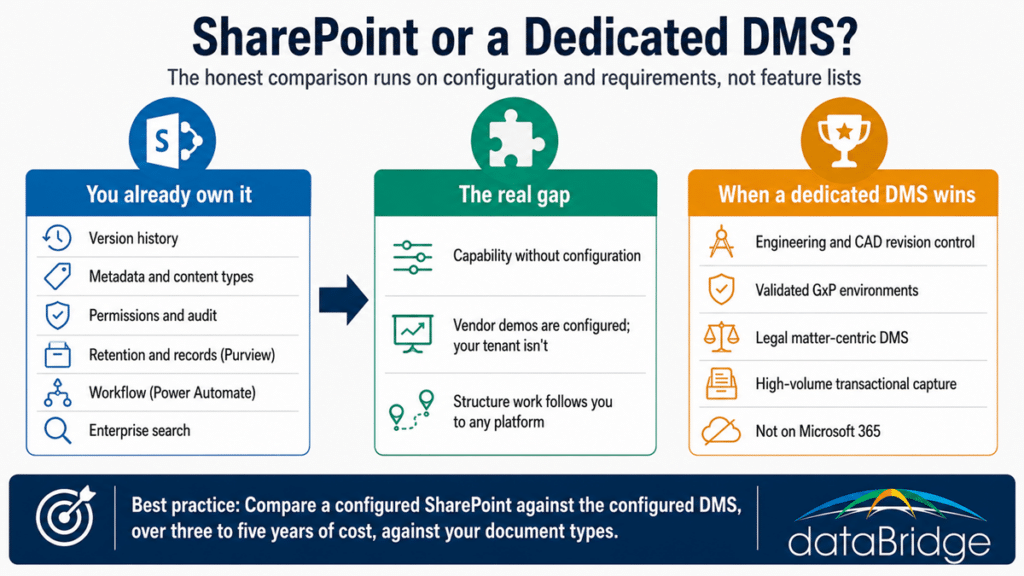
An organization on Microsoft 365 business or enterprise licensing already owns the core of a document management system. Version history, metadata columns and content types, granular permissions, co-authoring, records management and retention policies through Purview, approval workflows through Power Automate, audit logging, and enterprise search are all sitting in the tenant, paid for, whether or not anyone has configured them.

That is the substance behind our position that SharePoint is a genuine document management system when it is structured as one. The capabilities that show up as line items on a dedicated DMS quote map, one for one, onto things the Microsoft licensing already covers: check-in and check-out, controlled document workflows, retention and disposition, classification, and search that respects permissions. For regulated content specifically, document control in SharePoint and a proper records management and retention strategy cover ground that buyers routinely assume requires a specialized platform.

Owning a capability and having deployed it are different things, and that difference is the entire evaluation. A tenant where nobody has designed the libraries, metadata, or permission model genuinely does lack document management – not because the platform can’t do it, but because nobody made it do it. The vendor’s pitch lands hardest on exactly those tenants.

What the Feature Matrix Hides

Feature matrices compare what platforms can do. They hide the two questions that decide whether the purchase makes sense: what will this cost to actually run, and what happens at the seams between the DMS and everything else.

A dedicated DMS ships opinionated. It arrives with a working model of document types, lifecycle states, and interfaces, which is why it demos well and deploys reasonably fast for its core use case. SharePoint ships as a platform: full capability, no opinion, and the structure has to be designed. The dedicated platform’s advantage is a head start on configuration. Its costs are recurring per-seat licensing on top of the Microsoft licensing you keep paying anyway, an implementation project, integration work, training on a second interface, and the permanent operational weight of running two systems.

The seams matter more every year. Content living in a third-party DMS sits outside the Microsoft 365 boundary, which means a second search index, a second permission model to govern and audit, sync connectors to maintain, and content that Microsoft 365 Copilot cannot see. Organizations investing in Copilot are discovering that every repository outside the tenant is invisible to the AI layer they are paying for – the same consolidation logic that pulls content out of Box and Confluence applies with full force to a dedicated DMS. And where the traditional platforms held a real advantage in intelligent capture and automated classification, SharePoint Premium has narrowed that gap with document AI inside the tenant boundary.

Infographic comparing SharePoint vs document management systems, showing owned Microsoft 365 capabilities, the configuration gap, and when a dedicated DMS wins.
The comparison most buyers never run: their own configured tenant against the vendor's configured demo.

When a Dedicated DMS Is the Better Choice

A dedicated document management platform earns its place when the requirements sit outside what SharePoint does well, and pretending those cases don’t exist would make this comparison as slanted as the vendor matrices. There are four situations where we tell prospects the dedicated platform deserves serious consideration:

  • Engineering and CAD document management, where revision control is tied to part numbers, assemblies, and formal transmittals, and the workflows are built around drawing sets rather than office documents. Purpose-built engineering document systems handle this natively; recreating it in SharePoint is possible and rarely worth it
  • Validated environments in life sciences, where a GxP-compliant electronic document management system with a vendor-maintained validation package can cost less in validation burden than building and validating the equivalent controls on SharePoint yourself
  • Legal document management at law firms, where matter-centric workspaces and email-filing conventions are an industry standard that iManage and NetDocuments serve directly, and where the surrounding legal tech stack assumes one of them
  • High-volume transactional capture, such as AP invoice processing at serious scale, where a capture-and-workflow product is the core of the business process rather than a feature of a collaboration platform – though SharePoint Premium is closing this gap from inside the tenant

There is a fifth, simpler case: organizations not committed to Microsoft 365. The entire ownership argument in this post rests on already paying for the Microsoft stack. Remove that, and the comparison becomes an ordinary platform selection.

Outside those situations – general business documents, policies, contracts, quality documentation, project files, departmental content – the dedicated platform is usually a second system solving a configuration problem you could have solved in the first one.

The Real Cost Comparison

The cost structures are shaped differently, and the shapes matter more than any single number. A dedicated DMS carries recurring per-seat or per-server licensing for as long as you run it, plus implementation, plus integration, plus the ongoing cost of administering a second platform with its own permission model and upgrade cycle. Configuring SharePoint as a document management system is weighted toward one-time design and implementation effort – information architecture, metadata, permissions, retention, workflows – layered on licensing you already pay and administration you already staff.

Run the comparison over three to five years rather than year one. The dedicated platform’s licensing compounds annually across every seat; the SharePoint investment amortizes. The vendor’s proposal will frame year-one implementation costs as the comparison, because that is the only frame where the numbers look close. The honest version includes what you keep paying, and what it costs to operate two search experiences, two permission audits, and two places employees have to check for the current version of anything.

How to Decide

Write the requirements before you watch a demo. List the document types, the lifecycle each one follows, the compliance obligations attached to them, and who needs access from where. Then check that list against what Microsoft 365 already does when configured properly – not against your current tenant, which was probably never configured to do any of it. If the list lands in one of the four categories above, evaluate the dedicated platforms seriously. If it doesn’t, the money is better spent structuring SharePoint as your document management system than licensing a second platform to avoid structuring the first one.

Either way, run the decision on requirements and total cost, and make the vendors demo against your document types rather than theirs.

FAQ

Is SharePoint a real document management system?

Yes, when it is configured as one. Versioning, metadata, permissions, retention, records management, workflow, and audit capability are all native to SharePoint and Microsoft 365. The full case, including where the platform’s reputation problem actually comes from, is in Is SharePoint a Good Document Management System, Really?

Can SharePoint replace M-Files or Laserfiche?

For general business document management – policies, contracts, quality docs, project and departmental content – usually yes, and without new licensing. The dedicated platforms hold real advantages in engineering document management, validated life-sciences environments, legal matter management, and high-volume capture. If your requirements sit outside those categories, SharePoint configured properly covers the ground.

What does a dedicated DMS cost compared to SharePoint?

The structures differ more than the totals suggest. A dedicated DMS combines recurring per-seat licensing with implementation, integration, and the operating cost of a second platform. SharePoint’s cost is concentrated in one-time configuration and design work on licensing already owned. Over a multi-year window, the recurring licensing is usually the number that separates them.

Does a dedicated DMS integrate with Microsoft 365?

The major platforms all offer Office integration and connectors, and they work. The seams remain: content in the DMS lives outside the Microsoft 365 boundary, which means a separate permission model to govern, a separate search index, and content that Microsoft 365 Copilot cannot reach. Integration reduces the friction; it does not remove the boundary.

When should we choose a dedicated DMS over SharePoint?

When the requirement is engineering drawing control, a vendor-validated GxP document system, matter-centric legal document management, or capture-driven transactional processing at high volume – or when your organization is not on Microsoft 365 at all. In those cases the purpose-built platform earns its licensing. For everything else, the honest answer is that you already own the system and haven’t built it yet.

Most organizations that come to us mid-way through a DMS evaluation leave it having discovered the comparison was really a decision about their own environment. If you want that decision made on evidence, our SharePoint document management consulting starts by mapping your requirements against what your tenant can already do – before anyone signs a licensing agreement.

Reviewed By

Michael Fuchs
Michael FuchsFounder and CEO
Michael is the Founder and CEO of dataBridge, where he helps organizations approach SharePoint and Microsoft 365 with a stronger focus on strategy, governance, architecture, and long-term business value. His consulting-first perspective shapes how clients plan smarter, avoid costly missteps, and build digital workplaces that hold up over time.

Author

  • Hayden Honerkamp bio pic square

    Hayden helps organizations shape SharePoint and Microsoft 365 environments from the ground up, with a strong focus on discovery, readiness, architecture, migration planning, and adoption. He is especially skilled at helping clients translate broad goals into practical next steps and sustainable solutions.

SHARE ON SOCIAL MEDIA