When organizations start planning a Power Apps solution, one of the first technical questions usually sounds simple: should we use SharePoint or Dataverse?
The better question is usually more practical.
What kind of solution are you actually trying to build, how complex will it become over time, and what level of scale, governance, security, and reporting will the business need six months from now?
That is where many teams get stuck.
SharePoint and Dataverse can both support Power Apps. However, they are not interchangeable in the way many organizations assume. One may feel faster to start with. The other may be better built for long-term complexity. Choosing the wrong one does not always break the app immediately. More often, it creates quiet friction that shows up later through performance limits, security workarounds, reporting issues, or painful redesign.
In our experience, this is one of the most common Power Platform architecture decisions organizations underestimate early.
The wrong data source can make a workable app feel fragile.
The right data source can make the same app feel scalable, supportable, and easier to govern.
That is why this decision should be tied to a broader Power Apps Strategy & Architecture, not treated like a quick technical preference.
This article focuses specifically on the data-source decision for Power Apps. It does not replace Power Apps Strategy & Architecture or Microsoft Power Platform Consulting. Use this article when the practical question is whether a Power App should use SharePoint, Dataverse, or another data source based on complexity, scale, security, reporting, and long-term support.
Quick Answer: When to Choose SharePoint vs Dataverse
If you want the short version, here it is.
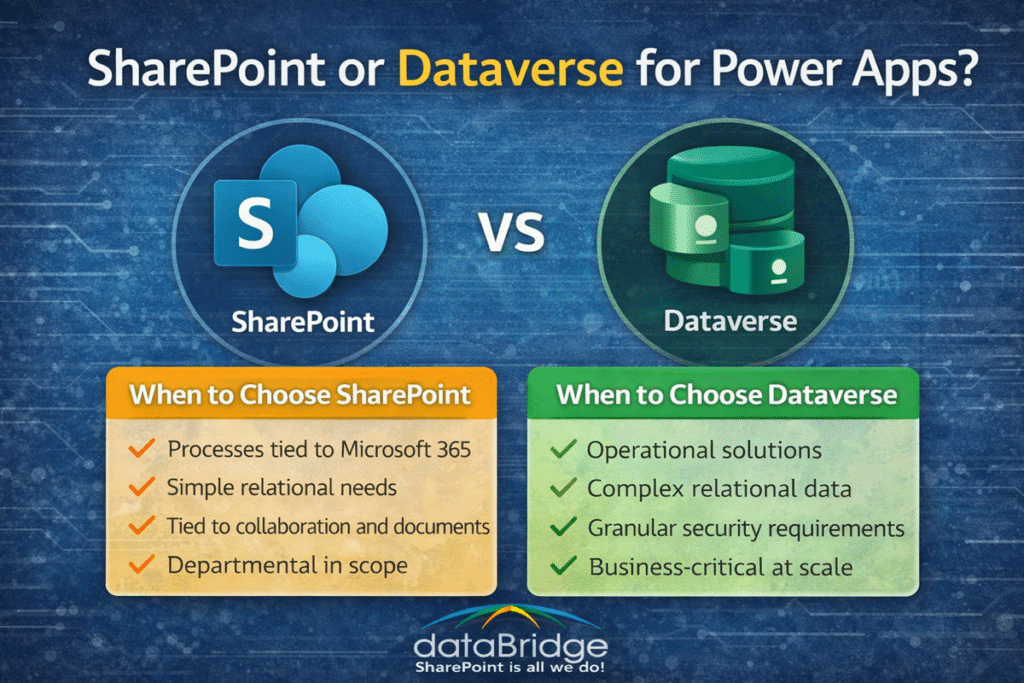
Choose SharePoint when:
- the solution is relatively simple,
- the data model is straightforward,
- the team already works heavily in Microsoft 365,
- documents and collaboration matter as much as structured records,
- and the app does not require highly relational data or advanced business logic.
Choose Dataverse when:
- the solution is becoming operationally critical,
- the data model is more relational or complex,
- security needs are more granular,
- automation and reporting need stronger consistency,
- or the app is expected to scale across departments, processes, or business units.
That does not mean SharePoint is “basic” and Dataverse is “always better.”
It means they solve different problems well.
A lot of Power Apps frustration starts when organizations try to make one act like the other.
What This Comparison Does Not Replace
This comparison does not replace the full Power Apps architecture conversation.
The data source decision should also consider:
- User experience
- App lifecycle
- Security model
- Reporting needs
- Workflow integration
- Ownership and support
- Governance expectations
- Future scale
For the broader app design model, use Power Apps Strategy & Architecture. For the broader service path, use Microsoft Power Platform Consulting.
Why This Decision Matters More Than It Seems
At first, SharePoint often looks attractive because it is already there.
Teams already use SharePoint lists, libraries, permissions, and Microsoft 365 structure. That makes it a natural starting point for forms, light tracking apps, request processes, and operational tools that live close to collaboration content.
And sometimes that is exactly the right answer.
However, the easiest starting point is not always the best long-term fit.
We have seen many organizations begin with a small Power App backed by a SharePoint list, only to discover later that the solution now needs more relationships, more controls, more scalable reporting, or more structured governance than the original design can support comfortably.
If SharePoint is the right call, the next step is putting list governance in place so the list stays reliable as the app grows.
That is usually not because SharePoint failed.
It is because the business need outgrew the original architecture.
This is where Microsoft Power Platform Consulting becomes especially valuable. Good consulting does not just help teams build apps faster. It helps them choose the right architecture early enough to avoid rebuilding later.
A simple rule tends to hold up here: design for the next real stage of growth, not just the easiest first version.
When SharePoint Is the Right Data Source for Power Apps
SharePoint works well when the solution needs to stay close to the Microsoft 365 collaboration layer.
That is one of its biggest strengths.
If the app is tied to team activity, document-centric work, light process tracking, or department-level information management, SharePoint can be a very strong fit.
SharePoint is often the right choice when:
The data model is simple
If the app relies on a manageable set of fields, straightforward records, and limited relationships, SharePoint lists can often support the solution well.
The process is tied to team collaboration
When the app belongs naturally in a team site, project site, or document-driven workspace, SharePoint creates useful alignment between the app and the content surrounding it.
Documents matter as much as records
This is an important point. Many operational apps do not live in a purely transactional environment. They sit next to files, supporting documents, policy references, approvals, or project materials. SharePoint handles that collaboration context well.
The organization wants a practical starting point
For lightweight departmental solutions, SharePoint can reduce friction and accelerate delivery, especially when the business problem is clear and the design stays disciplined.
The governance model already centers on Microsoft 365 structure
Where sites, permissions, document libraries, and content ownership are already established, SharePoint can fit naturally into broader SharePoint & Microsoft 365 Integration planning.
In our experience, SharePoint is often the better choice when the app is not trying to become a mini line-of-business platform. It works best when the solution is intentionally scoped and closely aligned to the way teams already work in Microsoft 365.
When Dataverse Is the Better Choice
Dataverse starts making more sense when the solution needs more structured application behavior than SharePoint is designed to provide comfortably.
This usually happens when the app stops being “a useful tool for a team” and starts becoming “an important system for the business.”
That shift matters.
Dataverse is often the better choice when:
The data model is more relational
If the app needs multiple related tables, more complex business relationships, or cleaner handling of structured entities, Dataverse is usually the stronger option.
Security needs are more granular
Some solutions need tighter control over who can see or update specific data, not just broad site or list-based access. That is where Dataverse often becomes a better architectural fit.
The app is expected to scale
When a solution is likely to grow across departments, workflows, business units, or multiple use cases, Dataverse usually gives the business a stronger long-term foundation.
Reporting and automation need greater consistency
As solutions mature, they often need more reliable data models, stronger process logic, and cleaner downstream automation. Dataverse is usually better suited to that level of operational maturity.
The app is becoming business-critical
Once a Power App is central to service delivery, operational coordination, case management, inspections, field activity, or process execution, architecture quality matters more. “It works for now” stops being a responsible standard.
A lot of Power Apps technical debt begins when organizations keep treating a growing operational solution like a lightweight list-based app long after it stopped being one.
SharePoint vs Dataverse: The Real Tradeoff
This is not really a debate between “simple” and “advanced.”
It is a tradeoff between context and structure.
SharePoint gives you strong Microsoft 365 context. It works well with collaboration, documents, team sites, and department-level information management.
Dataverse gives you stronger application structure. It is better suited for solutions that require more formalized data modeling, process consistency, and scalable operational design.
That distinction helps clarify the decision.
If the app lives inside the flow of collaboration, SharePoint may be the more natural fit.
If the app needs to behave more like a true business application, Dataverse often becomes the better foundation.
This is also where the conversation should stay clearly separated from the question of workflow automation. Apps and flows often work together, but they are not the same thing. Your architecture decisions get much clearer when the organization already understands the difference between user-facing apps and process automation. That is why Power Apps vs Power Automate is a useful companion resource to this discussion.
At a practical level, the best choice usually becomes clearer when you compare the typical fit for each platform side by side.