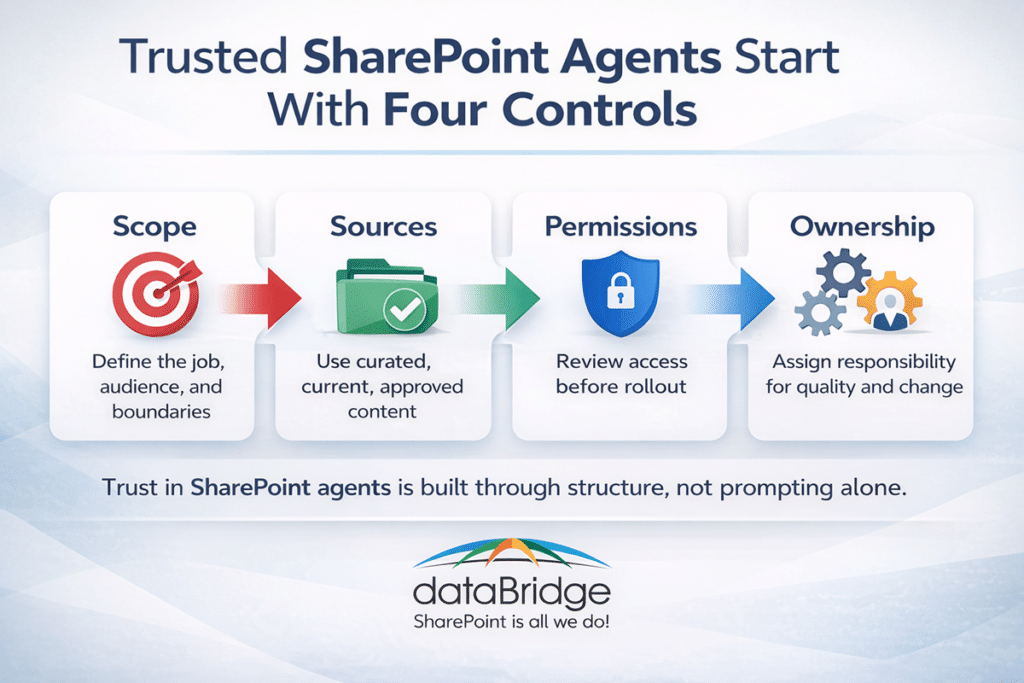
Why trust matters more than novelty
The same trust problem often appears in SharePoint search before it appears in an agent experience. If users receive different search results, the issue usually points back to permissions, source quality, metadata, or ownership. Reviewing SharePoint security trimming and search results can help teams identify those issues before they affect agents.
A lot of early conversation around Microsoft Copilot and SharePoint agents centers on what the tools can do. That makes sense. New capabilities always get attention first. Yet most frustration does not start with the model itself. It starts with the environment around it.
An agent becomes difficult to trust when:
- It searches too broadly and blends unrelated content
- It pulls from outdated, duplicated, or low-value material
- It returns answers from content users should not have seen in the first place
- Nobody owns it, so quality issues linger
That is usually the dividing line. Trust determines whether a SharePoint agent becomes part of real work or just another interesting demo.
SharePoint agents rely on the underlying content, structure, and access model already in place. That makes information architecture and permissions design much more important than many teams expect at the start.
The same readiness issues came up in our May 2026 SharePoint updates webinar, where we discussed Copilot Cowork, content structure, permissions, and the SharePoint foundations AI tools depend on.
The biggest design mistake: starting with the agent instead of the use case
The most common mistake is building the agent first and defining the job later.
It usually starts with something broad:
“We want an agent for HR.”
“We want an AI assistant for policies.”
“We want a SharePoint agent for the intranet.”
Those sound reasonable, but they are too wide to produce dependable answers.
A better starting point is much more concrete:
- Help employees find current travel and expense policy answers
- Help project managers locate approved PMO templates and instructions
- Help site owners understand publishing, permissions, and content ownership standards
- Help sales teams find the latest approved proposal assets
Specific use cases create better boundaries. They also make it easier to choose the right source set, define the audience, and measure whether the agent is actually useful.
Start with scope before sources
Scope is the first control point.
A trustworthy agent needs a clearly defined job, a defined audience, and a clear content boundary. That means deciding:
- Who the agent is for
- What questions it should answer
- What content it should use
- What content it should avoid
- What a good answer looks like
This is where teams often overreach. Broader scope sounds more valuable on paper. In reality, it usually creates more inconsistency.
A narrow agent often performs better because people quickly understand what it is meant to do. That clarity makes the experience easier to trust.
For many organizations, the best first SharePoint agents fall into one of these models:
- Policy agent: one controlled policy library or policy site
- Department agent: one function, one audience, one managed source set
- Project delivery agent: one PMO or operations content set
- Intranet support agent: one site owner or publishing support experience
- Knowledge-center agent: one well-governed library of curated guidance
That approach also aligns better with a strong Copilot readiness for SharePoint strategy, because readiness is not just about enabling features. It is about shaping the environment so AI can behave predictably.
Choose sources based on quality, not convenience
Source selection is often where trust either strengthens or starts to erode.
Content living in SharePoint is not automatically content that should power an agent.
A SharePoint agent depends on the quality of the sites, pages, libraries, and lists behind it. That means content quality still matters. Freshness still matters. Search hygiene still matters.
A strong source set usually has these traits:
- Current and actively maintained
- Clear document ownership
- Consistent naming and metadata
- Limited duplication
- Minimal ROT content
- Audience-appropriate permissions
- A clear line between draft and approved material
A weak source set usually looks different:
- Old and current versions mixed together
- Department folders with no curation
- Pages that nobody maintains anymore
- Libraries filled with vague file names
- Content that only insiders know how to interpret
- Broad access that was never intentionally designed
That is one reason solid SharePoint metadata strategy work matters so much in AI projects. Better structure improves more than navigation and search. It improves retrieval quality, answer relevance, and user confidence.
Do not confuse “available content” with “approved knowledge”
This is an important distinction.
Many organizations assume that if content sits in SharePoint and the permissions are technically correct, it is ready for AI use. That is not always true.
Some content is accessible and still a poor candidate for an agent because it is:
- Incomplete
- Duplicative
- Outdated
- In draft form
- Highly context-dependent
- Written for specialists rather than everyday users
That means the best source set is often smaller than the total content footprint.
So this is not only a permissions exercise. It is also a content curation exercise.
Permissions are not a cleanup strategy
This is where governance becomes very real.
SharePoint agents work within the access model already in place. That is reassuring because it keeps the experience inside the organization’s existing Microsoft 365 environment. It is also a warning. Messy permissions do not become safer when AI is introduced. They simply become more visible.
If an organization has years of loose sharing, inherited access confusion, broken group strategy, or overscoped sites, an agent may expose those problems much faster than ordinary browsing ever did.
That is why permissions need to be reviewed before rollout, not after concern shows up.
A practical pre-launch permissions review should examine:
- Who can access the source site or library
- Whether broken inheritance was used intentionally
- Whether “Everyone except external users” or similarly broad access exists
- Whether external sharing introduced unintended exposure
- Whether sensitive libraries sit inside general-use sites
- Whether the business owner actually understands who has access
For the access model itself, start with the SharePoint permissions guide. For finding overshared sites before an agent does, use SharePoint Advanced Management for Copilot.
A trustworthy agent needs an owner
Ownership is usually the most overlooked part of agent design.
An agent should not be treated as a one-time setup task. It needs a named business owner and, in many cases, a technical or governance partner.
The business owner should be responsible for:
- Defining the use case
- Approving source content
- Reviewing answer quality
- Monitoring gaps and confusion
- Deciding when scope should change
The technical or governance owner should be responsible for:
- Access model review
- Source configuration
- Content lifecycle alignment
- Change control
- Audit and review cadence
When ownership is missing, answer quality usually declines quietly. Users lose confidence long before leadership realizes anything is wrong.
Real-world scenario: where SharePoint agents usually go wrong
A company launches a policy agent for all internal operations content. On paper, it sounds efficient. One agent. One place to ask questions.
The problem is that the source set includes outdated PDFs, duplicate Word documents, draft pages in department sites, and inconsistent permissions across the environment. Some people get different answers than others. A few responses point to old guidance. Nobody is fully sure which team owns the corrections.
The answer is usually not better prompting.
More often, the right fix is to:
- Reduce the scope
- Curate the approved source set
- Remove duplicate and outdated content
- Review permissions
- Assign a clear owner
- Create a process for ongoing review and exceptions
That is why we keep coming back to the same point: structure before AI. The technology can improve access to knowledge, but it also exposes structural weakness very quickly.
Before a site or library becomes an agent source, Data Access Governance reports for SharePoint can help review whether the source area has broad access, external sharing, sensitive content, unclear ownership, or other access concerns that could weaken trust.
For the fullest example of these principles in one deployment, see SharePoint agents on the intranet, where scoped sources and named owners answer employees’ everyday questions.
Source design patterns that usually work
The strongest early-stage SharePoint agent deployments usually follow a few repeatable patterns.
1. The curated policy library model
This works well when policies are centralized, approved, and version-managed.
Best for:
- HR
- IT policies
- Compliance guidance
- Security awareness content
Success factors:
- One clear source library
- Approval discipline
- Strong metadata
- Retired duplicates removed
2. The department knowledge hub model
This works when one department owns a defined body of operational guidance.
Best for:
- PMO
- Finance operations
- Procurement
- Employee onboarding
Success factors:
- Clear audience definition
- One function-specific site or library
- Clean navigation and page structure
- Named content owners
3. The site owner support model
This is a strong fit for organizations trying to scale governance and publishing standards.
Best for:
- Intranet governance
- Publishing standards
- Site owner enablement
- Communications support
Success factors:
- Narrow content scope
- Good examples and templates
- Ownership clarity
- Alignment with governance standards
4. The list-driven operational model
This model can be useful when the value depends on current structured business data rather than static documents.
Best for:
- FAQ-style structured reference data
- Process steps
- Service catalogs
- Regional or departmental rule variations
Success factors:
- Clean fields
- Maintained records
- Role-appropriate access
- A clearly governed update process
Failure modes to watch for early
Most SharePoint agents do not fail because they cannot answer anything at all. They fail because users stop trusting what they get back.
Watch for these signals:
- Users say the answers are “sometimes right”
- Different users report inconsistent results
- The agent cites stale or duplicate content
- It returns answers that sound plausible but lack context
- Business teams start bypassing it after a few weak experiences
- Nobody knows who is supposed to fix source issues
When those signs appear, the real problem is usually source design, not the mere presence of AI.
Governance questions to answer before rollout
Before launch, every SharePoint agent initiative should answer a few basic questions.
Scope
- What exact job is this agent supposed to do?
- What questions should it answer well?
- What is outside scope?
Sources
- Which sites, pages, libraries, or lists are approved?
- Who owns each source?
- How are outdated or duplicate items handled?
Permissions
- Who currently has access to the source content?
- Is that access intentional and reviewed?
- Are there oversharing risks that AI could amplify?
Ownership
- Who owns the agent?
- Who approves source changes?
- Who reviews answer quality after launch?
Lifecycle
- How often will content and performance be reviewed?
- What triggers a scope update?
- How are user issues reported and resolved?
That checklist also strengthens rollout discussions around SharePoint governance framework planning. AI does not replace governance. It makes weak governance easier to see.
That checklist covers one agent at a time. The tenant-level question, who is allowed to create agents at all and how they get shared, now has its own admin surface in Microsoft Agent 365’s four governance controls, and it is worth setting before individual agent design begins.
SharePoint agent trust depends on architecture more than prompting
This is the part many organizations need to hear plainly.
Prompting matters. Naming matters. User guidance matters.
Architecture matters more.
If the information architecture is weak, the permissions model is inconsistent, and nobody owns the source set, the agent will reflect those weaknesses. If the structure is clean, the source set is intentional, and the operating model is clear, the agent has a much better chance of becoming reliable.
That is why SharePoint agent planning should sit close to:
- Information architecture
- Permissions strategy
- Content governance
- Site ownership
- Copilot readiness
- Ongoing operational review
Treating agents like a lightweight interface feature usually leads to shallow rollout thinking. Treating them like a governed knowledge layer produces better long-term results.
Where this fits in a broader Microsoft 365 AI strategy
Agent rollout is not just a content decision, and it is not just a feature decision. It is an operating model decision.
Organizations that get more value from AI usually do a few things earlier:
- Narrow the first use cases
- Clean up source environments
- Review access intentionally
- Assign ownership
- Create a repeatable review model
That is what makes later expansion safer.
Before an agent relies on a SharePoint source, download the Copilot permission review worksheet to confirm the source has clear owners, appropriate access, reviewed guests, and no risky sharing links.
Related SharePoint Agent and Copilot Readiness Resources
Final thought
The best SharePoint agents do not feel magical. They feel dependable.
That is the better goal.
In our experience, users trust AI faster when the experience is narrow, the content is carefully chosen, permissions are already under control, and someone clearly owns the result. Teams that skip those steps often blame the tool when the real problem is design discipline.
If you want SharePoint agents that users can trust, start with scope, source quality, permissions, and ownership. Everything after that becomes much easier.
Start the conversation. Contact dataBridge today.