Skip to content
Professional hero image for a SharePoint External Sharing Governance blog post showing three business professionals collaborating in a modern office with visual labels for Guest Access, Anyone Links, and Direct Sharing.

SharePoint External Sharing Governance

External sharing in SharePoint is easy to enable. Running it well takes more discipline.

That is where many organizations get into trouble. Files are shared too broadly, site owners make different judgment calls, and leadership assumes controls are tighter than they actually are.

At dataBridge, we see this often. External sharing usually begins as a practical response to a real business need. Over time, it can turn into a governance issue, a compliance concern, and, in some environments, a Copilot readiness problem.

The point is not to block collaboration. The point is to make external collaboration intentional, controlled, and easier to trust.

If your organization is trying to balance secure collaboration with business speed, contact dataBridge to assess the right model for SharePoint, OneDrive, Teams, and Microsoft 365.

What SharePoint external sharing governance really means

SharePoint external sharing governance is the operating model behind how your organization shares content with people outside the business.

That includes:

  • Guest access
  • Sharing links
  • Site-level sharing rules
  • File and folder sharing behavior
  • Ownership and review expectations
  • Link expiration and access cleanup
  • Oversharing prevention
  • Alignment with compliance and Copilot readiness goals

Many organizations treat external sharing like a simple admin setting. That view is too narrow.

A stronger approach treats external sharing as a business control. It affects security, user behavior, client collaboration, records exposure, and long-term platform trust.

This is where environments start to drift. The platform supports collaboration. The organization never fully defines the rules around it.

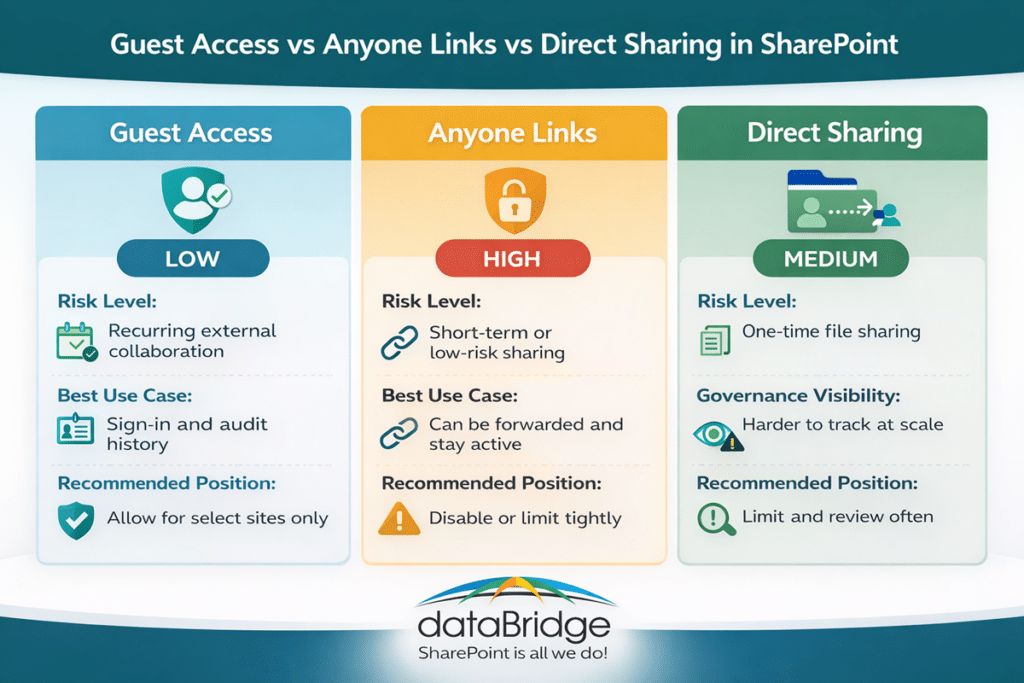
Infographic comparing Guest Access, Anyone Links, and Direct Sharing in SharePoint, including risk level, best use case, governance visibility, and recommended policy position.
A visual comparison of the three main SharePoint external sharing methods to help organizations choose the right governance approach for guest access, Anyone links, and direct sharing.

Why external sharing becomes a problem so quickly

External sharing usually breaks down for a few predictable reasons.

In many cases, the organization enables sharing but never clearly defines where it should happen. Teams start sharing from communication sites, project sites, personal OneDrive folders, and ad hoc workspaces without a consistent model.

Site owners are then given responsibility without enough guardrails. Most make reasonable decisions in the moment, but those decisions vary from site to site.

Link sharing often fills the policy gap. Instead of following a governed guest access model, users rely on whichever option feels fastest.

Over time, access stops getting reviewed. Files that were appropriate to share six months ago may no longer be appropriate today.

This is one of the most common SharePoint governance mistakes we see. Organizations focus on whether external sharing is enabled. Much less time gets spent defining how it should be used.

That is backwards.

The better question is not, “Can we share externally?” A better question is, “What external sharing model can we manage with confidence?”

External sharing is not just a permissions issue

It is easy to frame external sharing as a permissions topic. Permissions matter, but they are only part of the picture.

External sharing also touches:

  • Information architecture
  • Site purpose
  • Ownership maturity
  • Retention expectations
  • Client confidentiality
  • Search visibility
  • Lifecycle governance
  • Copilot exposure risk

For that reason, this topic should sit close to your broader governance model, not off to the side as a one-time admin task.

Organizations that already struggle with broken inheritance, unclear site ownership, or weak content lifecycle rules usually struggle with external sharing too. In many cases, the same structural issues that show up in a weak sharing model also show up in broader permission sprawl, which is why a page like the SharePoint Permissions Guide often becomes relevant long before external sharing is reviewed formally.

Guest access, Anyone links, and direct sharing are not the same

This is where many users, and even some administrators, get tripped up. Not all external sharing methods create the same level of risk.

Guest access

Guest access is usually the most governable model when external collaboration is legitimate and ongoing.

A guest signs in with an authenticated identity. That makes access easier to trace and easier to manage over time.

This model works well when vendors, partners, consultants, or clients need recurring access to a defined site, Team, or shared workspace.

Guest access is not risk free. Even so, it is usually far easier to govern than anonymous sharing.

Anyone links

Anyone links are convenient. They are also one of the easiest ways to create oversharing.

These links can be forwarded. Accountability drops. In many environments, the link outlives the business need unless someone actively manages expiration and cleanup.

In our experience, Anyone links are often used because the governed option feels slower or less clear.

That is usually a process problem, not just a user problem.

Direct file or folder sharing

Direct sharing often feels harmless. One person shares one file with one external contact and moves on.

At scale, that creates a visibility problem. Important external access becomes scattered across libraries, folders, and individual documents. Governance turns reactive because no one is working from a clean operating model.

This is one reason strong site design matters. Better structure reduces the need for one-off sharing in the first place. It also helps teams make better platform decisions earlier, especially when they understand the practical differences covered in OneDrive vs SharePoint.

The real risk is inconsistency

Most external sharing problems do not come from one dramatic mistake.

They come from hundreds of smaller inconsistencies.

One site allows broad sharing. Another site is tightly controlled. One owner understands the rules. Another owner does not. One team reviews access quarterly. Another team never reviews it at all.

That inconsistency weakens trust.

It also makes support harder. IT ends up troubleshooting exceptions instead of enforcing a model.

This is where governance has to become practical. A policy document alone will not fix the issue. Site owners need clear rules, realistic defaults, and defined escalation paths.

How Copilot changes the external sharing conversation

Copilot did not create oversharing. It did make more organizations pay attention to it.

That is a healthy shift.

When leadership starts preparing for Microsoft 365 Copilot, many teams realize the real issue is not AI itself. The real issue is that content access has been loosely governed for years.

Copilot increases visibility into content people already have access to. Because of that, weak external sharing practices deserve more scrutiny now, not less.

This does not mean every shared file becomes a crisis. It does mean organizations should stop treating external access as a background setting.

When external sharing is loosely managed, content boundaries become harder to explain and harder to defend. In an AI-enabled environment, that matters more. That is one reason organizations working through external sharing questions often end up looking at broader controls like those discussed in SharePoint Advanced Management for Copilot.

At dataBridge, we often tell clients the same thing: Copilot readiness is rarely just about Copilot. More often, it exposes governance debt that was already there.

That is why external sharing governance should be part of the broader readiness conversation alongside permissions, content quality, ownership, and lifecycle controls.

Signs your external sharing model needs work

Many organizations already know something is off. They just have not named the problem clearly yet.

Here are some common warning signs:

  • Site owners are unsure when external sharing is allowed
  • Anyone links are used because they are the fastest option
  • Teams and SharePoint are both being used without clear rules
  • Sensitive documents live in broadly accessible locations
  • Guest users are not reviewed on a regular schedule
  • Project workspaces remain open long after the project ends
  • External access decisions vary by department
  • Leadership wants Copilot, but governance confidence is low

If several of these sound familiar, the issue is probably not user behavior alone. In most cases, the bigger problem is that the organization has not made the right behavior clear and repeatable.

A better governance model for SharePoint external sharing

The strongest external sharing models are not built around fear. They are built around clarity.

That means defining the right control points before users create workarounds.

1. Set organization-level rules first

Start with the broadest boundaries.

Decide whether external sharing is allowed at all, where it is allowed, and which sharing methods fit your risk tolerance. Those decisions should not be left to informal habits.

An organization-level model creates consistency. It also keeps every department from inventing its own version of the rules.

2. Define which site types can support external sharing

Not every site should allow external sharing.

Project sites, client collaboration spaces, and selected team workspaces may support it. Broad intranet areas, sensitive operational sites, and records-heavy locations often should not.

This is one reason architecture matters so much. External sharing becomes easier to govern when site purpose is clear.

Strong SharePoint environments do not treat every site the same. They set different governance expectations by site type, which is also a core planning issue in SharePoint Strategy & Roadmapping.

3. Make authenticated guest access the default where possible

When external collaboration is legitimate and ongoing, authenticated guest access is usually easier to govern than anonymous sharing.

It creates more accountability. It also fits better with repeat collaboration, ownership review, and access management.

This does not mean every external scenario needs a guest account. It does mean convenience should not be the only factor driving the decision.

4. Restrict or tightly control Anyone links

Anyone links should be treated carefully.

In many organizations, they should be disabled or limited to narrow use cases. In others, they may remain available with expiration controls and clear guidance.

The key is to decide intentionally. Anyone links should never become the default simply because no one defined a better model.

5. Assign owner accountability

External sharing cannot be governed only from the admin center.

Site owners need to understand what kind of content belongs in their site, when external access is appropriate, and how to review that access over time.

This is where governance often fails in practice. Technical controls exist, but owner accountability stays vague.

That gap creates long-term risk.

6. Build a review cadence

External access should be reviewed on a schedule.

Quarterly reviews work well for many organizations. Higher-risk environments may need a tighter cycle. Lower-risk workspaces may not.

What matters most is that the review is real. A governance model without a review habit will eventually drift.

7. Tie sharing decisions to site lifecycle

Temporary collaboration spaces should not stay open forever.

Projects end. Vendor relationships change. Client work wraps up. External access should follow that lifecycle.

This is where external sharing governance becomes much stronger when it connects to provisioning, ownership, and site retirement practices.

SharePoint, OneDrive, and Teams each need a role

External sharing gets messier when organizations use Microsoft 365 without clear platform boundaries.

That is why dataBridge often recommends a simple rule: define what belongs where before trying to govern how it is shared.

SharePoint usually fits structured team or project collaboration. OneDrive often fits individual draft work and limited person-to-person sharing. Teams adds conversation and workspace context, but it still relies heavily on SharePoint behind the scenes.

When those roles are blurred, external sharing becomes harder to control.

A file may start in OneDrive, move into a Team, then get copied into a project site with different permissions and no clear ownership path. That is how governance debt grows. Organizations that need to clean up those boundaries often start with OneDrive vs SharePoint and then extend the conversation into workspace governance through Microsoft Teams Consulting Services.

What good external sharing governance looks like in practice

A well-governed model is usually less dramatic than people expect.

It does not block every collaboration scenario. It does not force users through unnecessary friction. It makes the right path clear.

In a mature model:

  • Approved site types support external sharing
  • Guest access is preferred for ongoing collaboration
  • Anyone links are restricted or intentionally limited
  • Site owners understand their responsibilities
  • Access is reviewed on a schedule
  • Temporary workspaces have lifecycle controls
  • High-risk content is handled differently
  • Governance and Copilot readiness support each other

That is what sustainable control looks like.

It is not flashy. It is effective.

A short real-world pattern we see often

A client wants faster collaboration with outside partners. External sharing is enabled quickly because the business need is real.

At first, the setup works. Teams move faster. Files are easier to exchange. People feel productive.

Then the exceptions begin.

Different departments use different approaches. Some rely on guest access. Others send Anyone links. A few store client files in places that were never designed for long-term shared collaboration.

Months later, leadership starts asking Copilot readiness questions. Suddenly, the organization is not just reviewing AI. It is reviewing years of sharing behavior, unclear boundaries, and weak owner accountability.

That is a common pattern.

The lesson is simple: external sharing works best when governance is built in early. Retrofitting control later is always harder.

When to get outside help

Some organizations can tighten external sharing rules on their own.

Others need help because the issue is bigger than settings.

That usually happens when:

  • Site ownership is inconsistent
  • Teams and SharePoint boundaries are unclear
  • Sensitive content is spread across many workspaces
  • Governance policies exist but are not operationalized
  • Leadership wants Copilot readiness without slowing collaboration
  • No one is confident that the current model is defensible

That is where outside guidance becomes valuable. The right consulting support helps you define a model that matches how your business actually works, not just how the admin center is configured. If you want help reviewing guest access, sharing links, site-level controls, and broader Microsoft 365 governance, contact dataBridge.

Final thoughts

External sharing is not the problem. Weak governance is the problem.

Most organizations do not need to eliminate external collaboration. They need to govern it with more precision.

That starts by defining where external sharing belongs, which methods are acceptable, who owns the decision, and how access gets reviewed over time.

It also means treating oversharing as a business risk before Copilot or any other AI tool makes that risk more visible.

At dataBridge, we have found that the best SharePoint environments are not the ones with the most restrictive rules. They are the ones with the clearest operating model.

That is what external sharing governance should deliver.

If your organization wants a more defensible approach to SharePoint, Teams, OneDrive, and Copilot readiness, contact dataBridge.


Why SharePoint teams keep mixing these up

Part of the confusion comes from the fact that all three controls can apply to the same file.

A document can sit inside a site with specific permissions. The same document can also carry a sensitivity label. On top of that, it can have a retention label. None of that means the controls overlap in purpose. Instead, it means the content is being managed across three separate layers.

Those layers are:

  • Access
  • Protection
  • Lifecycle

Most teams never separate those ideas clearly.

As a result, administrators expect permissions to solve records issues. In other cases, teams assume sensitivity labels replace access design. Sometimes retention labels get rolled out without enough structure, metadata, or ownership to support them well.

That approach creates friction.

It also creates the kind of SharePoint environment users stop trusting. You can see the same pattern in Why Employees Don’t Trust SharePoint. Poor structure and weak control decisions usually do more damage than the platform itself.

What permissions actually do in SharePoint

Permissions are the access-control layer.

They determine who can open a site, library, folder, or file. Access rules also shape who can edit, share, or manage that content. In plain terms, permissions decide who gets in.

That is why permissions come first.

When a user should not have access to content, permissions are the primary control that should enforce that boundary. Sensitivity labels do not replace that. Retention labels do not replace it either.

Permissions are foundational.

In our experience, this is where many environments drift off course. Teams break inheritance too often. Owners share files one by one. Exceptions pile up. Before long, nobody has a clean view of who can see what. At that point, security reviews get harder, governance gets weaker, and users lose confidence.

A strong permission model should feel intentional.

It should not feel like years of one-off fixes.

For the deeper version of this topic, the SharePoint Permissions Guide is the right companion resource. It explains how access should be structured before complexity takes over.

What sensitivity labels actually do in SharePoint

Sensitivity labels are classification and protection controls.

Their purpose is not to decide whether someone belongs in a SharePoint site. Instead, they identify sensitive content and apply the right protection based on risk, compliance, or business value.

That distinction matters.

Permissions protect access to the environment. Sensitivity labels help protect the content itself.

This becomes especially important when content moves.

A file may start in SharePoint, but it does not always stay there. People download it. Teams share it. Someone forwards it. Another copy ends up somewhere else. In those situations, sensitivity labels become much more valuable because they help carry protection with the content instead of relying only on the place where it was stored.

That is why sensitivity labels matter for:

  • Confidential business documents
  • Legal and financial records
  • Client and partner information
  • Sensitive HR content
  • Regulated documents that need stronger protection

Still, sensitivity labels are not a shortcut for poor architecture.

They work best when they sit inside a broader control model that includes strong governance, clear ownership, and better content organization. That is one reason they align so naturally with a stronger SharePoint Document Management System strategy.

Structure matters here too.

When content is badly organized, classification becomes harder to apply consistently. If metadata is weak, automation gets less reliable. Without a clear governance model, labels start getting used differently across teams.

That is why sensitivity-label strategy should never live in a silo. It should connect directly to your SharePoint Governance Guide and your broader SharePoint Metadata Strategy Guide.

What retention labels actually do in SharePoint

Retention labels are lifecycle and records-management controls.

They help determine how long content should be kept, whether it needs to be preserved as a record, and what should happen when its retention period ends.

That job is completely different from permissions.

Permissions answer who can access content. Retention labels answer how long the organization must keep that content and what governance rule applies over time.

This is where many organizations get tripped up.

Too often, teams use access controls as if those controls also solve retention or compliance needs. That never ends well. Permissions can help limit visibility. They do not create a defensible lifecycle strategy.

Retention labels are built for lifecycle governance.

They matter when the organization needs to answer questions like these:

  • How long should this content be retained?
  • Should this document be declared as a record?
  • When should the content be reviewed?
  • When can the content be deleted?
  • How do we support consistency across regulated or business-critical content?

Those are governance questions.

They are also document-management questions. That is why retention labels fit naturally alongside a stronger SharePoint Document Management System approach rather than living as a disconnected Purview task.

In our work, the best retention-label strategies rarely start with labels alone. They begin with business rules, content types, metadata, ownership, and architecture. Once those foundations are clear, retention becomes much easier to apply consistently.

Retention labels vs sensitivity labels vs permissions in SharePoint

Here is the most practical way to compare them.

Use permissions when the problem is access

Ask this question:

Who should be able to see, edit, or share this content?

When that is the issue, start with permissions.

Permissions are the right control when you need to define access boundaries for sites, libraries, folders, files, or groups of users. They belong at the center of security design.

Use sensitivity labels when the problem is protection

Ask this question:

How sensitive is this content, and what protection should stay with it?

When that is the issue, start with sensitivity labels.

Sensitivity labels help classify and protect content based on business risk, confidentiality, and compliance requirements. They become even more valuable when content may move beyond its original SharePoint location.

Use retention labels when the problem is lifecycle

Ask this question:

How long must this content be kept, and what should happen later?

When that is the issue, start with retention labels.

Retention labels support lifecycle governance, defensible retention, and records management. They are essential when content needs structured retention or controlled disposition.

The decision most teams actually need to make

Most organizations do not need another feature list.

They need a cleaner way to decide which control fits which problem.

Use permissions when the risk is unauthorized access. Choose sensitivity labels when the concern is protecting sensitive content. Turn to retention labels when the business needs a clear lifecycle, a record, or a defensible deletion path.

That is the practical difference.

In other words, do not ask which control is best. Ask which governance problem you are solving.

SharePoint sensitivity labels vs permissions

This is one of the most common comparison questions.

The answer is not “pick one.”

Instead, the real answer is that they do different jobs.

Permissions manage access inside SharePoint. Sensitivity labels classify and protect the content itself. Strong environments usually need both because access control and content protection are not the same thing.

That matters in real-world scenarios.

A user may have proper access to a document inside SharePoint. That does not automatically mean the file has the right protection posture once it leaves that collaboration space. On the other hand, a well-labeled document still does not fix a weak or overly broad permission model.

Both layers matter.

This is also why regulated organizations need a tighter control strategy. Industries with compliance pressure often need clearer architecture, stronger protection, and better lifecycle rules working together. That is exactly where SharePoint Site Architecture for Regulated Industries becomes especially relevant.

What retention labels do in SharePoint for Copilot readiness

Copilot has made this conversation more urgent.

It has not changed what each control does. What it has done is make bad governance easier to expose.

Here is the blunt version: Copilot does not clean up your SharePoint environment. It reveals what is already there.

That is why retention labels matter in a Copilot conversation. They help reduce stale, unmanaged, and outdated content over time. They support defensible governance. They make it easier to think clearly about what should stay active, what should be archived, and what should be disposed of.

Permissions matter too.

When access is poorly structured, Copilot can surface the consequences of that weakness faster. Sensitivity labels matter as well because protected content needs the right handling model in a modern AI-enabled environment.

Copilot readiness is not just a permissions project.

It is also a content, lifecycle, and governance project.

If you are cleaning up content before AI rollout, What to Archive Before Copilot Rollout is an important next read. For the broader planning view, Copilot Readiness for SharePoint connects the bigger structural pieces.

What we see in real SharePoint environments

At dataBridge, we usually do not see one big failure. More often, we see a stack of smaller control mistakes that add up over time.

A site has broad access because nobody wanted to slow down collaboration. Sensitive content sits in the right library, but no label strategy supports it. Retention rules exist on paper, yet content owners are not confident about what should be kept, declared, archived, or deleted.

That is the pattern.

Control confusion rarely looks dramatic at first. Instead, it shows up as uncertainty, inconsistency, and governance drift. Later, that drift turns into audit stress, user distrust, oversharing risk, and weak Copilot readiness.

This is one reason we take a strong view on the issue: labels do not rescue bad architecture. Clean governance decisions still matter more than feature count.

Where organizations make the biggest mistakes

Treating permissions like a records strategy

Permissions control access.

They do not define how long a document should be retained. They do not create a records rule. They do not replace retention governance.

That mistake is common, and it creates risk.

Assuming sensitivity labels replace permissions

Sensitivity labels help protect content.

They do not remove the need for clean site architecture, thoughtful access design, and controlled inheritance. A weak permission model stays weak, even if labels are in place.

Applying retention labels without enough structure

Retention labels work far better when content already has strong organization, clear ownership, and usable metadata.

Without that foundation, retention often becomes inconsistent, manual, or hard to trust. This is one reason more teams need to move beyond folders and toward structured classification. The article on How to Map Legacy Folder Structures to Metadata in SharePoint supports that transition well.

Preparing for Copilot without fixing governance gaps

AI rollout does not erase architecture problems.

When permissions are messy, content is stale, and lifecycle rules are unclear, Copilot will not solve that. It will increase the visibility of those issues. Strong governance comes before confident AI use.

The right layered model for SharePoint

The strongest SharePoint environments usually use all three controls together.

That is not overengineering. It is disciplined governance.

A healthy model usually looks like this:

  • Permissions establish the access boundary.
  • Sensitivity labels classify and protect important content.
  • Retention labels govern lifecycle, records, and defensible deletion.

Each layer answers a different question.

When those layers work together, SharePoint becomes easier to manage and easier to trust. Security reviews get cleaner. Content protection becomes more intentional. Lifecycle governance becomes more defensible. Copilot readiness becomes less theoretical and more practical.

This is the kind of control model that scales.

It also supports better authority positioning for the platform itself. SharePoint works best when structure comes before shortcuts.

How to decide which control to start with

Begin with the business problem.

For unauthorized access, start with permissions.

When the main concern is protecting sensitive content, use sensitivity labels.

For retention, records, or deletion governance, use retention labels.

In cases of broader control confusion, governance is usually the right starting point.

That is often the real answer.

Many teams do not have a technology problem. They have a control-model problem. Once the organization defines what each layer is supposed to do, better decisions follow much faster.

If your environment needs that kind of clarity, dataBridge can help you sort out governance, permissions, lifecycle design, and Copilot readiness before those issues get harder to unwind: Contact dataBridge.

Final thoughts

The wrong question is which of these controls is best.

That question creates the exact confusion most teams are already struggling with.

Permissions, sensitivity labels, and retention labels are not competing features. They are separate control layers for separate governance needs. One manages access. One manages classification and protection. One manages lifecycle and records control.

Organizations that understand that difference make better SharePoint decisions.

They stop asking one control to do another control’s job.

They build stronger governance.

They improve security.

They get more realistic about Copilot readiness.

Most importantly, they create an environment that is easier to defend, easier to scale, and easier for users to trust.

Frequently asked questions

What do retention labels do in SharePoint?

Retention labels help govern content lifecycle at the item level. They support retention, records management, review rules, and controlled deletion over time.

What is the difference between retention labels and sensitivity labels in SharePoint?

Retention labels govern how long content is kept and what happens to it later. Sensitivity labels classify and protect content based on sensitivity, confidentiality, or risk.

Do sensitivity labels replace permissions in SharePoint?

No. Sensitivity labels do not replace permissions. Permissions control access to content. Sensitivity labels classify and help protect that content.

What is the difference between sensitivity labels and permissions in SharePoint?

Permissions manage who can access content in SharePoint. Sensitivity labels help classify and protect the content based on sensitivity and risk.

Do retention labels matter for Copilot in SharePoint?

Yes. Retention labels matter because lifecycle governance affects how much stale, outdated, or unmanaged content remains in the environment. They do not replace permissions, but they do support a cleaner and more defensible content estate.

Should SharePoint use permissions, sensitivity labels, and retention labels together?

In many cases, yes. Most mature environments need all three because access, protection, and lifecycle are different governance needs.

Need help applying the right control model?

If your SharePoint environment needs clearer governance, stronger permissions design, better lifecycle control, or a more realistic Copilot readiness strategy, dataBridge can help you build the right structure before the platform gets harder to manage.

Start the conversation here: Contact dataBridge.

Reviewed By

Ken Lewis
Ken LewisPrincipal Consultant
Ken helps organizations bring order to complex content, compliance, and records challenges inside SharePoint and Microsoft 365. His work is especially valuable where document management, information control, and defensible structure matter as much as usability.

About The Author

Michael Fuchs
Michael FuchsFounder and CEO
Michael Fuchs is the Founder and CEO of dataBridge, a SharePoint and Microsoft 365 consulting firm focused on helping organizations build stronger digital workplaces through strategy, governance, architecture, migrations, intranets, and long-term platform success.

SHARE ON SOCIAL MEDIA

DATABRIDGE BLOG

Professional hero image showing Microsoft Purview DLP protecting SharePoint, Teams, OneDrive, and Copilot with a central security shield, Microsoft 365 app icons, alert symbols, and an AI assistant over a modern digital city background.

How Microsoft Purview DLP Protects SharePoint, Teams, OneDrive, and Copilot

Microsoft Purview DLP helps organizations reduce oversharing, control sensitive content movement, and protect Microsoft 365 across SharePoint, Teams, OneDrive, and Copilot. This guide explains how DLP works by workload, where it fits in a stronger governance model, and what to consider before rollout.
Professional SharePoint hero image comparing retention labels, sensitivity labels, and permissions with labeled document icons in a modern office workspace

Retention Labels vs Sensitivity Labels vs Permissions in SharePoint

Confused about retention labels, sensitivity labels, and permissions in SharePoint? This guide explains what each control actually does, where each one fits, and how to use them together for stronger governance, security, and Copilot readiness.
Experienced SharePoint consultant reviewing governance, ownership, security, and adoption priorities in a modern office setting

What 20+ Years of SharePoint Consulting Actually Teaches You

After more than two decades of SharePoint consulting, one lesson stands out: most SharePoint problems are not caused by missing features. They come from weak structure, unclear ownership, rushed governance, and short-term decisions that create long-term friction.