
How to Delete SharePoint Content Defensibly
Deleting SharePoint content is simple. Deleting it defensibly takes more care.
A Microsoft Purview disposition review for SharePoint gives your organization a controlled way to review content after its retention period ends. Instead of letting old files sit forever, reviewers can approve deletion, extend retention, relabel content, or bring in another decision-maker.
The search phrase “purview disposition review sharepoint” sounds technical. The real business question is much clearer: should this item still exist?
That question deserves more than a cleanup script. It needs ownership, policy logic, legal awareness, and a decision trail that can stand up later.
At dataBridge, we usually see this issue after organizations have already tackled bigger SharePoint priorities. They have improved collaboration, tightened permissions, planned for Copilot, or cleaned up old sites. Then a harder question appears: what can we finally delete?
That is where disposition reviews become important.
A disposition review is not just a deletion approval. It is the point where retention policy, business judgment, legal risk, and SharePoint governance meet. That decision is easier when controlled documents have been managed properly throughout their active life. A SharePoint document control model helps preserve the context reviewers need, including document owner, approval state, version history, effective date, review date, and retention category.
If your organization needs a defensible Microsoft 365 deletion model, contact dataBridge to talk through your SharePoint retention and disposition strategy.
What Is a Microsoft Purview Disposition Review for SharePoint?
A Microsoft Purview disposition review is a records management workflow that starts when labeled content reaches the end of its retention period.
In SharePoint, this often applies to documents or supported list items that have a retention label. When the label reaches its configured end date, Purview can route the item to assigned reviewers before final deletion occurs.
That extra step matters. Some content should not disappear only because a retention clock expired.
A reviewer may need to decide whether to:
- Approve the item for disposal
- Extend the retention period
- Apply a different retention label
- Add another reviewer
- Pause deletion because of legal, audit, or business concerns
Microsoft explains this workflow in its Microsoft Purview disposition documentation. The practical point is worth repeating: disposition review is a retention label capability. It is not a broad SharePoint cleanup feature.
That distinction gets missed often.
A retention policy can retain or delete content across a wider scope. A retention label can support item-level decisions, including disposition review after the retention period ends.
For a broader lifecycle foundation, start with SharePoint Records Management and Retention Strategy for Microsoft 365. That strategy should define what gets retained, why it gets retained, who owns the decision, and when disposition should happen.
For the wider governance path around lifecycle control, the SharePoint Governance Center connects disposition review with records, retention, site provisioning, permissions, search governance, external sharing, and Copilot readiness.
Why Defensible Deletion Matters in SharePoint
Most SharePoint environments do not break because content exists.
They become risky because no one can explain why content still exists.
Old project files stay active. Former employee documents remain searchable. Legacy procedures sit beside current ones. Teams keep duplicate files because deletion feels more dangerous than delay.
Over time, that creates a quiet governance problem.
Search becomes less trustworthy. Compliance teams question lifecycle decisions. Site owners avoid cleanup. Copilot may surface stale or low-value content. Storage keeps growing, but the business reason gets harder to defend.
Defensible deletion solves a different problem than basic cleanup.
Basic cleanup asks, “Can we remove this?”
Defensible deletion asks, “Can we prove this removal followed policy, authority, and business logic?”
That is the difference.
A strong disposition model helps your organization reduce risk without keeping everything forever. It also gives business teams a safer way to make deletion decisions.
Keeping everything is not safe. In many SharePoint environments, it is just delayed accountability.
For the broader lifecycle and AI-readiness context, use the SharePoint lifecycle governance for AI readiness hub to connect disposition, archive, retention, content trust, search, and Copilot outcomes.
How Purview Disposition Reviews Work for SharePoint Content
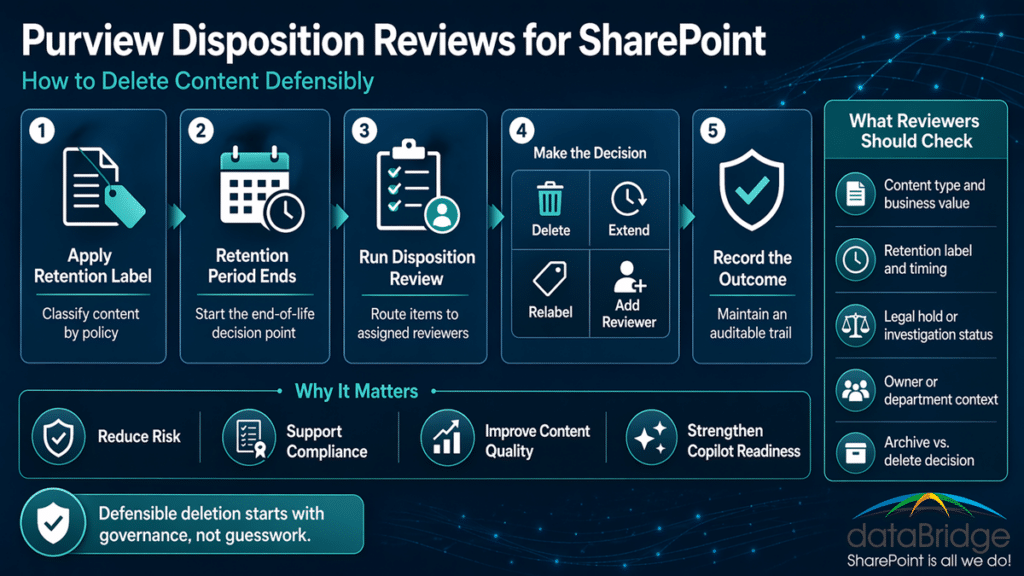
A practical Purview disposition review process follows a clear sequence.
- Create a retention label in Microsoft Purview.
- Configure the retention period and trigger.
- Select “Start a disposition review” at the end of the retention period.
- Assign one or more review stages.
- Assign reviewers for each stage.
- Publish or auto-apply the label to SharePoint content.
- Let Purview notify reviewers when items reach disposition.
- Reviewers inspect the item, metadata, source, and history.
- Reviewers approve disposal, relabel, extend, or add reviewers.
- Purview records disposition activity for audit support.
The workflow looks simple on paper.
In real SharePoint environments, the harder work starts before the queue appears. Teams need to know which labels deserve review and who has authority to approve deletion.
That is where many programs become too heavy.
They route too many items to review. Reviewers get flooded. The queue becomes stale. Soon, the process feels like another compliance burden instead of a useful control.
A good model is selective.
Use disposition reviews where human judgment adds value. Do not force manual review for every low-risk file that can follow a clear retention and deletion rule.
Disposition Review Is Not the Same as Archiving
Archiving and disposition are related, but they solve different problems.
Archiving usually means content still has value, but it should no longer stay in the active collaboration layer. Disposition means content has reached the end of its retention lifecycle and now needs a final decision.
That difference matters in SharePoint.
An inactive project site may need to be archived. A retained contract inside an active site may need disposition review. A completed project library may need both over time.
For the site-level cleanup conversation, see What to Archive, Keep, or Delete Before Copilot Rollout. That article focuses on content rationalization before AI rollout.
This article focuses on item-level disposition after retention ends.
Both topics support the same outcome: a cleaner, more trustworthy Microsoft 365 environment.
Where Retention Labels Fit in a SharePoint Disposition Strategy
Retention labels sit at the center of a Purview disposition review for SharePoint.
They classify content at the item level. They also define what should happen over time.
A retention label can support:
- A defined retention period
- Retention based on creation date, modified date, label date, or event
- Automatic deletion after the retention period
- Disposition review after the retention period
- Relabeling after the retention period
- Record or regulatory record declaration
That gives labels more precision than broad retention policies.
However, labels do not replace permissions. They also do not replace sensitivity labels. Each control has a different job.
Retention labels answer, “How long should this content be kept, and what happens next?”
Sensitivity labels answer, “How should this content be protected?”
Permissions answer, “Who can access this content?”
Those distinctions matter. We explain them in Retention Labels vs Sensitivity Labels vs Permissions in SharePoint.
Disposition becomes weak when teams confuse these controls. A strong SharePoint retention label deployment should define disposition expectations before labels are rolled out broadly, so reviewers understand which content is eligible for deletion, extension, relabeling, or escalation when the retention period ends.
A file can be properly retained but overexposed. Another file can be well protected but kept too long. A third file can have the right permissions but no lifecycle path at all.
Good governance uses the controls together.
When Should SharePoint Content Go Through Disposition Review?
Not every SharePoint file needs manual review before deletion.
That is a healthy rule.
Disposition reviews work best for content where deletion carries legal, regulatory, operational, or reputational weight.
Strong candidates include:
- Contracts and amendments
- Board or leadership records
- Policy and procedure documents
- Regulated operational records
- Audit-related evidence
- HR or employee lifecycle records
- Client deliverables with retention requirements
- Formal project closure records
- Documents marked as records or regulatory records
Weak candidates include routine drafts, low-value collaboration files, temporary working documents, and content with a clear automatic deletion rule.
There is no reward for creating the largest review queue.
The goal is not more review. The goal is better decisions.
In SharePoint governance work, the best disposition programs usually start narrow. They prove the decision model first, then expand to more content types.
Who Should Review SharePoint Content Before Deletion?
Disposition reviewers should not be chosen only because they know Microsoft 365.
They need decision authority.
In many organizations, reviewers include a mix of:
- Records managers
- Legal or compliance stakeholders
- Department content owners
- Business process owners
- Risk or audit leaders
- Information governance teams
IT should support the workflow. It should not own every deletion decision.
That mistake happens often.
IT can configure retention labels, publish policies, and manage access. However, IT usually cannot decide whether a contract, investigation file, or regulated record still has business value.
A defensible process separates technical administration from business authority.
For SharePoint, every review path should answer four questions:
- Who owns the content category?
- Who has authority to approve deletion?
- Who can identify legal or audit exceptions?
- Who can explain the decision later?
When those answers are unclear, automation will not fix the problem.
Start with governance.
The broader governance model should align ownership, lifecycle rules, permissions, and operating habits. See The Complete Guide to SharePoint Governance for Microsoft 365 for that foundation.
What Reviewers Should Check Before Approving Deletion
A disposition review should never ask reviewers to guess.
Give them a practical decision checklist.
Before approving deletion, reviewers should check:
- The retention label applied to the item
- The business category of the content
- The site, library, folder, or source location
- The created date and modified date
- The content owner or department
- Whether the item is under legal hold or investigation
- Whether the item supports an active contract, matter, audit, or process
- Whether the item should be relabeled instead of deleted
- Whether the item should move to an archive model
- Whether the review decision needs comments
The best reviewer experience is not just a Purview screen.
It is a decision model that tells reviewers what “safe to delete” actually means.
That model should be written in business language. Reviewers should not need to interpret a compliance taxonomy every time they open a queue.
Disposition Review Actions: Delete, Relabel, Extend, or Add Reviewers
Purview disposition reviews support more than a yes-or-no deletion decision.
That flexibility is useful when the process has clear rules.
Approve disposal
Use this when the item reached the end of its retention period and no business, legal, or regulatory reason remains to keep it.
This should be a confident decision.
If reviewers are unsure every time, the process probably needs better classification, clearer ownership, or both.
Relabel the item
Use relabeling when the original label no longer fits.
For example, a document may have started as a project record. Later, it may need a longer contractual or regulatory retention period.
Relabeling should not become a hiding place for uncertainty. It should reflect a real lifecycle decision.
Extend retention
Use extension when the item still needs time before final review.
This often happens when a matter, audit, project, or business process remains active.
Extensions should include a reason. Without that context, they become another version of keeping everything forever.
Add reviewers
Use additional reviewers when the current reviewer lacks enough authority or context.
This is especially useful for cross-functional content. Legal, compliance, and business teams may each hold part of the answer.
However, do not turn every disposition into a committee.
A committee is not a governance model. It is often a sign that ownership was never defined.
How Disposition Reviews Support eDiscovery Readiness
Disposition and eDiscovery are connected.
They are not the same thing.
Disposition focuses on lifecycle completion. eDiscovery focuses on finding, preserving, reviewing, and producing content for a legal or investigative need.
Still, weak disposition practices can make eDiscovery harder.
If an organization keeps too much old content, investigations become noisier. If it deletes content without authority, investigations become riskier. When audit-ready lifecycle decisions are missing, legal teams may struggle to explain what happened.
That is why defensible deletion should align with eDiscovery readiness.
Before approving disposal, reviewers should know whether the content is subject to a legal hold, investigation, audit, or active matter.
For the broader investigation-readiness model, read Microsoft Purview eDiscovery for SharePoint and Teams.
A mature SharePoint environment does not treat retention, disposition, and eDiscovery as separate silos. It connects them through governance, metadata, permissions, and ownership.
Common SharePoint Disposition Review Mistakes
Disposition reviews can fail even when Purview is configured correctly.
The problems usually start before the review queue appears.
1. Reviewing too much content manually
Manual review should be reserved for content that deserves judgment.
When every low-risk document goes to review, reviewers stop taking the process seriously.
2. Assigning reviewers without real authority
A reviewer should be able to make or escalate a decision.
Recognizing the file name is not enough.
3. Using vague retention labels
Labels like “General Records” or “Department Files” rarely support good disposition.
Better labels reflect real business categories and retention requirements.
4. Ignoring SharePoint structure
Disposition works better when sites, libraries, metadata, and ownership are clear.
Messy architecture creates messy deletion decisions.
5. Treating Purview as the strategy
Purview enforces the workflow. It does not decide your risk tolerance.
The strategy still belongs to the organization.
6. Forgetting Copilot and search impact
Old retained content can still shape discovery, search, and AI experiences.
Retention decisions should support content quality, not just compliance minimums.
7. Skipping documentation
A deletion decision without context may be hard to defend later.
Reviewer comments, governance standards, and label definitions all matter.
A review queue is not governance. It becomes useful only when the decision rules behind it are clear.
A Defensible Deletion Checklist for SharePoint
Use this checklist before rolling out disposition reviews across SharePoint.
- Define which content categories require disposition review.
- Confirm the retention schedule for each category.
- Map each category to a retention label.
- Decide which labels should delete automatically.
- Decide which labels should trigger disposition review.
- Assign reviewers by business authority, not convenience.
- Confirm Purview roles and reviewer access.
- Document what reviewers should inspect before approval.
- Define when to relabel, extend, or add reviewers.
- Align the workflow with legal hold and eDiscovery processes.
- Test with a limited scope before broad rollout.
- Review queue volume after launch.
- Adjust labels and reviewer assignments based on real behavior.
This is where experience matters.
In our work with SharePoint and Microsoft 365 environments, the best results usually come from practical governance, not oversized policy binders.
Start with the decisions people can actually make. Then configure Purview to support those decisions.
What Purview Can Decide vs. What Your Organization Must Decide
Microsoft Purview is powerful, but it does not replace judgment.
The separation should be clear.
Purview can help manage:
- Retention labels
- Retention periods
- Disposition review stages
- Reviewer notifications
- Review actions
- Audit activity
- Proof of disposition for records
Your organization must still define:
- Which content matters
- Which laws, contracts, or policies apply
- Who owns each content category
- Who has deletion authority
- What exceptions require escalation
- Which content should be archived instead of deleted
- How decisions will be explained later
This is the real work.
Tools execute governance. They do not create governance on their own.
How dataBridge Approaches Purview Disposition Reviews for SharePoint
dataBridge treats disposition review as part of SharePoint architecture and governance.
That matters because deletion decisions depend on the environment around them.
If sites have unclear owners, disposition reviews become slow. If libraries mix unrelated content, labels become noisy. When metadata is weak, reviewers lack context. If permissions drift, the wrong people may still see content that should have moved out of active use.
Our approach usually focuses on five areas.
1. Content lifecycle design
We help define what should be kept, archived, reviewed, or deleted.
This includes practical retention categories, not just abstract policy language.
2. SharePoint structure and ownership
We review sites, libraries, metadata, and business ownership.
Disposition works better when content lives in the right place.
3. Retention label strategy
We map labels to real content types and lifecycle decisions.
The label model should be understandable to compliance teams, IT, and business owners.
4. Reviewer workflow design
We help define review stages, reviewer roles, escalation paths, and decision criteria.
The workflow should be strong enough to defend, but simple enough to use.
5. Governance operating model
We connect disposition reviews to records management, eDiscovery, Copilot readiness, permissions, and long-term SharePoint governance.
That broader model helps teams avoid one-off cleanup cycles.
If your organization is ready to move from retention theory to defensible deletion practice, contact dataBridge to start the conversation.
Best Practices for SharePoint Disposition Reviews
Use these practices to keep the process defensible and manageable.
Start with high-value records
Do not begin with every document in SharePoint.
Start with content where deletion risk is real and ownership is clear.
Use fewer, clearer labels
A bloated label catalog creates confusion.
Each label should have a purpose, owner, retention period, and end-of-life action.
Keep reviewers close to the business
Business context matters.
A reviewer who understands the process behind the document can make better decisions than someone reviewing only metadata.
Align with legal before deletion starts
Legal hold and investigation processes should be clear before disposition queues appear.
This protects the organization and the reviewer.
Document decision rules
Reviewers need more than access.
They need a short, clear rule set for approval, extension, relabeling, and escalation.
Measure review volume
If queues grow too quickly, your scope may be too broad.
High disposition volume often signals a label design problem.
Review the process after launch
Disposition is not a set-and-forget control.
Review labels, reviewers, queue health, and exception patterns on a schedule.
How Disposition Reviews Strengthen Copilot Readiness
Copilot readiness is not only about permissions.
It is also about content quality.
If SharePoint contains years of stale, duplicate, or expired content, AI experiences may expose that weakness faster. Users may see outdated files, conflicting answers, or irrelevant references.
Disposition reviews help by moving expired content toward a final decision.
That does not mean every old file should be deleted. Some content should be archived. Some should be retained. Others should be relabeled. Still, content should not remain active and discoverable by accident.
That is the key.
Copilot does not remove the need for lifecycle governance. It raises the value of getting lifecycle governance right.
For cleanup planning before AI rollout, connect this topic with What to Archive, Keep, or Delete Before Copilot Rollout.
When to Get Help With Purview Disposition Reviews
Many organizations can configure a basic retention label.
Fewer can design a defensible deletion operating model.
You may need help if:
- Your SharePoint environment has years of unmanaged content
- Retention labels exist but users do not understand them
- Legal, compliance, and IT disagree on deletion authority
- Disposition reviews are creating too much manual work
- Reviewers lack context when approving disposal
- Copilot readiness has exposed stale or risky content
- eDiscovery pressure has revealed weak lifecycle controls
- Your organization keeps content because nobody wants to approve deletion
That last point is more common than most teams admit.
When nobody owns deletion, everything becomes permanent by default.
That is not a strategy.
dataBridge helps organizations design practical SharePoint governance, records management, retention labels, and Purview workflows that can stand up to real business pressure.
To discuss your environment, contact dataBridge.
Frequently Asked Questions About Purview Disposition Reviews for SharePoint
What is a Purview disposition review in SharePoint?
A Purview disposition review in SharePoint is a Microsoft Purview records management workflow that starts when content with a retention label reaches the end of its retention period. Reviewers can inspect the item and decide whether to approve disposal, relabel it, extend retention, or add other reviewers.
Does disposition review work with retention policies?
Disposition review is configured through retention labels, not broad retention policies. Retention policies can retain or delete content, but item-level disposition review is a retention label capability.
Should every SharePoint file go through disposition review?
No. Most organizations should reserve disposition review for higher-value content where deletion requires human judgment. Routine, low-risk content can often follow automatic retention and deletion rules.
Who should approve SharePoint content deletion?
The right reviewer depends on the content. Records managers, legal teams, compliance leaders, department owners, and business process owners may all play a role. IT should support the workflow, but business authority should drive deletion approval.
What happens if content should not be deleted?
Reviewers can extend retention, relabel the item, or add another reviewer. The right action depends on why the content still matters. For example, content tied to an active audit, legal matter, or business process may need more time.
How does disposition review support defensible deletion?
Disposition review supports defensible deletion by adding a controlled approval process after retention ends. It helps show that deletion followed policy, involved assigned reviewers, and produced an auditable decision trail.
How does this relate to SharePoint governance?
Disposition review is one part of SharePoint governance. It works best when sites have owners, libraries are structured, retention labels are clear, permissions are controlled, and legal or compliance exceptions are defined.
How does this relate to eDiscovery?
Disposition and eDiscovery are separate but connected. Before content is deleted, organizations should understand whether it is subject to a legal hold, investigation, audit, or active matter. Strong disposition practices reduce clutter while protecting content that must be preserved.
Final Thought: Defensible Deletion Is a Governance Decision
Microsoft Purview gives organizations the workflow.
SharePoint gives them the content layer.
Governance gives them the authority to decide.
That is why disposition review should never be treated as a technical cleanup feature only. It is a business control. It decides what can leave the environment, when it can leave, and who had the authority to approve that decision.
The strongest organizations do not keep everything forever.
They keep what they should, archive what still has value, and delete what has reached a defensible end.
If your organization needs that kind of clarity across SharePoint and Microsoft 365, contact dataBridge to build a more defensible retention and disposition strategy.
Reviewed By