SharePoint: the document layer
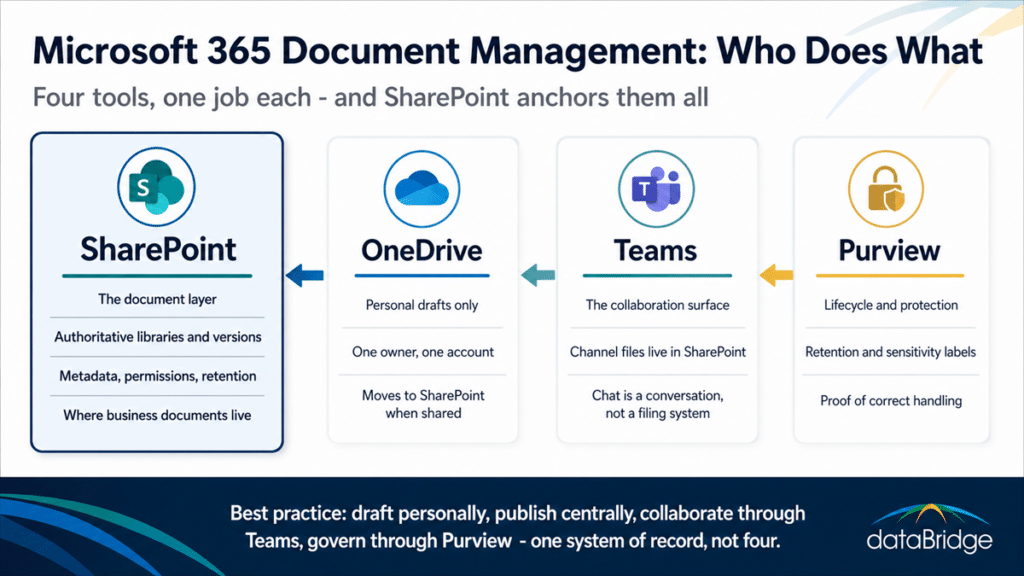
SharePoint is where business documents live – full stop. It is the only tool in the stack with the machinery a document system needs: structured libraries, content types, metadata, granular permissions, version history with approval, retention integration, and search that respects all of it. Everything else in Microsoft 365 either feeds documents into SharePoint or consumes documents from it. Designing that layer well is its own discipline, and our guide to building a SharePoint document management system covers the architecture, metadata, and governance model in full depth.
OneDrive: personal drafts, nothing more
OneDrive is the right home for a document exactly as long as it belongs to one person. The moment a file matters to anyone else – a teammate, a client, a process – it moves to SharePoint, where it survives the author’s departure and picks up the library’s permissions and lifecycle rules. The working boundary between the two is worth getting precise about, and our OneDrive vs SharePoint guide draws that line file type by file type.
Teams: the collaboration surface
Teams is where people talk about documents and work on them together – and the useful thing to understand is that files shared in a Teams channel already live in SharePoint, because every team gets a SharePoint site behind it. Managed well, Teams is a friendly front door to governed SharePoint libraries. Managed badly, it becomes a maze of channel folders and chat attachments with no structure behind the door. The difference is whether anyone designed the SharePoint side.
Purview: lifecycle, protection, and proof
Purview is the compliance layer that applies retention labels, sensitivity labels, and records rules across the platform. It answers the questions the storage tools can’t: how long must this be kept, who may see it, and what proves it was handled correctly. Purview works best when content is consolidated in SharePoint, because policies applied to governed libraries reach the documents that matter instead of chasing copies through personal drives.
Copilot and search: consumers of the structure
Microsoft Search and Copilot don’t manage documents – they reveal how well the documents are managed. Both retrieve from the same permissioned content the rest of the stack maintains, so a clean SharePoint layer produces trustworthy answers and a fractured one produces confident nonsense sourced from stale copies. AI readiness in Microsoft 365 is mostly document management readiness wearing a new name.
How the pieces work together day to day
A healthy Microsoft 365 document flow is simple to describe: draft personally, publish centrally, collaborate through Teams, govern through Purview. A proposal starts in the author’s OneDrive. When it becomes team business, it moves into the right SharePoint library, picks up its metadata and permissions, and gets worked on through the Teams channel connected to that library. Versions accumulate in one place. External sharing happens from the governed copy, so links survive personnel changes. When the document’s active life ends, its retention label – not somebody’s memory – decides what happens next.
The pattern is easy to state and it fails without operating discipline: naming an owner for every library, capturing metadata at upload, and reviewing the structure as the organization changes. We keep the full working list in our guide to SharePoint document management best practices, and every practice in it assumes the division of labor above is already in place.
Is Microsoft 365 enough, or do you need separate DMS software?
For most organizations, Microsoft 365 with a well-designed SharePoint layer is a complete document management system – and buying a separate DMS while running an unstructured SharePoint means paying twice for a problem that structure would have solved once. The licenses most organizations already own cover governed libraries, versioning with approval, permissions, retention, records, audit history, and search.
Dedicated platforms still earn their place at the edges: heavily regulated document control regimes with validation requirements, engineering document management with CAD-specific workflows, or vertical systems welded into an industry’s certification process. Outside those cases, the honest evaluation question is rarely “which DMS should we buy” and much more often “why isn’t the platform we own doing this” – a question we take apart in is SharePoint a good document management system.
Where to go deeper
This page is the platform-level view: what belongs where across Microsoft 365, and why SharePoint anchors it. The design work underneath – libraries, metadata, permissions, lifecycle, and the governance that keeps them trustworthy – lives in our complete guide to the SharePoint document management system, which is the right next read once the division of labor here makes sense for your environment.
Frequently asked questions
Does Microsoft 365 include a document management system?
Yes. SharePoint, included in nearly every Microsoft 365 business plan, provides the core document management capabilities: structured libraries, metadata, version control, approval workflows, permissions, and retention through Purview. What Microsoft 365 does not include is the design – the library structure, metadata model, and governance rules have to be built deliberately.
What is the difference between SharePoint and Microsoft 365 document management?
Microsoft 365 document management describes how the whole platform handles documents – SharePoint, OneDrive, Teams, and Purview working in defined roles. SharePoint document management is the design of the central layer itself. The first is the map of the stack; the second is the architecture of its foundation.
Should files be stored in Teams or SharePoint?
Files shared in Teams channels are already stored in SharePoint – every team runs on a SharePoint site behind the scenes. The real decision is whether that SharePoint side is deliberately structured with libraries, metadata, and permissions, or left as the default folder sprawl. Files sent in private chats are the exception: those land in the sender’s OneDrive, which is exactly why business documents should not travel through chat.
Why shouldn’t OneDrive be used for company documents?
OneDrive is tied to one person’s account. Documents stored there carry that person’s permissions, break their sharing links when moved, and enter deletion retention when the account is disabled after the employee leaves. Company documents belong in SharePoint, where ownership, access, and lifecycle survive any individual’s departure.
Can Microsoft 365 replace a dedicated document management system?
For most organizations, yes. A well-structured SharePoint environment with Purview retention covers the requirements that once justified separate DMS platforms. The exceptions are specialized regimes – validated document control, CAD management, and similar vertical requirements – where purpose-built systems still earn their cost.
Reviewed By