The push to leave Confluence almost never starts with the people who use it every day. It starts in a budget review, when someone notices the company is paying Atlassian for a wiki while already paying Microsoft for a platform licensed to every employee. An executive mandate follows: consolidate onto Microsoft 365, retire the overlapping tools, and stop paying twice for collaboration.
That is the most common trigger we see at dataBridge, and it shapes everything about how these projects go. The mandate is made two levels above the teams who live in Confluence, it’s framed as a cost decision, and it usually arrives with a deadline attached. What it doesn’t arrive with is any acknowledgment that Confluence and SharePoint store knowledge in fundamentally different shapes – which means the project everyone budgeted as “copy the content over” is actually a restructuring project wearing a migration’s clothes.
This post is the playbook for closing that gap: why these migrations happen, what genuinely doesn’t transfer, where Confluence content should land in SharePoint, and how to run the move so the consolidation delivers what the mandate promised.
Why organizations migrate from Confluence to SharePoint
The honest answer is rarely “we dislike Confluence.” Confluence is a capable wiki. The drivers are structural:
- License overlap – Microsoft 365 is already paid for across the whole company, and leadership wants one collaboration stack, one security model, and one vendor bill
- IT and security consolidation – every additional platform is another identity boundary, another compliance review, another place data governance has to reach
- The Copilot effect – content sitting in Confluence lives outside the Microsoft 365 boundary, so Copilot can’t see it. As organizations invest in Copilot, every knowledge base outside M365 becomes invisible to the AI layer they’re paying for
- Acquisition and standardization – a merged or acquired business unit arrives on Atlassian, and the parent standardizes on Microsoft
Notice that none of these are content arguments. They’re platform arguments, made at the platform level. That’s legitimate – the savings and the simplification are real. But it means the people approving the project usually haven’t looked inside the Confluence spaces they’ve just scheduled for demolition, and the timeline reflects that.
The same consolidation logic drives moves off Google Workspace, where the overlap is the entire productivity suite rather than one wiki. If that’s the mandate you’re holding, the Google Workspace to SharePoint migration playbook covers what translates, what converts imperfectly, and what has to be rebuilt.
Confluence and SharePoint store knowledge in different shapes
This is the part that breaks naive lift-and-shift plans, so it’s worth being precise.
In Confluence, everything is a page. Pages live in spaces, nest into deep page trees, and carry their attachments, comments, and labels with them. The hierarchy is the navigation. Macros embedded in pages generate dynamic content – child-page lists, Jira issue tables, status roll-ups – so a Confluence page is often part document, part application.
SharePoint separates those concerns. Sites contain modern pages, document libraries, and lists. Documents live in libraries with metadata, not as attachments hanging off a page. Navigation is built deliberately rather than inherited from a tree. Dynamic behavior comes from web parts, not macros. Structure comes from information architecture you design, not from wherever someone happened to nest a page in 2019.
Copy a ten-level Confluence page tree into SharePoint as-is and you get the worst of both worlds: a wiki’s sprawl without a wiki’s navigation, in a platform that expected you to make structural decisions you skipped. The migration only works if you treat the shape difference as the actual project.
What doesn’t move cleanly
Plan around these from day one, because each one surfaces late if you don’t:
- Macros – dynamic Confluence content has no automatic SharePoint equivalent. Jira tables, child-page listings, and include-macros either get rebuilt as web parts, replaced with static content, or dropped. This is usually the single biggest rework item
- Page hierarchy – deep page trees have to be flattened and re-expressed as site structure and navigation. A tree that “worked” in Confluence often turns out to be three good pages and forty stale ones
- Comments and page history – most tooling moves page content, not the conversation and revision trail around it. If the history matters for compliance, capture it deliberately
- Labels – Confluence labels can map to SharePoint metadata, but only if someone designs the mapping. Done well, this is an upgrade; ignored, the classification is simply lost
- Permissions – space-level permissions don’t translate one-to-one to SharePoint’s site and library model. Rebuild access intentionally rather than approximating
- Jira integration – if your teams live in Jira, decide up front how linked issues will surface after the move, because the deep integration doesn’t come with you
None of this makes the migration a bad idea. It makes “we’re just copying pages” a bad estimate.
Decide where content lands before you move anything
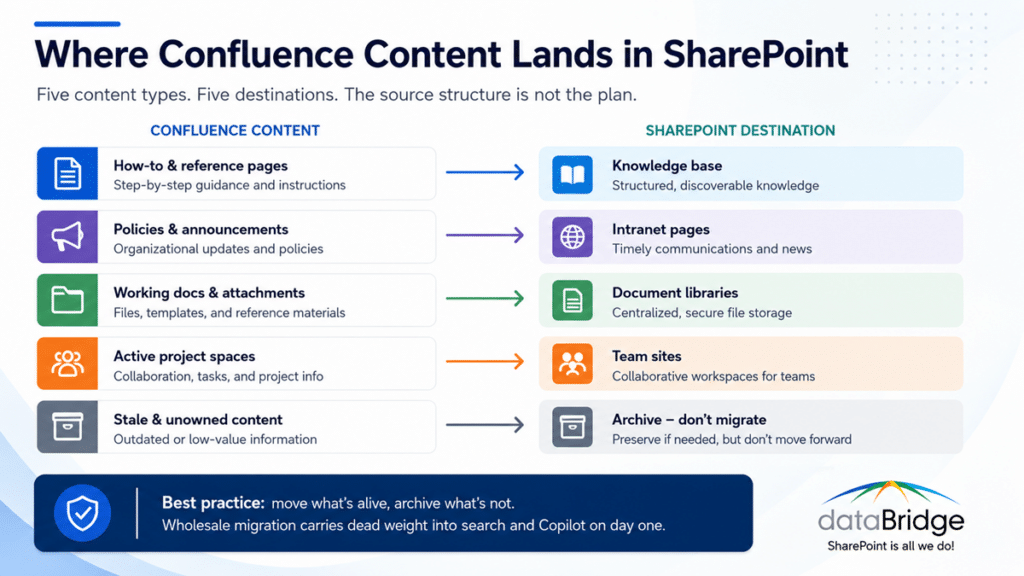
The single most useful planning exercise is mapping Confluence content types to their correct SharePoint destinations – because the answer is not one place.
- How-to articles, runbooks, and reference content belong in a structured SharePoint knowledge base, with metadata, ownership, and review dates
- Policies, announcements, and company-wide reference belong on intranet pages, written for consumption rather than collaboration
- Working documents and attachments belong in document libraries, not embedded on pages – this is where Confluence’s attachment model gets corrected rather than copied
- Active project and team spaces map to team sites, scoped to the group that owns them
- Stale content – and there will be a lot of it – gets archived or retired, not migrated
That last line is the position we’ll defend in any room: a Confluence migration is the best content audit opportunity your organization will ever get, and migrating everything wastes it. Every space you move wholesale carries its dead weight into the new platform and dilutes search, Copilot grounding, and user trust on day one. Move what’s alive. Archive what’s not. Your future self – and your AI tooling – will thank you.