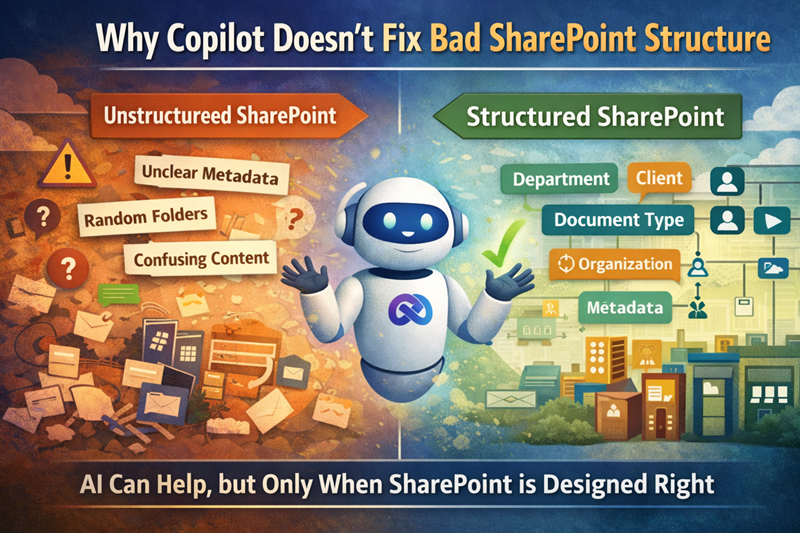
Copilot Doesn’t Fix Bad SharePoint Structure
AI Cannot Outrun a Broken SharePoint Foundation
Microsoft Copilot has created enormous excitement—and for good reason. When organizations deploy it on a strong foundation, Copilot saves time, surfaces insights, and reduces everyday friction.
However, in many environments, Copilot adoption stalls almost immediately.
Why?
Because Copilot does not fix bad SharePoint structure. It exposes whether the environment already has the structure, permissions, metadata, ownership, and lifecycle controls needed to support trusted answers.
This article is a thought-leadership primer. For the full readiness model, use Copilot Readiness for SharePoint. For a diagnostic review, use the Copilot Readiness Assessment for SharePoint. For the technical structure behind AI grounding, use Copilot-Ready SharePoint Information Architecture.
For a practical worksheet that turns this idea into a review process, use the Copilot Readiness Checklist for SharePoint to check permissions, stale content, source authority, metadata, search quality, archive readiness, and ownership before rollout.
Copilot Works With the SharePoint Environment It Is Given
First and foremost, Copilot relies on the content and signals already in your Microsoft 365 environment. That includes:
- SharePoint document libraries
- Pages and intranet content
- Metadata and search signals
- Permissions and security boundaries
Copilot does not invent business context. It does not decide which file is “final.” And it cannot compensate for years of unmanaged content growth.
It is just as important to understand that Copilot Chat vs Microsoft 365 Copilot vs SharePoint agents are different experiences with different grounding scopes, not interchangeable versions of the same tool.
As a result, when SharePoint is cluttered, Copilot’s responses reflect that same clutter.
For a deeper look at how structure affects AI outcomes, see Copilot Readiness for SharePoint.
How Poor SharePoint Structure Undermines Copilot
When SharePoint lacks structure, Copilot struggles to:
- Identify the correct version of a document
- Filter out outdated or duplicate content
- Surface relevant information quickly
- Deliver consistent, trustworthy answers
In many cases, the root cause of these issues can be traced back to SharePoint migration mistakes, where legacy structures were moved into SharePoint without improving architecture or governance.
Over time, users stop trusting AI responses—not because Copilot failed, but because the underlying content was never reliable. This is a common pattern we see in Why SharePoint Fails.
Common Structural Problems Copilot Exposes
Interestingly, Copilot doesn’t create new problems. Instead, it exposes issues that already existed, such as:
- Libraries built around folders instead of metadata
- Files named Final_v3_FINAL_actual.docx
- Empty or inconsistent metadata fields
- No clear content ownership
- Sites created without consistent patterns
These issues often point to two practical readiness questions: which content should be trusted, and who should be able to access it? A SharePoint source of truth model helps define the trusted answer, while the SharePoint Permission Review Checklist for Copilot helps reduce oversharing risk before AI makes access issues more visible.
Previously, users worked around these problems manually. Now, Copilot surfaces them instantly—and at scale.
If these issues sound familiar, they often point to gaps in SharePoint Information Architecture & Metadata.
Why AI Makes SharePoint Structure More Important
Some organizations assume AI reduces the need for structure. In reality, the opposite is true.
Structure provides:
- Context for search and AI
- Signals for relevance and trust
- Boundaries for security and access
Without structure, AI has no reliable way to determine what matters most—or who should see it. That is also why SharePoint Advanced Management matters in Copilot planning. It does not replace structural cleanup, but it can help organizations spot oversharing, review site access, and apply temporary discovery controls while they fix the foundation. That’s why governance becomes foundational, not optional. Learn more in the SharePoint Governance Framework.
The SharePoint Foundation Copilot Needs
To deliver real value, Copilot depends on a SharePoint environment with:
- Clear information architecture
- Consistent site and library patterns
- Meaningful, maintained metadata
- Role-based permissions
- A governed content lifecycle
When these elements are in place, Copilot can finally do what it’s designed to do: assist users with confidence and accuracy.
For a deeper technical breakdown of how metadata, hubs, permissions, source authority, and search signals affect AI retrieval, use Copilot-Ready SharePoint Information Architecture.
Organizations often start this work through SharePoint Consulting Services, especially when structure and governance have evolved organically over time.
Fix the SharePoint Structure, Then Enable the AI
Successful Copilot adoption follows a clear sequence.
First, organizations:
- Clean up content
- Reduce noise
- Align permissions
- Establish practical governance
Then—and only then—Copilot becomes a productivity accelerator instead of a source of frustration.
The Bottom Line
Copilot is powerful.
However, it isn’t magic.
It doesn’t fix messy SharePoint environments.
Instead, it amplifies them.
If you want Copilot to work, start by fixing the structure it depends on.
Related Copilot Readiness Resources
Reviewed By