Already in effect: check whether these broke anything
These cutoffs have passed. If your environment depended on any of them and nobody migrated ahead of time, the impact has already landed, so the task now is to find and fix rather than to prepare.
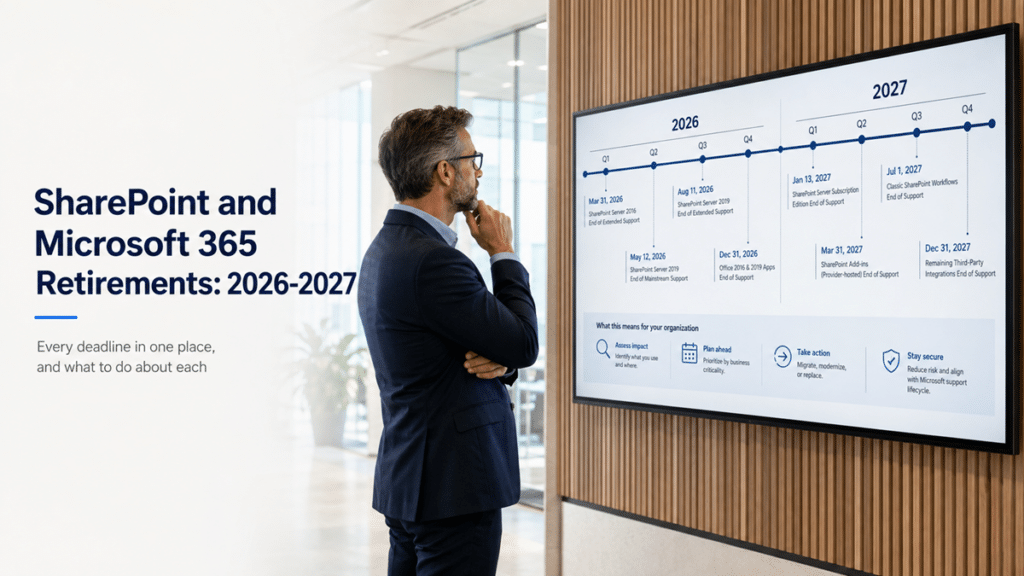
SharePoint Server 2016 and 2019 end of support (July 14, 2026)
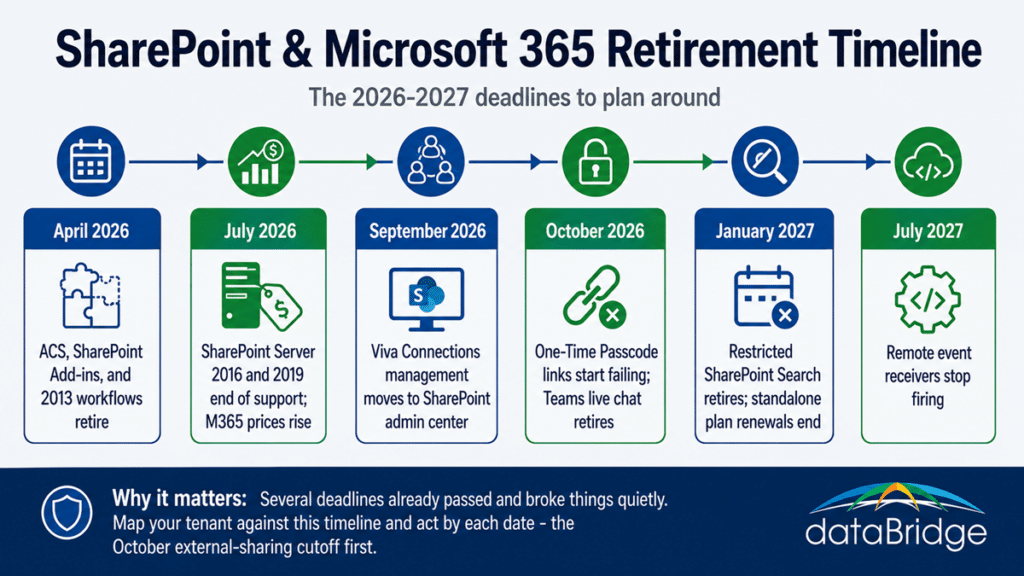
Support for SharePoint Server 2016 and 2019 ended on July 14, 2026. The servers keep running, but there are no more security updates, which turns every future vulnerability into a permanent one. If you are still on either version, you are now running unpatched infrastructure, and the fix is a move to SharePoint Server Subscription Edition or, for most organizations, a migration to SharePoint Online. Treat this as urgent rather than eventual, because the risk compounds with every month unpatched.
SharePoint Add-ins, Azure ACS, and remote event receivers (April 2, 2026)
Azure Access Control Service and the old SharePoint Add-in model retired on April 2, 2026, and it was a hard cutoff with no grace period. Legacy SharePoint Add-ins stopped working, and remote event receivers that depended on ACS stopped firing that day, which quietly broke custom integrations and workflows in a lot of tenants. Receivers re-registered with a Microsoft Entra application get a reprieve until July 1, 2027, but that is a bridge, not a home. The path forward is to inventory any legacy customizations and rebuild them on modern approaches, work that belongs in a plan for modernizing SharePoint customizations rather than a scramble after something breaks.
SharePoint 2013 workflows (April 2, 2026)
SharePoint 2013 workflows reached full retirement on April 2, 2026. Any process still running on the 2013 engine has stopped, and the replacement is Power Automate. If a business process quietly went dark this spring, an abandoned 2013 workflow is a likely culprit, and rebuilding it well is a matter of moving the logic into Power Automate with proper ownership rather than recreating the old design step for step.
Featured Links on the SharePoint Start Page (mid-2026)
Microsoft retired the Featured Links capability on the SharePoint Start Page and mobile app through mid-2026, citing low adoption. If your organization used Featured Links to surface key sites, those links are gone, and the supported alternatives are global navigation links or Resources in Viva Connections. This one is minor for most tenants, but worth a check if anyone relied on it for navigation.
Coming next: act before these reach you
These are the deadlines still ahead or actively rolling out. The external sharing change is the one to prioritize, because it fails silently and it affects almost every organization that shares files outside its walls.
External sharing and the One-Time Passcode retirement (October 2026)
SharePoint is retiring its One-Time Passcode authentication and moving all external sharing to Microsoft Entra B2B. New sharing already switched over earlier in 2026, but existing “specific people” links created under the old model begin failing around October, and the failure is silent: an external partner clicks a link they have used for months and simply gets Access Denied, with no notice to them or to you. Before October, inventory the older links and pre-create guest accounts or re-share for the external relationships you cannot afford to interrupt. This is the one most likely to generate surprise tickets, and getting ahead of it is far cheaper than fielding them, which is what a sound external sharing governance model is built to handle.
Restricted SharePoint Search (blocked now, retires January 2027)
Restricted SharePoint Search, the stopgap many organizations used to limit what Copilot could reach, can no longer be newly enabled as of mid-2026 and retires fully on January 31, 2027. If you leaned on it to hold Copilot back while you cleaned up permissions, that clock is running, and the durable answer is real content governance rather than a tenant-wide brake. Use the runway to get your environment genuinely ready for Copilot rather than to find another temporary block.
Viva Connections management moves to the SharePoint admin center (September 2026)
Around September 2026, management of multiple Viva Connections home sites moves from the Microsoft 365 admin center to the SharePoint admin center, legacy Viva Connections instances are upgraded to full Home sites, and the old draft and enabled states retire. No action is strictly required, but if you run multiple intranet home experiences for frontline, regional, or business-unit audiences, the configuration now lives somewhere new. Update your runbooks and help-desk documentation so nobody is sent to the retired Viva section, part of the broader shift where Viva Connections becomes the SharePoint app and Home sites become the foundation.
Teams live chat retirement (October 5, 2026)
Microsoft is retiring the Teams live chat integration for customer messaging on October 5, 2026. New setups are already unavailable, and existing integrations stop relaying customer chat messages into Teams in early October. This is narrow, affecting only organizations that route external customer chat into Teams, but if that is you, line up a replacement before the relay stops.
Standalone SharePoint and OneDrive plans (renewals end January 2027)
Microsoft is retiring the standalone SharePoint Online and OneDrive for Business Plan 1 and Plan 2 subscriptions. New sales ended in June 2026, renewals stop in January 2027, and the plans reach full end of service in December 2029. If you buy SharePoint or OneDrive outside a Microsoft 365 suite, your renewal is the decision point, and the alternatives are a Microsoft 365 suite, storage capacity add-ons, or pay-as-you-go storage. Sorting out the right move is a Microsoft 365 licensing question worth settling before renewal rather than at it.
The pricing change behind all of it
Alongside the retirements, Microsoft raised commercial Microsoft 365 prices by 5 to 43 percent on July 1, 2026, and folded Copilot Chat into every base plan. Existing customers keep their current rate until their next renewal, so your renewal date is the real deadline. The structural part is that AI is now part of the platform cost rather than an optional add-on, which means the practical question has shifted from whether to pay for AI to whether your environment can make the AI you are now paying for actually useful. That answer runs straight through your SharePoint content quality.
How to get ahead of the whole list
Two moves cover most of the risk on this page. First, map your own tenant against the list rather than reading it as general news: which SharePoint version you run, whether you have legacy add-ins or 2013 workflows, whether you share externally with specific-people links, and what you renew and when. Second, act by the nearest dates, starting with the October external sharing cutoff, because that is the one most likely to break something a client or partner depends on.
Most of these are not really separate problems. They are the same few themes, legacy authentication giving way to Entra, old customizations giving way to modern ones, and standalone pieces folding into the Microsoft 365 suite, arriving on different dates. An environment with clean permissions, modern integrations, and a clear migration path absorbs the whole list with far less drama than one carrying years of deferred cleanup. If you want a single pass that maps these deadlines to your environment and sequences the work, that is exactly what a SharePoint and Microsoft 365 consulting engagement is for.
Frequently asked questions
What SharePoint features are retiring in 2026?
The largest 2026 retirements are the SharePoint Add-in model and Azure ACS along with ACS-based remote event receivers (April 2), SharePoint Server 2016 and 2019 end of support (July 14), SharePoint 2013 workflows (April 2), Featured Links on the Start Page (mid-2026), and the start of the One-Time Passcode retirement for external sharing (October). Standalone SharePoint and OneDrive plans also ended new sales in June 2026.
When do old SharePoint external sharing links stop working?
Existing “specific people” links that used the old One-Time Passcode model begin failing around October 2026, once that authentication method retires and external users without a Microsoft Entra B2B guest account lose access. New external sharing already moved to Entra B2B earlier in 2026. The failure is silent, so affected links should be found and fixed before the cutoff.
Is SharePoint Server 2016 and 2019 still supported?
No. Support for both SharePoint Server 2016 and 2019 ended on July 14, 2026. The software continues to run but receives no further security updates, so organizations still on those versions should plan a move to SharePoint Server Subscription Edition or SharePoint Online.
Are standalone SharePoint Online plans being discontinued?
Yes. Standalone SharePoint Online and OneDrive for Business Plan 1 and Plan 2 subscriptions stopped new sales in June 2026, will stop renewals in January 2027, and reach full retirement in December 2029. Customers need to move to a Microsoft 365 suite or use storage add-ons and pay-as-you-go storage as alternatives.
What should I do first about these retirements?
Map your own environment against the list, then act by the nearest date. For most organizations the highest priority is the October external sharing change, because it fails silently and affects nearly anyone who shares files externally, followed by any legacy customizations that already stopped working in April.
Reviewed By