SharePoint Governance at a Glance
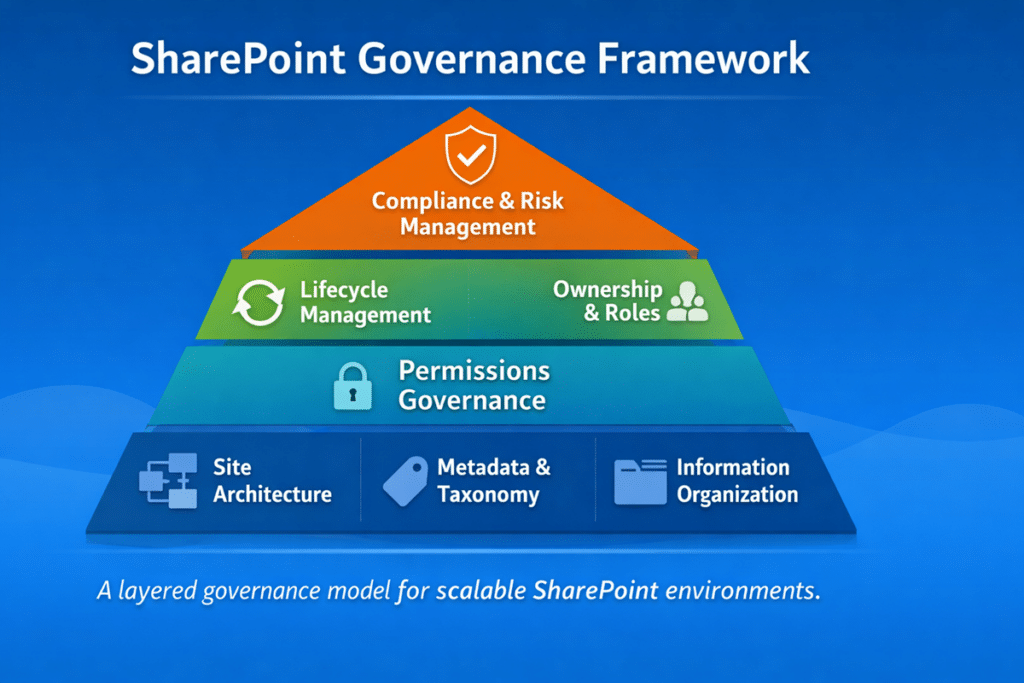
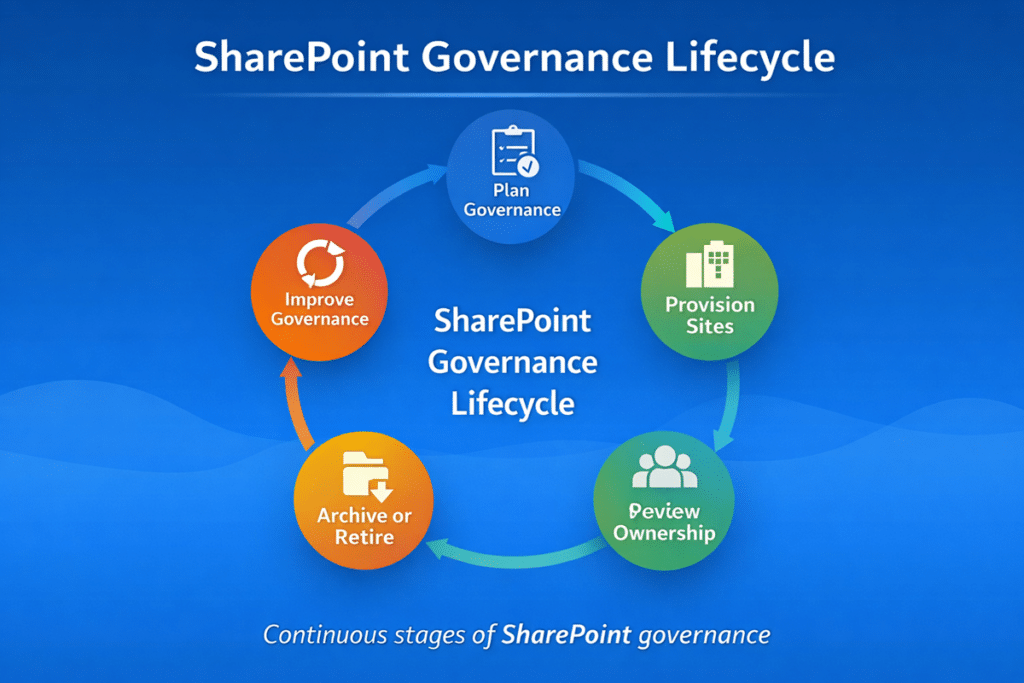
Effective SharePoint governance ensures collaboration environments remain organized, secure, and scalable. A strong governance framework defines ownership, provisioning standards, lifecycle management, permissions policies, and compliance controls across the Microsoft 365 environment.
What Is SharePoint Governance?
SharePoint governance is the operating model behind how sites, permissions, content, lifecycle, and ownership are managed across Microsoft 365. In 2026, the definition matters less than the outcome: whether your environment stays organized, trusted, and ready for AI, compliance, and long-term collaboration.
For the full evergreen definition, framework, and implementation guidance, see our complete SharePoint governance guide.
Why Governance Matters More Than Ever in Microsoft 365
Governance matters more in 2026 because SharePoint now sits underneath more of the Microsoft 365 experience than ever before. Teams, OneDrive, Power Platform, and Copilot all depend on the same underlying structure, permissions, and content quality.
That means weak governance no longer creates only administrative problems. It creates search problems, trust problems, security problems, and AI-quality problems across the wider Microsoft 365 environment.
This is also why governance now has to align more closely with SharePoint Information Architecture & Metadata Strategy and broader Microsoft 365 consulting strategy.
A practical response is to connect governance with the structure underneath it. SharePoint architecture and governance consulting helps organizations define site models, hub relationships, permissions, ownership, metadata, lifecycle controls, and governance decisions that keep Microsoft 365 trusted as it grows.
The Governance Priorities That Matter Most in 2026
The core governance disciplines are still familiar, but in 2026 the priority is not just having them documented. The priority is making sure they are actually working together in a live Microsoft 365 environment.
1. Provisioning and Ownership
Uncontrolled site and workspace creation still drives duplication, inconsistent naming, and weak ownership. In 2026, organizations need a clearer process for how collaboration spaces are requested, approved, and assigned to accountable owners.
2. Permissions Governance
Permissions remain one of the fastest ways for governance to break down. Group-based access, regular reviews, and limited use of broken inheritance are more important now because weak permissions also affect AI trust and information exposure.
3. Information Architecture and Metadata
Governance depends on structure. If content is poorly organized, governance enforcement becomes inconsistent and search credibility declines. This is why metadata, taxonomy, and site architecture still sit near the center of mature governance models.
4. Lifecycle Management
Inactive sites, outdated content, and abandoned workspaces create clutter and risk. Lifecycle governance should define when environments are reviewed, archived, or retired instead of allowing them to accumulate indefinitely.
5. Compliance and Retention
Retention, records management, audit expectations, and legal requirements remain essential, especially in regulated environments.
In 2026, the bigger priority is connecting those controls to day-to-day ownership, lifecycle review, archive decisions, and defensible disposition. Compliance cannot sit off to the side as a policy exercise. It needs to show up in how SharePoint sites, libraries, records, and older content are managed over time.
For the broader evergreen framework behind these governance components, see our complete SharePoint governance guide.
What Changed in SharePoint Governance in 2026
The biggest governance shift in 2026 is not that every principle changed. Organizations still need ownership, provisioning rules, permission standards, information architecture, metadata, retention, and review cadence.
What changed is the urgency.
Microsoft 365 now rewards environments that are structured and exposes environments that are not. Weak governance is easier to see across search, Copilot, SharePoint agents, external sharing, lifecycle decisions, and compliance workflows.
Copilot Made Permission and Content Quality More Visible
Copilot did not create permission problems, stale content, or duplicate information. It made those issues harder to ignore.
If SharePoint contains outdated files, duplicated policies, loosely governed libraries, unclear owners, or overly broad access groups, AI-assisted experiences may reflect those weaknesses. That makes content quality, permission review, and source authority part of the governance conversation.
Organizations preparing for AI should connect Copilot readiness for SharePoint with the SharePoint Permissions Guide and a clear SharePoint source of truth model. Copilot readiness is not only a technical rollout. It is a governance maturity issue.
SharePoint Agents Made Source Scope and Ownership More Important
SharePoint agents made governance more specific. An agent is only as trustworthy as its purpose, source content, permissions, and owner.
In 2026, organizations need to define which sites, pages, libraries, and knowledge sources can be used by an agent before rollout. They also need to decide who approves the source scope, who keeps the content current, how permissions are reviewed, and how the agent is monitored after launch.
That is why organizations should design SharePoint agents users can trust by defining scope, sources, permissions, and ownership before the agent becomes part of daily work.
Microsoft 365 Archive Made Lifecycle Decisions More Practical
Lifecycle governance became more practical because organizations now have better options than leaving inactive SharePoint sites live forever or deleting them too soon.
Microsoft 365 Archive for SharePoint gives organizations a way to move inactive sites out of the active collaboration layer while preserving the broader governance conversation around ownership, compliance, search, restoration, and long-term access.
This changes the governance question. The question is no longer only, “Should we keep this site?” A better question is, “Should this site remain active, be archived, be retained for compliance, or move toward disposition?”
Archive decisions should be connected to site ownership, lifecycle review, retention expectations, and Copilot readiness. Otherwise, archive becomes another storage action instead of a governance control.
Retention Labels and Disposition Reviews Moved Closer to Day-to-Day Governance
Retention labels, records management, and disposition reviews are no longer only back-office compliance topics. They now sit much closer to everyday SharePoint governance.
The reason is simple: organizations cannot keep everything forever, but they also cannot delete content casually. They need a governed lifecycle that defines what should be retained, what should be reviewed, who has authority to decide, and how the decision is documented.
That makes retention labels, sensitivity labels, and permissions part of the same governance conversation, even though they do different jobs. It also makes Microsoft Purview disposition reviews for SharePoint more important for organizations that need defensible deletion, reviewer accountability, and a documented decision trail.
In 2026, mature governance is not just about creating content safely. It is also about reviewing, archiving, retaining, and disposing of content responsibly.
External Sharing Needed Stronger Review Cadence
External sharing also became a more visible governance issue in 2026 because collaboration now extends across SharePoint, OneDrive, Teams, guests, partners, vendors, clients, and AI-enabled discovery experiences.
The issue is not whether external sharing should exist. The issue is whether the organization can explain where it is allowed, which sharing methods are acceptable, who owns the decision, and how access is reviewed over time.
A stronger SharePoint external sharing governance model should define approved site types, guest access expectations, Anyone link restrictions, direct sharing rules, owner responsibilities, expiration settings, and recurring access review.
External sharing should never be treated as a one-time setting. It needs a review cadence, especially in environments preparing for Copilot, handling sensitive content, or working with regulated data.
Site Provisioning Became a Bigger AI Readiness Issue
Site provisioning became a bigger governance issue because every poorly created site can become future search, permission, lifecycle, and AI-readiness debt.
In 2026, site creation should not be treated as a simple request queue. A strong SharePoint site provisioning strategy should define site purpose, template selection, naming, ownership, permission defaults, external sharing posture, metadata expectations, lifecycle rules, and review cadence before a site goes live.
This matters more now because Copilot, SharePoint agents, search, and compliance tools all depend on the quality of the environment underneath them. A site that starts with unclear ownership, broad permissions, weak structure, and no lifecycle expectation becomes harder to govern later.
The best governance models do not wait for sprawl to appear. They prevent much of it at the point of creation.
What These Changes Mean for Governance Leaders
Together, these changes make SharePoint governance more operational and less theoretical.
In 2026, strong governance means leaders can answer practical questions:
- Which content should remain active?
- Which sites should be archived?
- Which content is authoritative?
- Which access needs review?
- Which agents are approved and owned?
- Which external sharing methods are acceptable?
- Which sites should be created, and under what model?
- Which records need retention, review, or disposition?
That is why SharePoint governance in 2026 should be treated as an active operating model, not a passive set of rules.