Skip to content
An IT leader and finance colleague review a Microsoft 365 renewal quote showing higher costs and a Copilot line item.

Microsoft 365 Price Increase: You’re Paying for AI Now

On July 1, Microsoft raised the price of Microsoft 365 by as much as 43 percent, and quietly changed what you are buying. Copilot Chat, the AI you may have been carefully deciding whether to pay for, is now folded into every base plan. The decision you were weighing is closed. You are paying for AI whether you switch it on or not.

Most of the coverage of the Microsoft 365 price increase has focused on the percentages, which matter. But the percentage is not the real story for anyone who runs SharePoint. The real story is that Microsoft just made AI part of the platform, and whether you get anything back for it now depends entirely on the state of your content.

What changed on July 1, 2026?

Microsoft raised commercial Microsoft 365 prices by 5 to 43 percent and bundled Copilot Chat into every Business, Enterprise, and Frontline base plan. The increase took effect July 1, 2026, but existing customers keep their current rate until their next renewal, so the date that actually matters is your renewal date, not July 1 itself.

The increases are uneven. Business Standard moved to $14 per user per month and Business Basic to $7, while Business Premium held at $22. Enterprise plans like E5 rose around 5 percent, and some Frontline configurations climbed as high as 43 percent. Home plans, standalone Teams, and the standalone Microsoft 365 Copilot add-on are not part of this change. Microsoft also added capabilities to justify the increase, folding things like Defender for Office 365 Plan 1, additional Intune management features, Security Copilot for E5 customers, and extra mailbox storage into the affected plans. The structural change underneath all of it is the one worth your attention: Copilot Chat is now a standard part of the plan rather than an add-on you can leave off the order.

Why this is really an AI story, not a pricing story

The percentage is the headline, but the change that lasts is that AI is now part of the platform cost instead of an optional line item. You can no longer separate the Microsoft 365 decision from the AI decision, because buying the base plan now means buying into Copilot. That quietly rewrites the question every IT and finance leader has been asking for two years.

For a long time, the Copilot question was whether it was worth adding. For Copilot Chat, that question is closed, because it is in the base plan you already pay for. One accurate distinction to keep straight: the lighter Copilot Chat experience is what got bundled, while the full Microsoft 365 Copilot, the richer version that works across your documents and email, remains a separate add-on at its own price. But the direction could not be clearer. Microsoft is moving AI from something you choose into something you own, and it will keep pushing more of it into what you already buy. Planning as though you can opt out of paying for AI is planning for a world that ended on July 1.

The uncomfortable part: most environments waste the AI they now pay for

Here is what the pricing coverage skips. Copilot is only as good as the SharePoint content it reads, and in most tenants that content is a mess. So a large number of organizations are now paying more for AI that returns mediocre answers, and the AI is not the reason. The environment underneath it is.

Copilot grounds its answers in your content and respects your existing permissions. Point it at libraries full of duplicates, stale files, weak metadata, and unclear ownership, and it will hand people confident answers built on the wrong version of a document. Point it at an environment where permissions were never cleaned up, and it will surface content to people who were never supposed to see it, just faster than they could have found it themselves. You have now paid for the engine. Whether it runs on clean fuel is still on you, and this is the exact argument our Copilot readiness work has made from the start. The price increase only raised the stakes. The cost of a messy environment used to sit quietly in the background. Now you are paying a premium for AI that your own content quality is throttling.


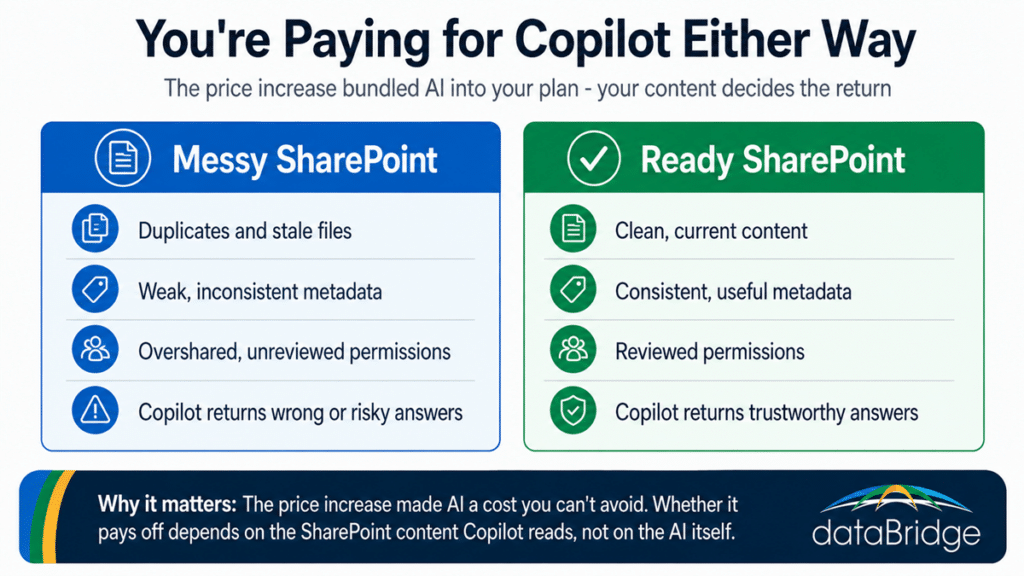
Comparison showing how SharePoint content quality determines the return on the Copilot AI now bundled into Microsoft 365 after the price increase.
The price increase made AI unavoidable; a ready SharePoint environment is what turns that cost into trustworthy answers.

What to actually do before your renewal

Treat your renewal date as the trigger for two separate jobs: right-size what you are buying, and get your SharePoint ready to make the bundled AI worth it. The first controls what you spend. The second controls whether that spend returns anything. Four moves matter:

  • Know your renewal date, because that is when the new pricing reaches you, not July 1. Model the increase against your current plan and seat count now, so the number at signing is not a surprise.
  • Right-size the buy. Review seat counts and plan tiers, and check whether you are still paying separately for add-ons that just moved into your base plan, so you are not covering the same capability twice.
  • Fix the content environment so the Copilot you are now funding returns trustworthy answers. That means permissions cleanup, metadata, source authority, and stale-content retirement, the same work that makes any AI rollout safe.
  • Decide on the full Microsoft 365 Copilot add-on with clear eyes. The bundled Chat is a preview of the value, not the whole of it, and the full version is only worth adding on top of an environment that is actually ready for it.

None of this is about beating a July deadline that has already passed. It is about using your renewal as the moment to stop overpaying and start getting something back.

Where SharePoint fits the new math

The price increase turns SharePoint content quality from a background nicety into the thing that decides your return on a cost you can no longer avoid. Every dollar of the AI you are now funding runs through the SharePoint content that Copilot reads. Structure that content well and the AI pays for itself in answers people trust. Leave it messy and you are subsidizing wrong answers at a higher price than last year.

That is why the renewal conversation and the Copilot-ready information architecture conversation are really the same conversation now. The first sets what you pay. The second sets what you get. Cleaning up permissions and oversharing with tools like SharePoint Advanced Management is not a separate AI project anymore, it is how you protect the money you are already spending. If you are heading into a renewal at the new pricing and want the AI you are now paying for to return something real, getting the SharePoint environment ready is the work that decides it, and it is where a SharePoint and Microsoft 365 consulting engagement earns its keep.

Frequently asked questions

How much did Microsoft 365 prices go up in 2026?

Commercial Microsoft 365 prices rose between 5 and 43 percent on July 1, 2026, across Business, Enterprise, and Frontline plans. The increases are uneven, with lower-tier plans seeing smaller changes and some Frontline configurations rising as much as 43 percent. Home plans, standalone Teams, and the standalone Copilot add-on are not affected.

When does the Microsoft 365 price increase affect me?

At your next renewal after July 1, 2026, not on July 1 itself. Existing customers keep their current pricing until they renew, so your renewal date is the real deadline. That gives most organizations a window to model the increase and prepare before the new rate applies.

Is Copilot included in Microsoft 365 now?

Copilot Chat, the lighter AI experience, is now bundled into every affected base plan. The full Microsoft 365 Copilot, which works across your documents and email, remains a separate paid add-on. So AI is now part of what you pay for at the base level, even though the premium version is still an upsell.

Why does the Microsoft 365 price increase matter for SharePoint?

Because the AI you are now paying for grounds its answers in your SharePoint content. If that content is disorganized, duplicated, or overshared, Copilot returns weak or risky answers, which means you pay more for AI that underperforms. Content quality now directly determines the return on a cost you cannot avoid.

What should I do before my Microsoft 365 renewal?

Model the increase against your current plan, right-size seat counts and tiers, and check for add-ons that moved into the base plan so you are not paying twice. Then prepare your SharePoint environment so the bundled Copilot returns trustworthy answers rather than confident guesses built on messy content.

Reviewed By

Michael Fuchs
Michael FuchsFounder and CEO
Michael is the Founder and CEO of dataBridge, where he helps organizations approach SharePoint and Microsoft 365 with a stronger focus on strategy, governance, architecture, and long-term business value. His consulting-first perspective shapes how clients plan smarter, avoid costly missteps, and build digital workplaces that hold up over time.

Author

  • Andrea Skinner Bio Square

    Andrea leads operations at dataBridge and plays a key role in keeping complex SharePoint and Microsoft 365 engagements organized, efficient, and well managed. She brings a strong blend of project leadership, platform knowledge, and operational discipline that helps clients move forward with confidence.

SHARE ON SOCIAL MEDIA