When to use the Knowledge Agent
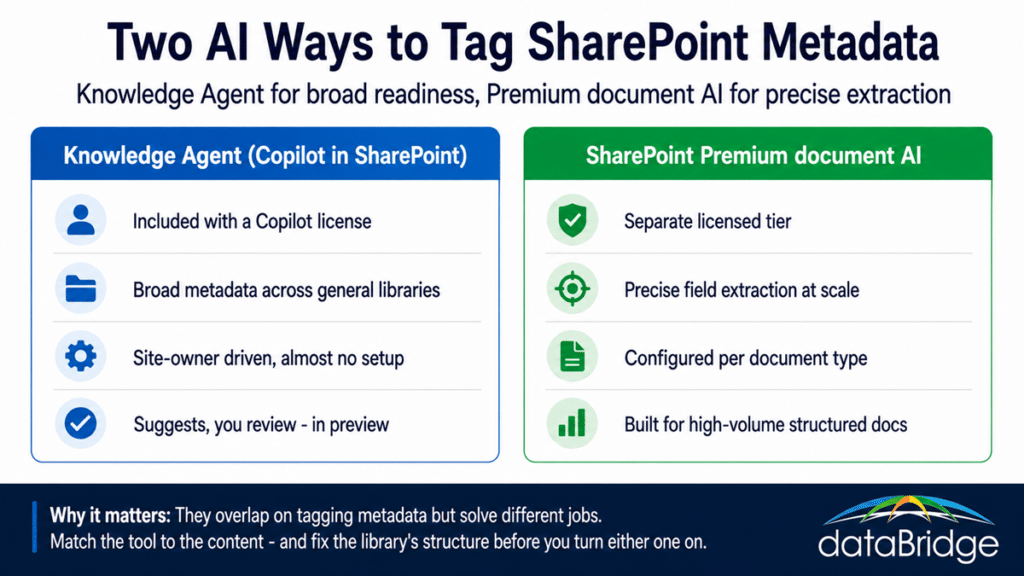
Use the Knowledge Agent when you already have Copilot licensing and you want low-friction metadata enrichment and site cleanup across general libraries, without standing up a project to do it. It is the natural first move for broad Copilot readiness across varied content, because it is included and site owners can run it themselves.
It fits best when:
- Your libraries hold mixed, general content rather than one repeatable document type.
- Site owners will drive the work, and you want organization without a separate purchase or a training exercise.
- The goal is better findability and stronger Copilot grounding across a lot of content, not exact field extraction on one high-value type.
Because it rides your existing Copilot license, the marginal cost of trying it on a few important libraries is close to zero, which makes it the sensible place to start before you consider paying for anything more specialized.
When to use SharePoint Premium document AI
Use Premium document AI when you have a specific, high-volume, structured document type where precise field extraction matters and manual tagging is never going to happen. Contracts, invoices, claims, and orders are the classic cases, because the fields inside them drive a real downstream process and the volume is too high to handle by hand.
It earns the separate tier when:
- You can name the document type and list the exact fields you need pulled from it.
- The volume is high enough that manual tagging will realistically never get done.
- A legal or procurement process consumes that extracted data, so accuracy is not optional.
- The library is structured and consistent enough for a trained model to work against.
If you cannot name the document type and the fields, that is usually a sign the content is not ready for this tool yet, and the Knowledge Agent or a round of information-architecture work is the better next step.
Can you use both?
Yes, and in a large environment you often should. The Knowledge Agent handles broad Copilot readiness across your general content estate, while Premium document AI does precise extraction on the handful of high-value, high-volume libraries that justify it. These are not an either-or choice for the whole tenant.
The mistake is treating it as one decision for everything: turning on Premium document AI across libraries that do not need that precision, or leaning on the Knowledge Agent for a contract process that genuinely requires trained extraction. Match each tool to the content it fits. A single organization can reasonably run the Knowledge Agent widely and reserve Premium document AI for the contract and invoice libraries where the fields feed a process.
Neither one fixes a messy library
Both tools amplify the structure you already have, and neither invents structure you don’t. Point either one at a disorganized library full of duplicates and no agreed content model, and you get faster, more confident mess: metadata suggestions built on top of chaos, or extracted fields no one trusts. The library’s information architecture comes first, then the tool.
This is the part worth slowing down on before you turn either on. Deciding your document types, your content model, and what the metadata is actually for is the unglamorous work that makes both tools pay off, and it is the same Copilot-ready information architecture that shapes whether Copilot returns trustworthy answers at all. Get the structure right, then pick the tool that matches the content. If the underlying document management model needs work first, that is the place to start, not the AI switch.
Frequently asked questions
What is the difference between the SharePoint Knowledge Agent and SharePoint Premium?
The Knowledge Agent, included with Microsoft 365 Copilot, suggests and auto-fills metadata broadly across general libraries and helps site owners clean up sites, with almost no setup. SharePoint Premium document AI is a separate licensed tier that uses trained models to extract precise fields from a specific, high-volume document type. One is broad and low-effort, the other precise and configured.
Does the SharePoint Knowledge Agent cost extra?
The Knowledge Agent is included with a Microsoft 365 Copilot license rather than sold separately, so if your users are already licensed for Copilot, there is no additional purchase to use it. SharePoint Premium document AI is a separate tier with its own cost, which is part of why the two are worth telling apart before you buy anything.
Is the SharePoint Knowledge Agent generally available?
As of this writing, the Knowledge Agent is in public preview and Microsoft has changed its name more than once, so expect the branding and some behavior to keep shifting. SharePoint Premium document AI is generally available. Confirm the current status before you plan a rollout around either one.
Can the Knowledge Agent replace SharePoint Premium document AI?
Not for precise, high-volume extraction. The Knowledge Agent is strong at broad, low-effort metadata across varied content, but a contract or invoice process that needs exact fields pulled at scale is what Premium document AI’s trained models are built for. Many organizations use the Knowledge Agent widely and Premium document AI on the few libraries that require that precision.
Do these tools change my file permissions?
No. The Knowledge Agent adds structure like metadata, views, and rules, and does not move, rename, or delete files, and existing permissions continue to apply. Both tools operate within the access model you already have, so they organize and enrich content without widening who can see it.
Reviewed By