The taxonomy problem
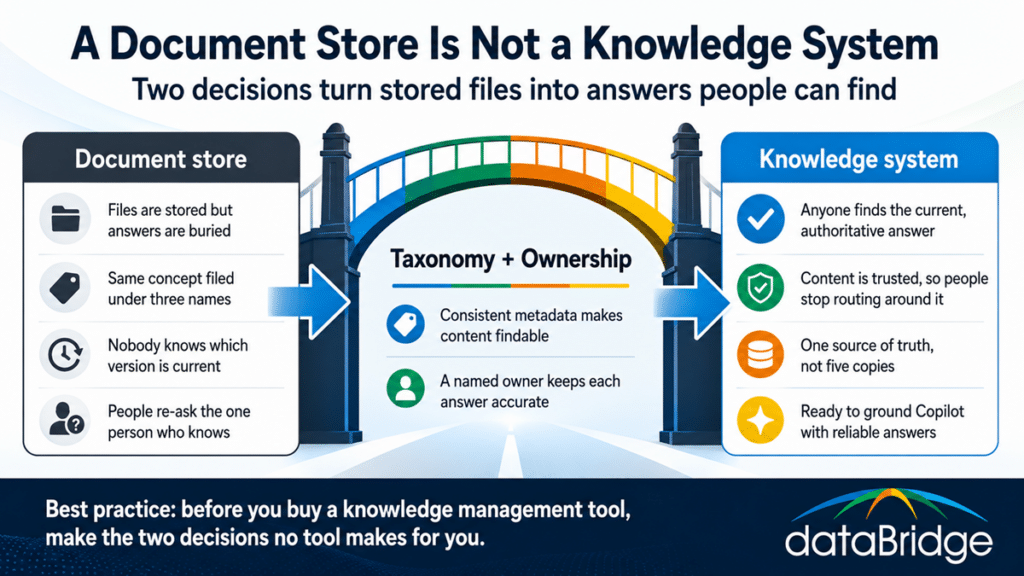
Taxonomy is how content is classified so it can be found by structure rather than by luck, and its absence is the single most common reason SharePoint knowledge management fails. Without an agreed way to categorize content, every team files by its own logic, the same concept gets three different names, and search returns everything because the content carries no consistent signal about what it is.
Fixing this is not a folder cleanup. It is deciding the metadata that describes your content – document type, department, topic, status, audience – and applying it consistently so that a filter returns the right set every time and search has something structured to match against. This is the same information architecture discipline that underpins document management, covered in our guide to SharePoint information architecture and metadata, applied with a knowledge lens: the goal is not just orderly storage, it is retrievable answers.
The organizations that skip this step and buy a knowledge management product first end up with the same disorganized content behind a more expensive interface. Structure is the work. There is no tool that supplies it for you.
The ownership problem
Every piece of knowledge content needs a named owner responsible for keeping it accurate, and the absence of that owner is what turns a knowledge system stale. Taxonomy makes content findable. Ownership makes it trustworthy – and trust is the part that decides whether people rely on the system or route around it. The moment someone finds an out-of-date answer and gets burned, they stop trusting the whole library and go back to asking a person.
Ownership means a specific individual accountable for a defined body of content: is this still correct, does it need review, should it be retired. Not a committee, not “the team,” a person – because content that belongs to everyone is maintained by no one. This is the same accountability principle that governs a healthy environment generally, which is why our SharePoint governance framework work treats named ownership as foundational rather than optional. A knowledge system without owners degrades quietly, one stale document at a time, until people no longer trust any of it.
Source of truth: one answer, not five
A knowledge system has to establish a single source of truth for each answer, because five copies of a policy in five locations is the same as having none – nobody knows which one is real. This is where document management discipline and knowledge management meet. When the current version of an answer lives in exactly one authoritative place, and everything else points to it rather than copying it, people can trust what they find. When it lives in five places, every search becomes a guess.
Establishing this means deciding where each type of answer officially lives and enforcing that links point back to the authoritative copy instead of duplicating it. Our guide to building a SharePoint source of truth covers the mechanics. At the strategy level, the rule is simple: one answer, one home, everything else references it. The duplication that feels convenient in the moment is the exact thing that erodes trust in the system over time.
Why Copilot made this urgent
For years, weak knowledge management was tolerable because a human could compensate – people knew to ask the right colleague, to check the date, to ignore the obviously stale result. Copilot removed that human filter, and in doing so it turned a slow-burning problem into an immediate one.
When Copilot answers a question, it retrieves from your content and states an answer with confidence. It does not know that the policy it found was superseded two years ago, that the document has no owner, or that three conflicting versions exist and it happened to surface the wrong one. Weak taxonomy and absent ownership used to produce a frustrated employee who asked around. Now they produce a confident, wrong answer delivered by an assistant people are inclined to believe. The knowledge problems organizations deferred for a decade became visible the week Copilot went live.
This is why so many knowledge management conversations now start with an AI rollout. The rollout did not create the problem – it removed the human workaround that had been hiding it. Preparing content to be a reliable source for Copilot is the same work as building a knowledge system: structure, ownership, and a single source of truth. Our Copilot readiness for SharePoint practice is, underneath, knowledge management with a deadline attached.
Where knowledge management fits your SharePoint environment
Knowledge management is not a separate system you bolt on. It is a layer that runs across your intranet, your document management, and your Copilot readiness at once – which is why it is easy to under-invest in, since no single project owns it. The intranet is where people go looking for answers, so knowledge management shapes how the modern SharePoint intranet is structured and surfaced. Document management supplies the governed content underneath. Copilot readiness is the test of whether the whole thing actually works.
Because it spans all three, knowledge management tends to fall into the gap between them, owned by no single initiative and therefore neglected. The organizations that do it well treat it as its own discipline with its own owner, not as a byproduct they hope emerges from the other three. Our SharePoint AI Readiness Center pulls the structure, content, and readiness threads together in one place.
Start with the two decisions, not the tool
If you take one thing from this: before you evaluate a knowledge management product, make the two decisions that no product makes for you. Decide how your content is classified, and decide who owns keeping each body of it accurate. Taxonomy and ownership are the whole game. A knowledge system is what you get when those two decisions are made well and applied consistently, and no amount of software substitutes for making them.
That is also the honest answer to the request we hear most. When an organization says it needs a knowledge management system, the useful first question is not which platform – it is whether the content is organized and owned. Answer that, and you usually find you already have the system you were about to go buy. Our architecture and governance consulting practice exists to make those two decisions with organizations before they spend on tooling that assumes they are already made.
Frequently asked questions
Can SharePoint be used as a knowledge management system?
Yes. SharePoint provides the structure a knowledge management system needs – metadata, libraries, search, permissions, and integration with Microsoft Search and Copilot. Whether it functions as a knowledge system depends on how it is organized and owned, not on additional software. Most organizations already have the capability and lack the taxonomy and ownership decisions that activate it.
What is the difference between document management and knowledge management?
Document management governs how files are stored, versioned, secured, and retained. Knowledge management governs whether the stored content can actually answer a question – which depends on taxonomy, ownership, and a single source of truth. You can have excellent document management and still have no working knowledge system if content is filed correctly but nobody can find the current, authoritative answer.
Why can’t people find answers in our SharePoint?
Almost always because of weak taxonomy, absent ownership, or duplicated content. Without consistent metadata, search has no structured signal to match against. Without owners, content goes stale and people stop trusting it. With the same answer in several places, nobody knows which is current. These are decisions to make, not features to buy.
Do we need a knowledge management tool, or is SharePoint enough?
For most organizations, SharePoint is enough – the missing pieces are taxonomy and ownership, which no tool supplies. A dedicated knowledge management product layered over disorganized, unowned content produces the same problem behind a more expensive interface. Make the structure and ownership decisions first; evaluate additional tooling only if a specific need remains after that.
How does knowledge management affect Copilot?
Directly. Copilot retrieves from your existing content and answers with confidence, including when the content is outdated, unowned, or duplicated. Strong taxonomy, clear ownership, and a single source of truth are what make Copilot’s answers trustworthy. Knowledge management and Copilot readiness are substantially the same work.
Reviewed By