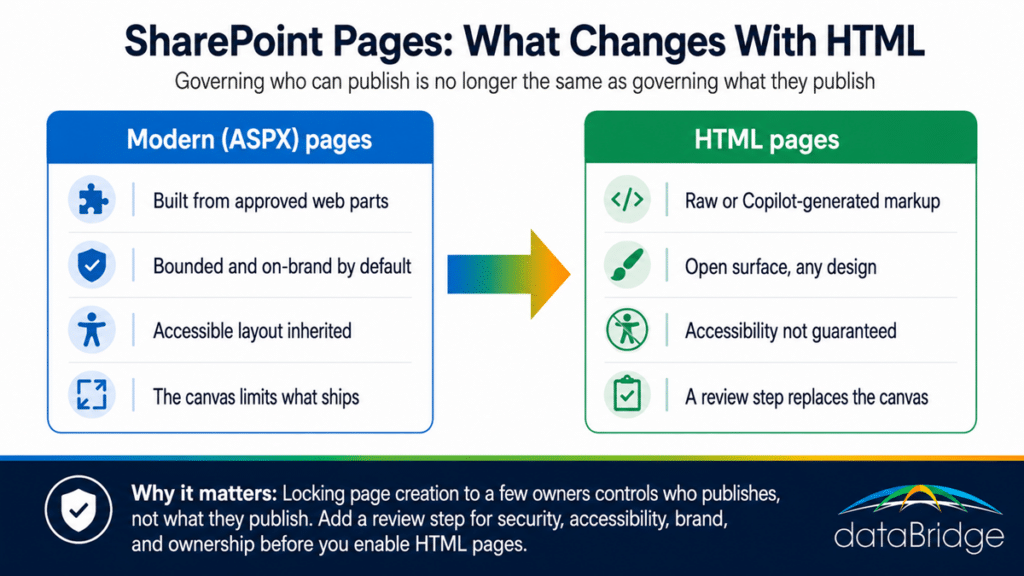
The governance gaps HTML pages open
HTML pages open four gaps a permissions setting doesn’t cover: what the markup is allowed to contain, whether it meets accessibility standards, whether it holds your brand, and who owns it once it’s live.
A wider security surface
Microsoft spent the past year narrowing this surface. Custom scripting was disabled by default on classic publishing sites through early 2026, largely to shut down ungoverned JavaScript and the risk that came with it. HTML pages reopen a version of that question. Before you enable them broadly, confirm with your admin team exactly what the rendering permits and what it strips, because “we can publish HTML now” and “we can publish anything” are not the same statement.
Accessibility and compliance
A modern page inherits responsive, accessible patterns by default. Hand-written or AI-generated HTML inherits nothing. If your organization answers to ADA, Section 508, or EN 301 549, an HTML page that skips heading structure or fails colour contrast becomes a compliance finding, not just an ugly page. Someone has to check it.
Brand and design drift
Your design system exists so a hundred sites still feel like one intranet. HTML pages can ignore it entirely. Two or three off-model pages won’t sink you. Without a standard they multiply, and the intranet starts to read like a stack of unrelated documents.
For standard modern pages, the SharePoint Brand Center’s governed themes and fonts make the approved look the easy choice. Hand-written or Copilot-generated markup can still ignore all of it, which is why brand belongs on the HTML page review checklist.
Ownership over time
Every HTML page is a small application someone has to maintain. A Copilot-generated dashboard wired to list data is more than a layout – it carries assumptions about who should see that data. When the person who built it moves on, the page stays, still pulling live content, with no owner and no review date.
What to put in place before you turn it on
Decide about this feature deliberately instead of letting it arrive on a release ring. The core move is to extend your page model from a question about who can publish into a question about what they can publish and how it gets reviewed.
Before broad enablement, put these in place:
- Confirm your release ring and decide, at the tenant level, whether HTML pages are on, off, or limited to specific sites.
- Define the use cases you actually want. A live dashboard from a list may earn its place while a free-form microsite does not.
- Add a review step for HTML pages the same way you would for any published application, covering security, accessibility, brand, and ownership.
- Set a written standard your reviewer can check against, so approval is a decision rather than a matter of taste.
- Treat Copilot-generated markup as a draft a person signs off on before it goes live.
- Inventory HTML pages as they appear and give each one an owner and a review date.
Where HTML pages fit in a governance model
HTML pages are a small feature that lands on a large question: does your tenant have a page governance model, or just a permissions setting standing in for one. The organizations that handle this well already treat publishing as something they design, not something they toggle.
This is the work we do in SharePoint architecture and governance engagements – defining who is allowed to publish and what published content has to meet before it goes live. Because Copilot now sits inside the authoring flow, HTML pages also belong in a Copilot readiness conversation, where the rule stays simple: AI drafts, a person approves. If you want the building blocks of a model you can apply beyond this one feature, our governance center collects the frameworks and worksheets we use with clients.
And if you’re weighing whether to enable HTML pages across a large tenant and want a second read before you do, that’s a conversation worth having with our SharePoint consulting team.
Frequently asked questions
Are HTML pages replacing ASPX pages in SharePoint?
No. Microsoft has described HTML pages as living alongside existing ASPX pages, not replacing them. Modern ASPX pages stay the default authoring experience, and HTML pages are an additional option held in the same library.
Can Copilot create the HTML for a SharePoint page?
Yes. Copilot in SharePoint can generate the HTML from a prompt, and it can build interactive dashboards from a list that stay connected to the source data. You can also upload HTML authored elsewhere. In both cases the output should be reviewed before it’s published.
Should we turn SharePoint HTML pages off?
Not necessarily. For some teams a live, list-connected dashboard is genuinely useful. The right answer depends on whether you can put a review step and an ownership model around the feature. If you can’t yet, limiting it to a few controlled sites while you build that model is a defensible starting point.
How do we know if HTML pages are already enabled in our tenant?
Check which release ring your tenant is on and review your SharePoint admin settings and message center posts for roadmap item 569208. Because the feature is rolling out to targeted release, it can appear before you’ve made a decision, which is the main reason to look now rather than later.
Reviewed By