
SHAREPOINT DESIGN & BRANDING SERVICES
we are SharePoint design specialists
At dataBridge, our SharePoint Design Services focus on creating structured, user-centered environments that support long-term governance and adoption.
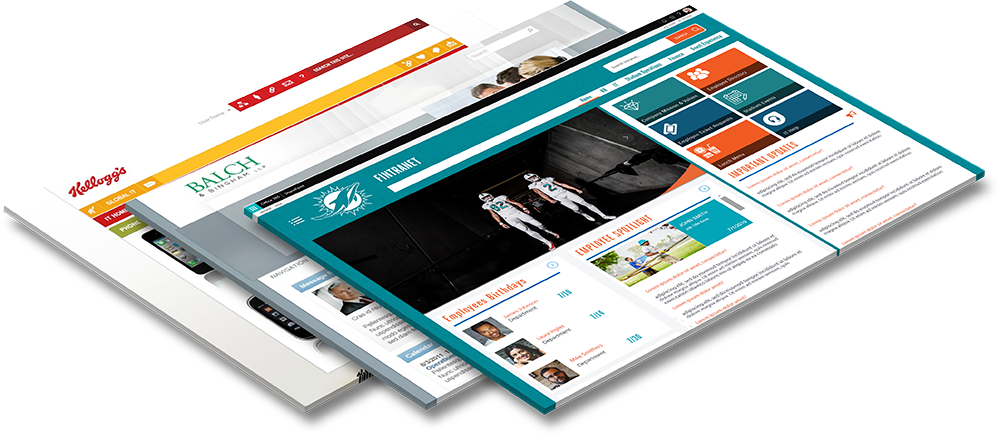
With expertise in all versions of SharePoint, from SharePoint on-premise to SharePoint Online in Microsoft 365 we are here to give you support as your business grows. Put the dataBridge team to work for you and enjoy a stunning visualization of your organizations brand. As part of our SharePoint Consulting Services, you get design and branding expertise, with attention to detail, stellar service, and stunning results.
SharePoint Design Services - Microsoft 365 Intranet Design
Transform SharePoint Into a User-First, Purpose-Driven Experience
Today’s SharePoint is built on the Modern framework, giving organizations unmatched flexibility to design engaging intranets, intuitive collaboration hubs, and business-centric workplaces without custom code. At dataBridge, we help organizations design SharePoint solutions that are not only visually compelling but also strategically aligned to how teams work, share, and make decisions.
Our design philosophy: structure before customization. This approach is central to how dataBridge delivers effective SharePoint Design Services that scale with your organization.
Rather than relying on outdated design patterns (like classic master pages or style sheets), we leverage Microsoft’s Modern capabilities—such as custom layouts, responsive sections, adaptive UX patterns, and governance-ready templates—to create environments that scale, perform, and drive adoption.
Whether you’re building a new intranet, enhancing departmental portals, or refining user experiences, dataBridge brings design rigor, governance discipline, and user empathy to every engagement through our SharePoint Consulting Services.
What are SharePoint intranet design best practices?
SharePoint intranet design best practices focus on ensuring users can quickly find information, complete tasks efficiently, and trust the platform over time. The most effective environments prioritize strong information architecture (Information architecture is the structural design of sites, navigation, and content relationships that helps users quickly find and trust information within SharePoint), role-based navigation, Microsoft 365 integration, and governance built into the user experience.
Organizations that follow proven SharePoint intranet design best practices typically see higher adoption, better search success, and more sustainable intranet management. Check out our work here!
Key SharePoint intranet design best practices include:
- Start with strong information architecture
- Design for real SharePoint UX and usability
- Align with Microsoft 365 workflows
- Keep navigation simple and role-based
- Embed governance from the beginning
- Optimize for search and findability
- Continuously monitor and improve
Start with Information Architecture, Not Visual Design
Many organizations jump directly into page layouts and branding. However, long-term success depends on strong structure first. Effective SharePoint intranet design best practices begin with clear site hierarchy, logical navigation, and well-defined content ownership.
When information architecture is sound, visual design becomes far more effective — and far easier to maintain over time. This is why many organizations begin with a formal SharePoint Information Architecture & Metadata engagement before investing heavily in interface changes.
Design for Real User Experience (UX), Not Just Appearance
Strong SharePoint UX design (SharePoint UX (user experience) design focuses on how employees navigate, search, and complete tasks efficiently within the intranet environment.) This focuses on how people actually work. Instead of optimizing only for aesthetics, successful intranets prioritize:
- Task completion speed
- Search success
- Role-based navigation
- Mobile usability
- Cross-department clarity
This user-centered approach ensures your SharePoint UX and usability investments translate into measurable productivity gains and align closely with broader SharePoint Intranet & Portal Design initiatives.
Align SharePoint Design to Microsoft 365 Workflows
Your intranet should not operate in isolation. Modern Microsoft 365 intranet design must integrate seamlessly with Teams, OneDrive, and other collaboration tools.
At dataBridge, we design environments that:
- Support Teams-connected collaboration
- Reduce duplicate storage patterns
- Reinforce governance controls
- Improve cross-platform consistency
This alignment is essential for organizations seeking scalable SharePoint Design Services that support long-term platform health and complement a broader Microsoft 365 Consulting Strategy.
Keep Navigation Simple and Role-Based
Complex navigation is one of the fastest ways to reduce adoption. Effective SharePoint intranet design best practices emphasize:
- Audience targeting
- Role-based menus
- Shallow click depth
- Consistent global navigation
When users can predict where information lives, trust in the intranet increases significantly. This is a core principle within The dataBridge Way delivery model.
Build for Governance and Lifecycle from Day One
Design decisions should support governance — not fight it later. The most sustainable environments incorporate:
- Structured content types
- Metadata standards
- Ownership models
- Retention alignment
- Permission discipline
This is where many visual-first approaches fall short. At dataBridge, our SharePoint Design Services intentionally embed governance into the user experience so the platform remains manageable as it grows and aligns with the SharePoint Governance Maturity Model.
Optimize for Search and Findability
Search success is one of the clearest indicators of intranet health. Effective SharePoint UX design ensures content is not only well organized but also easily discoverable.
Key practices include:
- Consistent metadata
- Clear naming conventions
- Authoritative content sources
- Search-friendly page layouts
Organizations that struggle with findability often benefit from a focused SharePoint Search Optimization initiative to reinforce these improvements.
Design for Continuous Improvement
Finally, the best intranets are never truly “finished.” Strong SharePoint intranet design best practices include ongoing measurement and refinement.
We recommend organizations:
- Monitor search analytics
- Review usage patterns
- Validate navigation assumptions
- Reinforce governance regularly
This continuous improvement mindset is central to The dataBridge Way and ensures your intranet evolves with your organization over time.
Why SharePoint Design Matters
Design isn’t just about aesthetics—it’s about clarity, usability, and purpose. When people visit a SharePoint site, they should immediately find what they need, understand how to act, and come away confident and productive. Poor design leads to confusion, wasted time, and resistance to adoption.
As organizations shift to the Modern SharePoint experience, design now plays a crucial role in:
- Communicating brand and culture
- Reducing cognitive load for users
- Improving findability and contextual relevance
- Supporting governance and lifecycle management
- Integrating with Microsoft Teams, Viva, and Power Platform
At dataBridge, we design SharePoint experiences that strike the right balance between form and function, leveraging Microsoft’s modern UX patterns instead of outdated customization frameworks.
Our SharePoint Design Approach
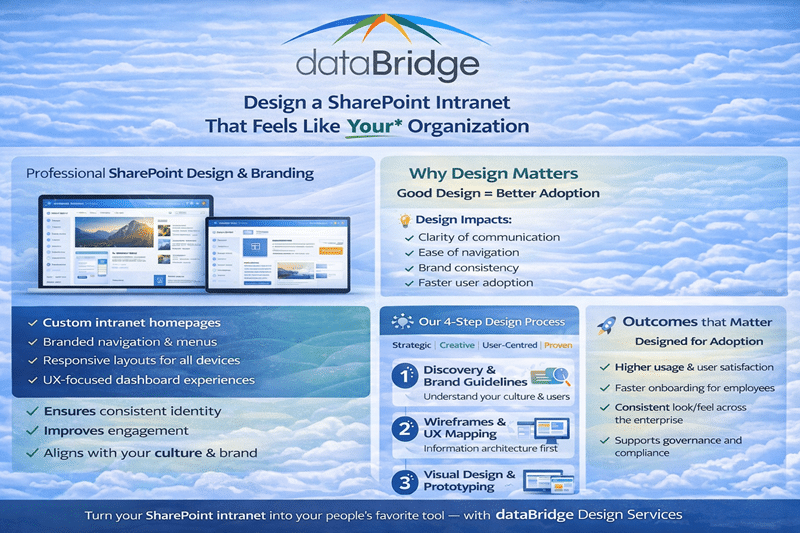
Our design philosophy is simple: start with people, not pixels. We begin by understanding how teams work, what they need, and how information flows. Then, we design SharePoint experiences that fit into those workflows, rather than forcing users to adopt unfamiliar patterns.
Here’s how we approach SharePoint design:
1. Discovery & Context
We begin by identifying key user personas, business priorities, content needs, and success metrics. This often surfaces opportunities to improve information architecture, navigation structures, and content hierarchy before diving into visual design.
Outcome: A clear roadmap for design decisions that support real user scenarios.
2. Blueprint & Structure
Next, we define the scaffolding—such as hubs, sites, communication portals, and collaboration spaces—that will support your business outcomes. We align this with your taxonomy, metadata strategy, and governance model.
Outcome: A structured, scalable design plan grounded in modern SharePoint capabilities.
3. Layout & Visual Design
Using the Modern SharePoint framework, we create compelling page layouts, site templates, and reusable patterns. This includes responsive section layouts, hero banners, cards and quick links, and audience-targeted components that adapt to different user groups.
Outcome: Visually consistent and user-centric experiences that elevate your internal brand.
4. Prototype & Validate
We don’t just design on paper — we build previews in a test tenant, validate with real users, and refine based on feedback. This iterative process ensures the design works in the context of real work.
Outcome: Designs that are validated, effective, and ready for scale.
5. Implementation & Adoption Guidance
Finally, we help you implement the design in your production environment, and provide adoption resources, governance practices, and documentation to ensure long-term success.
Outcome: A sustainable, governed SharePoint ecosystem that people love to use.
What Makes Our Design Work Different
Modern SharePoint design requires a strategic mindset, not just creative flair. Here’s how dataBridge sets itself apart:
User-First Experiences
We don’t design for designers — we design for users. Our focus is on information flow, task clarity, and intuitive interaction.
Governance & Structure
Design and governance are integrated, not bolted on. Your design supports site lifecycle, permissions boundaries, and taxonomy rules.
Outcome-Driven, Not Template-Driven
We don’t recycle generic templates. We tailor every design to your business context, audience needs, and success measures.
Connected to Microsoft 365
Our designs connect SharePoint to the broader Microsoft 365 ecosystem — including Microsoft Teams, Viva Engage, Power Apps, and Power BI — so your intranet becomes a real hub for work.
Common Design Challenges We Solve
Organizations often struggle with:
- Navigation confusion across sites and hubs
- Inconsistent branding and lack of visual cohesion
- Poor information findability
- Under-utilized collaboration spaces
- Lack of mobile responsiveness (Responsive design ensures SharePoint intranet pages automatically adapt to different screen sizes so field, mobile, and desktop users have a consistent experience.)
We tackle these through thoughtful design, clear patterns, and governance-aligned frameworks.
Related Services That Amplify Design Impact
To ensure your SharePoint design delivers measurable value, our SharePoint Design Services typically include:
SharePoint Consulting Services— to assess current state and clarify goals
Copilot Readiness & AI Strategy — to surface insights and improve content discoverability
Enterprise SharePoint Migration Consulting — to migrate and reorganize content as needed
Microsoft 365 Adoption & Change Management — to drive user engagement and value realization
Get Started — Design SharePoint for Real Users
Your intranet or collaboration environment shouldn’t just exist — it should work. Good SharePoint design reduces friction, improves productivity, and accelerates adoption.
Ready to design SharePoint that feels intuitive and drives results?
Schedule a SharePoint Discovery Engagement and chart the design path that fits your organization.
If you want to see more examples of our SharePoint design Expertise, check out our work here!
Frequently Asked Questions About SharePoint Design Services
Most SharePoint intranet designs fail because they prioritize visuals over structure. Organizations focus on colors, layouts, and web parts before defining information architecture, ownership, navigation, and governance. Without a structural foundation, even the best-looking intranet becomes confusing, hard to maintain, and difficult to scale.
Yes—when branding is applied intentionally and within SharePoint’s native design framework. Effective SharePoint branding uses themes, layouts, and design patterns that respect governance, security, and lifecycle management. When branding avoids unsupported customizations, it enhances usability and consistency instead of creating long-term maintenance issues.
SharePoint design focuses on user experience, structure, navigation, and branding, while SharePoint development focuses on extending functionality through custom code and integrations. Strong intranets start with design to ensure clarity and adoption, and only introduce development when business requirements cannot be met using out-of-the-box capabilities.
Effective SharePoint design starts with structure, not aesthetics.
At its core, strong design focuses on:
- Clear information architecture that reflects how the business actually works
- Consistent navigation patterns that reduce cognitive load
- Design decisions that reinforce SharePoint governance, not fight it
- Flexibility that supports growth without sacrificing clarity
At dataBridge, we design SharePoint environments so users don’t have to think about where content lives or how to find it. When structure comes first, visual design becomes an accelerator instead of a distraction.
Design directly determines whether users trust SharePoint or avoid it.
When SharePoint design is inconsistent or confusing, users stop engaging. They create workarounds, store files elsewhere, and bypass the platform entirely. Over time, adoption erodes — even if the technology itself works.
In contrast, thoughtful SharePoint intranet design:
- Makes content predictable and easy to find
- Reinforces ownership and accountability
- Reduces training needs
- Encourages long-term adoption
Good design lowers friction. As a result, users adopt SharePoint naturally because it supports how they work instead of forcing new habits.
Governance and design are closely related — but they serve different roles.
SharePoint governance defines rules, ownership, and standards. It answers questions like:
- Who owns content?
- What rules apply?
- How are decisions enforced?
SharePoint design, on the other hand, translates those rules into a usable experience. Design determines:
- How governance is reflected in navigation and structure
- How users interact with content day to day
- Whether governance feels supportive or restrictive
In short, governance sets direction. Design makes it real. When design and governance are aligned, SharePoint becomes easier to use and easier to manage.
Branding plays a critical role in whether employees view SharePoint as the place to work or just another tool.
A well-branded SharePoint intranet design reinforces trust, familiarity, and credibility. When the intranet visually aligns with your organization’s brand — colors, typography, tone, and layout — employees recognize it as an official, reliable source of information.
However, branding is not about decoration. At dataBridge, we ensure branding supports usability, accessibility, and SharePoint governance, rather than overpowering them. The best intranet branding feels natural, consistent, and purposeful.
Yes — when branding is implemented thoughtfully, it directly influences engagement and adoption.
Consistent branding improves:
- Recognition of official content
- Confidence in navigation and layout
- Willingness to return to the intranet as a daily resource
When users can quickly recognize where they are and what’s important, engagement increases. Combined with strong information architecture and a clear content strategy, branded intranets become hubs for communication, collaboration, and culture — not just document storage.
Branding works best when it supports adoption goals, content ownership, and long-term sustainability.
If you’re evaluating SharePoint Design Services and want a structured approach, dataBridge can help.
What our clients say

THE SEARCH IS OVER
We're a Microsoft SharePoint partner - everything you need IS right here
For more information about how dataBridge can transform your business with improved corporate communication, collaboration, forms, workflows, and document management, contact us today.