

SharePoint Migration FAQ's
These FAQs answer the most common questions about SharePoint migrations, including planning, readiness, governance, content cleanup, post-go-live optimization, and Microsoft 365 alignment. They help organizations understand why migration success depends on more than moving files from one system to another.
Migration questions usually reveal deeper concerns about structure, ownership, cleanup, and how the new environment will actually work after launch. This FAQ page gives concise answers to those questions and helps organizations connect migration planning to broader SharePoint governance and adoption decisions.
A successful SharePoint migration improves more than storage—it improves how people work.
With the right structure, governance, and strategy, migration becomes a foundation for collaboration, automation, and AI.
If your migration feels overwhelming—or already went sideways—it’s fixable.
Clear Answers to Common SharePoint Migration Questions
Who We Serve
We support professional services, healthcare, financial services, manufacturing, education, construction and government organizations that require secure, compliant, and strategically structured SharePoint migrations.
Business Outcomes of a Structured Migration
A successful SharePoint migration should result in:
- Improved search accuracy
- Reduced compliance risk
- Clear content ownership
- Streamlined collaboration
- AI-ready information architecture
- Reduced technical debt
Migration Scenarios We Support
- File shares to SharePoint Online
- SharePoint Server to Microsoft 365
- Tenant-to-tenant migrations
- Departmental consolidations
- M&A SharePoint integrations
- Legacy form and workflow modernization
Common Risks We Address
- Broken permissions inheritance
- Metadata loss
- Workflow failures
- Integration disruption
- Compliance exposure
- Poor Copilot data quality
Preparing Your Migration for Microsoft Copilot
Copilot performance depends on clean, structured, and secure content. Our migration process includes metadata normalization, permission alignment, and governance enforcement to ensure AI delivers accurate and context-aware results.
Our Typical Migration Phases
- Assess & Discover
- Architecture & Governance
- Migration Strategy & Tool Selection
- Validation & Cutover
- Post-Migration Optimization
Proven Across Regulated and Complex Environments
Short 1-line summary examples:
- Multi-location financial firm consolidation
- Healthcare compliance-driven migration
- Manufacturing document repository restructuring
Still Have Questions About Your Migration?
Every SharePoint migration is different. If you need guidance on planning, governance, permissions, or phased rollout strategy, our SharePoint migration consulting team can help you define a clear, low-risk path forward.
Talk to a SharePoint Migration Expert
Explore These Resources
- The Complete Guide to SharePoint Online Migrations
- SharePoint Migrations
- SharePoint Migration Readiness Assessment
- SharePoint Post-Migration Checklist
- SharePoint Governance Framework
- SharePoint Adoption & Change Management
- Copilot Readiness for SharePoint
- SharePoint Information Architecture & Metadata
- SharePoint Security & Compliance
A SharePoint migration is the process of moving content, structure, and permissions from legacy systems—such as file shares, SharePoint Server, or third-party platforms—into SharePoint Online as part of a broader Microsoft 365 environment.
In practice, a SharePoint Online migration involves more than copying files. It requires decisions about information architecture, content ownership, retention, and how people will find and use information after the move. In our experience, migrations that focus only on speed often recreate the same problems organizations were trying to escape, including poor search results, unclear ownership, and low adoption.
When structure and ownership are addressed during a SharePoint migration, organizations typically see improved search, stronger Microsoft 365 adoption, and a more sustainable environment over time.
Most SharePoint migrations fail after data has moved, not during the technical migration itself.
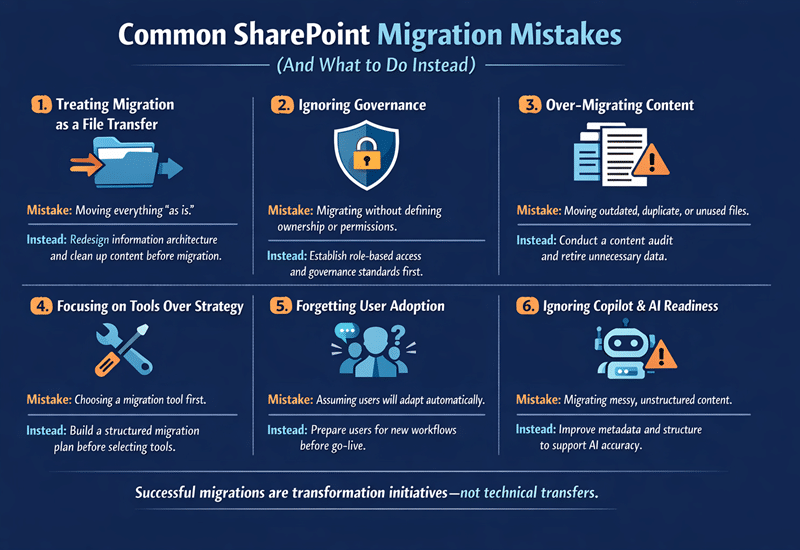
dataBridge has found that failures usually stem from decisions that were deferred early in the process. Migrating everything “just in case,” preserving deep folder structures, or copying legacy permissions often leads to content sprawl, unclear security, and reactive SharePoint governance. Users struggle to find information, and IT teams spend significant time fixing avoidable issues.
Successful migrations treat go-live as a milestone rather than the finish line. They emphasize SharePoint migration readiness, content cleanup, and solution design before data moves, which prevents many post-migration problems.
Not all content belongs in SharePoint Online.
In our experience, organizations benefit from evaluating content based on business relevance, usage, ownership, and content lifecycle management requirements. Migrating outdated, duplicated, or unused content increases noise, reduces search and discoverability, and raises long-term management costs within Microsoft 365.
Content that is actively used, has a clear owner, or supports current business processes typically belongs in SharePoint. Content that no longer provides value often does not. Thoughtful content selection results in a cleaner SharePoint environment and higher user trust.
Permissions should be redesigned during a SharePoint migration rather than copied directly.
Legacy environments often rely on individual-level permissions that do not align with SharePoint Online security best practices. dataBridge has found that copying these permissions increases security risk, complicates administration, and creates confusion for users.
A migration provides an opportunity to implement group-based permissions aligned to site and hub architecture and business roles. This approach supports governance, improves clarity, and simplifies long-term administration.
Folder-heavy structures limit many of SharePoint’s strengths.
While folders feel familiar, they often hide content from search, restrict flexibility, and encourage duplication. In our experience, organizations that reduce folder depth and introduce SharePoint metadata see immediate improvements in discoverability, reporting, and automation.
Metadata allows content to be filtered, surfaced, and automated in multiple ways without duplication. Redesigning structure during migration helps SharePoint scale as content and usage grow.
Migration tools help move data, but they do not define migration strategy.
Migration Tool | Best Use Case | Common Limitations |
SharePoint Migration Tool (SPMT) | Simple file share migrations | Limited restructuring and governance |
Migration Manager | Microsoft-managed bulk migrations | Requires planning; limited transformation |
Third-party tools (ShareGate, AvePoint) | Large or complex migrations | Can move problems faster if design is skipped |
Manual uploads | Very small migrations | High risk of inconsistency and error |
dataBridge has found that tools deliver the best outcomes when paired with decisions about structure, permissions, and ownership. Without that foundation, tools simply accelerate existing issues.
SharePoint migration timelines depend more on preparation than data volume.
Organizations that invest time in migration discovery and planning, cleanup, and pilot migrations typically experience smoother cutovers and fewer post-migration issues. When preparation is skipped, teams often spend more time correcting issues after go-live.
A realistic SharePoint migration timeline includes discovery, testing, validation, and a final migration window to minimize disruption.
Microsoft Teams uses SharePoint Online for file storage, which means migration decisions directly affect Teams.
In our experience, poorly structured SharePoint sites lead to cluttered Teams channels, inconsistent file storage, and governance challenges. When SharePoint and Teams integration is planned intentionally, collaboration becomes more intuitive and manageable.
Migration planning should account for Microsoft Teams governance, channel structure, and long-term content ownership.
Microsoft Copilot relies on the quality, structure, and security of SharePoint content.
dataBridge has found that migrations that carry forward disorganized or poorly permissioned content reduce Copilot accuracy and trust. Content without clear ownership, metadata, or governance limits Copilot’s effectiveness.
Clean SharePoint migrations improve Copilot readiness by ensuring content is relevant, secure, and well structured.
A SharePoint migration marks a transition, not an endpoint.
In our experience, organizations that stop at go-live often see adoption decline and governance issues increase. Without validation, training, and monitoring, the environment becomes harder to manage over time.
Post-migration activities typically include user feedback, Microsoft 365 adoption reporting, governance refinement, and continuous optimization.
A SharePoint migration readiness assessment identifies risks before migration begins.
dataBridge has found that assessments uncover issues related to content sprawl, permissions, ownership, and adoption expectations. Addressing these areas early reduces disruption and surprises.
Readiness assessments are especially valuable for complex environments or organizations modernizing their broader Microsoft 365 platform.
A successful SharePoint migration is measured by outcomes, not completion.
Beyond confirming that content moved, organizations should evaluate whether users can find information, permissions are clear and secure, adoption is improving, and governance processes are working.
In our experience, usage and adoption insights provide the clearest indicator of long-term success.
Yes—when governance is designed during the migration.
When governance is deferred, enforcement becomes difficult. dataBridge has found that migrations provide a natural opportunity to define ownership, lifecycle policies, and access standards.
Building SharePoint governance into the migration reduces long-term risk and simplifies ongoing management.
User readiness is as important as technical readiness.
Organizations that communicate early, set expectations, and provide SharePoint training and adoption support typically see stronger engagement. When users are surprised by new structure or unclear changes, frustration increases.
In our experience, even modest change-management efforts significantly improve post-migration outcomes. Read The Complete Guide to SharePoint Online Migrations
Phased SharePoint migrations reduce risk and disruption.
dataBridge has found that phased approaches allow teams to validate structure, gather feedback, and adjust before moving all content. This improves quality and confidence across the organization.
Large or complex SharePoint environments almost always benefit from phased migration strategies.
Organizations frequently integrate SharePoint with CRM systems, ERP platforms, document management tools, or custom APIs. During one migration, a client relied on automated data feeds from an external financial system. Before migration, we mapped dependencies as part of a structured SharePoint migration strategy, validated API compatibility, and tested authentication methods within the new Microsoft 365 environment.
By addressing integration risks early, we prevented workflow disruption and ensured system continuity post-migration. Successful migrations treat integrations as critical infrastructure—not afterthoughts—and often require strong SharePoint governance planning to maintain long-term stability.
SharePoint migration directly affects Copilot performance because AI tools rely on structured, secure, and well-governed content. If content is migrated without improving metadata, permissions, and lifecycle management, Copilot may surface inaccurate or irrelevant results. A structured migration ensures clean information architecture, permission alignment, and trustworthy data—creating a strong foundation for AI-driven productivity.
A well-planned SharePoint migration improves more than storage—it enhances collaboration, strengthens governance, reduces compliance risk, and increases operational efficiency. By restructuring content, clarifying ownership, and modernizing workflows, organizations reduce duplication, improve search accuracy, and support long-term scalability. When approached strategically, migration becomes a transformation initiative rather than a technical upgrade.
Legacy forms and workflows—such as InfoPath, SharePoint Designer workflows, or heavily customized list logic—often cannot be migrated directly to SharePoint Online. In one recent engagement, a client had over 40 legacy InfoPath forms tied to approval workflows. Instead of attempting a direct lift-and-shift, we evaluated business purpose first during a structured migration readiness assessment, retired redundant forms, and rebuilt critical processes using modern Power Platform tools.
This approach reduced technical debt, simplified governance, and improved long-term maintainability rather than recreating outdated architecture in a modern environment. That customization debt is also the reason teams stall on moving off old farms, one of the delay patterns covered in what to do now that SharePoint 2016 and 2019 have reached end of support.
In many cases, these modernization decisions align closely with broader SharePoint design and development planning.
Several tools are commonly used for SharePoint Online migrations, including the Microsoft SharePoint Migration Tool (SPMT), ShareGate, AvePoint, and other third-party platforms. The right tool depends on your environment, content complexity, customization level, and reporting requirements.
However, successful migrations depend less on the tool itself and more on planning, information architecture, permission design, and governance alignment. Experienced SharePoint migration consulting ensures the selected tool supports your broader strategy rather than driving it.
Migrating large lists, document libraries, or custom content types requires careful planning to avoid performance issues and broken metadata relationships. This often includes restructuring content, validating column mappings, testing permission inheritance, and confirming workflow compatibility before full migration.
For complex environments, structured SharePoint Migration consulting helps preserve metadata integrity, maintain version history where required, and ensure custom content types align with your redesigned information architecture in SharePoint Online.
SharePoint migration strategies vary by industry due to compliance requirements, data sensitivity, and operational workflows. For example, healthcare organizations must address HIPAA-aligned permissions, financial firms require strict audit controls, and manufacturing environments often manage large engineering file sets. A tailored migration approach ensures governance, security, and structure align with industry-specific standards and business processes.
dataBridge helps organizations:
- Plan migrations strategically
- Clean up content before it moves
- Design modern SharePoint structure
- Simplify permissions and security
- Align migration with governance
- Prepare SharePoint for Copilot and Microsoft 365
We don’t just move data—we make SharePoint work. Read The Complete Guide to SharePoint Online Migrations
A typical SharePoint migration can take anywhere from a few weeks to several months, depending on content volume, complexity, integrations, governance requirements, and organizational readiness. Smaller, well-structured environments may migrate quickly, while enterprise environments with legacy workflows, customizations, or compliance constraints require phased planning and validation. A structured SharePoint migration strategy defines timeline expectations early and reduces unexpected delays.