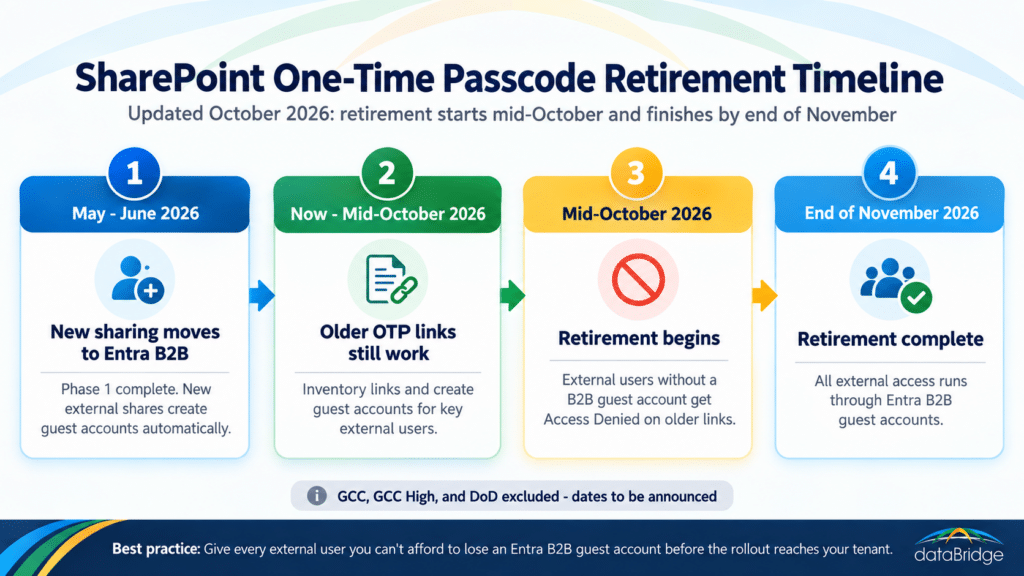
Who loses access, and who doesn’t
External users who don’t have an Entra B2B guest account in your directory lose access to older “specific people” links once the retirement reaches your tenant. Those are links created under the SPO OTP model, before Phase 1 rolled out to you. Anything shared since then created a guest account automatically, so recent shares are safe.
Two groups see no change. Guests who already have a B2B account in your directory keep working exactly as before. And Anyone links, the anonymous ones with no sign-in, sit outside this retirement entirely. The exposure is narrow but easy to miss: older specific-people links tied to people who never got a guest account.
Why the errors are silent, and why that is the real risk
Nobody gets warned when one of these links fails. The external collaborator sees Access Denied with no explanation, and your team gets no alert that a link went dark. The only path back runs through whoever shared the file in the first place.
That person may have changed roles or left the company. If they’re still around, they likely have no idea why a link they created a year ago stopped working. Now make the external user an auditor halfway through an engagement, or a client waiting on a deliverable. A file that disappears at that moment costs you credibility with someone outside the building, and the support ticket is the cheap part. Finding these links in the next few weeks costs far less than explaining the outage in December.
What to do before the retirement reaches your tenant
Find the content shared through SPO OTP and give the external users who matter a real guest account before the rollout lands. Then confirm your Entra settings won’t quietly block the fix. That breaks down into four moves:
- Inventory the exposure. Use SharePoint sharing reports or Microsoft Purview audit logs to surface older specific-people links and the external users still attached to them.
- Create guest accounts for the relationships you can’t afford to interrupt. An admin can add the external user as an Entra B2B guest directly, or an internal user with permission can re-share any file or folder with them, which creates the guest account automatically through the Entra B2B Invitation Manager.
- Check who is allowed to invite guests. The re-share fix only works if Entra lets that user create a guest. If your tenant restricts guest invitations, assign the Guest Inviter role to the people who manage external relationships, or the re-share will fail at the exact moment you need it.
- Confirm email one-time passcode is still on in Entra External ID settings. It’s on by default, but some tenants turned it off years ago. If it’s disabled, guests without a Microsoft account have no way to sign in, and the move to B2B strands the very users it is supposed to carry over.
You don’t need to chase every historical link. Prioritize the active client and the auditor mid-engagement, and let the long tail of one-off shares from years ago go. The point is to decide which is which before the rollout decides for you. Your external sharing governance model is what tells you which external access still matters and which was never reviewed in the first place.
If a link already broke, here is how to restore access
Access comes back as soon as a matching B2B guest account exists. An admin can create the guest account manually at any time, or an internal user can share or re-share one item with the external person. Once the guest account exists, the user regains access to everything previously shared with them, including content beyond the item that was re-shared.
That makes the fix fast when you know who is affected. The hard part is knowing. Tell your help desk and your client-facing staff now what an OTP-related Access Denied looks like, so a confused email from a vendor in November gets routed to a two-minute fix instead of a week of back-and-forth. Microsoft’s external sharing FAQ covers the mechanics if your admins want the official version.
The bigger problem: a directory full of guests
This transition trades an invisible problem for a visible one. SPO OTP links had no audit trail and no lifecycle, so they were ungoverned but out of sight. Entra B2B replaces them with guest accounts you can see and control, which is the stronger security posture. It also hands you a growing pile of guest identities that someone now has to own.
Every re-share and every automatic provision creates a guest account. An organization that never governed its OTP links is unlikely to have a guest lifecycle model ready to catch them. Without one, you swap silent broken links for silent guest sprawl – accounts that linger long after a project ends and keep access nobody reviews, quietly widening what Copilot and search can reach. The move to B2B is a real upgrade, but it only pays off with guest governance to match: recurring access reviews and a named owner for every external account.
Where this fits your Microsoft 365 governance
The OTP retirement is a forced step toward governed external access. It lands cleanest for organizations that already treat external sharing as something they manage. If guest access has never had an owner or a review cycle, this rollout is the reason to give it one, while there’s a concrete task to hang it on.
The near-term job is keeping the right links working through November. The longer job is deciding how external access gets granted and when it gets taken away. Both belong in the same governance model that covers your sites and permissions, instead of sitting off to the side as a one-time cleanup. If you need to find the at-risk links and stand up a guest-access model before the rollout reaches you, that’s work a SharePoint consulting engagement can move on quickly.
Frequently asked questions
What is SharePoint One-Time Passcode (SPO OTP)?
SPO OTP was a SharePoint and OneDrive method that let external users open shared content with a temporary code emailed to them, without creating any account. It made external sharing easy but gave admins little identity governance and no real audit trail, which is why Microsoft is retiring it in favor of Entra B2B guest accounts.
When does SharePoint OTP retire?
Microsoft updated the timeline on October 1, 2026. The retirement now begins in mid-October 2026 and is expected to finish by the end of November 2026 for production tenants. It reaches tenants on a rollout schedule, so check Message Center post MC1243549 for your environment.
Has the SharePoint OTP retirement already started?
Phase 1, which moved new external sharing to Entra B2B, is complete. Phase 2, which retires the older links, rolls out from mid-October through November, so whether your older links still work depends on when the rollout reaches your tenant.
Who is affected by the SPO OTP retirement?
External users who reach your content through an older specific-people link and don’t have an Entra B2B guest account in your directory. Vendors, clients, auditors, and partners on legacy OTP links are the ones at risk. Guests who already have a B2B account see no change.
Are Anyone links affected by this change?
No. The retirement applies to specific-people links that authenticated external users through SPO OTP. Anonymous Anyone links, which require no sign-in, are outside this change, though they carry their own governance risks worth reviewing separately.
Does the retirement apply to GCC and GCC High tenants?
Not yet. Microsoft excluded GCC, GCC High, and DoD environments from both phases and says it will announce dates for those clouds in Message Center. Government tenants should still inventory their exposure now and expect the same Access Denied behavior once their rollout begins.
How do I restore access if an external link already broke?
Create a B2B guest account for the external user, either manually as an admin or by having an internal user re-share any item with them. Once the guest account exists, the user regains access to all content previously shared with them.
How do I stop external links from breaking?
Inventory older specific-people links with SharePoint sharing reports or Purview audit logs, then create guest accounts for the external users you can’t afford to lose. Before you start, confirm that email one-time passcode is enabled in Entra and that the right people hold permission to invite guests.
Reviewed By