
Non-Profit SharePoint Intranet Services
A SharePoint intranet for nonprofit organizations helps teams improve communication, policy access, knowledge sharing, collaboration, and operational visibility across Microsoft 365. dataBridge designs nonprofit intranets that balance usability, governance, and resource constraints while making the platform more practical for everyday mission-driven work.
Nonprofits need internal platforms that help people find what they need quickly without creating a burden to manage. A good intranet supports clarity, coordination, and staff enablement. This page explains how dataBridge approaches nonprofit intranets so structure and usability support the mission instead of competing with it.
This page focuses on non-profit intranet needs such as program documentation, grant resources, board materials, volunteer information, policy access, and practical governance for resource-constrained teams. For the broader intranet delivery model, use SharePoint Intranet Consulting Services; for educational planning guidance, use the modern SharePoint intranet guide.
At dataBridge, we help nonprofit organizations transform Microsoft 365 into a structured digital workplace that supports mission-driven work. Our approach focuses on governance, usability, and long-term sustainability—because a nonprofit intranet should continue delivering value long after launch.
Nonprofits that approach the intranet as an operating model, not just a homepage, usually see clearer ownership, better policy access, stronger knowledge sharing, and more consistent adoption.
Nonprofits exploring intranet modernization should start with SharePoint Intranet Consulting Services when the priority is structure, governance, design, adoption, and long-term ownership.
Why Non-Profits Choose SharePoint for Their Intranet
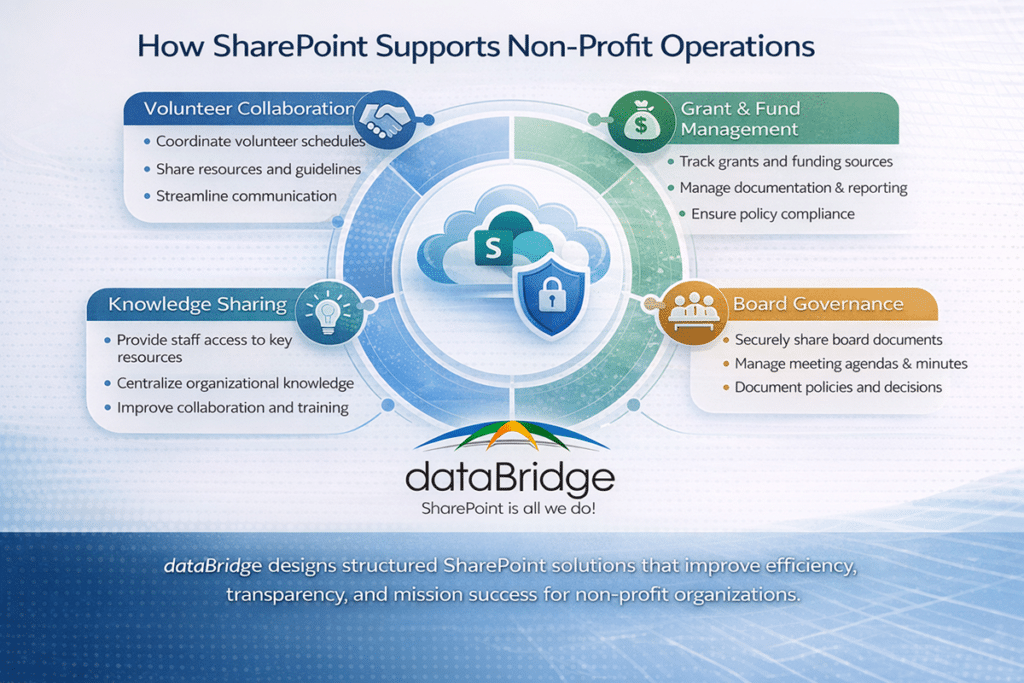
Many nonprofit organizations already use Microsoft 365. However, without a clear structure, the environment often becomes fragmented.
Documents live in multiple locations. Staff struggle to find policies. Volunteers rely on outdated information.
A well-designed SharePoint intranet changes that.
Key benefits include:
- Centralized document management
- Secure collaboration for staff and volunteers
- Consistent access to policies and procedures
- Improved grant documentation management
- Better internal communication
- Stronger knowledge sharing across departments
SharePoint works particularly well for nonprofits because it integrates seamlessly with Teams, Outlook, and other Microsoft 365 tools.
However, technology alone does not solve these challenges.
Successful nonprofit intranets require intentional architecture, governance, ownership, and adoption planning. That is why many organizations begin with a SharePoint Intranet Assessment to evaluate content structure, navigation, ownership, governance, and adoption barriers before making structural improvements.
Organizations can also explore practical guidance and planning frameworks in the dataBridge SharePoint & Microsoft 365 Knowledge Center, which includes articles, guides, and best practices for improving Microsoft 365 environments.
Common SharePoint Challenges Non-Profit Organizations Face
Many nonprofit SharePoint environments evolve organically over time. Departments create their own sites, naming conventions vary, and content becomes increasingly difficult to locate.
Organizations evaluating intranet strategy across Microsoft 365 often begin with a broader SharePoint intranet guide, which explains how architecture, governance, search, and document management influence long-term intranet success.
We see several recurring challenges.
Scattered Documents and Organizational Knowledge
Important information often lives in email threads, personal drives, or department-specific folders. As staff members transition roles or leave the organization, that knowledge can disappear.
A structured document strategy supported by the SharePoint Document Management System helps nonprofits protect institutional knowledge, improve accessibility, and reduce the risk of important program or grant information becoming trapped in email, personal drives, or department folders.
Inconsistent Operational Processes
Grant management, program documentation, and policy management frequently follow different workflows across departments.
This inconsistency creates operational friction and increases risk.
Many nonprofits address this by implementing standardized workflows through Power Automate consulting and workflow automation services, which allow teams to automate routine approvals and operational tasks.
Limited Governance
Without clear governance policies, SharePoint environments quickly become difficult to manage.
Sites multiply. Permissions drift. Search results become unreliable.
A practical SharePoint Governance Framework helps nonprofits define site ownership, content review, permissions, publishing standards, lifecycle rules, and support expectations without creating unnecessary administrative burden.
Underutilized Microsoft 365 Capabilities
Many nonprofits already have powerful collaboration tools but lack the structure required to use them effectively.
This becomes especially important when organizations begin exploring AI capabilities such as Microsoft Copilot readiness for SharePoint, which depends heavily on well-organized SharePoint content.
Simply enabling AI tools without structured information rarely delivers meaningful results.
Nonprofit Intranet Needs That Shape SharePoint Design
Nonprofit intranets need to support mission-driven work with practical access to programs, grants, policies, board materials, volunteer resources, and staff communication.
Common needs include:
- Program documentation
- Grant resources
- Board and committee materials
- Staff and volunteer communication
- Policy access
- Resource-constrained governance
- Cross-program knowledge sharing
Nonprofit Intranet Requirements: Departments, Documents, Governance, and AI Readiness
A nonprofit SharePoint intranet should help staff, volunteers, program leaders, development teams, and executives work from the same trusted information without creating unnecessary administrative burden. Nonprofits need structure, but that structure has to be realistic for teams with limited time and resources.
Nonprofit intranet planning usually includes programs, development, grants, finance, HR, volunteer coordination, operations, communications, leadership, board support, IT, and compliance-related functions. The intranet should help each group find what it needs while keeping the overall experience simple enough to maintain.
Common nonprofit document types include:
- Program documentation
- Grant materials
- Board packets
- Volunteer resources
- Policies and procedures
- Donor communication resources
- HR and onboarding content
- Training materials
- Financial process documents
- Operational forms
The governance problem is that nonprofit SharePoint environments often grow through necessity. Teams add sites, files, folders, and Teams workspaces as work expands. Over time, program knowledge becomes scattered, grant documentation becomes hard to trace, and staff cannot always tell which resource is current.
A nonprofit intranet should support use cases such as program coordination, grant resource access, board communication, volunteer guidance, policy access, employee onboarding, internal announcements, and cross-program knowledge sharing. Document management use cases often include grant libraries, board document areas, policy libraries, program documentation, template management, and permissioned spaces for sensitive leadership or donor-related content. These needs should connect to a practical SharePoint Document Management System so important knowledge does not remain trapped in email, personal drives, or isolated folders.
Copilot readiness matters for nonprofits because AI can make scattered content easier to find, but it can also expose old, sensitive, or poorly governed information. Before expanding AI use, nonprofits should clarify ownership, reduce duplication, review permissions, and define authoritative sources through Copilot Readiness for SharePoint.
What this looks like in practice: a nonprofit may ask for a better intranet because employees cannot find policies or program resources. dataBridge would also look at grant documentation, board access, volunteer content, program ownership, permissions, and long-term governance. A right-sized SharePoint Intranet Consulting Services engagement helps the organization improve structure without overcomplicating the platform.
How dataBridge Designs Non-Profit SharePoint Intranets
At dataBridge, we follow a structured methodology designed to create intranets that scale with the organization.
This consulting framework—known internally as The dataBridge Way™ -focuses on building strong foundations before introducing complexity.
Organizations looking to understand how different industries approach intranet design can also explore the Industry Specific SharePoint Intranet Solutions, where we outline collaboration strategies used across sectors such as healthcare, financial services, manufacturing, and nonprofit organizations.
Discovery and Organizational Alignment
Every engagement begins with stakeholder interviews and environment analysis.
During this phase, we identify:
- Communication challenges
- Content ownership responsibilities
- Program and operational workflows
- Compliance and governance requirements
This insight ensures the intranet supports real organizational needs rather than simply replicating existing problems in a new interface.
Organizations that skip discovery often build intranets that look polished but fail to solve actual operational issues.
That is why many nonprofits begin with a SharePoint Intranet Assessment before designing or rebuilding the intranet experience.
Information Architecture and Governance
Next, we design the structural framework that organizes the intranet.
This includes:
- Site architecture
- Metadata structure
- Content types
- Permission models
- Lifecycle policies
When architecture is done correctly, search improves dramatically and information becomes easier to manage.
In our experience, information architecture is the single biggest factor determining long-term intranet success.
That is why architecture planning should connect to SharePoint Information Architecture & Metadata Consulting, especially when program resources, grant materials, board content, policies, and operational documents need clearer structure.
Intranet Design and Implementation
With the structure in place, we design the intranet experience.
Typical nonprofit intranet features include:
- Department collaboration hubs
- Volunteer and program resource libraries
- Policy and procedure repositories
- Board governance documentation areas
- Leadership communication portals
- Event coordination workspaces
The goal is not simply to build a site.
Instead, we create a digital workplace that supports daily operations and collaboration.
Our SharePoint Intranet Portal Design Services focus on usability, clarity, and long-term maintainability.
Adoption and Change Enablement
Even the best intranet will struggle if employees and volunteers do not actively use it.
That is why adoption planning is built into every dataBridge engagement.
We help organizations establish:
- Content ownership responsibilities
- Publishing workflows
- Training resources
- Governance reinforcement practices
In environments with strong adoption planning, we typically see measurable improvements in intranet engagement within the first few months after launch.
Adoption is not an afterthought—it is a design requirement.
Organizations looking to improve adoption can also find practical strategies within the dataBridge SharePoint resources library, which contains guidance on governance, architecture, and intranet best practices.
Ongoing Optimization and Copilot Readiness
As nonprofits modernize their digital workplace, many begin exploring AI capabilities within Microsoft 365.
However, Copilot performs best when information is structured and accessible.
Organizations with well-organized SharePoint environments typically see much stronger results when implementing AI tools.
Our Copilot Readiness for SharePoint consulting services help nonprofits ensure their information architecture supports accurate AI outcomes.
Real-World Experience Supporting Mission-Driven Organizations
Over the past two decades, dataBridge has helped organizations across multiple industries implement structured SharePoint environments.
Mission-driven organizations often share a common challenge: maximizing impact while operating with limited resources.
That reality makes operational efficiency especially important.
In several nonprofit environments we’ve supported, leadership teams reported immediate improvements once their SharePoint intranet centralized operational information.
Read the Justice Resource Institute intranet case study to see how dataBridge centralized policy management, improved internal communication, and supported credential tracking across more than 100 programs.
Staff no longer needed to search multiple locations for documents. Program teams could collaborate more effectively. Leadership gained clearer visibility into organizational resources.
The most successful intranets share one common characteristic.
They are designed around how people actually work—not how software vendors imagine they work.
When a Non-Profit Should Modernize Its Intranet
Several signals indicate it may be time to redesign a nonprofit intranet.
- Staff frequently ask where documents are located
- Policies exist in multiple versions
- New employees struggle to navigate internal systems
- Teams rely heavily on email attachments
- SharePoint search produces inconsistent results
When these symptoms appear, the root cause is usually structural.
A structured modernization effort supported by experienced consultants can resolve these challenges and dramatically improve collaboration.
Organizations often begin this process with a SharePoint Intranet Assessment to identify where content structure, navigation, ownership, permissions, governance, and adoption need improvement before a redesign begins.
Partner with dataBridge
dataBridge specializes in helping organizations design structured SharePoint environments that support real operational needs.
For nonprofits, this means creating a digital workplace that improves collaboration, strengthens governance, and supports mission-driven work.
Our consulting services focus on building foundations that continue delivering value long after implementation.
If your organization is exploring a new intranet or looking to improve an existing SharePoint environment, we can help.
Start with SharePoint Intranet Consulting Services when you need project support, the modern SharePoint intranet guide when you are still researching, or a SharePoint Intranet Assessment when you need to evaluate an existing nonprofit intranet before redesign.
Related SharePoint Intranet Resources
- SharePoint Intranet Consulting Services
- How to Design and Build a Modern SharePoint Intranet
- SharePoint Intranet Assessment
- SharePoint Branding, UX & Page Template Design
- SharePoint Intranet Adoption Strategy
- Industry-Specific SharePoint Intranet Solutions
- SharePoint Document Management System
- SharePoint Information Architecture & Metadata Consulting
- SharePoint Knowledge Base Design
- SharePoint Source of Truth Model for Copilot Readiness
- SharePoint Intranet Page Governance
- SharePoint Architecture for Regulated Industries
- SharePoint Records Management and Retention Strategy
- The Complete Guide to SharePoint Permissions
Ready to Modernize Your Non-Profit Intranet?
If your organization is planning a new SharePoint intranet — or trying to fix one that is struggling — dataBridge can help you move forward with clarity and confidence.
Talk to dataBridge about your Non-Profit intranet strategy.
Non-Profit SharePoint Intranet FAQs
Below are common questions we hear from Non-Profit leaders.
SharePoint helps nonprofit organizations centralize documents, streamline collaboration, and improve access to institutional knowledge. Instead of information living in email threads or departmental folders, a structured SharePoint intranet creates a single location where staff and volunteers can access policies, program resources, and operational documents.
For nonprofits, this structure improves transparency and efficiency while reducing administrative overhead. When combined with governance and information architecture best practices, SharePoint becomes more than a document repository—it becomes a secure collaboration platform that supports mission-driven work across teams.
Most nonprofit SharePoint environments grow organically without a clear architecture or governance framework. Departments create their own sites, naming conventions vary, and permissions are often applied inconsistently.
Over time, this leads to duplicated content, unreliable search results, and confusion about where important information lives.
In our experience, these issues rarely stem from technology limitations. Instead, they result from missing information architecture and governance planning. A structured SharePoint strategy establishes clear site organization, metadata standards, and lifecycle policies that keep the environment manageable as the organization grows.
A well-designed SharePoint intranet improves collaboration by giving staff and volunteers a shared digital workspace where information, documents, and communication tools are organized in one place.
Teams can access program resources, collaborate on documents, track initiatives, and share updates without relying on email attachments or disconnected systems.
When integrated with Microsoft Teams and other Microsoft 365 tools, SharePoint becomes the foundation for modern collaboration. The key is designing the intranet around how people actually work—rather than simply deploying default templates that fail to reflect real organizational workflows.
Yes. SharePoint is particularly effective for managing grant documentation, compliance records, and organizational policies. With the right architecture in place, nonprofits can create secure document libraries for grant applications, reporting materials, board documents, and compliance records.
Metadata and document lifecycle policies help ensure information remains organized and accessible. Permissions can also be structured so sensitive documents are only visible to authorized staff.
Many nonprofits rely on SharePoint to create a structured system for managing grant-related documentation while maintaining transparency and accountability.
SharePoint can support Microsoft Copilot effectively—but only when the underlying content structure is well organized. Copilot relies on SharePoint data to generate answers, summarize documents, and surface organizational knowledge.
If content is scattered across poorly organized sites or inconsistent folders, AI results can become unreliable.
That is why many organizations focus on SharePoint architecture and governance before deploying Copilot. When information is structured properly, Copilot becomes significantly more valuable because it can retrieve accurate information from trusted sources within the organization.
What Our Clients Say
