Skip to content
Consultant presenting a Microsoft 365 tenant-to-tenant migration diagram with Tenant A and Tenant B consolidating into a single tenant during a business planning meeting.

Tenant to Tenant Migration: Plan for Mergers & Divestitures

“We’re just moving files.” That’s the line, nearly word for word, every time a merger or divestiture lands on the IT team’s desk. Leadership looks at two Microsoft 365 tenants and pictures a copy job – point tenant A at tenant B, flip a switch on close day, done. Then the date arrives. Half the content is still in flight, permissions don’t line up, and people in the freshly combined company can’t find or trust the documents they need to do their jobs.

It is always more complicated than that. The files themselves copy fine. What breaks is identity, permissions, retention, and the governance two companies spent years building on their own terms. A tenant-to-tenant migration is one of the hardest moves in Microsoft 365, and the deal timeline is usually working against you from the first day.

Why “just moving files” is the assumption that blows the budget

A SharePoint tenant is not a folder. It is an identity and security boundary, with its own accounts, its own permission model, its own governance, and its own retention rules. When you move content from one tenant to another, you are re-homing every account, re-establishing every permission, reconciling two governance models, and carrying years of history that two companies built apart.

That is what makes a merger or divestiture migration different from a routine move. A standard project – the kind covered in our complete guide to SharePoint Online migrations – moves one organization’s content into a cleaner home it controls. A tenant-to-tenant migration forces two organizations, or one organization splitting in two, to make decisions about ownership, access, and structure under a deadline set by the transaction. The technical lift sits on top of a pile of business decisions nobody scheduled time for.

If you want the broader picture of how we approach these, our SharePoint migration practice covers the full range. This post is about the specific pressure of moving between tenants when a deal is driving the calendar.

The timeline trap that sinks most of these projects

Here is the mistake we see more than any other. The close or Day-1 date gets set by lawyers, bankers, and executives working around the transaction – the valuation and the regulatory clock. None of them scoped the content. The date is fixed long before anyone asks how many terabytes, how many sites, how many years of permissions, or how many custom workflows are actually in scope.

Then the migration gets chained to that date. The IT team is handed a finish line and told to hit it, often weeks after the deal is signed, when the runway is already half gone. By the time discovery is done and the real volume is clear, there is no longer enough time to map and validate it properly. So corners get cut. Permissions get rushed. Validation gets skipped. And the problems surface after Day-1, in front of the whole combined company.

You cannot compress a tenant-to-tenant migration to fit a date that was never built around the content. The only fix is to start before the date is locked, or at least before the runway is gone. The earlier you run a migration readiness assessment, the more honestly you can tell leadership what is actually achievable by Day-1 and what has to follow in a planned second phase. That conversation is uncomfortable early. It is far worse the week before close.

What has to move – and what quietly doesn’t

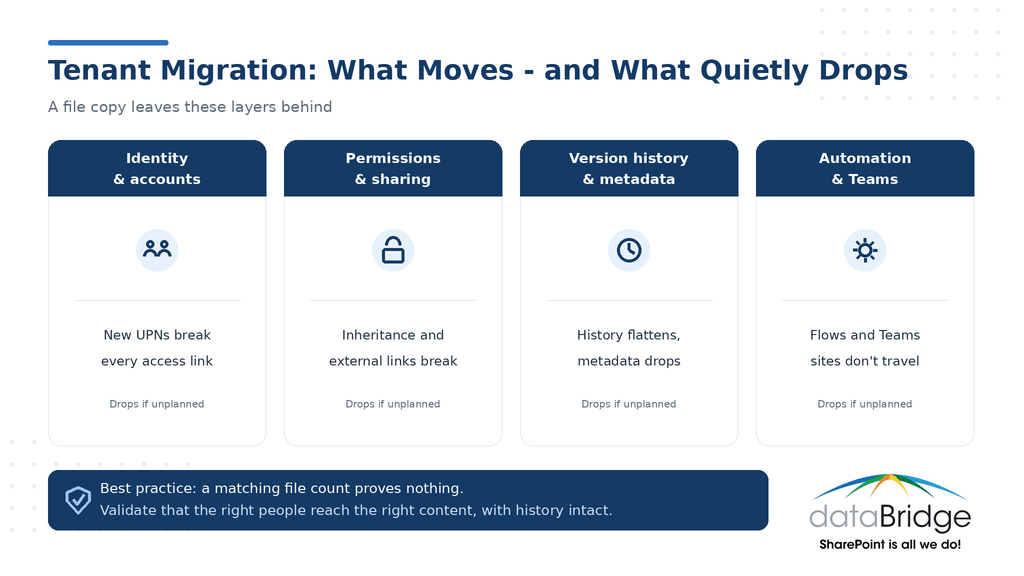
Once you accept that this is more than a copy, the scope gets real. A move between tenants has to account for several layers that a file count will never reveal:

Identity and accounts. User accounts live in the source tenant. In the target, they are different objects with different UPNs, so every “who owns this” and “who can see this” link has to be remapped.

Permissions and sharing. Broken inheritance, direct grants, external sharing links, and orphaned access rarely survive a move cleanly. If you have never audited how access is actually granted across your sites, our SharePoint permissions guide is the place to start before you migrate, not after.

Version history and metadata. Many tools flatten version history or drop custom metadata and content types unless you plan for them explicitly. Losing the audit trail on regulated content is the kind of thing nobody notices until an auditor asks.

Automation and Teams-connected sites. Power Automate flows and the SharePoint sites behind every Team do not travel as part of a file copy, and neither do Power Apps. They have to be inventoried and rebuilt or reconnected by hand.

The dangerous items are the ones nobody validated. A file count matching on both sides feels like success. It tells you nothing about whether the right people can still reach the right content with the right history intact.

Infographic showing the four layers a SharePoint tenant-to-tenant migration must carry - identity, permissions, version history and metadata, automation and Teams - and what drops if each is unplanned
A file copy moves the documents. Identity, permissions, history, and automation only move if you plan for them.

A merger and a divestiture are not the same migration

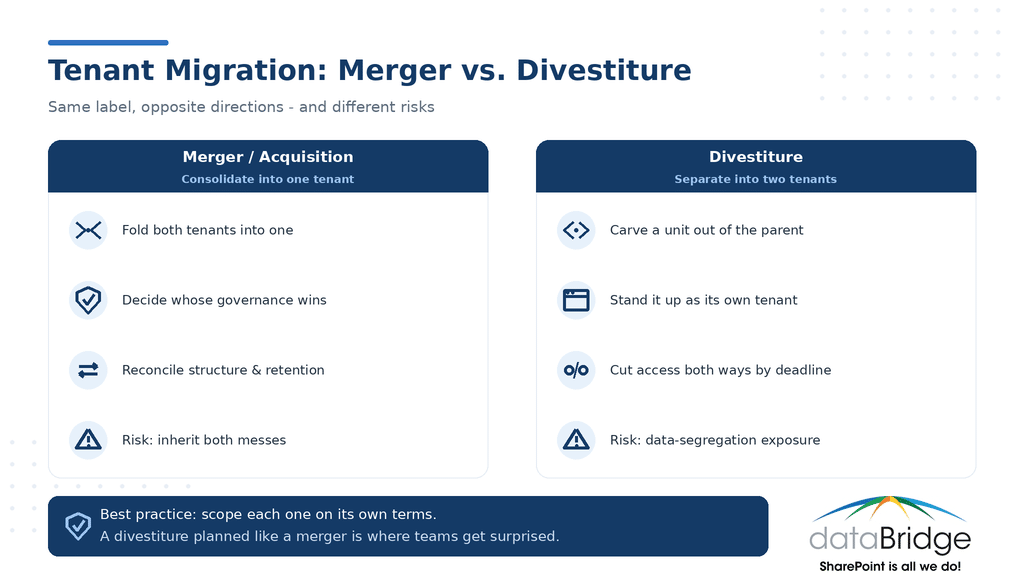
These two scenarios get lumped together as “tenant-to-tenant,” but they pull in opposite directions.

In a merger or acquisition, you are consolidating – folding one or both tenants into a single environment. The hard question is whose governance model wins. Two companies arrive with different site structures, different naming, different retention rules, and different permission habits. Jam them together without a decision and you inherit both messes at once.

In a divestiture, you are separating – carving a business unit out of the parent tenant and standing it up on its own. The pressure here is clean separation under legal scrutiny. The divested entity cannot keep access to the parent’s data, and the parent cannot keep access to theirs, often by a contractual deadline tied to the sale. For regulated businesses, the data-segregation requirements raise the stakes further, which is where architecture for regulated industries becomes part of the plan rather than an afterthought.

Same label, different project. Scoping a divestiture like a merger, or the reverse, is how teams end up surprised halfway through.

Infographic comparing SharePoint tenant migration for a merger (consolidate into one tenant) versus a divestiture (separate into two tenants)
A merger and a divestiture pull in opposite directions. Scoping one like the other is where teams get surprised.

 How to scope a tenant to tenant migration before the clock starts

The teams that come through this well do the same things early. The ones that struggle skip them and pay later.

Inventory before you plan. You cannot scope what you have not counted. Total volume, site count, permission complexity, external sharing, and customizations – get the real numbers before you commit to any date.

Decide whose governance wins, in writing. For a merger, pick the target structure, naming, and retention model up front. Reconciling it mid-migration is where projects stall.

Sequence by business priority. Move the sites the business cannot work without first. Alphabetical or whatever-is-easiest sequencing leaves critical teams stranded on the wrong tenant at the wrong time.

Build the business case with real numbers. When leadership is pushing an unrealistic date, a credible cost-and-effort estimate is your strongest argument. Our SharePoint Migration ROI Calculator helps you put a defensible figure on the table instead of a gut feel.

None of this is glamorous. All of it is cheaper than re-doing a rushed migration after the combined company has already lost trust in where its content lives.

The coexistence period you have to plan for

There is almost always a stretch where both tenants are live at once. Mail is routing, some teams have moved, others haven’t, and links that worked yesterday now point at the wrong place. This in-between period is where user trust erodes fastest, and it is the part most plans gloss over.

Decide in advance what is authoritative during coexistence, communicate it plainly, and give people a clear answer to “where do I go for this now.” A migration that is technically correct but leaves users guessing for a month still reads as a failure to the business.

Frequently asked questions

How long does a tenant-to-tenant migration take?

It depends on volume and complexity, not on the deal date. A small, clean environment can move in weeks; a large enterprise with terabytes of content, heavy permissions, and customizations can take months of planning and phased execution. The honest answer comes from an inventory, not a calendar.

Can we finish a tenant-to-tenant migration by the deal close date?

Sometimes the critical content can, with a planned second phase for the rest – but only if you start early enough to know what “critical” actually is. Chaining the full move to a fixed close date that was set without scoping the content is the most common way these projects fail.

What gets lost in a tenant-to-tenant migration?

The usual casualties are version history, custom metadata and content types, permissions and external sharing, and anything in Power Platform or workflows that wasn’t inventoried. Most of it is preventable with planning. Almost none of it is recoverable once the source tenant is gone.

Should we consolidate into one tenant or keep both?

For a merger, a single tenant usually wins on governance and long-term Copilot readiness, though the consolidation is real work. Keeping two tenants is faster in the short term and more expensive forever. The right call depends on the size of each environment and how integrated the two businesses need to be.

The bottom line

“We’re just moving files” is the assumption that sets the timeline wrong, and the timeline is what sinks most tenant-to-tenant migrations. The data copies fine. What sinks these projects is the identity, permissions, governance, and a deadline somebody set without scoping the content – and the only real defense is starting before that deadline is locked.

If a merger or divestiture is on your horizon, the best time to scope the migration is before the date is fixed. That’s the work we do inside our SharePoint migration practice, and the earlier we’re in the room, the more of it we can get right.

About The Author

Michael Fuchs
Michael FuchsFounder and CEO
Michael Fuchs is the Founder and CEO of dataBridge, a SharePoint and Microsoft 365 consulting firm focused on helping organizations build stronger digital workplaces through strategy, governance, architecture, migrations, intranets, and long-term platform success.

SHARE ON SOCIAL MEDIA