You can phase automation and integrations after launch
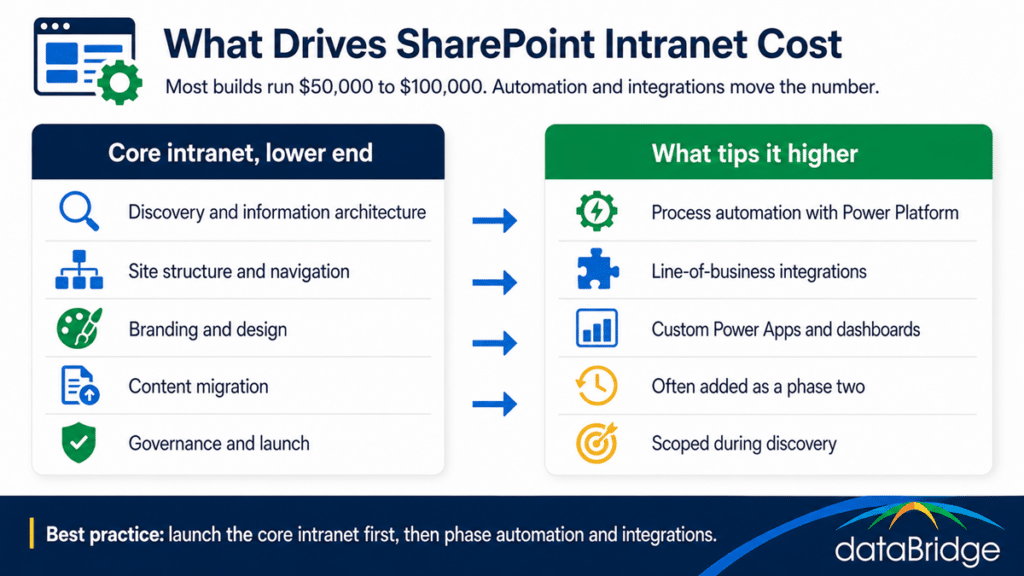
You don’t have to buy all of it at once. We scope the automation and integrations during discovery, and many clients choose to launch the core intranet first and add some or all of that work as a phase two. It’s one of the most practical levers you have on the budget.
Phasing works because it gets the intranet live faster, spreads the investment, and lets you prioritize the automations that matter most once people are actually using the platform. You learn what your teams need from real adoption rather than guessing up front, and you build the right integrations instead of all of them. The phase-one foundation has to be solid for this to work, which is why the discovery and readiness assessment matters, and why adoption comes before automation rather than after.
Other factors that affect the price
Automation is the biggest variable, and a handful of others move the number too:
- The number of departments and distinct audiences the intranet has to serve.
- The volume of existing content that has to be cleaned up and migrated.
- The depth of custom branding and design beyond a standard themed build.
- Governance complexity, especially in regulated industries with stricter controls.
- Multilingual or multi-region requirements, which add design and content effort.
These rarely swing the price on their own, but together they explain why two intranets of similar size can still land at different points in the range.
What about ongoing cost after launch?
The build is a one-time cost, and an intranet also carries an ongoing run cost after it goes live. The licensing is already covered by Microsoft 365, so the ongoing cost is people and process, keeping content current, governing the intranet as it grows, and supporting users.
Some organizations handle that internally with a content owner and a governance team. Others bring in outside help through ongoing SharePoint support or an advisory partnership so the intranet keeps improving instead of drifting. Either way, budgeting only for the build and nothing for the run is the most common reason an intranet looks great at launch and feels neglected a year later.
Why the cheapest intranet rarely stays the cheapest
A bargain quote usually buys a templated site with shallow information architecture and no real governance. It launches fast, and then adoption stalls, people go back to email and shared drives, and within a year you are paying for a redesign. The low number on the invoice gets spent later in lost productivity and a rebuild.
An intranet that is structured to be used returns the investment, because people actually work in it. The one bought purely on price tends to become shelfware, which is the most expensive outcome of all. The pattern behind that is the same one behind why adoption fails and why employees stop trusting SharePoint.
Frequently asked questions
How much does a SharePoint intranet cost to build?
Most builds run between $50,000 and $100,000, depending on size and complexity. Smaller or templated projects can come in under that, and large enterprise rollouts can run over. The biggest variable is how much process automation and integration you include.
Why do SharePoint intranet quotes vary so much?
Because they cover different scopes. A communications-focused intranet costs less than one with heavy automation and line-of-business integrations. Content volume, branding depth, and governance complexity also move the number, so two quotes are often pricing two different projects.
Is there an ongoing cost after the intranet launches?
Yes. The build is one-time, but governance, content, and support carry an ongoing cost. SharePoint licensing is included in Microsoft 365, so the run cost is mostly people and process, whether handled internally or through a support or advisory arrangement.
Can I build the intranet now and add automation later?
Yes, and many clients do. We scope the automation and integrations during discovery, then launch the core intranet first and add some or all of that work as a phase two. It gets you live faster and spreads the investment.
Can a calculator estimate my intranet cost?
A calculator gives you a useful starting range based on your size and complexity, which is why we built the Intranet ROI Calculator. Treat the result as a planning estimate, then sharpen it with a discovery conversation about what you actually need.
If you want a real number for your organization rather than a guess, model your starting range with the Intranet ROI Calculator, then talk to us about a discovery so the estimate reflects your size, content, and the automation you have in mind.
Reviewed By