
SharePoint intranet ROI calculator
Use this free SharePoint intranet ROI calculator to estimate what a well-built intranet is worth to your organization — in dollars, hours, and payback months. Enter your employee count, average salary, and expected adoption, and the calculator shows your annual productivity savings, payback period, and multi-year return instantly. Built by dataBridge from 20 years of SharePoint consulting engagements, the model uses the same intranet cost benefit analysis we run for clients evaluating a new intranet investment.
Intranet ROI Calculator
The business case for a
well-run intranet
Estimate the productivity value, investment payback, and multi-year ROI of a secure, well-designed SharePoint intranet — recalculated live as you tune the assumptions.
Assumptions
Tune these to fit your organization. Everything recalculates instantly.
Workforce
Employees in scope
Expected to use intranet
Work days per yeardays
Compensation
Average annual salary
$
Employer burden rate
Hours worked / FTE / yearhours
Productivity
Minutes saved / user / day
Productivity capture rate
Investment
Implementation / architecture
$
Content migration (one-time)
$
Advisory partnership / year
$
Enhancement budget / yr (from Yr 2)
$
Evaluation horizon
How the money moves
Net annual benefit
Cumulative cash flow
Scenario sensitivity
Conservative and optimistic cases share your compensation and cost assumptions and vary only adoption, daily time savings, and capture. Edit the highlighted drivers to stress-test the case.
| Scenario | Adoption | Min / day | Capture | Annual savings | Year 1 net $ | ROI (x) | Payback |
|---|---|---|---|---|---|---|---|
| Conservative | |||||||
| BaseLive inputs | |||||||
| Optimistic |
Annual savings sensitivity
Annual captured savings across adoption rate (columns) and minutes saved per user per day (rows), holding your other assumptions fixed.
| min ↓ / adoption → | 40% | 60% | 80% | 100% |
|---|
In the tables above, Year 1 net is a dollar figure - your captured savings minus every Year 1 cost (implementation, content migration, and first-year advisory). ROI is a multiple, not a percentage: total net benefit divided by total investment across your evaluation horizon. The advisory partnership cost begins in Year 1; the optional enhancement budget begins in Year 2. Actual results depend on adoption, content quality, governance, integrations, and change management - treat these figures as a directional business case, not a guarantee.
How this intranet ROI calculator works
Most intranet ROI claims fail in front of a CFO because they count every saved minute as money in the bank. This model doesn’t. It calculates the fully loaded hourly cost of your workforce (salary plus employer burden), multiplies it by the time employees actually save finding documents, policies, people, and answers — then applies a productivity capture rate that discounts the result, because not every saved minute converts to productive output. The default capture rate is 60%, which keeps the business case defensible rather than optimistic.
On the cost side, the model accounts for one-time implementation and content migration, plus recurring advisory and enhancement budgets — the real SharePoint intranet cost over a multi-year horizon, not just the launch invoice. Payback is calculated from cumulative cash flow: the month your accumulated savings overtake your total investment.
What drives intranet ROI
Three inputs move the number more than everything else combined.
Adoption. An intranet only saves time for people who use it. The gap between 40% and 80% adoption typically doubles or triples the annual savings — which is why governance, information architecture, and launch communication matter as much as the build itself. This is the foundation of our SharePoint intranet design and consulting services.
Minutes saved per day. Industry research consistently finds knowledge workers spend roughly one day per week searching for internal information. Reclaiming even 10–15 minutes per person per day through better search, structured navigation, and a single source of truth is a conservative target for a well-architected SharePoint intranet.
Capture rate. This is the honesty dial. Set it to 100% and the case looks spectacular and nobody believes it. Set it to 50–60% and the case survives finance review.
Run the conservative scenario in the calculator before you present anything to leadership. If the project still pays back inside 36 months at 65% adoption and 5 minutes saved per day, you have a business case that holds up under scrutiny.
A worked example
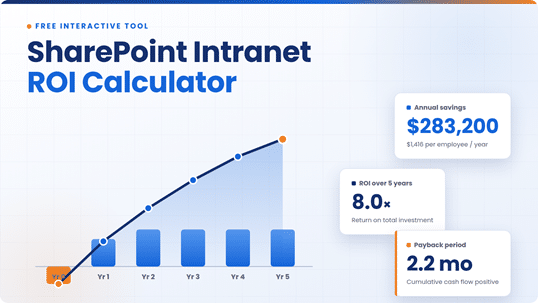
For a 200-person organization with a $100,000 average salary, 80% adoption, and 12 minutes saved per user per day, the model estimates roughly $283,200 in annual captured savings — about $1,416 per employee per year — with a payback period of just over 2 months on a $50,000 implementation. Over five years, that’s an 8.0× return on the total investment. Your numbers will differ; that’s what the sliders are for.
Frequently asked questions
How do you calculate the ROI of a SharePoint intranet?
Multiply your active users (employees × adoption rate) by hours saved per year and your fully loaded hourly cost, then discount by a productivity capture rate of 50–60%. Subtract total costs — implementation, migration, and recurring support — over your evaluation horizon. ROI is the net benefit divided by total investment. The calculator on this page runs this intranet cost benefit analysis automatically.
What is a typical payback period for a SharePoint intranet?
For mid-sized organizations of 100 or more employees, a well-adopted SharePoint intranet typically pays back in 3 to 12 months. Payback stretches when adoption is weak or content migration costs balloon — two risks that good information architecture and governance directly reduce.
How much does a SharePoint intranet cost?
SharePoint intranet cost varies with scope: implementation and architecture for a mid-sized organization commonly runs $30,000–$100,000 or more, with content migration, annual advisory, and enhancement budgets on top. Because SharePoint is included in most Microsoft 365 licenses, there’s usually no separate platform subscription — a structural cost advantage over standalone intranet products.
How much time does an intranet actually save employees?
Studies of knowledge work consistently estimate employees spend around one day per week looking for information they need to do their jobs. A well-structured intranet with strong search and clear ownership typically recovers 10–20 minutes per employee per day. Use the conservative end in your business case.
How do you measure employee intranet ROI after launch?
Track adoption (active users vs. licensed users), search success rate, time-to-find benchmarks, and support-ticket deflection for HR and IT questions. Re-run this calculator quarterly with measured adoption instead of projected adoption — employee intranet ROI is a living number, not a launch-day slide.
Does this calculator work for intranets other than SharePoint?
Yes. The productivity math is platform-agnostic. But the cost structure assumes SharePoint’s licensing model, where the platform is already included in Microsoft 365 — standalone intranet products add a per-user subscription that this model doesn’t include by default. Add it to the annual advisory field if you’re comparing.
Want this business case built for your organization?
dataBridge has spent 20 years building SharePoint intranets that people actually use. We’ll validate your assumptions, run the numbers against your real org structure, and show you a live intranet demo built on your scenarios. Schedule a free structured consultation or explore our SharePoint intranet design and consulting services. If you’re also moving content off file servers or legacy systems, run that case through the SharePoint migration ROI calculator.