Where dataBridge fits, and where it doesn’t
We handle the Drive-to-SharePoint content and collaboration side, the part that takes SharePoint architecture and Microsoft 365 expertise. We leave the mail migration, Gmail and Calendar to Exchange and Outlook, to a migration partner or your MSP or internal IT team. That is a different specialty, and the two tracks run in parallel without stepping on each other.
This is worth saying plainly, because a firm that promises to do all of it often does the hard SharePoint part poorly. You get a SharePoint-first team on the content, structure, and app rebuild, which is exactly where a Google move is won or lost, and your mail provider runs the inbox cutover alongside us. If you want the content side scoped properly, that is what our SharePoint migrations work is built for.
Why Shared Drives don’t map cleanly to SharePoint
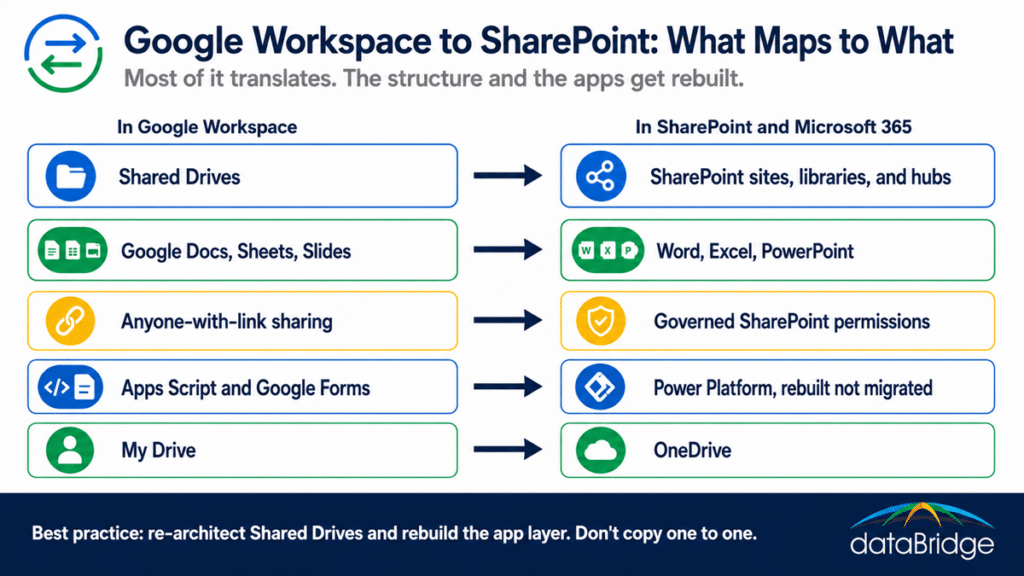
Google Shared Drives and SharePoint sites look like the same thing and behave differently, which is the first place a Workspace migration goes sideways. A Shared Drive is a flat container with folders. A SharePoint site is a structured workspace with document libraries, metadata, and its own permissions. Copy one Shared Drive into one site and you have recreated the flat folder pile in a system designed to do better, and wasted the migration.
The work is deciding what each Shared Drive should become. Some map to a single site, some split across several, and a set of related drives often belongs under a hub that ties sites together. This is the same re-architecture that separates a real move from a lift and shift, which is why mapping the old structure to metadata and getting the architecture and governance right is the core of the project, not an afterthought.
The Google sharing model becomes a SharePoint permissions problem
Google’s sharing is loose by design. Files get shared with “anyone with the link,” access spreads informally, and few organizations have a clear picture of who can see what by the time they leave. Carry that into SharePoint untouched and the looseness becomes a security liability, because SharePoint governs access at a level Google never enforced.
The migration is the moment to fix it. You decide real ownership and access as content lands, rather than importing years of accumulated sharing and cleaning it up later, which rarely happens. Planning external sharing governance during the move is how you avoid trading Google’s open links for an equally messy SharePoint.
File formats: Google Docs, Sheets, and Slides don’t convert perfectly
Google Docs, Sheets, and Slides convert into Word, Excel, and PowerPoint, and the conversion is rarely flawless. Simple documents come across fine. Complex formatting, heavy formulas, and embedded elements can break, and the larger and more intricate the file, the higher the chance something shifts.
The fix is not hoping it works. It is inventorying the high-value documents, testing conversions before cutover, and giving the critical files a human check on the other side. Most content converts cleanly enough, and the small percentage that matters most is exactly the part you cannot afford to discover broken after launch.
Apps Script, Google Forms, and the app layer with no Microsoft equivalent
The hardest part to scope is the layer of small applications your teams built inside Google. Apps Script automations, Google Forms feeding spreadsheets, and Sheets used as lightweight databases have no direct Microsoft equivalent. They cannot be migrated. They have to be rebuilt.
The Microsoft path for all of it is the Power Platform. Apps Script logic becomes Power Automate flows, Google Forms become Microsoft Forms or Power Apps, and Sheets-as-database becomes a SharePoint list or Dataverse. This is design and development work, and it is the piece most often missed in a Google migration quote, because the person scoping it never asked what the team actually built. A structured look through the Power Platform is how those processes survive the move instead of dying with the old tenant.
How a Google Workspace to SharePoint migration should run
A clean migration runs in phases rather than one big copy. Discovery comes first, to inventory the Shared Drives, find the widely shared content, and catalog the scripts and forms nobody documented. Architecture design follows, deciding what becomes a site, a library, or a hub. Then a piloted move proves the approach on a real slice before the full cutover, with the mail track running alongside on the partner’s side.
Adoption runs through all of it, because people coming off Google have habits to relearn, and a system that works but feels foreign still fails. The fastest way to avoid the common traps is a structured migration readiness assessment up front, since most of what derails these moves is visible before a single file is touched. The patterns behind a stalled rollout are the same ones behind why adoption fails on any platform.
Frequently asked questions
Can you migrate Google Workspace to SharePoint without losing files?
Yes, the content migrates reliably with the right tools. The real risk is not lost files, it is formatting that shifts during conversion and structure that gets copied across badly. Both are managed with inventory, conversion testing, and a proper architecture, not avoided by hoping.
Do Google Shared Drives map to SharePoint sites?
Not one to one. A Shared Drive is a flat container, while a SharePoint site is a structured workspace, so part of the migration is deciding what each drive should become. Copying them across unchanged recreates the old mess in a new place.
What happens to Apps Script and Google Forms in a migration?
They have no direct Microsoft equivalent, so they are rebuilt rather than migrated. Apps Script becomes Power Automate, Google Forms becomes Microsoft Forms or Power Apps, and Sheets used as databases become SharePoint lists or Dataverse. Cataloging them in discovery keeps them from being missed.
Does dataBridge migrate Gmail to Exchange too?
No. We focus on the Drive-to-SharePoint content and collaboration side, where SharePoint expertise matters most. The mail migration is handled by a migration partner or your MSP or IT team, running in parallel with our work.
How long does a Google Workspace to SharePoint migration take?
It depends on the volume of content, how tangled the Shared Drives are, and how many scripts and forms need rebuilding. Discovery sets a realistic timeline, because the app layer and the architecture work, not the file count, are what drive how long it takes.
If you are planning a move off Google Workspace, start with a migration readiness assessment so the Shared Drive mapping and the app rebuild are scoped before anything moves, then talk to us about running the content side while your mail provider handles the inbox.
Reviewed By