What happens to your content when Restricted Search retires
When Restricted SharePoint Search retires, content it was keeping out of search and Copilot can become discoverable again unless you have re-restricted it or fixed the permissions underneath. The exposure was technically always present. Copilot grounds its answers only in content a person already has permission to open, so it never granted new access. What Restricted SharePoint Search did was hide weak permissions from easy discovery.
That is the uncomfortable part. If a site was overshared – a library opened to “Everyone except external users,” a folder shared far past its intended audience – the restriction masked the problem rather than resolved it. Remove the mask, and Copilot will surface that content to anyone who technically has access, at conversational speed. A permission review before Copilot rollout is how you find those sites, and Data Access Governance reports help rank them by exposure before the retirement date removes the cover.
The honest limit of any discovery control
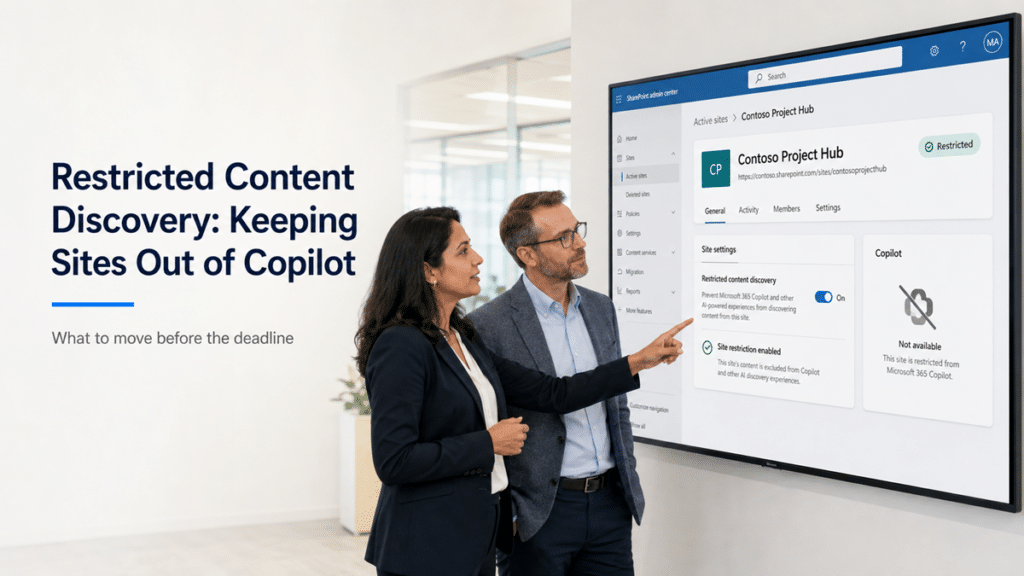
Restricted Content Discovery keeps content out of Copilot’s view, and it does nothing to the permissions underneath. The people who should not have access to a site still have it after you turn the control on. They simply cannot surface that content through Copilot or search for the moment. Treating the control as the finish line leaves the real exposure sitting exactly where it was.
This is the position worth being clear about. Restricted SharePoint Search was never a security boundary, and Restricted Content Discovery is the same category of tool, built to contain exposure rather than remove it. It has a real and useful job, which is to buy you time. It takes a high-risk site off the AI-discovery table today so you are not forced to choose between blocking a Copilot rollout and exposing content you have not cleaned up yet. What it cannot do is stand in for fixing the access. Used as a temporary hold while you correct permissions, it is exactly right. Used as the permanent answer, it quietly preserves the oversharing it was supposed to buy time against. The architecture and governance work underneath is what turns the restriction from a lasting crutch into a short one.
What to do before the deadline
The move is to contain first and correct second, on a schedule you control rather than one the retirement date forces on you. Before Restricted SharePoint Search retires, work through these steps:
- Inventory which sites Restricted SharePoint Search is currently holding back, while the configuration still exists to read.
- Re-restrict the genuinely high-risk sites with Restricted Content Discovery so nothing on them becomes Copilot-visible when the old control retires.
- Correct the permissions on those sites so the content is only reachable by the people who should reach it.
- Remove Restricted Content Discovery from each site once its permissions are fixed, so the restriction stays temporary.
One licensing note belongs here. Restricted Content Discovery is part of SharePoint Advanced Management, which is included with a Microsoft 365 Copilot license – one assigned Copilot license enables the capabilities for administrators – or through a separate SharePoint Advanced Management add-on for tenants without Copilot. Confirm what your tenant carries before you plan around it, since these terms move. SharePoint Advanced Management for Copilot covers what the tier adds for oversharing and access review.
Where this fits in a Copilot rollout
Restricted Content Discovery is one containment step inside a Copilot readiness effort, not the whole of it. It lets you turn Copilot on for the organization while a handful of high-risk sites stay off the AI-discovery table, so a few unresolved areas do not hold up the entire rollout. The broader work of correcting permissions and assigning clear ownership is what makes the answers Copilot returns worth trusting.
The rest of that work, from source-of-truth decisions to lifecycle cleanup, is mapped in the SharePoint AI Readiness Center.
If you are early in that planning, a Copilot readiness assessment identifies where oversharing and stale content create the most risk, and the wider Copilot readiness model connects permissions, content quality, ownership, and governance into a sequence you can actually run. Restricted Content Discovery earns its place in that sequence as the fast containment move. It should not be the only move you make.
If your tenant still relies on Restricted SharePoint Search, the inventory and re-restriction steps above take a few weeks to do properly, and the deadline is fixed. Talk to dataBridge if you want the migration and the permission cleanup underneath it planned as one sequence.
Frequently asked questions
What is the difference between Restricted Content Discovery and Restricted SharePoint Search?
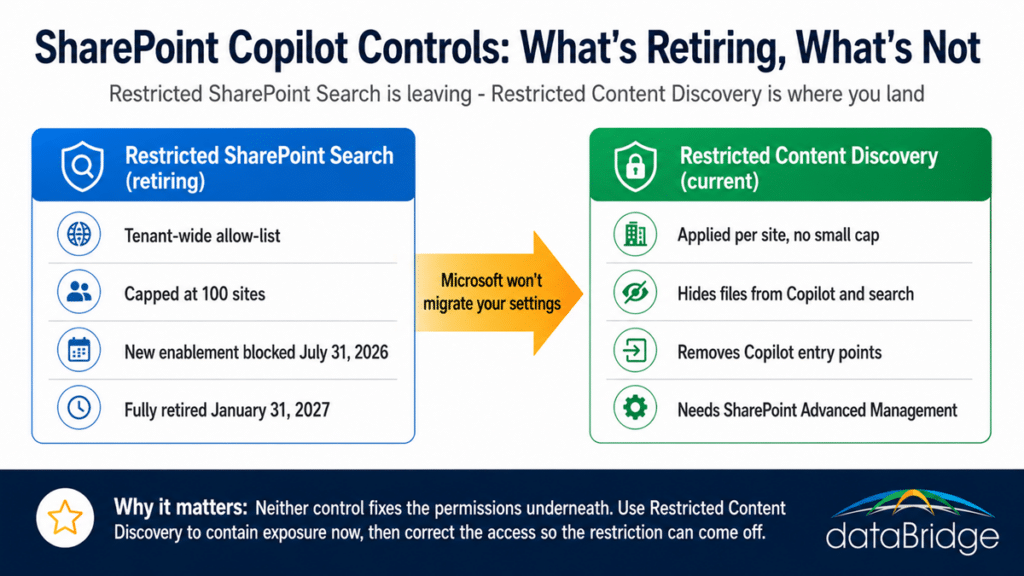
Restricted SharePoint Search was a tenant-wide allow-list capped at 100 sites, and it is being retired. Restricted Content Discovery is a per-site control with no small cap that keeps a specific site’s files out of Copilot and Microsoft 365 search. They are not the same feature, and Microsoft does not convert one into the other.
When is Restricted SharePoint Search being retired?
New enablement of Restricted SharePoint Search was blocked as of July 31, 2026, and the feature is fully retired on January 31, 2027. The related PowerShell cmdlets are discontinued on February 28, 2027. Existing configurations keep working through the retirement window, which is the time you have to migrate.
Will my content become visible to Copilot when Restricted SharePoint Search retires?
It can. Content that Restricted SharePoint Search was holding back may become discoverable by Copilot and organization-wide search once the feature retires, unless you have re-restricted those sites with Restricted Content Discovery or corrected the underlying permissions. Microsoft does not migrate your old configuration, so nothing is protected by default after retirement.
Does Restricted Content Discovery fix oversharing?
No. Restricted Content Discovery hides a site’s content from Copilot and search, but it does not change who has permission to that content. It is a containment control that buys time to correct permissions, not a replacement for fixing them. Used as a permanent solution, it leaves the oversharing in place.
What license do I need for Restricted Content Discovery?
Restricted Content Discovery is part of SharePoint Advanced Management, which comes with a Microsoft 365 Copilot license or through a separate SharePoint Advanced Management add-on. Confirm your tenant’s exact entitlement before planning, since licensing terms change.
Reviewed By