SharePoint Intranet Consulting Services
dataBridge helps organizations plan, design, govern, and optimize SharePoint intranets that support communication, knowledge sharing, navigation, and long-term ownership. Our intranet consulting approach connects strategy, architecture, design, content governance, editorial planning, and adoption so the intranet remains useful well after launch.
A SharePoint intranet becomes valuable when it helps employees find information, understand priorities, and trust the platform that delivers it. That requires more than page design. This page explains how dataBridge approaches intranet consulting through structure, governance, content planning, and user experience alignment.
A successful SharePoint intranet is not just a design project. It is a consulting engagement that connects communication, governance, information architecture, search, adoption, and long-term Microsoft 365 structure.
At dataBridge, we help organizations plan, build, redesign, and improve SharePoint intranets that employees can trust and actually use. We focus on the decisions that determine whether an intranet becomes a real digital workplace or just another underused portal.
When intranets perform well, employees find information faster, content ownership becomes clearer, governance gets stronger, and Microsoft 365 works more like one connected environment.
If you are still researching the topic, start with the SharePoint Intranet Center, which organizes the broader intranet planning model and related resources. If you already know you need project support, this page is the right place to start.
How This SharePoint Intranet Consulting Page Fits With Related Resources
This page focuses on project support: how dataBridge helps organizations plan, build, redesign, govern, launch, and improve SharePoint intranets.
Use the related resources this way:
- Use the SharePoint Intranet Center when you need the broader educational guide and resource map for intranet strategy, structure, governance, design, search, adoption, document management, and AI readiness.
- Use the SharePoint Intranet Assessment when you need a current-state diagnosis before deciding whether to redesign or rebuild.
- Use the SharePoint Intranet ROI Calculator when you need to build the financial business case for a new intranet, with savings, payback, and ROI based on your own workforce numbers.
- Use SharePoint Branding, UX & Page Template Design when the main need is visual design, page templates, branding, and layout standards.
- Use SharePoint Intranet Adoption Strategy when launch planning, adoption reinforcement, training, and post-launch sustainment are the main concerns.
- Use the SharePoint Hub Site & Enterprise Intranet Architecture Framework when the main issue is hub structure, navigation, site relationships, or hub sprawl.
- Use Industry-Specific SharePoint Intranet Solutions when the intranet needs to reflect industry-specific communication, compliance, policy, workforce, or operational requirements.
Talk to a SharePoint intranet consultant
Written by Michael Fuchs, Founder and CEO of dataBridge. Reviewed by Barry Turnmeyer, Senior Solution Architect and Director of Client Success, for SharePoint intranet strategy, solution design, training, adoption, and long-term client success accuracy.
Published: January 28, 2026
Last reviewed: May 29, 2026
Who This Page Is For
This page is for organizations that:
- need a new SharePoint intranet but want the structure right before launch
- have an intranet that looks acceptable on the surface but is hard to navigate or trust
- are redesigning an outdated portal with weak search and low adoption
- need stronger governance, ownership, and publishing standards before expanding
- want a consulting partner who can connect intranet strategy to the broader Microsoft 365 environment
- need a practical path from discovery to design, rollout, and long-term improvement
For organizations still defining the size of the intranet effort, use the SharePoint Intranet Redesign Readiness Worksheet to decide whether the current intranet needs focused improvements, deeper restructuring, or a complete rebuild before engaging a consulting partner.
If leadership needs to see the numbers first, calculate your intranet ROI to estimate annual savings and payback period before sizing the engagement.
What This Looks Like in Practice
A healthcare, nonprofit, or professional services organization may start with an intranet redesign request because the homepage looks dated or employees are not using it. During discovery, the larger issue often becomes clear: outdated policies, unclear page ownership, inconsistent department sites, weak search, fragmented announcements, and no shared publishing model.
In that situation, dataBridge approaches the intranet as a governance, information architecture, content ownership, and adoption project — not just a visual refresh. The work may include hub structure, navigation cleanup, page templates, content review, publishing standards, policy organization, search improvement, launch planning, and long-term site owner guidance.
The improvement is an intranet employees can trust. Content owners know what they are responsible for, staff have a clearer path to policies and resources, communications become easier to manage, and the intranet becomes a more useful part of the broader Microsoft 365 environment.
For a related client example, the SharePoint Intranet Case Study for Nonprofit Healthcare shows how dataBridge helped create a centralized SharePoint intranet supporting communication, policy governance, credential tracking, employee resources, and a large distributed workforce.
This work often connects to the SharePoint Intranet Assessment, SharePoint Intranet Redesign Services, SharePoint Intranet Adoption Strategy, and the SharePoint Intranet Redesign Readiness Worksheet.
Common SharePoint Intranet Problems We Help Solve
A polished homepage does not rescue a weak intranet.
Most intranet problems are not caused by SharePoint itself. They usually come from unclear structure, inconsistent ownership, weak search logic, disconnected department sites, or a launch process that focused on visuals before deciding how content should be governed.
We help organizations solve issues such as:
- cluttered homepages and disconnected department sites
- weak navigation and low confidence in search
- outdated content with no clear owner
- inconsistent permissions and publishing standards
- fragmented communication across teams or regions
- low intranet adoption after launch
- intranets that look modern but are still hard to use
- environments that are not ready to support better search, automation, or Copilot
What SharePoint Intranet Consulting Includes
We do not treat intranet work as a single deliverable. We treat it as an operating environment that needs to function long after launch.
Our SharePoint intranet consulting work typically includes:
- Intranet strategy and discovery
- Audience and stakeholder alignment
- Information architecture and content planning
- Hub structure, navigation, and search design
- Governance, permissions, and publishing standards
- Branding, UX, and reusable page templates
- Launch planning and adoption support
- Redesign and optimization of existing intranets
- Post-launch ownership and improvement planning
- Alignment with document management, Teams, automation, and Copilot readiness
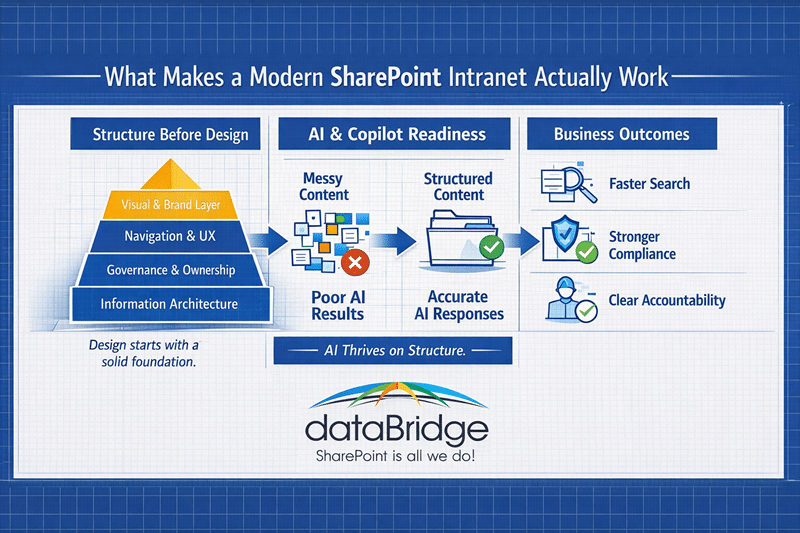
Strategy Before Design
Many intranet projects start in the wrong place.
Teams begin by discussing homepage layouts, hero images, quick links, or branding treatment. Those choices matter, but they are rarely what determines whether the intranet succeeds. In our experience, the real work starts earlier. It starts with goals, audiences, ownership, content logic, governance decisions, and how people actually find information across the organization.
That is why dataBridge starts with strategy before design. We help organizations define what the intranet is for, who it serves, what content belongs there, how it should scale, and what success should look like after launch.
If you need a broader educational view of how these pieces fit together, read our Guide to Building a Modern SharePoint Intranet.
Information Architecture, Navigation, and Search
Search problems are usually structure problems wearing a different label.
When employees cannot find what they need, the issue is often not search alone. It is the combination of weak information architecture, inconsistent metadata, unclear site relationships, and content that has not been governed well over time.
We help organizations design SharePoint intranets around clearer navigation, stronger site structure, better content grouping, cleaner page hierarchy, and more reliable search behavior. That includes planning hub relationships, reducing structural drift, and creating an intranet that feels easier to move through.
For deeper architecture planning, use SharePoint Information Architecture & Metadata Consulting for content structure and metadata, and the SharePoint Hub Site & Enterprise Intranet Architecture Framework for hub structure, navigation, and site relationships.
Governance, Permissions, and Content Ownership
A successful intranet needs an operating model behind the interface.
We help organizations define who owns content, how publishing works, how permissions should be managed, what review cycles are needed, and how the environment should stay useful as it grows. Without that structure, intranets become stale, inconsistent, and harder to trust.
For organizations that need this discipline at the publishing layer, our page governance after launch guide explains how to manage modern pages, news posts, review dates, templates, and stale-content retirement once the intranet is live.
This is one of the biggest differences between a short-lived launch and a durable intranet. Governance keeps the experience stable. Ownership keeps the content current. Clear permissions reduce noise and confusion.
When that operating model needs to be designed before a larger intranet build, SharePoint intranet architecture and governance helps define the hub model, navigation structure, permissions approach, ownership rules, publishing standards, lifecycle controls, and search readiness.
Long-term intranet stability also depends on governed SharePoint site creation so new department sites, project spaces, communication sites, and collaboration areas enter the intranet ecosystem with clear ownership, templates, approval rules, permission expectations, and lifecycle standards.
For broader governance planning, see our SharePoint Governance Framework. If intranet issues include unclear ownership, stale content, weak search, or inconsistent support, the SharePoint Governance Maturity Scorecard can help separate design problems from governance maturity problems before the next redesign or improvement phase.
Intranet Redesign vs. New Intranet Build
Some organizations need a new intranet. Others need to fix the one they already have.
We often see teams assume the platform is the problem when the real issue is clutter, duplicated content, weak ownership, poor navigation, or an intranet structure that never had the chance to mature. In those cases, a redesign may be the better move.
A redesign usually makes sense when the existing intranet still has value but the experience is hard to navigate, underused, or difficult to manage. A new build usually makes more sense when the architecture, ownership model, content structure, and governance approach all need a reset.
Either way, the goal is the same: build an intranet that helps people find trusted information, not one that creates another layer of confusion.
When the team has not yet agreed on the right level of change, use the intranet redesign decision worksheet to compare focused improvements, deeper restructuring, and a complete rebuild before sizing the consulting effort.
Adoption, Launch, and Sustainment
Launch is a milestone. It is not the outcome.
Even a well-structured intranet can lose momentum if employees do not understand why it matters, where to go, or how to use it in daily work. That is why adoption should be planned early, not treated as an afterthought.
We help organizations support intranet rollout through stakeholder alignment, communication planning, training support, role-based guidance, and realistic post-launch reinforcement. We also help teams protect adoption by reinforcing governance and ownership after launch, when many intranets start to drift.
For organizations that want a defined path to maintain that momentum, the dataBridge SharePoint Advisory Partnership provides post-launch guidance for adoption, governance, site owner support, and continuous improvement after the intranet goes live.
For deeper post-launch planning, visit our SharePoint Intranet Adoption Strategy.
Industry-Specific SharePoint Intranet Expertise
Intranet requirements are not the same across industries.
A healthcare organization may need stronger policy control and permission discipline. A manufacturer may care more about frontline access, procedures, and location-based communication. A nonprofit may need program resources, policy governance, and staff communication to work together in one place.
That is why dataBridge brings industry context into intranet planning. We help organizations design SharePoint intranets that reflect how their teams operate, how information needs to move, and where governance or compliance pressures shape the environment.
Explore our Industry-Specific SharePoint Intranet Solutions to see how these challenges vary by sector.
Design That Supports the Structure
Good visual design matters. It just should not lead the project.
Branding, UX, and page templates help make an intranet more usable, more consistent, and more aligned with the organization’s identity. But design works best when it is built on top of clear structure, not used to hide structural problems.
dataBridge helps organizations connect intranet strategy to page templates, navigation patterns, layout standards, and design consistency so the environment looks polished without creating unnecessary technical debt.
If you need deeper support around visual standards and template design, see SharePoint Branding, UX & Page Template Design. You can also review examples in our SharePoint Design & Development Portfolio.
When an intranet requires custom components, reusable web parts, workflow-connected experiences, or specialized SharePoint interfaces, our SharePoint development and customization services help keep those enhancements governed, documented, and easier to support after launch.
Real Intranet Outcomes
We have seen the same pattern across intranet work for years: when structure, ownership, and navigation are addressed early, adoption gets easier to sustain.
That is because employees do not judge an intranet by how modern it looks on launch day. They judge it by whether they can find what they need next week, next month, and next quarter.
dataBridge has helped organizations use SharePoint intranets to centralize communication, improve policy access, simplify search, support distributed teams, and create a stronger foundation for governance, automation, and Copilot. In one nonprofit healthcare engagement, dataBridge implemented a SharePoint intranet and policy management environment that supported a workforce of more than 1,000 employees across more than 100 programs while centralizing policies, credential tracking, internal communication, and program resources in one searchable platform.
See the full SharePoint Intranet and Policy Management System for National Nonprofit Healthcare Organization case study for a real-world example of how intranet strategy, governance, and structured delivery come together.
Related SharePoint Intranet Consulting Resources
- How to Design and Build a Modern SharePoint Intranet
- SharePoint Intranet Assessment
- SharePoint Branding, UX & Page Template Design
- SharePoint Intranet Adoption Strategy
- SharePoint Hub Site & Enterprise Intranet Architecture Framework
- Industry-Specific SharePoint Intranet Solutions
- SharePoint Document Management System
- Copilot Readiness for SharePoint
- SharePoint Intranet and Policy Management System for National Nonprofit Healthcare Organization
Frequently Asked Questions
What is SharePoint intranet consulting?
SharePoint intranet consulting helps organizations plan, build, redesign, and improve intranets with the right mix of strategy, governance, architecture, search, design, adoption, and Microsoft 365 alignment. The goal is not just to launch an intranet. The goal is to build one that stays useful.
Do we need a new intranet or a redesign?
That depends on the condition of the current environment. If the structure still has value, a redesign may be enough. If the intranet suffers from deeper issues around ownership, architecture, governance, and content logic, a new build may be the better choice.
Sometimes the right next step is not a redesign decision yet. If your organization knows the intranet is underperforming but needs clarity on what is actually broken first, a SharePoint intranet assessment can identify structural, governance, content, and usability issues before you commit to a larger initiative.
Why is governance so important for intranets?
Governance determines how content stays accurate, who owns what, how permissions are managed, and how the environment scales. Without governance, intranets become harder to trust and harder to maintain.
How does search improve in a SharePoint intranet?
Search improves when information architecture, metadata, navigation, content ownership, and site structure improve together. Search tuning helps, but better findability usually starts with better structure.
Can a SharePoint intranet support Copilot readiness?
Yes, but only when the content and structure behind the intranet are well managed. Clean site hierarchy, useful metadata, stronger ownership, and better governance all improve how Microsoft 365 tools, including Copilot, interact with organizational information. For that next step, see Copilot Readiness for SharePoint.
Build a SharePoint Intranet People Will Actually Use
If your organization is planning a new intranet, redesigning an outdated portal, or trying to improve adoption, dataBridge can help you define the right strategy before you invest in the wrong structure.
We help organizations create SharePoint intranets that are easier to use, easier to govern, and better aligned with how work actually happens across Microsoft 365.
When the intranet already exists but has become cluttered, stale, or difficult to govern, our SharePoint intranet redesign services provide a focused path for restructuring navigation, content ownership, page standards, search, and relaunch planning.
What Our Clients Say