
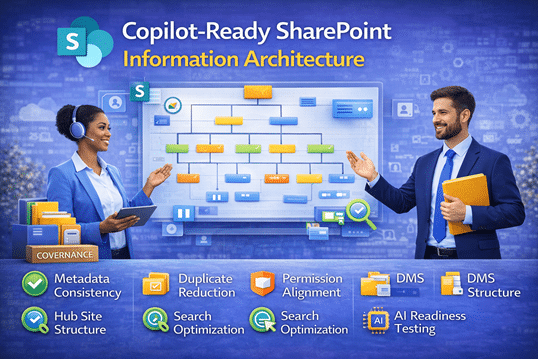
How to Prepare Your SharePoint Environment for Microsoft Copilot — The dataBridge Way™
Copilot performance is only as strong as the SharePoint structure behind it. When information architecture is inconsistent, metadata is missing, and governance is unclear, Copilot surfaces incomplete or unreliable results. At dataBridge, we design SharePoint information architecture specifically for AI readiness—aligning taxonomy, metadata, permissions, and content ownership so Copilot can deliver accurate insights, faster discovery, and meaningful business value across Microsoft 365.
Copilot-Ready SharePoint Information Architecture
Copilot Doesn’t Fix Structure. It Reveals It.
Microsoft Copilot is powerful. However, it does not correct weak architecture. It surfaces what already exists.
If your SharePoint environment contains inconsistent metadata, fragmented permissions, duplicate content, or unclear ownership, Copilot will amplify those weaknesses. Faster answers do not equal better structure.
Organizations that rush AI activation without structural discipline often mistake speed for maturity.
Copilot readiness begins with architecture — not licensing. That is why Copilot Readiness for SharePoint must be grounded in strong SharePoint Information Architecture & Metadata.
What Actually Makes SharePoint “Copilot-Ready”?
Copilot relies on Microsoft Graph signals, SharePoint search indexing, managed properties, security trimming, metadata consistency, and content ownership clarity. When those layers are misaligned, output becomes unpredictable.
In enterprise environments exceeding 5TB of content, we routinely see duplication rates above 25 percent. Without structural refinement, Copilot summaries often pull from conflicting versions of the same document. That is not an AI flaw. It is an architectural gap.
AI amplifies clarity. It also amplifies chaos.
What Happens If You Don’t Prepare?
When Copilot is enabled without architectural alignment, patterns emerge quickly:
- Summaries differ across departments
- Users encounter references to outdated documents
- Conflicting versions surface in executive briefings
- Permission boundaries feel inconsistent
- Confidence in AI output declines
In practice, once trust in AI weakens, restoring it requires far more effort than preparing properly from the beginning.
Preparation is less expensive than remediation.
Every time.
In highly regulated sectors, structural weaknesses are not merely operational risks—they can become compliance liabilities. Our framework for SharePoint architecture for regulated industries addresses how governance, metadata, and permission controls must be reinforced before AI deployment.
Copilot Readiness Delivered The dataBridge Way™
Activating Copilot is simple. Preparing the environment correctly is not.
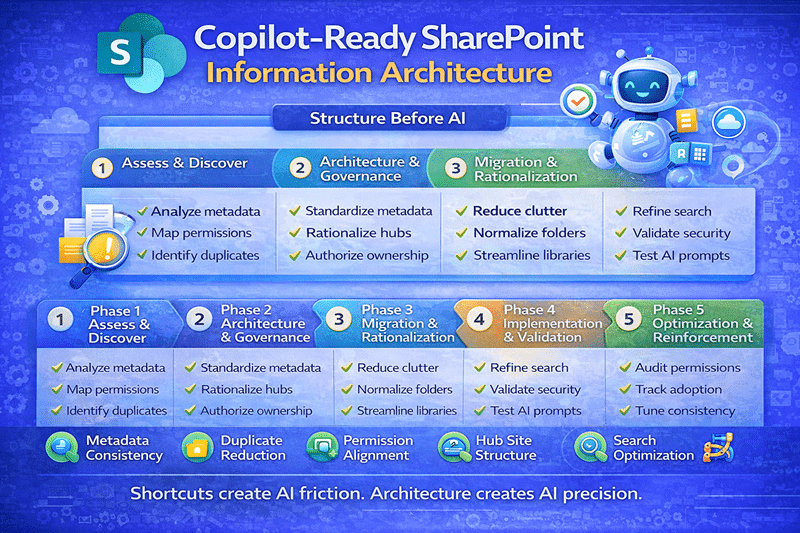
Copilot readiness follows the same disciplined structure as every architecture engagement we deliver through The dataBridge Way™:
- Assess & Discover
- Architecture & Governance
- Migration & Rationalization
- Implementation & Validation
- Optimization & Reinforcement
Each phase builds structural resilience before AI is introduced.
Phase 1: Assess & Discover
Understand What Copilot Will Actually See
Before enabling AI, we evaluate the structural reality of the environment.
This includes reviewing metadata consistency, analyzing duplicate and version conflicts, mapping permission inheritance, identifying orphaned sites, evaluating managed properties, and validating content ownership assignments.
A nuance we consistently observe in large enterprises is that ownership is often implied rather than defined. Copilot surfaces that ambiguity immediately.
This discovery work connects directly to SharePoint Strategy & Roadmapping, ensuring AI readiness aligns with broader structural objectives rather than becoming a disconnected initiative.
Phase 2: Architecture & Governance
Stabilize Structure Before Scaling AI
In practice, AI retrieval accuracy reflects the structural discipline behind it.
At this stage, architectural refinements typically involve standardizing metadata models, rationalizing hub site design, aligning content types, correcting broken permission inheritance, and clarifying governance accountability.
Copilot retrieval precision depends on consistent enterprise terminology. A disciplined SharePoint taxonomy and metadata strategy strengthens AI summarization accuracy by reducing ambiguity across term sets, content types, and classification models.
Folders organize location. Metadata organizes meaning.
Copilot retrieves meaning.
Hub grouping decisions influence how content is discovered and summarized by AI. A structured SharePoint hub site architecture framework strengthens contextual retrieval by aligning site relationships, navigation models, and permission boundaries.
Governance alignment becomes especially critical here, particularly when connecting structural clarity to the SharePoint Governance Maturity Model. Without governance reinforcement, architectural improvements do not sustain.
Phase 3: Migration Strategy & Content Rationalization
Clean Before You Accelerate
Historical clutter undermines AI reliability more than most organizations expect.
Common structural challenges include redundant legacy libraries, deep subsite hierarchies, inconsistent naming conventions, over-permissioned document sets, and file shares migrated without structural redesign.
For example, one financial services organization migrated over 12TB of legacy content directly into SharePoint Online. During early Copilot testing, summaries referenced outdated regulatory documentation alongside current versions. After structured rationalization and metadata normalization, retrieval consistency improved dramatically.
Cleaning structure improves AI accuracy. It’s that simple.
Yet it is often the step organizations postpone because it feels operational rather than strategic.
Phase 4: Implementation & Validation
Test AI Against Real Use Cases
Architecture must be validated in real-world scenarios, not theoretical ones.
During implementation, we strategically backfill metadata, refine managed properties, test Copilot prompts across departments, validate security trimming behavior, and monitor retrieval consistency under varying permission roles.
If AI output varies unexpectedly between roles, structural alignment requires further refinement.
This work strengthens long-term integrity and connects directly to SharePoint Search Optimization best practices.
Phase 5: Post-Launch Optimization
Maintain Structural Discipline Over Time
Over time, AI maturity becomes an operational discipline rather than a one-time activation.
Post-launch optimization focuses on monitoring content growth trends, reviewing taxonomy drift, auditing permission exceptions, evaluating duplication patterns, and tracking AI adoption metrics across business units.
Interestingly, the most stable Copilot environments are not the most complex. They are the most disciplined.
Consistency beats complexity.
The Strategic Advantage of Preparing Early
Organizations that embed Copilot readiness into architectural design experience stronger search accuracy, reduced duplication, clearer governance ownership, faster AI adoption, and greater executive confidence.
Those who delay structural alignment often retrofit under pressure — which is disruptive, expensive, and avoidable.
Strong structure protects long-term Microsoft 365 investments.
How Copilot Readiness Integrates Across Your SharePoint Environment
Copilot readiness is not a standalone initiative. It intersects with core architectural disciplines across your Microsoft 365 ecosystem.
Strong AI performance depends on disciplined SharePoint Information Architecture & Metadata, enforceable governance standards reflected in the SharePoint Governance Maturity Model, and a long-term structural plan guided by SharePoint Strategy & Roadmapping.
Execution matters just as much as design. That is where structured SharePoint Consulting Services ensure architectural intent translates into operational reality.
Architecture drives sustainability. AI depends on architecture.
When structure scales, AI scales with it.
Frequently Asked Questions
Does Microsoft Copilot require a new SharePoint architecture?
No. It requires a refined one. Copilot retrieves what already exists. If metadata, permissions, and search configuration lack consistency, output reliability declines.
How does metadata affect Copilot accuracy?
Metadata provides contextual signals that improve filtering, relevance ranking, and summarization precision. Inconsistent metadata reduces retrieval clarity.
Can Copilot bypass SharePoint permissions?
No. Copilot respects security trimming. However, fragmented permission inheritance can create confusing output patterns if not properly aligned.
Should we clean up legacy content before enabling Copilot?
Yes. Duplicate and outdated content reduces reliability. Structured rationalization improves both search performance and AI accuracy.
The Bottom Line
Copilot does not demand more content.
It demands better structure.
Organizations that invest in disciplined SharePoint architecture reduce friction, increase trust in AI output, and position Microsoft 365 as a long-term strategic platform.
Copilot readiness is not a feature deployment. It is an architectural discipline.
And that is exactly how dataBridge approaches SharePoint — The dataBridge Way™.

THE SEARCH IS OVER
We're a Microsoft SharePoint partner - everything you need IS right here
For more information about how dataBridge can transform your business with improved corporate communication, collaboration, forms, workflows, and document management, contact us today.