
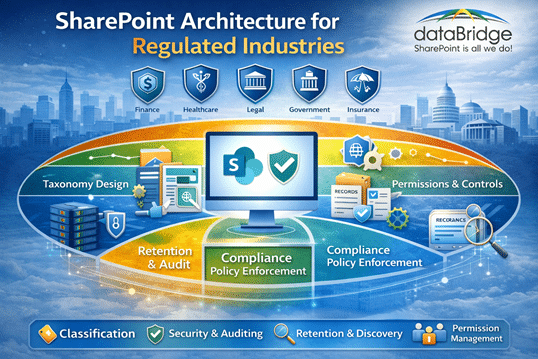
In regulated industries, SharePoint architecture is not about convenience.
It is about defensibility.
When auditors ask questions, your structure should answer them.
SharePoint Site Architecture for Regulated Industries
Designing a Compliance-Ready, Audit-Defensible Microsoft 365 Environment
In financial services, healthcare, government, and education, compliance failures rarely happen because Microsoft 365 lacks capability. They happen because architecture was never designed with governance in mind.
We’ve seen this repeatedly.
The tools were there.
The structure wasn’t.
At dataBridge, we design SharePoint environments where compliance is embedded into the foundation — not layered on after deployment. That foundation begins with structured discovery and architectural clarity through our SharePoint Discovery & Readiness Assessment.
Why Regulated Industries Require a Different SharePoint Architecture
Most organizations start with collaboration.
Regulated organizations must start with structure.
There is a difference.
Flat Teams sprawl, deep folder hierarchies, and informal permissions may work in low-risk environments. They do not hold up under regulatory scrutiny. In regulated environments, permission clarity is not optional. Organizations that need stronger control over access, inheritance, and auditability should review our SharePoint permissions guide as part of broader architecture planning.
Here’s what typically breaks down:
- Retention policies applied inconsistently
- Sensitivity labels ignored or misaligned
- Broken permission inheritance
- Duplicate document storage across Teams
- No defined content ownership
- Lifecycle review that never happens
If your SharePoint environment cannot clearly demonstrate:
- Who owns the content
- Who has access
- How long it is retained
- When it will be disposed
… then it is not audit-ready.
That may sound direct. It is.
We believe clarity reduces risk.
This is why our SharePoint Information Architecture & Metadata Strategy and SharePoint Governance Maturity Model engagements lead regulated implementations. Structure is not a feature — it is the operating model.
Read the Barrett document control case study to see how a regulated SharePoint environment preserved audit history, enforced approvals, and supported compliance reporting in a highly controlled setting.
The 5 Pillars of Compliance-Driven SharePoint Architecture
When we design regulated environments, we anchor the architecture around five principles.
1. Structural Hierarchy with Defined Purpose
Every site must have:
- A documented business function
- Named ownership
- A defined lifecycle
- Clear boundaries between regulated and operational content
In mature environments, you can explain every site’s purpose without hesitation.
If a site exists without a purpose statement, governance has already eroded.
That’s not theory. It’s pattern recognition from years of remediation work and advisory engagements delivered through our SharePoint Consulting Services.
2. Retention Built Into the Architecture
Retention should never rely on user memory.
Instead, it must map directly to:
- Document types
- Business processes
- Regulatory obligations
We frequently encounter environments where retention labels were configured but not aligned to structure. The result? Inconsistent enforcement.
Retention works best when it’s architected at the library and content-type level from day one.
That is a design decision — not a technical toggle.
And it begins during SharePoint Strategy & Roadmapping, not during migration cleanup.
3. Sensitivity Labels Aligned to Risk
Sensitivity labels are powerful.
But without architectural alignment, they become decorative.
In regulated environments, labels should reflect:
- Client financial data
- PHI or PII
- Confidential board materials
- Restricted compliance records
When labeling strategy and structural hierarchy disagree, users default to convenience.
Convenience is rarely compliant.
We embed labeling strategy into the architecture itself, aligning with governance standards defined during the SharePoint Governance Maturity Model evaluation.
4. Role-Based Permission Governance
In compliance-driven SharePoint environments:
- Unique permissions are rare
- Access is group-based
- Inheritance is respected
- Exceptions are documented
One of the most common risk signals we see?
Libraries with fragmented permission inheritance and no explanation for why.
In mature environments, fewer than 5% of libraries contain broken inheritance — and every exception has a reason.
Permission clarity is a leadership decision disguised as a technical one.
Strong role-based access design is reinforced during SharePoint Information Architecture & Metadata Strategy engagements to ensure classification and access tiers align.
5. Audit-Ready Design from Day One
Audit readiness is not a report.
It is a structural condition.
An audit-ready SharePoint environment includes:
- Naming standards that reflect business domains
- Version control enabled by default
- Retention policies mapped to content
- Sensitivity alignment enforced
- Lifecycle reviews scheduled
- Ownership documented
When an auditor asks, “How is this controlled?” the answer should be visible in the architecture — not buried in a policy PDF.
And as AI becomes embedded into Microsoft 365, this structure directly impacts results. Clean classification and governance are foundational to Copilot Readiness for SharePoint.
In regulated environments, metadata classification often determines how retention policies, sensitivity labels, and audit controls are applied. Our SharePoint metadata strategy guide explains how taxonomy and metadata design support compliance-ready information architecture.
Industry Examples: What Compliance Architecture Looks Like in Practice
Let’s ground this in reality.
Financial Services
In Financial Services SharePoint Intranet Solutions, investment firms and advisory organizations operate under fiduciary and regulatory oversight.
Their SharePoint architecture must separate:
- Portfolio management documentation
- Client financial records
- Compliance monitoring
- Executive-level restricted materials
We typically recommend structural separation between operational workspaces and record repositories. Client data cannot sit inside general collaboration Teams.
In regulated financial environments, retention classification must be defined before migration — not after content is already moved.
Remediation always costs more than intentional design.
Healthcare
In Healthcare SharePoint Intranet Solutions, organizations manage:
- Clinical documentation
- HR compliance
- Policy lifecycle tracking
- Incident reporting
- Workforce records
PHI exposure risk demands structural clarity.
Access tiers must be deliberate. Version history must be enforced. Policy updates must be traceable.
Healthcare environments do not fail because SharePoint lacks capability.
They fail because classification and governance were never operationalized.
That operationalization begins with disciplined discovery and architectural modeling.
Government
Within Government SharePoint Intranet Solutions, public sector organizations face:
- Public records laws
- FOIA requests
- Grant documentation audits
- Defined retention schedules
Architecture must distinguish:
- Public-facing records
- Restricted operational materials
- Legislative documentation
- Archived historical records
If content classification cannot support discoverability during a records request, the environment is structurally fragile.
In government environments, SharePoint must support transparency and accountability — not just collaboration.
Education
In Education SharePoint Intranet Solutions, institutions balance autonomy with governance.
They manage:
- Student data (FERPA considerations)
- Research grant documentation
- Accreditation records
- Administrative policy repositories
Distributed departments often create decentralized sprawl.
Architecture must balance flexibility with institutional control.
Standardized provisioning templates and governance guardrails are not restrictive. They are stabilizing.
Teams & SharePoint Alignment in Regulated Environments
Every Microsoft Team creates:
- A SharePoint site
- A document library
- A security boundary
Without governance:
- Teams sprawl increases exposure
- Private channels fragment record storage
- Duplicate Teams create confusion during audits
In regulated industries, uncontrolled Team creation is a governance risk.
Provisioning must include:
- Naming standards
- Sensitivity defaults
- Ownership documentation
- Lifecycle controls
This alignment is core to our SharePoint Strategy & Roadmapping approach.
Collaboration should amplify structure — not undermine it.
Common Compliance Architecture Mistakes
We routinely encounter:
- Folder-heavy libraries instead of metadata-driven structure
- Sensitivity labels applied inconsistently
- Retention policies configured but not enforced
- Teams created without lifecycle planning
- No documented ownership model
These are not software failures.
They are architectural oversights.
The fix is rarely technical. It is structural.
What an Audit-Ready SharePoint Environment Actually Feels Like
In a well-architected environment:
- Search results surface authoritative content first
- Ownership is obvious
- Retention is automatic
- Sensitive documents are appropriately restricted
- Lifecycle reviews are routine
- Governance is visible — not theoretical
You do not hope the system is compliant.
You can demonstrate that it is.
How dataBridge Architects Compliance from Day One
We do not add governance later.
We design it into the foundation.
Our regulated industry engagements begin with:
- Structured discovery
- Governance maturity assessment
- Information architecture blueprinting
- Retention and sensitivity mapping
- Teams provisioning framework
That foundation supports long-term compliance, scalable growth, and — increasingly — AI readiness.
Because Copilot does not fix bad structure.
It amplifies it.
Explore our SharePoint Consulting Services to see how we approach enterprise-level architecture.
Frequently Asked Questions
Can SharePoint meet regulatory compliance requirements?
Yes — when architecture, governance, and retention are intentionally aligned. Configuration alone is not enough.
What is the biggest compliance risk in Microsoft 365?
Uncontrolled structural sprawl combined with fragmented permissions.
How often should governance be reviewed?
At minimum annually, with quarterly lifecycle review for regulated workspaces.
Do sensitivity labels replace structural governance?
No. Labels reinforce structure. They do not replace it.
Final Thought
If your organization operates in a regulated industry, your SharePoint architecture is either reducing risk — or quietly increasing it.
Structure determines compliance.
If you’re unsure which side you’re on, start with a SharePoint Discovery & Readiness Assessment and build from there.
Industry Specific SharePoint Solutions
- Healthcare
- Financial Services
- Government
- Education
- Non Profit
- Manufacturing
- Professional Services
- Construction
- SharePoint Site Architecture for Regulated Industries

THE SEARCH IS OVER
We're a Microsoft SharePoint partner - everything you need IS right here
For more information about how dataBridge can transform your business with improved corporate communication, collaboration, forms, workflows, and document management, contact us today.