
SharePoint can be far more than a place to store files. When designed with the right architecture, metadata, permissions, and governance, it becomes a powerful document management system that improves search, strengthens compliance, and supports collaboration across Microsoft 365. This guide explains how organizations can design and scale SharePoint document management systems that remain secure, discoverable, and ready for modern capabilities like Microsoft Copilot.
SharePoint Document Management System
A well-designed SharePoint document management system does more than store files. It creates a structured foundation for document control, search, governance, compliance, and Microsoft 365 collaboration. This guide explains how SharePoint architecture, metadata, permissions, and lifecycle management work together to support scalable document management and prepare content for modern capabilities such as Microsoft Copilot.
How to Design, Govern, and Scale Enterprise Document Management with SharePoint
SharePoint has become one of the most widely used enterprise document management platforms within Microsoft 365. Organizations rely on it to store business content, manage collaboration, and maintain secure access to critical information.
At first, many SharePoint environments appear to function well. Teams create document libraries, upload files, and begin collaborating. Documents are accessible, and work moves forward.
Over time, however, the environment grows.
New libraries appear. Permissions become inconsistent. Search results begin returning irrelevant documents. Teams begin storing files locally or attaching them to email messages because they are unsure where the correct version lives.
At that point the organization no longer has a document management system. It has a collection of disconnected document repositories.
A well-designed SharePoint Document Management System addresses this challenge by introducing intentional architecture, metadata classification, governance policies, and document lifecycle management. Documents remain secure, discoverable, and manageable across the organization while supporting modern capabilities such as Microsoft Copilot.
Since 2006, dataBridge has helped organizations transform fragmented file repositories into structured SharePoint environments designed for governance, compliance, and long-term scalability.
This guide explains how organizations can design a SharePoint document management system that improves collaboration, strengthens governance, and prepares their environment for modern AI-driven capabilities.
Table of Contents
What Is a SharePoint Document Management System?
A SharePoint Document Management System (DMS) is a structured framework within Microsoft 365 that allows organizations to store, organize, govern, and retrieve documents using metadata, permissions, search, and lifecycle policies.
Rather than functioning as simple file storage, a well-designed SharePoint document management system allows organizations to:
- Organize documents through structured metadata
- Control access with role-based permissions
- Improve search accuracy and knowledge discovery
- Automate document workflows and approvals
- Enforce retention and compliance policies
When these elements work together, SharePoint becomes a powerful enterprise document management platform capable of supporting both collaboration and governance.
Key Takeaways
- SharePoint becomes a powerful document management platform when architecture and governance are designed intentionally.
- Metadata is essential for document classification, search accuracy, automation, and compliance.
- Role-based permissions simplify security management and reduce administrative complexity.
- Governance ensures documents remain manageable as environments grow.
- Structured SharePoint environments significantly improve Microsoft Copilot accuracy and knowledge discovery.
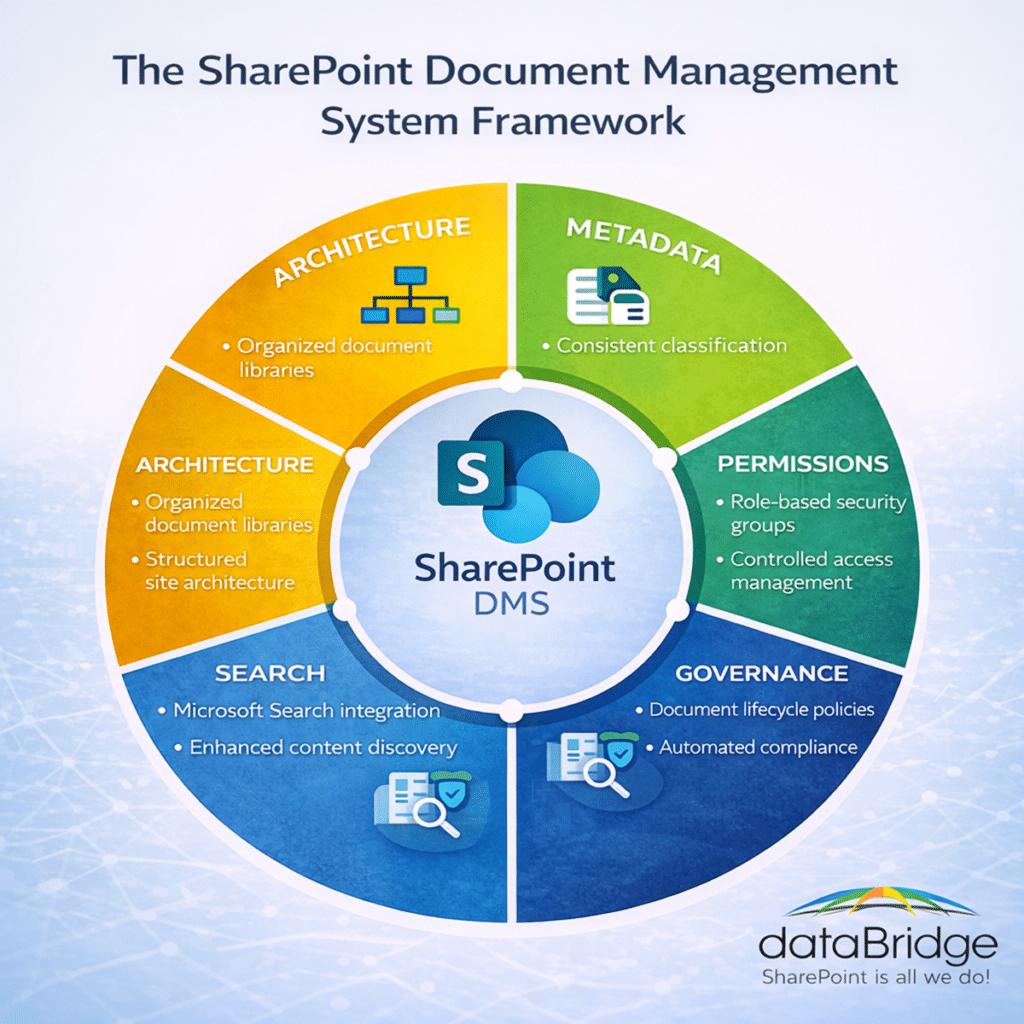
The SharePoint Document Management Framework
Successful document management systems built on SharePoint typically rely on five foundational layers.
- Information Architecture
- Metadata Classification
- Permissions and Security
- Governance and Lifecycle Management
- Search and Discoverability
When these layers work together, SharePoint becomes a reliable enterprise document management platform. When one or more layers are missing, organizations often experience confusion, duplicate content, and declining trust in the system.
Understanding how these components interact is essential when designing a sustainable SharePoint environment.
In This Guide
- What a SharePoint Document Management System Is
- Core Components of SharePoint Document Management
- Metadata and Document Classification
- Permissions and Security
- Search and Discoverability
- Governance and Lifecycle Management
- Automation and Workflow
- SharePoint Document Management Best Practices
- Evaluating a SharePoint Document Management Implementation
- Copilot and AI Implications
- Common Document Management Mistakes
Why Organizations Choose SharePoint for Document Management
SharePoint has become one of the most widely adopted enterprise document management platforms because it integrates directly with Microsoft 365.
Documents stored in SharePoint are accessible across multiple tools employees already use daily, including:
- Microsoft Teams
- Outlook
- OneDrive
- Microsoft Office Applications
- Power Platform Solutions
This integration allows organizations to maintain strong document governance while enabling collaboration across departments and project teams.
In practice, organizations tend to experience one of two outcomes.
Organizations that treat SharePoint as a strategic information platform design environments with clear architecture, consistent governance, and reliable search capabilities.
Organizations that treat SharePoint as a network drive replacement often encounter inconsistent structures, permission challenges, and limited discoverability.
Recognizing this distinction early has a significant impact on long-term success.
Organizations evaluating these decisions often explore SharePoint Consulting Services to better understand how architecture, governance, and adoption work together within modern Microsoft 365 environments.
How SharePoint Replaces Legacy File Shares
Most organizations originally implemented SharePoint to replace legacy network file shares.
Traditional file servers typically relied on deep folder hierarchies that mirrored organizational structures. While this approach worked reasonably well for small environments, it became increasingly difficult to manage as organizations grew.
Over time, several problems often emerged:
- Duplicate documents stored in multiple locations
- Limited search capabilities
- Inconsistent permission structures
- Difficulty collaborating across departments
- Lack of lifecycle management or compliance controls
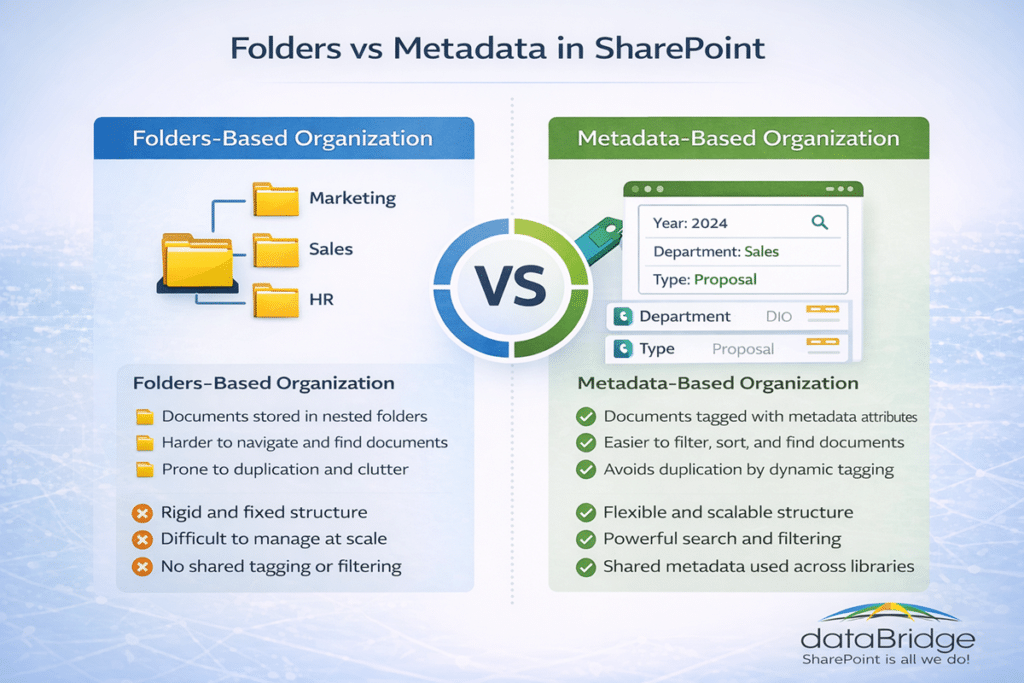
SharePoint addresses many of these limitations by shifting document management away from rigid folder structures and toward metadata-driven classification.
Instead of storing files within deeply nested folder hierarchies, organizations can classify documents using attributes such as department, document type, project name, or lifecycle status. This allows documents to appear in multiple filtered views without being duplicated.
For example, a contract document might simultaneously appear in a client view, a department view, and a compliance view — all while remaining a single file.
This approach significantly improves discoverability and reduces duplication.
However, organizations that simply recreate their legacy folder structures inside SharePoint often fail to realize these benefits. When SharePoint is treated like a network drive replacement, the platform’s most powerful document management capabilities remain underutilized.
Successful migrations therefore focus not only on moving content, but also on redesigning how documents are organized, classified, and governed within the new environment.
SharePoint vs Traditional Document Management Systems
Traditional document management systems were historically designed around storage and compliance requirements. While they often provide strong control mechanisms, many lack the collaboration capabilities modern organizations expect.
SharePoint combines document governance with collaboration, automation, and integration across the Microsoft ecosystem.
| Capability | SharePoint | Traditional DMS |
|---|---|---|
| Collaboration | Native Microsoft 365 integration | Often limited |
| Metadata | Highly customizable | Fixed schemas |
| Search | Microsoft Search + Graph | Platform specific |
| Automation | Power Automate workflows | Often proprietary |
| AI readiness | Integrated with Microsoft Copilot | Limited AI integration |
For organizations already using Microsoft 365, SharePoint frequently becomes the natural platform for enterprise document management.
Core Components of an Effective SharePoint Document Management System
A sustainable document management system relies on several interconnected components. Each element contributes to discoverability, security, and long-term governance.
When one component is neglected, the entire system becomes harder to manage.
Information Architecture
Information architecture defines how SharePoint sites, libraries, and content structures are organized.
Without intentional architecture, document management environments quickly become fragmented. Teams create their own libraries, duplicate documents appear in multiple locations, and navigation becomes confusing.
Effective architecture typically includes several structural elements.
Department sites provide centralized locations for functional teams such as finance, human resources, or operations. Project collaboration sites support temporary or cross-department work. Hub sites connect related sites together so users can navigate information logically across the organization.
Libraries themselves should often be structured around business processes rather than arbitrary folder hierarchies. For example, a legal department might organize libraries around contracts, policies, and regulatory documentation.
When architecture is thoughtfully designed, users can navigate information naturally instead of relying entirely on search.
Organizations seeking deeper architectural guidance often review SharePoint Information Architecture & Metadata, which explains how structure supports long-term scalability.
Designing Libraries for Long-Term Scalability
Document libraries represent the core storage containers within a SharePoint document management system. Designing them correctly is essential for long-term scalability.
Many environments encounter challenges because libraries were created quickly without a long-term structure in mind. As departments add documents and projects evolve, these libraries can grow into large, difficult-to-manage repositories.
To avoid this outcome, document libraries should be designed around logical business processes rather than individual teams or temporary initiatives.
For example, a legal department may structure libraries around contracts, policies, regulatory filings, and litigation documentation. A finance department might organize libraries around reporting, audits, vendor agreements, and budgeting materials.
This approach ensures that document structures remain stable even when personnel or organizational structures change.
Metadata also plays a crucial role in scalable library design. Rather than creating dozens of separate libraries for slightly different content types, organizations can use metadata fields to distinguish between document categories.
Filtered views then allow users to quickly see only the content relevant to their role.
Another important consideration is library size. SharePoint supports very large document libraries, but performance and usability improve when content is logically segmented across multiple libraries aligned with business processes.
Organizations that plan library structures carefully are far more likely to maintain a document management environment that remains organized as it grows.
Metadata and Document Classification
Metadata is one of the most powerful features of a modern document management system.
Folders describe where documents are stored. Metadata explains what those documents represent.
For example, a document might be classified by:
- Document Type
- Department
- Client or Project
- Lifecycle Status
- Compliance Classification
- Author or Owner
Metadata allows organizations to group, filter, and retrieve documents regardless of where those files physically reside within SharePoint.
This capability transforms how users interact with information. Instead of navigating through multiple folders to locate content, users can filter documents by attributes that describe the content itself.
Metadata also enables automation. Workflows can route documents for approval based on document type. Retention policies can apply automatically based on compliance classification. Search results can prioritize documents with specific metadata attributes.
Many organizations initially underestimate how important metadata is for long-term document management success.
However, once metadata is implemented consistently, it becomes the foundation for discoverability, automation, and governance.
Organizations exploring metadata design in greater depth often review the SharePoint Metadata Strategy Guide.
Permissions and Security
Security is a central component of any document management system.
Permissions determine who can view, edit, or manage documents within SharePoint.
Over time, poorly structured environments often accumulate several problematic patterns.
Broken inheritance may occur when individual libraries or folders have custom permissions. Administrators sometimes assign permissions directly to individual users instead of groups. Security groups may evolve inconsistently across departments.
When these patterns develop, administrators frequently struggle to answer a basic question:
Who actually has access to this document?
A well-designed document management system relies on role-based permissions aligned with organizational responsibilities. Access is granted to groups rather than individuals, and inheritance structures remain predictable.
Organizations experiencing permission complexity often benefit from reviewing the SharePoint Permissions Guide, which outlines strategies for restoring clarity to access management.
Search and Discoverability
Search is where the value of document management becomes most visible to employees.
When search works well, users locate documents quickly and confidently. When search fails, productivity declines rapidly.
Effective SharePoint search depends on several factors working together.
Meaningful metadata ensures documents can be filtered and categorized. Consistent architecture ensures documents are stored in predictable locations. Clear permission structures ensure users only see content they are authorized to access.
Duplicate content can also degrade search performance. When multiple versions of similar files exist across the environment, users may struggle to determine which document represents the authoritative version.
Organizations often assume search problems are technical issues. In reality, search quality usually reflects underlying architecture and classification decisions.
Organizations focused on improving discoverability often review SharePoint Online Search Optimization to better understand how these elements interact.
Governance and Lifecycle Management
Document management does not end when files are uploaded.
Organizations must also determine how documents are maintained over time.
Governance defines how content is created, managed, and retired. Without governance, even well-structured systems eventually drift toward complexity.
Governance policies typically address several questions:
- Who owns each site or library?
- How are new sites created?
- What content requires approval?
- How long should documents be retained?
Ownership is particularly important. Each document library or content area should have a responsible owner who maintains structure, metadata quality, and document relevance.
A comprehensive governance framework is explained in the SharePoint Governance Guide.
Document Lifecycle Management
Documents evolve over time.
Policies are revised. Contracts expire. Reports become outdated.
A well-designed document management system supports the entire lifecycle of content.
Typical lifecycle stages include:
- Draft
- Review
- Approved
- Archived
- Disposed
Lifecycle management ensures outdated content does not remain visible long after it becomes irrelevant. It also improves compliance by ensuring records are retained for appropriate durations.
Retention, Compliance, and Records Management
Many industries operate under strict regulatory requirements that define how long certain documents must be retained.
SharePoint supports these requirements through retention labels and records management policies.
Retention rules can apply based on several factors.
- Document Type
- Compliance Classification
- Department
- Business Process
These policies allow organizations to automate compliance requirements rather than relying on manual processes.
Organizations operating in regulated industries often explore these strategies through SharePoint Architecture for Regulated Industries.
Version Control and Document Integrity
One of SharePoint’s most valuable document management capabilities is version control.
Version history allows organizations to track document changes, restore previous versions, and maintain audit trails.
This eliminates the common practice of storing multiple files with names such as “Final_v3” or “Final_v5.”
Instead, SharePoint maintains a structured version history that records who made changes and when those changes occurred.
Version control improves collaboration while protecting document integrity.
Document Automation with Power Automate
Modern document management systems increasingly rely on automation.
Power Automate allows organizations to create workflows that streamline document management tasks.
Common automation scenarios include:
- Routing documents for approval
- Notifying stakeholders of updates
- Applying metadata automatically
- Archiving completed records
Automation reduces administrative overhead while improving consistency across the environment.
Organizations exploring automation opportunities often review Power Automate Best Practices & Use Cases.
SharePoint Document Management Best Practices
Organizations implementing document management systems in SharePoint consistently follow several best practices.
Design Architecture Before Migration
Successful environments begin with a clear architecture plan before content is migrated. The SharePoint Discovery & Readiness Assessment and SharePoint Migration Readiness Assessment are two helpful resources.
Use Metadata Strategically
Not every document requires extensive metadata. Focus classification on high-value content such as policies, contracts, and regulated records.
Align Permissions With Organizational Roles
Role-based permissions simplify security management and improve transparency.
Establish Clear Ownership
Each document library should have a designated owner responsible for maintaining content quality.
Implement Governance Early
Governance policies introduced early prevent environments from becoming difficult to manage later.
How to Evaluate a SharePoint Document Management Implementation
Organizations evaluating SharePoint as a document management platform should consider several key questions.
Does the Architecture Support Long-Term Growth?
Sites and libraries should be structured so the environment can scale without becoming fragmented.
Is Metadata Consistent Across the Organization?
Consistent metadata improves search accuracy, automation capabilities, and compliance enforcement.
Are Permissions Transparent?
Administrators should clearly understand who has access to specific content areas.
Is Governance Clearly Defined?
Governance policies should define ownership, lifecycle management, and site creation standards.
Does Search Work Reliably?
Users should be able to locate documents quickly without knowing exactly where files are stored.
The Business Impact of Effective Document Management
Well-designed document management systems deliver measurable benefits across an organization.
One of the most immediate improvements is faster information retrieval. When documents are classified consistently and searchable through metadata, employees spend less time locating information and more time completing meaningful work.
Improved document visibility also reduces duplication. When employees can easily locate authoritative versions of documents, they are less likely to create redundant copies.
Security and compliance also benefit from structured document management practices. Role-based permissions ensure sensitive information remains accessible only to authorized users, while retention policies ensure documents are maintained according to regulatory requirements.
Document management also improves collaboration. Teams working on shared documents can rely on version history and structured approval workflows to ensure changes are tracked and approved appropriately.
Finally, effective document management significantly improves the value organizations can extract from emerging technologies such as Microsoft Copilot.
Artificial intelligence tools rely heavily on the quality of underlying content structures. When documents are organized with metadata, governed appropriately, and searchable across the environment, AI tools can surface insights that would otherwise remain hidden.
In this sense, document management does more than organize files. It transforms how organizations access and use their collective knowledge.
The Role of Document Management in Microsoft Copilot
Artificial intelligence is increasing the importance of well-structured document management systems.
Microsoft Copilot relies heavily on SharePoint architecture, metadata, and permissions to interpret organizational knowledge.
When document management practices are weak, Copilot may surface outdated or irrelevant information.
When document management practices are strong, Copilot can generate meaningful insights by connecting information across the organization.
Simply put:
AI amplifies the quality of your information architecture.
Organizations preparing for AI adoption often evaluate their environments through Copilot Readiness for SharePoint.
Common Document Management Mistakes
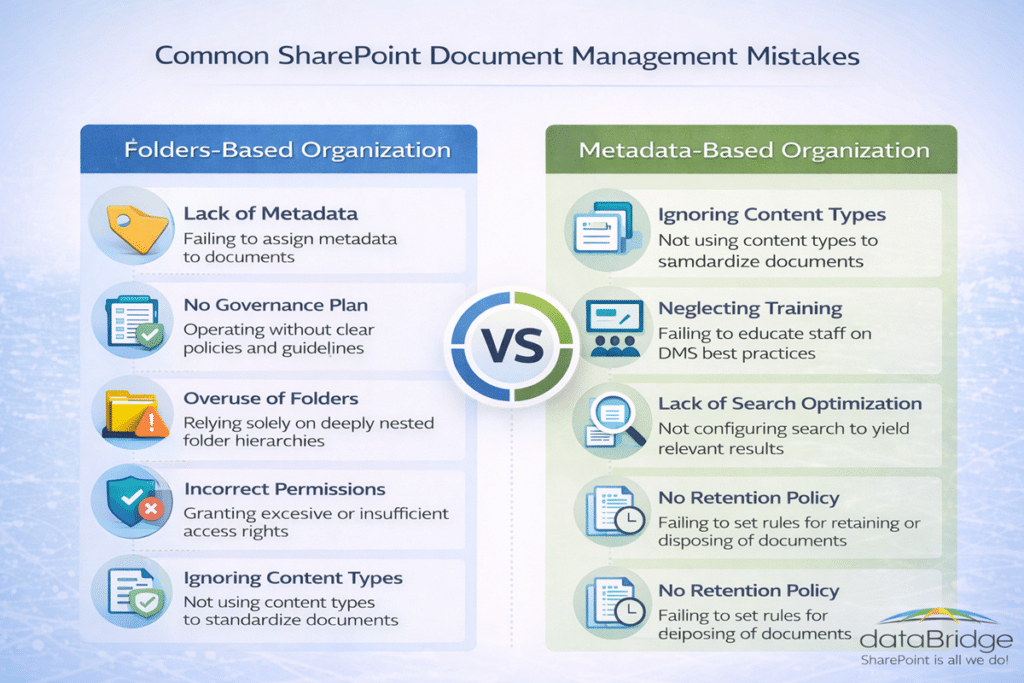
Several mistakes frequently undermine SharePoint document management initiatives.
Treating SharePoint Like a Network Drive
Organizations sometimes replicate legacy file share structures inside SharePoint. This approach limits the benefits of metadata and governance.
Ignoring Governance Early
Governance policies introduced too late often require significant remediation.
Migrating Legacy Problems
Migration projects sometimes focus on moving files rather than improving structure.
Organizations planning migrations often review SharePoint Migration Mistakes.
Where SharePoint Document Management Often Fails
Even organizations that invest in SharePoint frequently struggle to achieve consistent document management outcomes. In most cases, the challenge is not the platform itself but how the environment was designed.
One of the most common issues is uncontrolled growth. As new departments create sites and document libraries independently, the environment expands without a clear structure. Over time, content becomes fragmented across multiple locations.
Another common challenge is inconsistent metadata usage. When different teams apply classification fields differently — or ignore them entirely — search quality declines and automation becomes difficult to implement.
Permission complexity can also undermine document management. Environments that rely heavily on individual user permissions instead of role-based security groups often become difficult to audit and maintain.
Finally, governance is frequently introduced too late. Organizations may attempt to implement policies after thousands of documents have already been created without consistent standards.
When these patterns develop, users lose confidence in the system. They begin storing files locally or sharing documents through email, which further fragments organizational knowledge.
Recognizing these warning signs early allows organizations to address structural issues before document management challenges become deeply embedded in daily workflows.
When Organizations Should Reevaluate Their Document Management Strategy
Certain warning signs indicate that a SharePoint environment may require redesign.
Common indicators include:
- Inconsistent document structures
- Unreliable search results
- Excessive permission exceptions
- Duplicate content across sites
- Unclear content ownership
Organizations facing these challenges often explore the framework discussed in Fix SharePoint, Rebuild It, or Start Over?
Learning from Real Implementations
Organizations evaluating document management strategies often benefit from reviewing real implementations.
Read the Barrett document control case study to see how controlled documents were migrated into SharePoint Online while preserving version history and adding approvals, lifecycle management, and compliance dashboards.
The Future of Document Management in Microsoft 365
Document management is evolving rapidly as organizations adopt cloud collaboration platforms and artificial intelligence technologies.
In the past, document management systems were primarily designed for storage and compliance. While these capabilities remain essential, modern organizations increasingly expect document management platforms to support collaboration, automation, and knowledge discovery.
Microsoft 365 has significantly expanded the role SharePoint plays in this ecosystem. Documents stored in SharePoint now interact with services across the Microsoft platform, including Microsoft Teams, Power Automate, Microsoft Search, and Microsoft Copilot.
Artificial intelligence is accelerating this transformation. Tools such as Microsoft Copilot analyze organizational knowledge stored within SharePoint to generate insights, summarize information, and assist employees with complex tasks.
However, the effectiveness of these tools depends heavily on the quality of the underlying document management system.
When documents are poorly organized, inconsistently classified, or governed by unclear permissions, AI tools struggle to interpret the information correctly. The result is incomplete or misleading insights.
Conversely, when organizations maintain structured metadata, consistent governance policies, and reliable search capabilities, AI systems can surface highly valuable insights across large volumes of content.
In this way, document management has become more than a compliance requirement. It now plays a critical role in how organizations access and use knowledge across the enterprise.
Organizations that invest in strong document management foundations today are far better positioned to benefit from emerging AI capabilities tomorrow.
The following questions address some of the most common topics organizations ask when evaluating SharePoint as a document management platform.
Frequently Asked Questions About SharePoint Document Management
What is a SharePoint document management system?
A SharePoint document management system is a structured framework within Microsoft 365 that allows organizations to store, organize, govern, and retrieve documents using metadata, permissions, search, and lifecycle policies. When implemented correctly, SharePoint supports version control, workflow automation, retention policies, and secure collaboration across departments.
Organizations often design these systems with the help of SharePoint consulting services to ensure the environment includes proper architecture, governance policies, and scalable information structures from the beginning.
Is SharePoint a true document management system?
Yes. SharePoint can function as a full enterprise document management system when it is designed with proper information architecture, metadata classification, governance policies, and permission structures. Without these foundations, SharePoint may behave more like a basic file repository rather than a structured knowledge platform.
Organizations evaluating this often begin by reviewing SharePoint information architecture and metadata strategy, which explains how content structure and classification support long-term document management success.
How does SharePoint improve document search?
SharePoint improves document search through metadata classification, Microsoft Search indexing, and integration with Microsoft Graph. When documents are tagged with consistent metadata and stored within a well-designed architecture, users can locate information quickly using filters, keywords, or contextual search results across Microsoft 365.
Organizations seeking to improve discoverability often explore strategies outlined in SharePoint Online search optimization, which explains how architecture, metadata, and permissions work together to improve search accuracy.
What are the benefits of using SharePoint for document management?
SharePoint provides several advantages for document management, including centralized storage, version control, secure access management, workflow automation, and integration with Microsoft 365 tools such as Teams and Outlook. These capabilities allow organizations to maintain governance while supporting collaboration across departments and project teams.
Many organizations strengthen these capabilities by implementing a structured SharePoint governance framework, which ensures document ownership, lifecycle management, and security policies remain consistent as environments grow.
How does metadata improve SharePoint document management?
Metadata allows documents to be classified using descriptive attributes rather than relying solely on folder locations. This improves search accuracy, supports automated workflows, enables compliance policies, and allows documents to appear in multiple filtered views without creating duplicate copies.
Organizations designing classification systems often begin with a structured SharePoint metadata strategy, which defines how document types, departments, and lifecycle stages should be represented within the environment.
Can SharePoint replace traditional file servers?
Yes. Many organizations migrate legacy network file shares to SharePoint in order to improve collaboration, governance, and document search capabilities. However, successful migrations typically involve redesigning document architecture and metadata structures rather than simply copying existing folder hierarchies into SharePoint.
Organizations planning these initiatives often review common pitfalls outlined in SharePoint migration mistakes, which highlights structural issues that can undermine long-term document management success.
How does document management affect Microsoft Copilot?
Microsoft Copilot relies heavily on the structure and governance of content stored in SharePoint. When documents are organized with consistent metadata, clear permissions, and reliable search capabilities, Copilot can surface accurate insights and generate meaningful responses.
Organizations preparing their environments for AI typically begin with a Copilot readiness assessment for SharePoint, which evaluates architecture, governance, and content quality to ensure the platform can support AI-driven knowledge discovery.
Final Thoughts
A SharePoint Document Management System is far more than a collection of folders and libraries.
It represents a structured approach to managing organizational knowledge.
When architecture, metadata, governance, and security work together, SharePoint becomes a powerful platform for storing, discovering, and governing documents.
When those elements are neglected, even advanced technology struggles to deliver value.
The difference between those outcomes rarely lies in the platform itself.
It lies in the strategy behind it.
Organizations that invest time in designing their document management systems intentionally are far more likely to achieve long-term success with SharePoint.
Key SharePoint DMS Resources

THE SEARCH IS OVER
We're a Microsoft SharePoint partner - everything you need IS right here
For more information about how dataBridge can transform your business with improved corporate communication, collaboration, forms, workflows, and document management, contact us today.