
Designing Scalable Hub Structures for Modern SharePoint Intranets
A SharePoint intranet does not scale because of design alone.
It scales because of structure.
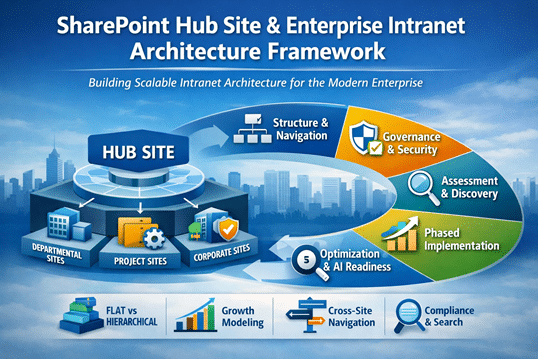
SharePoint Hub Site & Enterprise Intranet Architecture Framework
Hub site architecture determines whether your intranet remains clear and navigable as content grows, departments expand, and governance requirements mature. When hubs are structured intentionally, navigation simplifies, governance strengthens, and AI tools like Microsoft Copilot retrieve information more predictably.
When hub strategy is improvised, intranets gradually become fragmented.
Structure first. Navigation second.
Organizations planning broader intranet initiatives often explore our SharePoint intranet planning guide, which explains how architecture, governance, search, and content lifecycle decisions shape scalable Microsoft 365 intranet environments.
This framework builds on disciplined SharePoint Information Architecture & Metadata and aligns directly with long-term SharePoint Strategy & Roadmapping.
Why Hub Strategy Determines Intranet Success
Hub sites are not just visual groupings. They define structural relationships across your environment.
A flat model reduces hierarchy depth and improves search clarity. A deeply nested model often introduces permission drift and navigation confusion over time. The right balance depends on growth modeling and governance maturity.
In enterprise environments, we frequently see hubs created around org charts rather than workflows. It works initially. It rarely scales cleanly.
Effective hub strategy must account for:
- Flat vs. hierarchical structure decisions
- Growth modeling for future departments
- Cross-site navigation standards
- Governance implications of hub-level permissions
Here’s the nuance: hub design influences both user experience and compliance enforcement. When hubs are misaligned, navigation and governance begin competing instead of reinforcing each other.
Strong hub architecture simplifies both.
Hub site grouping logic has heightened implications in regulated sectors, where permission inheritance and audit boundaries must be tightly controlled. Our SharePoint architecture for regulated industries page explores how hub strategy intersects with compliance enforcement.
Assess & Discover
Understand How Work Actually Happens
Before restructuring hubs, discovery is essential.
We evaluate:
- Departmental alignment versus functional alignment
- Cross-team collaboration patterns
- Security boundary requirements
- Executive communication priorities
In practice, collaboration rarely mirrors formal reporting lines. Sales may collaborate more closely with Marketing than with adjacent business units. If hub grouping ignores that reality, navigation friction increases quickly.
We have seen organizations with more than 40 hub sites created organically over time. Individually, each hub made sense. Collectively, they diluted structural clarity and search precision.
This discovery phase connects directly to SharePoint Strategy & Roadmapping, ensuring intranet architecture reflects real workflows rather than temporary organizational charts.
It also sets the foundation for disciplined alignment with the SharePoint Governance Maturity Model.
Architecture & Governance
Designing Hub Structures That Scale
Hub architecture must reinforce governance, not undermine it.
Key structural components include:
Hub Grouping Logic
Hubs should align with business capabilities or service lines—not simply departments. Grouping based on long-term functions reduces the need for restructuring when organizational charts shift. Stability matters.
Hub grouping logic becomes significantly more effective when supported by a consistent SharePoint taxonomy and metadata strategy, ensuring classification standards extend across sites, libraries, and business capabilities.
Navigation Standards
Global navigation, hub navigation, and local site navigation must work together. Inconsistent navigation models create cognitive overload. Clear hierarchy reduces it.
Search and navigation are partners. When one weakens, the other compensates poorly.
Site Templates
Standardized site templates within hubs ensure consistency in metadata fields, content types, permissions, and page structure. Without template discipline, structural drift accelerates.
Templates protect architecture.
Provisioning Controls
Uncontrolled site creation undermines hub clarity. Provisioning controls, request workflows, and governance checkpoints preserve structural integrity.
Over time, provisioning discipline prevents hub sprawl.
Architecture becomes durable when governance reinforces it. That alignment is central to structured SharePoint Consulting Services engagements.
Implementation & Phasing
Rolling Out Hub Strategy Intentionally
Hub restructuring should not happen all at once.
Effective rollout typically includes:
- Prioritized hub sequencing
- Navigation testing with pilot groups
- Permission inheritance validation
- Adoption reinforcement sessions
- Governance checkpoint reviews
In larger environments, phased hub rollout reduces disruption and strengthens user trust. When navigation shifts too abruptly, adoption declines—even if the structure improves.
Testing matters. Validation matters. Communication matters.
This phase also supports long-term alignment with Copilot Readiness for SharePoint, ensuring AI retrieval logic reflects refined hub structures.
Post-Launch Optimization
Refining Structure as the Intranet Evolves
Hub architecture is not static. It evolves alongside the organization.
Post-launch refinement focuses on:
- Search analytics review
- Engagement metric evaluation
- Structural redundancy detection
- Navigation performance testing
- AI retrieval validation
Interestingly, hub models that begin slightly simpler tend to scale more effectively than overly complex initial designs.
Complexity feels strategic. Simplicity scales better.
Search analytics often reveal subtle navigation gaps within weeks. Structural adjustments at this stage are easier than retrofits years later.
Optimization reinforces discipline.
How Hub Architecture Strengthens the Entire SharePoint Ecosystem
Hub strategy does not stand alone. It intersects directly with:
- SharePoint Information Architecture & Metadata
- SharePoint Governance Maturity Model
- Copilot Readiness for SharePoint
- SharePoint Strategy & Roadmapping
- SharePoint Consulting Services
Hub design influences metadata alignment, search behavior, permission inheritance, compliance enforcement, and AI accuracy.
When hub architecture is intentional, intranet performance becomes predictable.
When structure scales, adoption follows.
Enterprise Intranet Architecture Delivered The dataBridge Way™
Enterprise intranet architecture aligns with The dataBridge Way™:
Assess & Discover — Evaluate collaboration patterns and structural alignment
Architecture & Governance — Design scalable hub logic and navigation standards
Implementation & Phasing — Roll out intentionally with validation checkpoints
Optimization & Scale — Refine structure using analytics and governance reinforcement
Hub strategy is not a layout decision.
It is an architectural commitment.
When hub design reflects disciplined information architecture and governance alignment, SharePoint becomes more than a collaboration tool. It becomes a structured digital workplace platform capable of scaling with the business.
That is how enterprise intranets endure.
It is how structure supports scale.
That is The dataBridge Way™.
Frequently Asked Questions
What is SharePoint hub site architecture?
SharePoint hub site architecture is the structured framework that organizes related sites into logical groupings to improve navigation, governance alignment, search clarity, and scalability. Instead of relying on deep hierarchies, hub architecture connects sites through shared navigation, metadata, and permissions models to create a cohesive enterprise intranet structure.
How many hub sites should an enterprise SharePoint intranet have?
There is no fixed number, but most enterprise environments perform best with a limited number of strategically defined hubs aligned to business capabilities rather than departments. Excessive hub creation leads to navigation fragmentation and governance complexity. A disciplined hub strategy prioritizes clarity over quantity.
What is the difference between flat architecture and hierarchical hub structures?
A flat architecture reduces subsite depth and relies on hub associations for logical grouping. Hierarchical structures rely on nested sites and inherited permissions. In modern SharePoint Online environments, flat hub-based architecture typically scales more predictably and supports cleaner search and governance alignment.
How does hub site design impact Microsoft Copilot and AI readiness?
Hub architecture influences how content is grouped, discovered, and permissioned. When hubs are structured intentionally with consistent metadata and clear governance boundaries, Copilot retrieves more accurate and contextually relevant information. Poorly structured hubs can fragment context and reduce AI reliability.
How do you prevent hub site sprawl in large SharePoint environments?
Preventing hub sprawl requires defined provisioning controls, governance checkpoints, clear grouping logic, and executive alignment on structural standards. Without oversight, departments may create redundant hubs that dilute navigation clarity and weaken enterprise information architecture over time.

THE SEARCH IS OVER
We're a Microsoft SharePoint partner - everything you need IS right here
For more information about how dataBridge can transform your business with improved corporate communication, collaboration, forms, workflows, and document management, contact us today.