Skip to content
SharePoint and Microsoft 365 Consulting Solutions hero image showing a professional dataBridge team reviewing strategy, governance, architecture, and adoption in a modern executive workspace.

SharePoint & Microsoft 365 Consulting Solutions

dataBridge provides SharePoint and Microsoft 365 consulting solutions that connect governance, information architecture, intranets, migrations, automation, Teams, Power BI, and Copilot readiness into one structured consulting model. This page helps organizations understand how those capabilities fit together and where to start based on current priorities.

Most organizations do not need another disconnected Microsoft 365 service list. They need a clear view of how strategy, architecture, migration, governance, adoption, and analytics work together. This page explains the dataBridge solution portfolio so teams can identify the right starting point without losing sight of the larger platform picture.

At dataBridge, we help organizations design and improve structured SharePoint and Microsoft 365 environments that support collaboration, governance, and long-term scalability. Our consulting solutions focus on the foundational elements that determine whether a Microsoft 365 environment succeeds or slowly becomes difficult to manage.

From strategy and architecture to modernization and AI readiness, our consulting approach ensures that structure comes first.

That principle is central to The dataBridge Way™.

This page is a solution-navigation hub. It helps organizations choose the right dataBridge consulting path based on their current challenge. For the broad SharePoint consulting services overview, start with SharePoint Consulting Services. For educational guides and practical resources, use the SharePoint & Microsoft 365 Knowledge Center.

How This Page Fits With Related dataBridge Resources

This page is the primary dataBridge solution-navigation hub for SharePoint and Microsoft 365 consulting. It explains how dataBridge service areas fit together across SharePoint consulting, governance, document management, intranets, migrations, Copilot readiness, Microsoft 365 strategy, Teams, Power Platform, Power BI, support, and adoption.

Use the related resources this way:

  • Use SharePoint Consulting Services when you want the broad SharePoint consulting overview before choosing a more specific service path.
  • Use the SharePoint Governance Center when your organization needs to connect ownership, permissions, lifecycle rules, provisioning, records, search governance, external sharing, and AI readiness.
  • Use the SharePoint Document Management System page when the main issue is document libraries, metadata, permissions, search, records, retention, document control, and content lifecycle.
  • Use the SharePoint Intranet Center when the main issue is intranet planning, navigation, page ownership, adoption, search, redesign, or employee experience.
  • Use the SharePoint Migration Center when the main issue is migration readiness, file share migration, destination architecture, permissions cleanup, validation, or post-migration optimization.
  • Use the SharePoint AI Readiness Center when the main issue is preparing SharePoint content, permissions, metadata, lifecycle governance, search, and source authority for Copilot or SharePoint agents.
  • Use the SharePoint & Microsoft 365 Knowledge Center when you want educational guides, articles, checklists, FAQs, webinars, and practical planning resources.

Together, these pages separate the broad solution portfolio from the deeper consulting, authority-center, assessment, governance, and implementation resources that help organizations choose the right path.

Written by Michael Fuchs, Founder and CEO of dataBridge. Reviewed by Andrea Skinner, Director of Operations, for SharePoint consulting process, client engagement, project coordination, and Microsoft 365 delivery accuracy.

Published: March 5, 2026
Last reviewed: May 29, 2026

Start With Your Challenge

Most Microsoft 365 problems are not tool problems. They are structure problems. Start with the area that needs the most attention, then explore the consulting path that fits your environment. Use this section as a routing guide. Each path below points to a dedicated page where that specific service area is explained in more detail.

SharePoint Consulting Services

Improve SharePoint architecture, permissions, governance, migrations, intranets, adoption, and long-term platform direction. Start here when you need broad SharePoint consulting guidance before choosing a more specific service path.

Explore SharePoint Consulting Services

SharePoint Intranets

Plan and build a modern intranet that improves navigation, search, content ownership, and employee experience. This is the right path when the goal is a digital workplace people actually use.

Explore SharePoint Intranets

SharePoint Document Management

Create a more structured document management environment with better libraries, metadata, permissions, search, lifecycle control, records alignment, and user adoption. Start here if file sprawl, poor findability, or unclear ownership is slowing teams down.

Explore SharePoint Document Management

SharePoint Migrations

Move to SharePoint Online without recreating old problems. Start here for migration planning, cleanup, permissions review, governance, and post-migration structure.

Explore SharePoint Migrations

Microsoft Copilot Consulting & Readiness

Prepare Microsoft Copilot with better content structure, permissions, governance, use-case prioritization, and rollout planning across Microsoft 365. Good Copilot results usually start long before launch.

Explore Microsoft Copilot Consulting & Readiness

Microsoft Power Platform Consulting

Build apps, forms, workflows, and automation that scale cleanly across SharePoint, Teams, and Microsoft 365. Start here if quick wins are turning into long-term support problems.

Explore Microsoft Power Platform Consulting

How to Choose the Right dataBridge Consulting Path

Use this simple starting point:

If your main challenge is…

Start here

Broad SharePoint direction, structure, governance, or modernization

SharePoint Consulting Services

Document libraries, metadata, search, lifecycle, records, or content structure

SharePoint Document Management System

Governance roles, policies, ownership, lifecycle, and review cadence

SharePoint Governance Framework

Migration planning, cleanup, permissions, and post-go-live validation

SharePoint Migration Consulting

Intranet navigation, publishing, homepage design, and adoption

SharePoint Intranet Consulting Services

SharePoint readiness for Microsoft 365 Copilot

Copilot Readiness for SharePoint

Apps, forms, workflows, and low-code governance

Microsoft Power Platform Consulting

Teams structure, lifecycle, permissions, and governance

Microsoft Teams Consulting & Governance

Power BI reporting, data modeling, and analytics

Power BI Consulting & Reporting Services

Long-term Microsoft 365 strategy across tools

Microsoft 365 Consulting & Strategy


If your team needs a practical resource before choosing a consulting path, start with the SharePoint planning tools and assessment resources hub. It helps you compare scorecards, worksheets, readiness checklists, and assessment resources across governance, migration, intranet, and Copilot planning.

A Consulting-First Approach to Microsoft 365 Success

Many organizations begin with implementation. They deploy tools, migrate content, and configure collaboration platforms. Only later do they discover that structure and governance were never clearly defined.

The result is predictable.

Search becomes inconsistent. Permissions drift. Teams multiply. Content ownership becomes unclear.

Over time, even well-intentioned deployments can become difficult to maintain.

Our consulting engagements reverse this pattern.

Instead of starting with tools, we begin with structure.

We assess how information flows across the organization. We examine governance maturity, collaboration patterns, and the architecture that supports everyday work. Then we design an environment that aligns with both operational needs and long-term growth.

Technology is still important. But architecture determines whether technology works as intended.

Organizations seeking expert guidance can explore our SharePoint Consulting Services to understand how structured consulting engagements help align Microsoft 365 with business goals.

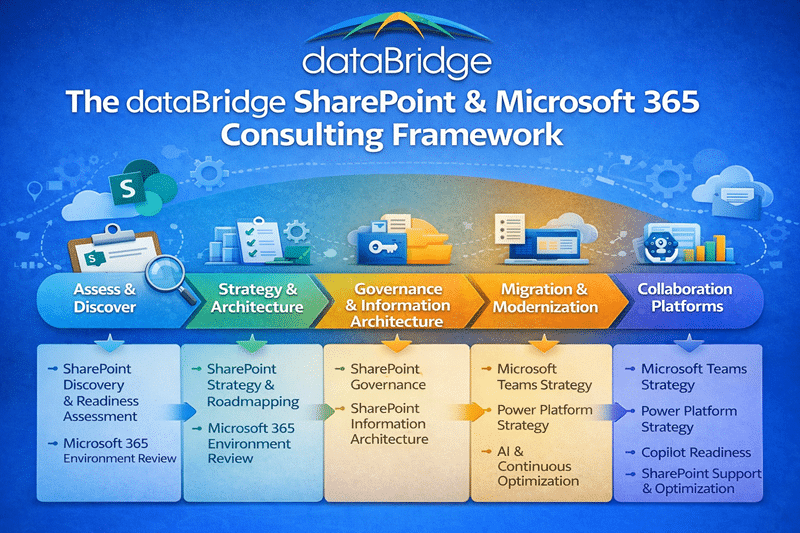
dataBridge SharePoint and Microsoft 365 consulting framework infographic showing assess and discover, strategy and architecture, governance and information architecture, migration and modernization, and collaboration platforms.
The dataBridge SharePoint and Microsoft 365 consulting framework illustrates how structured discovery, architecture, governance, migration, and collaboration platform strategy work together to create scalable Microsoft 365 environments.

Strategy & Architecture Solutions

A successful Microsoft 365 environment begins with clear strategy and information architecture. Without these foundations, even well-configured tools can struggle to support collaboration at scale.

Our strategy and architecture consulting services help organizations define how SharePoint and Microsoft 365 should work across teams, departments, and leadership groups.

SharePoint Strategy & Roadmapping

Many organizations know they need to modernize collaboration, but they lack a clear roadmap for how to proceed.

Our SharePoint Strategy & Roadmapping engagements help organizations define:

  • Platform objectives
  • Modernization priorities
  • Governance planning
  • Adoption strategies
  • Implementation sequencing

A well-defined roadmap reduces uncertainty and ensures that technology investments align with long-term goals.

SharePoint Governance

Governance keeps SharePoint and Microsoft 365 environments sustainable as sites, Teams, permissions, content, and collaboration patterns grow.

Use this path when your organization needs clearer ownership, lifecycle standards, permission models, site creation rules, review cadence, or governance roles.

Start with:

For a real-world example of governance and compliance work, see the Microsoft 365 & Teams Compliance Rollout for Healthcare Provider case study.

SharePoint Information Architecture

Information architecture determines whether content can be found, trusted, governed, reused, and prepared for future Microsoft 365 capabilities.

Use this path when your organization needs clearer site structure, metadata, taxonomy, content types, hub architecture, navigation, document library design, or search improvement.

Start with:

For a real-world example, see the SharePoint Document Control Migration for Global Manufacturer case study.


Implementation & Modernization Solutions

Modernizing collaboration environments requires more than migrating files. It requires thoughtful planning and structural improvements.

Our modernization consulting services guide organizations through migrations and intranet initiatives designed for long-term success.

SharePoint development often sits inside this modernization work. When a project needs custom components, forms, workflow-connected experiences, list and library enhancements, or maintainable SharePoint interfaces, use SharePoint development and customization services to plan the build path before implementation starts.

Real Client Success Stories

See how organizations implement these strategies in real environments by exploring our SharePoint consulting case studies and client success stories.

SharePoint Migrations

A SharePoint migration is an opportunity to improve the environment, not simply move content.

Use this path when your organization needs migration planning, readiness assessment, cleanup, permission review, metadata planning, governance alignment, migration execution, or post-migration validation.

Start with SharePoint Migration Consulting. For the full educational planning guide, use The Complete Guide to SharePoint Online Migrations.

For a real-world example, read the ReVision Energy migration case study.

SharePoint Intranet Strategy

A modern SharePoint intranet should improve communication, navigation, publishing, knowledge access, and employee trust.

Use this path when your organization needs intranet planning, homepage strategy, navigation design, audience targeting, publishing governance, page templates, search improvement, or adoption support.

Start with SharePoint Intranet Consulting Services. For the educational guide, use The Complete Guide to Building a Modern SharePoint Intranet.

For a real-world example, read the Justice Resource Institute intranet case study.


Microsoft 365 Collaboration Platforms

While SharePoint serves as the foundation for many collaboration scenarios, Microsoft 365 also includes additional platforms that influence how organizations work together.

Understanding how these platforms interact is essential for maintaining a well-structured environment.

For organizations researching governance, architecture, migrations, and Microsoft 365 best practices, our SharePoint & Microsoft 365 Knowledge Center provides detailed guides and resources.

Microsoft Teams Strategy

Microsoft Teams has become central to collaboration across many organizations. Yet rapid adoption often leads to structural challenges.

Teams sprawl, duplicate workspaces, and inconsistent permissions can create confusion.

Our Microsoft Teams Strategy consulting focuses on aligning Teams with SharePoint architecture so that collaboration spaces remain organized and manageable.

When Teams and SharePoint work together intentionally, organizations experience better collaboration and clearer governance.

Power Platform Strategy

The Microsoft Power Platform enables organizations to build workflows, applications, and dashboards without extensive development.

While this flexibility is powerful, it also introduces governance considerations.

Our Power Platform Strategy consulting helps organizations establish standards for:

  • Power Apps development
  • Power Automate workflows
  • Power BI reporting architecture
  • Low-code governance

Structured oversight ensures that low-code solutions enhance productivity without creating long-term maintenance challenges.


Preparing Microsoft 365 for AI and Copilot

Copilot readiness is not only a licensing decision. It depends on content quality, permissions, metadata, governance, lifecycle control, source authority, and adoption.

Use this path when your organization needs to prepare SharePoint and Microsoft 365 for AI-assisted work.

Start with:


The dataBridge Way™

Our consulting engagements follow a structured methodology designed to support long-term platform success.

This approach, known as The dataBridge Way™, focuses on five core phases:

  1. Assess & Discover
    Understand existing content, collaboration patterns, and governance maturity.

  2. Architecture & Governance Design
    Establish structural frameworks that support scalability and compliance.

  3. Migration & Implementation Planning
    Design modernization strategies that improve the environment during transition.

  4. Adoption & Enablement
    Support user adoption through training, communication, and leadership alignment.

  5. Optimization & Continuous Improvement
    Monitor platform health and reinforce governance practices over time.

This methodology ensures that technology investments align with organizational needs rather than creating additional complexity.


Why Organizations Choose dataBridge

Organizations choose dataBridge because our consulting approach prioritizes long-term sustainability.

While many firms focus primarily on tool configuration, we emphasize structural design.

This difference matters.

Well-structured environments consistently deliver:

  • Improved search results
  • Clearer content ownership
  • Reduced governance friction
  • Stronger collaboration practices

When architecture and governance are thoughtfully designed, the technology becomes significantly easier to manage and scale.


Start a Conversation

Improving a SharePoint or Microsoft 365 environment often begins with a structured discovery engagement.

If your organization is planning a migration, modernizing an intranet, preparing for Copilot, or addressing governance challenges, our consultants can help identify practical next steps.

Learn more about how structured engagements begin with our SharePoint Consulting Services, or reach out to start a conversation about your environment.

What our clients say

Client testimonial graphic featuring a quote praising dataBridge as a strategic SharePoint partner, attributed to Breana Roides of Strategic Knowledge & Insight, with branding and quote icon design
“Through multiple high-profile projects, dataBridge has become a true business partner… not only optimizing design and functionality but transforming the user experience and taking SharePoint to a whole new level.” — Breana Roides Strategic Knowledge & Insight

Frequently Asked Questions

What does a SharePoint and Microsoft 365 consulting firm do?

A SharePoint and Microsoft 365 consulting firm helps organizations design, implement, and improve collaboration environments across the Microsoft 365 platform. This includes architecture planning, governance frameworks, migration strategy, intranet design, and integration with tools like Microsoft Teams and the Power Platform. The goal is not just to deploy technology, but to create a structured environment that supports collaboration, security, and long-term scalability.

When should an organization engage a SharePoint consulting partner?

Organizations typically engage a consulting partner when they are planning a major change to their Microsoft 365 environment. Common scenarios include SharePoint migrations, intranet redesigns, governance challenges, Teams sprawl, or preparing for AI tools like Microsoft Copilot. A consulting engagement helps identify structural issues early and ensures that the platform is designed to support both current and future needs.

How do SharePoint and Microsoft Teams work together?

Microsoft Teams uses SharePoint as its document management and content storage platform. Every Team is backed by a SharePoint site that stores files, permissions, and collaboration data. Because of this relationship, effective Teams governance depends on well-structured SharePoint architecture, including clear site ownership, metadata strategy, and lifecycle management practices.

What is the most common problem organizations face with SharePoint?

The most common challenge is not technology—it is structure. Many organizations deploy SharePoint without a clear information architecture, governance model, or ownership framework. Over time, this leads to inconsistent permissions, duplicate content, and difficulty finding information. Addressing these issues typically requires a combination of governance planning, metadata strategy, and structured modernization.

How does preparing SharePoint for AI tools like Copilot change the consulting approach?

Preparing a Microsoft 365 environment for AI requires stronger information architecture and governance than traditional collaboration deployments. AI tools rely on structured, well-classified content to deliver accurate results. Consulting engagements focused on AI readiness often include metadata standardization, content lifecycle improvements, permission reviews, and governance alignment to ensure that AI systems can safely and accurately access organizational knowledge.