

Structure Is the Foundation of Everything
IA Best Practices
SharePoint information architecture and metadata are what determine whether your content is usable—or unmanageable. Without a clear structure, consistent taxonomy, and well-defined metadata strategy, even the most advanced Microsoft 365 environments quickly become difficult to navigate, search, and govern. At dataBridge, we design information architecture that aligns with how your business actually works—making content easier to find, improving user adoption, and creating the foundation for scalable governance and AI-ready environments.
SharePoint Information Architecture & Metadata
Design Structure That Makes SharePoint Work
SharePoint succeeds or fails based on structure. Without clear information architecture and metadata, even the most feature-rich Microsoft 365 environment becomes difficult to navigate, hard to govern, and nearly impossible to scale. At dataBridge, we help organizations design intentional SharePoint information architecture and metadata strategies that bring clarity, consistency, and long-term value to the platform. A critical part of our SharePoint Consulting Services.
Rather than treating structure as an afterthought, we position information architecture and metadata as foundational design decisions. When done correctly, they improve findability, support governance, enable adoption, and prepare SharePoint for advanced capabilities like Microsoft Copilot and AI.
These architecture capabilities are part of our broader SharePoint & Microsoft 365 consulting solutions, which bring together strategy, governance, migration planning, and collaboration design to help organizations build structured, scalable Microsoft 365 environments.
As organizations begin preparing for Microsoft Copilot, structural discipline becomes even more critical. Our detailed guide on Copilot-Ready SharePoint Information Architecture explains how metadata consistency, governance alignment, and search configuration directly impact AI reliability and output accuracy.
Why Information Architecture and Metadata Matter
Metadata Best Practices for Microsoft 365
As SharePoint environments grow, content volume increases quickly. Without structure, organizations face common challenges:
- Content sprawl and duplication
- Inconsistent naming and organization
- Poor search results and low trust in content
- Permissions complexity and security risk
- Difficulty reporting on usage and ownership
Information architecture defines where content lives and how it’s organized. Metadata defines how content is described, filtered, secured, and discovered.
Those same structural decisions sit at the center of an effective SharePoint Document Management System, where metadata, permissions, search, and lifecycle governance work together to keep business content secure, discoverable, and manageable at scale.
For a deeper breakdown of how metadata structures are designed and governed, see our complete guide to SharePoint metadata strategy. Together, they turn SharePoint from a file repository into a usable, governable platform.
At dataBridge, we design both with business outcomes in mind, not just technical convenience.
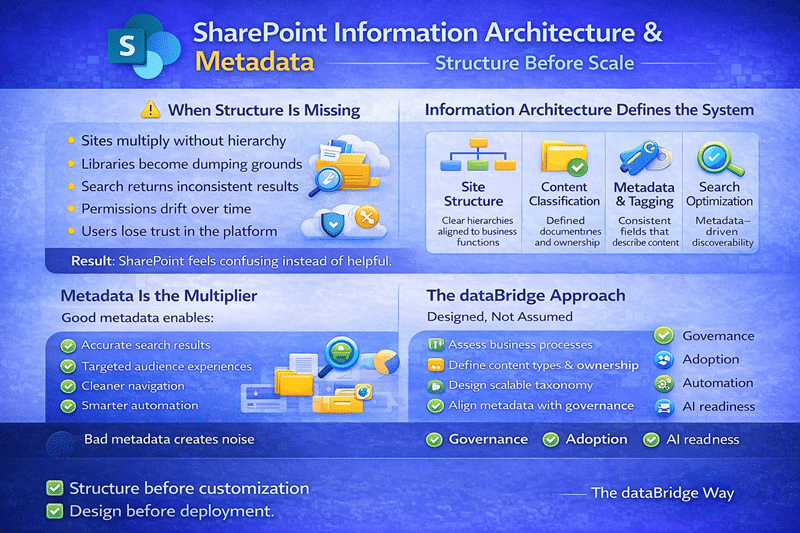
Our Approach to SharePoint Information Architecture
Start with How the Business Works
Before designing sites, libraries, or metadata, we focus on understanding how your organization actually operates.
We assess:
- How teams collaborate and share information
- What content is most critical to daily work
- Who owns information and decisions
- How content flows across departments
- What leaders need visibility into
This discovery work often begins as part of a
SharePoint Discovery & Readiness Assessment
and ensures architecture decisions align to real workflows—not assumptions.
Design a Scalable Site and Hub Structure
How Information Architecture Reduces Governance Burden
Next, we design a SharePoint architecture that supports growth without chaos.
This includes:
- Communication sites, team sites, and hubs
- Logical separation of collaboration vs. publishing
- Clear ownership and responsibility boundaries
- Consistent navigation patterns across hubs
We avoid over-engineering while still planning for scale. As a result, SharePoint remains intuitive for users and manageable for administrators.
This work aligns closely with our
SharePoint Architecture & Governance Consulting
to ensure structure and policy work together.
Information architecture is one component of a broader digital workplace strategy. Organizations often address architecture alongside governance, migration planning, and intranet design as part of a structured SharePoint and Microsoft 365 consulting solutions approach.
Metadata That Supports Findability and Governance
Move Beyond Folders
Folders alone don’t scale. Metadata enables users to find, filter, and manage content across sites and libraries—without relying on deep folder structures.
We design metadata strategies that:
- Reflect business language and processes
- Reduce duplication and ambiguity
- Support filtering, views, and search
- Enable reporting and lifecycle management
Metadata becomes a tool users rely on, not avoid.
| Metadata Field | Purpose |
|---|---|
| Department | Filters content by team |
| Document Type | Distinguishes contracts vs policies |
| Sensitivity | Drives security and retention |
Lifecycle | Triggers cleanup and archiving |
As environments grow, ad hoc metadata quickly leads to duplication and term sprawl. A structured SharePoint taxonomy and metadata strategy ensures consistent classification across hubs, libraries, and business units—supporting long-term search accuracy and governance enforcement.
While strong information architecture benefits every organization, regulated industries require additional structural safeguards. Our SharePoint architecture for regulated industries framework outlines how metadata, retention, and security controls must be intentionally aligned to support audit and compliance requirements.
Organizations researching information architecture, taxonomy strategy, and governance alignment in more depth can explore our SharePoint & Microsoft 365 Knowledge Center, which contains detailed guidance on metadata strategy, migration planning, and long-term Microsoft 365 architecture.
Define Metadata at the Right Level
Effective metadata starts with consistency. We help organizations define metadata at the appropriate level, including:
- Tenant-level content types
- Reusable site columns
- Library-specific metadata where appropriate
- Required vs. optional fields
This approach ensures metadata remains consistent while still flexible enough to support different teams.
Site-level design decisions directly influence scalability and navigation clarity. Our detailed SharePoint hub site architecture framework explains how hub grouping logic, navigation standards, and governance alignment determine long-term intranet performance.
Design for Security, Retention, and Compliance
Metadata plays a critical role in governance. We design it to support:
- Sensitivity labels
- Retention policies
- Permissions models
- Records management
By embedding metadata into governance strategies, organizations reduce risk while maintaining usability.
This often complements
SharePoint Migration Consulting
where content cleanup and reclassification are essential.
Information Architecture That Enables Search and AI
Why Metadata Improves SharePoint Search
Search and AI only work as well as the structure behind them.
Well-designed information architecture and metadata:
- Improve Microsoft Search accuracy
- Enable meaningful filters and refiners
- Support Copilot summaries and comparisons
- Reduce hallucinations and misinformation
As organizations prepare for Copilot, structure becomes even more critical. Poor metadata leads to poor AI outcomes.
While metadata enables flexible organization, many organizations still rely heavily on folder hierarchies. Understanding the difference is essential for modern SharePoint design. Our guide on folders vs metadata in SharePoint and why it matters for AI explains how these approaches impact search, governance, and Microsoft Copilot.
That’s why this work is foundational to Copilot readiness and Microsoft 365 optimization initiatives. As AI adoption increases, taxonomy discipline becomes even more consequential. Structured term stores and consistent metadata application directly influence Copilot retrieval behavior. Learn more in our guide to Copilot-Ready SharePoint Information Architecture.
Integrating Architecture with Design and Adoption
Information architecture should never live in isolation. We integrate it with:
- SharePoint Design & Development to ensure layouts reinforce structure
- Microsoft 365 Adoption & Optimization to align training and usage patterns
- SharePoint Training to teach users how and why structure matters
When users understand why SharePoint is organized the way it is, adoption improves naturally. Automation performs best when paired with structured architecture. See our recommendations for Power Automate best practices in enterprise environments.
Common Architecture and Metadata Problems We Fix
Organizations often come to dataBridge after experiencing:
- Overuse of folders and document libraries
- Inconsistent metadata across sites
- Poor search results and low user trust
- Excessive unique permissions
- Difficulty migrating or modernizing content
We help untangle these environments and redesign structure without disrupting day-to-day work.
Who This Is Best For
Our information architecture and metadata services are ideal for organizations that:
- Rely heavily on SharePoint and Microsoft 365
- Need structure to support scale and governance
- Are preparing for migration or Copilot
- Want better search, reporting, and visibility
- Value long-term platform health over quick fixes
If you’re exploring related topics like governance, migration planning, or Microsoft Teams architecture, our SharePoint & Microsoft 365 Knowledge Center provides a collection of practical guides and resources.
Many organizations also explore our industry-specific SharePoint intranet solutions to understand how information architecture, governance requirements, and compliance considerations vary across healthcare, financial services, government, education, and other regulated sectors.
Good Information Architecture vs. Poor Information Architecture
A Clear Contrast
Good Information Architecture
- Clear site hierarchy aligned to business functions
- Defined content types and ownership
- Consistent, governed metadata fields
- Search results that are predictable and relevant
- Permissions aligned to business intent
- Scalable structure that supports automation and AI
Outcome:
Users trust the platform. Search works. Governance feels natural. The environment scales.
Poor Information Architecture
- Sites created without structural alignment
- Libraries used as dumping grounds
- Inconsistent or missing metadata
- Search results that feel random
- Permission sprawl and ownership confusion
- Reactive governance and cleanup cycles
Outcome:
Users lose trust. Search becomes unreliable. Governance becomes a policing exercise.
The dataBridge Difference
Many firms treat information architecture as documentation.
dataBridge treats it as strategy.
We combine:
- Deep SharePoint expertise
- Real-world governance experience
- Business-first consulting
- Practical implementation guidance
As a result, the structure we design doesn’t just look good—it works.
Get Started with SharePoint Information Architecture
If your SharePoint environment feels cluttered, difficult to manage, or unprepared for what’s next, information architecture is the place to start.
Begin with a SharePoint Discovery Engagement and let dataBridge help you design structure that brings clarity, control, and confidence to SharePoint.
Frequently Asked Questions
1️⃣ Why is information architecture more important than site design in SharePoint?
Information architecture determines how content is structured, classified, secured, and discovered — long before visual design comes into play. While site design affects user experience, architecture governs how information behaves across the entire Microsoft 365 environment. Poor architecture leads to inconsistent metadata, unreliable search, permission sprawl, and governance challenges. Strong architecture ensures that design, automation, collaboration, and AI capabilities all operate on a stable foundation.
2️⃣ How does metadata improve SharePoint search and Copilot accuracy?
Metadata gives context to content. When documents are consistently tagged with structured fields — such as department, document type, sensitivity level, or lifecycle stage — SharePoint search can return predictable, relevant results instead of keyword-based guesses. In modern Microsoft 365 environments, metadata also improves Copilot grounding. AI systems rely on structured, governed content to generate trustworthy responses. Without metadata discipline, AI amplifies confusion instead of clarity.
3️⃣ What is the biggest mistake organizations make with SharePoint information architecture?
The most common mistake is designing structure after content has already scaled. Organizations often migrate files first and attempt to impose architecture later. By that point, inconsistent naming, duplicated content, and fragmented permissions are already embedded in the environment. Effective SharePoint architecture must be intentional from the beginning — aligned to business functions, ownership models, governance requirements, and long-term scalability.

THE SEARCH IS OVER
We're a Microsoft SharePoint partner - everything you need IS right here
For more information about how dataBridge can transform your business with improved corporate communication, collaboration, forms, workflows, and document management, contact us today.