
67%
reduction in post-migration rework
Structured discovery reduces cleanup and remediation after launch by identifying risks and structural gaps early.
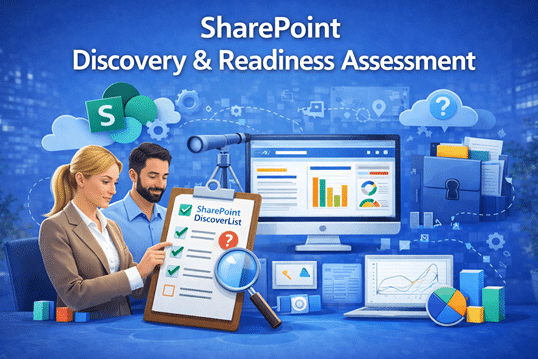
Start with Clarity Before You Build, Migrate, or Optimize
Successful SharePoint and Microsoft 365 initiatives don’t begin with tools or templates—they begin with understanding and SharePoint Consulting Services. At dataBridge, our SharePoint Discovery & Readiness Assessment provides the clarity organizations need before making structural, migration, or design decisions.
Rather than jumping straight into implementation, we take the time to understand how your business actually works. As a result, the solutions that follow are aligned, scalable, and built for long-term success—not short-term fixes.
A SharePoint Discovery & Readiness Assessment is a structured evaluation of governance, architecture, permissions, adoption risk, and AI readiness conducted before migration, intranet development, or modernization.
This assessment is the foundation of The dataBridge Way and informs every engagement that follows.
Proven impact before you invest in migration, intranet development, or Copilot readiness.
Structured discovery reduces cleanup and remediation after launch by identifying risks and structural gaps early.
Clear governance and ownership modeling accelerates decision-making and reduces scope drift.
Content rationalization eliminates duplicate, outdated, or redundant material before it scales into your new environment.
Structured metadata and permission clarity improve AI reliability and reduce “noise” in answers.
When discovery precedes intranet development, navigation reflects real business workflows, ownership is clear, and governance is embedded from the start—reducing redesign cycles and increasing early engagement.
Before investing in an intranet, migration, redesign, or Copilot, most organizations should ask a simple question:
Do we truly understand the current state of our SharePoint environment?
Without structured discovery, teams often move forward based on assumptions — not evidence.
Organizations typically encounter:
Discovery replaces assumptions with visibility.
It clarifies what exists, what should change, and what should remain. More importantly, it ensures your next step is intentional — not reactive.
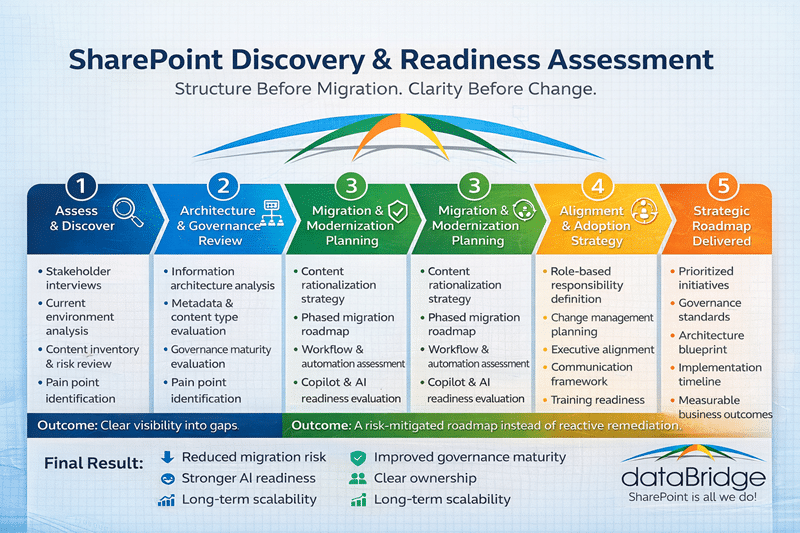
Our assessment examines both the technical environment and the business context in which SharePoint operates. We focus on how people work, how information flows, and how decisions are made.
We begin by understanding the organization itself.
This includes:
This context ensures SharePoint is designed to support real workflows—not theoretical ones.
Next, we review the existing platform to understand what’s working and what isn’t.
This may include:
These insights often inform SharePoint Architecture & Governance recommendations.
Structure determines everything that follows. During discovery, we assess how content is organized and described today—and where improvements are needed.
We evaluate:
This work directly supports
SharePoint Information Architecture & Metadata design efforts.
Governance is not optional—it’s foundational.
We assess:
These findings help define a governance model that supports growth without chaos.
For organizations planning to migrate or modernize, discovery reduces surprises.
We evaluate:
This work directly informs
SharePoint Migration Consulting strategies.
Even the best design fails without adoption. That’s why discovery includes people, not just technology.
We assess:
These insights support
Microsoft 365 Adoption & Optimization
and SharePoint Training initiatives.
As organizations prepare for Copilot, discovery becomes even more critical.
We assess whether your environment is ready for:
Poor structure leads to poor AI outcomes. Discovery helps prevent that.
Most SharePoint problems don’t start with bad technology — they start with skipped discovery. A structured SharePoint Discovery & Readiness Assessment ensures you solve the right problems in the right order before investing in migration, redesign, automation, or Copilot.
A discovery assessment often reveals structural issues that lead to SharePoint migration mistakes, including inconsistent permissions, duplicate content, and missing governance policies.
For many organizations, permissions are where those structural issues become most visible. Our SharePoint permissions guide outlines the core principles behind cleaner inheritance, group-based access, and scalable permission design.
Here’s why it matters.
When organizations migrate content or rebuild intranets without structured discovery, they often carry forward outdated permissions, redundant content, broken workflows, and inconsistent metadata.
Example:
A company migrates 1.2 million files into SharePoint Online — only to realize afterward that 40% of the content is duplicate or obsolete. Cleanup becomes a second project, doubling the cost and delaying adoption.
A discovery assessment identifies:
You fix root causes before they scale.
Adoption fails when structure is unclear and ownership is undefined. Users disengage, create workarounds, and store files outside the platform.
Example:
An HR team launches a new intranet site, but navigation doesn’t match how departments actually operate. Within weeks, employees revert to email and shared drives.
Discovery prevents this by:
Our SharePoint governance maturity model helps quantify those governance gaps before rollout so remediation can be prioritized early.
Instead of redesigning later, you launch with clarity.
Many organizations underestimate the risk hidden in inherited permissions and unmanaged environments. Over-permissioned libraries, broken inheritance, and unclear role definitions create compliance exposure.
Example:
A sensitive finance library is accessible to a broader group than intended because of inherited permissions from legacy structure. The issue is only discovered during an audit.
A readiness assessment evaluates:
Security becomes intentional — not reactive.
| Without Discovery | With Discovery |
|---|---|
| Reactive remediation | Proactive planning |
| Permission chaos | Structured governance |
| Redesign after launch | Launch aligned to workflow |
| Low adoption | Adoption supported from day one |
SharePoint projects often stall because IT and business stakeholders define success differently. Without shared milestones, scope drifts and priorities conflict.
Example:
IT focuses on technical deployment while business leaders expect improved collaboration metrics. Both sides feel the project “missed the mark.”
Discovery creates alignment by:
Everyone understands what success looks like — and how to reach it.
A SharePoint Discovery & Readiness Assessment reduces uncertainty before investment. It transforms reactive remediation into proactive strategy — protecting your budget, strengthening governance, and setting the stage for scalable, AI-ready growth.
Discovery is not just conversation—it produces clear, actionable deliverables.
Typical outputs include:
These outputs become the blueprint for next steps.
A typical SharePoint Discovery & Readiness Assessment runs in focused phases. Timelines vary by scope, stakeholders, and environment complexity.
The SharePoint Discovery & Readiness Assessment often leads directly into:
Because discovery defines direction, every phase that follows is faster, cleaner, and more successful.
The SharePoint Discovery & Readiness Assessment is ideal for organizations that:
Clients choose dataBridge because we:
Discovery is where that partnership begins.
Start with SharePoint Discovery
If you’re considering changes to SharePoint or Microsoft 365, start with clarity.
A SharePoint Discovery & Readiness Assessment helps you understand where you are, where you need to go, and how to get there—confidently.
Schedule a discovery conversation and begin designing SharePoint the right way.
After a SharePoint readiness assessment with dataBridge, a healthcare organization reduced migration remediations by 67% and achieved full governance adoption within 90 days.
The cost of discovery is small compared to the cost of migration rework, governance remediation, or AI misalignment after launch.

For more information about how dataBridge can transform your business with improved corporate communication, collaboration, forms, workflows, and document management, contact us today.