

Power Automate Best Practices & Use Cases
This page explains how organizations can use Power Automate more effectively by aligning workflow design with ownership, data structure, governance, and support expectations. It highlights practical use cases and the design habits that keep automation from becoming fragile, opaque, or difficult to maintain.
Power Automate delivers the most value when workflows reflect clear process logic, clean data, and defined ownership. Without those foundations, automations often break or become hard to troubleshoot. This page explains the practices dataBridge uses to help organizations build workflows that remain reliable over time.
This page focuses specifically on Power Automate workflow design and automation reliability. For broader Microsoft 365 automation strategy, use Microsoft Power Platform Consulting. For user-facing app design, use Power Apps Strategy & Architecture. For governance, environments, connectors, ownership, and security controls, use Power Platform Governance & Security.
Automation should make work simpler. If it makes your Microsoft 365 environment harder to manage, something is wrong. Power Automate can scale quickly across departments, which means ownership, naming, documentation, security, and lifecycle standards need to be defined before automation becomes difficult to support.
At dataBridge, we regularly step into environments with dozens — sometimes hundreds — of Power Automate flows. Many were created with good intentions. Few were built with long-term governance in mind.
The result? Broken dependencies, unclear ownership, inconsistent naming, and automation no one trusts.
Power Automate is powerful. But like SharePoint, it rewards structure and punishes improvisation.
This guide outlines practical Power Automate best practices based on real-world enterprise implementation — not theory.
What Are Power Automate Best Practices?
Power Automate best practices focus on designing secure, sustainable, and well-governed workflows that align with business processes and SharePoint architecture.
Strong automation environments prioritize clear ownership, standardized naming, role-based permissions, lifecycle management, and integration with structured Microsoft 365 governance models.
Organizations that follow disciplined Power Automate best practices typically see fewer broken workflows, stronger compliance alignment, and higher long-term adoption.
Power Automate Does Not Replace Power Apps
Power Automate is best used as the workflow engine behind a process. It should route work, trigger approvals, send notifications, update records, and connect systems.
It should not be forced to compensate for weak intake design.
When users need a structured front-end experience, the solution may also need Power Apps. The comparison guide Power Apps vs Power Automate explains how Power Apps should often act as the front door while Power Automate handles the process logic behind the scenes.
Why Power Automate Projects Break Down
In our experience, automation environments fail for predictable reasons:
- Flows are created without defined ownership
- No naming standards exist
- Service accounts are poorly governed
- Business logic is undocumented
- Flows are never reviewed or retired
Automation without governance creates invisible technical debt. In larger environments, we often find active flows with unclear ownership, no defined review cycle, inconsistent naming, or dependencies that are difficult to troubleshoot.
In one recent Microsoft 365 environment, dataBridge found that many flows depended on outdated SharePoint lists, unclear ownership, and inconsistent naming. Most of those failures trace back to the list, not the flow, which is why governing the SharePoint lists your flows depend on prevents the breakage before it starts. After implementing structured ownership, naming standards, and lifecycle review checkpoints, the organization reduced redundant automation without losing important functionality.
We often tell clients: If you cannot identify the business owner of a flow within 30 seconds, you already have a governance gap.
That may sound direct, but it’s accurate.
Power Automate Best Practices That Actually Work
These are the principles dataBridge applies in Microsoft Power Platform Consulting engagements where Power Automate needs to support reliable, governed Microsoft 365 automation.
1. Start With Process Clarity — Not Triggers
Before building a flow, document:
- What problem are we solving?
- What does success look like?
- What are the exception paths?
- Who approves what?
Automation should improve measurable outcomes, not simply move data between systems.
This aligns closely with structured Microsoft 365 Consulting Strategy initiatives.
2. Assign Ownership and Accountability
Every production flow should have:
- A named business owner
- A technical owner
- A review cadence
- A documented purpose
- A retirement plan
In environments where this discipline exists, automation scales cleanly. Where it doesn’t, automation becomes fragile.
This governance structure mirrors the maturity principles found in the SharePoint Governance Maturity Model.
3. Design Security Before Scaling
Power Automate interacts with SharePoint libraries, Teams channels, and sensitive business data. Security cannot be an afterthought.
We recommend:
- Least-privilege access
- Role-based connection references
- Centralized service account management
- Regular permission audits
Automation should reinforce compliance, not introduce exposure.
4. Standardize Naming and Documentation
Clear naming standards prevent confusion at scale.
For example:
Flow name format:
BusinessArea – Process – Trigger – Version
This small discipline dramatically improves long-term manageability.
Automation is infrastructure. Treat it like infrastructure.
5. Align Automation With SharePoint Structure
Power Automate performs best when paired with strong SharePoint Information Architecture & Metadata.
When metadata is inconsistent or libraries are poorly structured, workflows become brittle.
Conversely, when SharePoint architecture is disciplined, automation becomes predictable and scalable. That discipline applies to lists as much as libraries. Many flow failures trace back to a renamed column, a changed status value, or an orphaned connection – problems covered in SharePoint list governance for apps and flows.
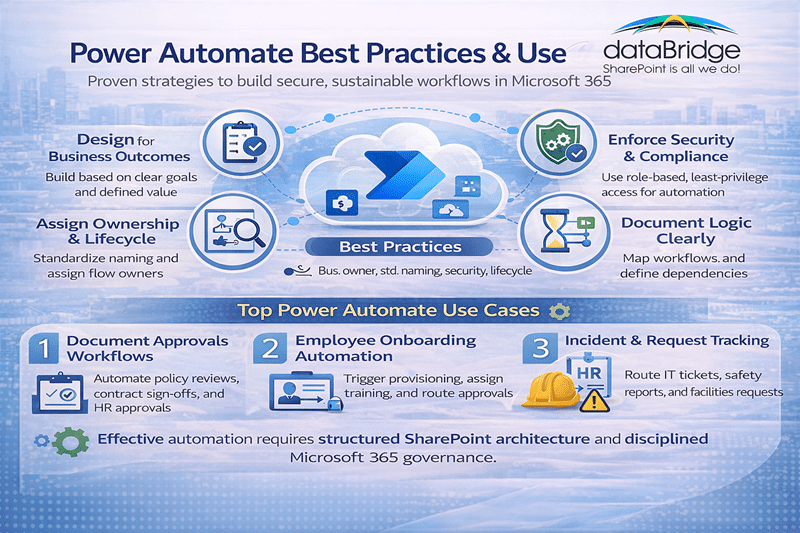
Real-World Power Automate Use Cases
Organizations that standardize approval workflows often report measurable reductions in processing time and manual follow-ups within the first quarter of implementation. These are high-impact automation scenarios we frequently implement.
Document Approval Workflows
Automate:
- Policy reviews
- Contract approvals
- HR documentation sign-offs
- Compliance confirmations
These workflows are most effective when built inside structured SharePoint Intranet & Portal Design environments.
Employee Onboarding Automation
Trigger workflows to:
- Provision access
- Assign training
- Send acknowledgment forms
- Route approval chains
However, onboarding automation without clear governance often creates long-term cleanup work.
Incident and Request Routing
Automate:
- IT support tickets
- Compliance reports
- Safety incident tracking
- Facilities management workflows
When structured properly, these automations reduce email dependency and increase visibility.
Teams and SharePoint Lifecycle Automation
Automate:
- Team provisioning
- Channel creation
- Site expiration policies
- Content archiving triggers
However, Teams automation without foundational SharePoint structure often increases fragmentation.
This is why we typically evaluate automation readiness within broader SharePoint Consulting Services engagements.
A Hard Truth About Automation
Automation amplifies the quality of your architecture.
If your environment is structured, automation creates efficiency.
If your environment is chaotic, automation spreads chaos faster.
This is why we embed automation inside the larger framework of The dataBridge Way.
Power Automate and Copilot Readiness
Automation plays an indirect but meaningful role in Copilot performance.
Structured workflows:
- Improve metadata consistency
- Reduce duplicate content
- Reinforce authoritative sources
- Standardize document handling
Organizations preparing for AI should evaluate automation as part of a broader Copilot Readiness for SharePoint initiative.
When Should You Invest in Power Automate?
You are ready for structured automation if:
- Manual approvals slow business decisions
- Compliance tracking is inconsistent
- Teams and SharePoint workflows feel disconnected
- Employees rely on email for structured processes
However, if governance and architecture are weak, strengthen those first.
Automation should be layered on structure — not used to compensate for its absence.
Final Thought
Power Automate is not just a workflow tool. It is an operational accelerator.
When paired with strong SharePoint architecture and disciplined governance, it improves accuracy, reduces friction, and supports scalable Microsoft 365 environments.
When deployed carelessly, it creates complexity.
The difference is structure. Contact us today to start the conversation.
Related Power Automate and Workflow Resources
- Microsoft Power Platform Consulting
- Power Apps Strategy & Architecture
- Forms & Workflow Readiness Assessment
- Power Platform Governance & Security
- Power Platform Adoption & Change Management
- Power Apps vs Power Automate
- SharePoint and Power Platform Integration
Power Automate Frequently Asked Questions
What is the biggest mistake organizations make with Power Automate?
Scaling workflows without governance. Automation must have ownership and lifecycle management.
Is Power Automate secure?
Yes — when designed properly. Security depends on permission discipline and service account governance.
How many flows is too many?
There is no universal number. What matters is whether each flow has ownership, documentation, and a defined purpose.
How do we prevent Power Automate sprawl in Microsoft 365?
Preventing Power Automate sprawl requires clear ownership, naming standards, and lifecycle governance from the start. Every flow should have a defined business owner, documented purpose, and scheduled review cycle. In our experience, organizations that embed automation governance into their broader SharePoint Governance Maturity Model avoid duplication, reduce broken workflows, and maintain long-term stability.
Should Power Automate flows be built by IT or business users?
Power Automate can empower business users, but enterprise environments require guardrails. Citizen development works best when supported by clear governance policies, standardized templates, and IT oversight for production-level workflows. Without structure, well-intentioned automation can create compliance and security risks. A balanced model — supported by structured Microsoft 365 Consulting Strategy — ensures flexibility without sacrificing control.