

A healthcare organization modernizes collaboration with Microsoft Teams and Microsoft 365 governance.
MedPOINT Management worked with dataBridge to standardize collaboration tools, implement retention and sensitivity labels, and strengthen governance across Microsoft 365. This case study demonstrates how structured architecture and compliance planning support secure collaboration in HIPAA-regulated environments.
Microsoft 365 & Teams Compliance Rollout for Healthcare Services Provider
MedPOINT Management Case Study
Introduction
MedPOINT Management is a healthcare services organization focused on providing care management services to Clinically Integrated Networks (CINs) and hospital clients. As the organization expanded its use of Microsoft 365 in 2024, leadership recognized the need to standardize collaboration tools while ensuring the environment met strict healthcare compliance requirements.
MedPOINT partnered with dataBridge to design and implement a structured Microsoft 365 collaboration environment centered on Microsoft Teams, while introducing governance and compliance tools to support a HIPAA-regulated environment.
Key Outcomes
✔ Successfully deployed Microsoft Teams across the organization
✔ Consolidated multiple collaboration tools into a single Microsoft 365 platform
✔ Implemented Retention and Sensitivity labels for HIPAA-aligned compliance
✔ Established a foundation for enterprise document taxonomy and metadata
✔ Improved collaboration governance across SharePoint, Teams, and OneDrive
✔ Began safe evaluation of Microsoft Copilot in a regulated healthcare environment
Client Overview
Industry: Healthcare Services
Organization: MedPOINT Management
Primary Platforms: Microsoft 365, Microsoft Teams, SharePoint
Key Focus Areas
- Collaboration modernization
- HIPAA compliance readiness
- Microsoft 365 governance
- Document management modernization
- AI readiness for Microsoft Copilot
Project Scope Snapshot
Project Duration: 6–9 months
Primary Platforms: Microsoft Teams, SharePoint, Microsoft Purview, Microsoft 365 Compliance
Key Workstreams:
- Microsoft Teams enterprise rollout
- Collaboration governance design
- Retention and Sensitivity label implementation
- Document management and metadata strategy
- External collaboration governance
- Microsoft Copilot risk and readiness evaluation
Stakeholders Involved:
- IT leadership
- Compliance and risk management teams
- Project Management Office
- Departmental leadership
The Challenge
During the COVID pandemic, MedPOINT adopted several collaboration tools to support remote work and communication. While these tools helped the organization adapt quickly, they eventually created new operational challenges.
By early 2025, the organization identified several issues:
- Rising licensing and IT support costs
- Collaboration inefficiencies caused by multiple disconnected tools
- Staff training complexity due to platform proliferation
- The need to ensure collaboration tools met HIPAA compliance requirements
Leadership recognized the need to simplify the collaboration environment while strengthening governance and compliance controls across Microsoft 365.
Microsoft 365 Governance Framework for Healthcare Compliance
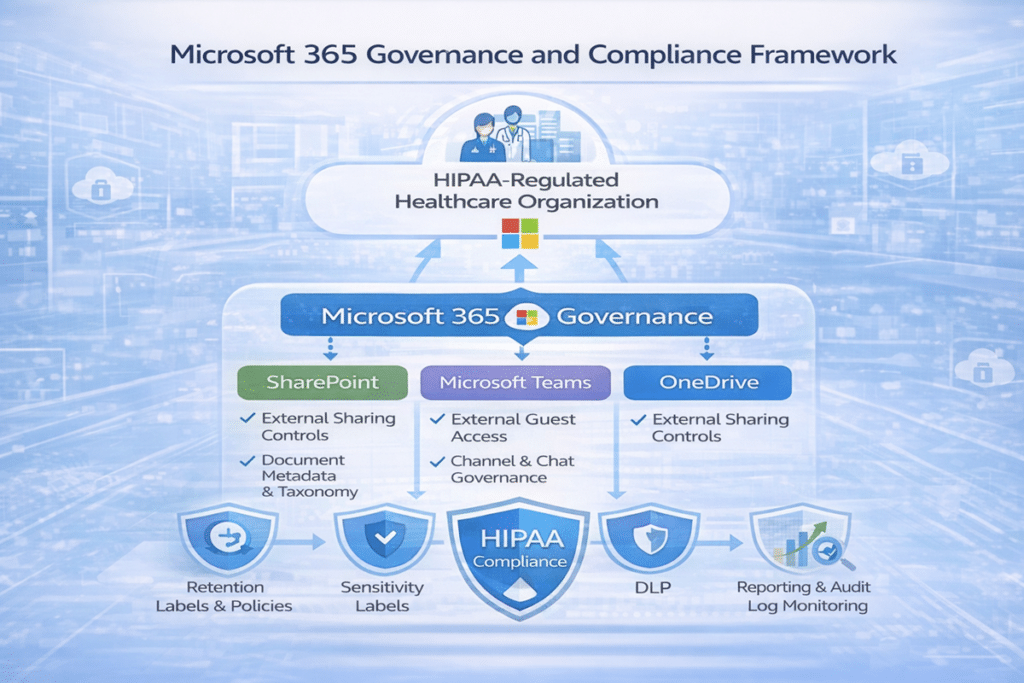
The Compliance Complexity
Healthcare organizations operate within strict regulatory environments where protecting patient data is critical.
Modern collaboration platforms such as Microsoft Teams and emerging AI tools like Microsoft Copilot introduce additional considerations. Without proper governance and tenant configuration, sensitive data could be exposed through external sharing, improper permissions, or unstructured content management.
MedPOINT needed a strategy that would allow the organization to adopt modern collaboration tools while maintaining the compliance and security standards required in a healthcare environment.
The dataBridge Approach
dataBridge worked with MedPOINT to design and implement a structured Microsoft 365 collaboration strategy that balanced productivity, governance, and compliance.
Microsoft 365 Information Governance Architecture
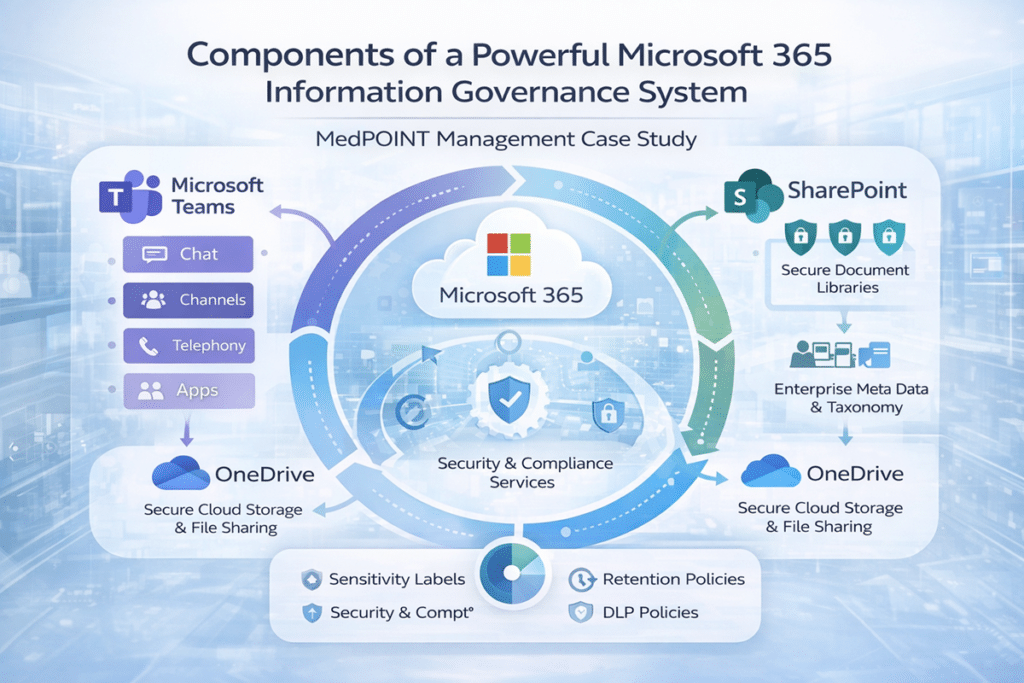
The engagement focused on five key initiatives.
Microsoft Teams Rollout
dataBridge helped MedPOINT design and execute a structured Microsoft Teams rollout across the organization.
This included:
- Development of a detailed work breakdown structure (WBS) and project schedule
- IT support staff training and knowledge transfer
- Teams architecture planning and governance guidance
- Decision frameworks for channels, chat usage, and telephony capabilities
Throughout 2025, MedPOINT conducted several proof-of-concept deployments to evaluate how Teams would be used across departments and refine the collaboration model.
By late 2025, Microsoft Teams had been successfully deployed organization-wide, allowing MedPOINT to retire several legacy collaboration tools.
External Collaboration and Content Governance
During the rollout, several governance questions emerged related to collaboration practices.
These included:
- How external guest access should be managed
- When content should reside in SharePoint versus individual OneDrive accounts
- How staff should collaborate securely with partners and external stakeholders
dataBridge worked with MedPOINT to establish clear governance guidelines to support secure collaboration.
Compliance Tools Implementation
To strengthen regulatory compliance, dataBridge helped MedPOINT implement Microsoft Purview compliance capabilities across the Microsoft 365 environment.
This included:
- Sensitivity labels for information protection
- Retention labels and policies for regulatory compliance
- Compliance configuration for Exchange, SharePoint, OneDrive, and Teams
Compliance, legal, and risk management teams were trained on the tools and reporting capabilities so they could manage policies and monitor compliance independently.
Document Management and Metadata Strategy
As part of the engagement, dataBridge began working with MedPOINT to modernize document management practices across the organization.
The initiative focused on helping the organization understand how metadata can improve governance, search, and compliance.
Training and guidance included:
- Enterprise metadata strategy
- SharePoint Content Type Hub configuration
- SharePoint Term Store taxonomy design
This work helped MedPOINT begin establishing a consistent enterprise taxonomy that improves information organization and supports audit and compliance activities.
Project Management Modernization
dataBridge also assisted MedPOINT’s Project Management Office in evaluating Microsoft Planner as a replacement for several legacy project management tools.
This effort focused on simplifying the project management environment while maintaining visibility into project status and collaboration across teams.
Microsoft Copilot Evaluation
As part of the organization’s long-term technology strategy, MedPOINT began exploring Microsoft Copilot for AI-assisted productivity.
dataBridge provided guidance on:
- Copilot governance considerations
- AI risk management in regulated environments
- Preparing Microsoft 365 environments for responsible AI use
This early evaluation allowed MedPOINT to explore the potential benefits of AI while maintaining strong compliance and governance controls.
Results
MedPOINT successfully completed the rollout of Microsoft Teams along with Retention and Sensitivity labeling policies across the Microsoft 365 environment.
Key outcomes included:
- Simplified collaboration by consolidating multiple tools
- Reduced licensing and operational complexity
- Improved compliance visibility and reporting
- A foundation for enterprise document taxonomy and metadata governance
- Early preparation for AI tools such as Microsoft Copilot
MedPOINT continues to work with dataBridge to expand its governance framework, refine document management practices, and evaluate new Microsoft 365 capabilities.
Key Takeaways
Organizations in regulated industries must balance modern collaboration capabilities with strict security and compliance requirements.
With the right governance strategy and Microsoft 365 architecture, organizations can deploy tools such as Microsoft Teams and Copilot securely while improving productivity and collaboration across the enterprise.
If your organization is facing similar challenges with SharePoint, Microsoft Teams, or Microsoft 365 governance, dataBridge can help design a structured solution.
Explore more SharePoint consulting case studies and client success stories.
Related Resources
What our clients say
Client Success Resources
Case Studies
What Our Clients Say
“North American Roofing has just begun our SharePoint journey, and dataBridge has been instrumental in guiding our SharePoint implementation in the right direction. As we adopt more advanced SharePoint features to support our business processes, I’m confident that dataBridge is fully capable of providing ongoing SharePoint consulting and support for North American Roofing.”
— Tom Ryan
North American Roofing

THE SEARCH IS OVER
We're a Microsoft SharePoint partner - everything you need IS right here
For more information about how dataBridge can transform your business with improved corporate communication, collaboration, forms, workflows, and document management, contact us today.