SharePoint Information Architecture Best Practices
The Foundation for Search, Governance, and Copilot Accuracy
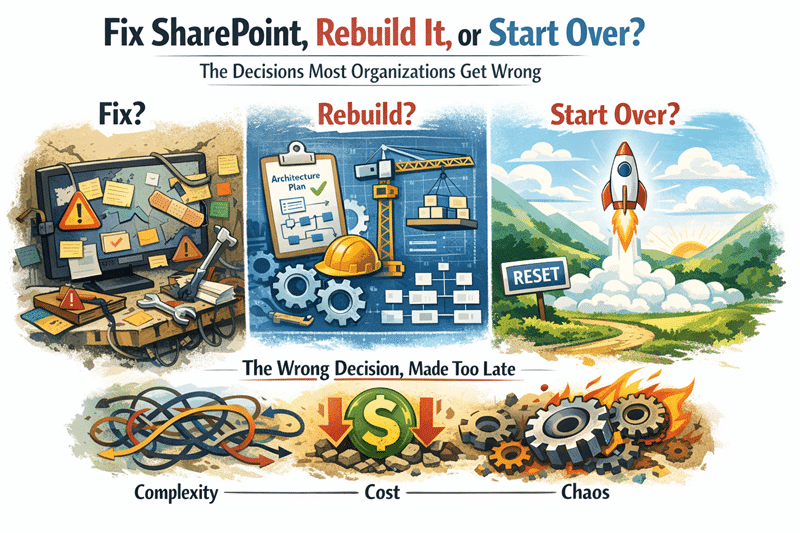
Most organizations do not struggle with SharePoint because of technology. They struggle because of structure.
When information architecture is weak, even a well-implemented SharePoint environment can feel chaotic. Documents become difficult to locate, permissions grow inconsistent, and employees lose confidence in search results.
In our experience, most organizations struggling with SharePoint search, governance, or Copilot readiness are not facing a technology problem. They are facing an information architecture problem.
In contrast, when information architecture is designed intentionally, SharePoint becomes a powerful organizational knowledge platform.
Documents surface quickly in search. Policies remain consistent. Collaboration becomes easier. And modern AI tools like Copilot deliver significantly better results.
This is why experienced organizations treat information architecture as the foundation of any successful SharePoint environment.
At dataBridge, we frequently see organizations invest heavily in migrations or intranet design before realizing their environment lacks the structural framework needed for long-term success. That is when information architecture becomes a priority.
Organizations exploring these improvements often start by reviewing the broader capabilities available through our SharePoint and Microsoft 365 consulting solutions.
What Is SharePoint Information Architecture?
SharePoint information architecture refers to the way content is organized, classified, and governed across a SharePoint environment.
It determines how employees locate documents, how information is categorized, and how governance policies are applied across the platform.
A strong architecture framework typically includes:
- Site structure
- Metadata design
- Content types
- Document libraries
- Managed taxonomy
- Search configuration
When these components work together, SharePoint becomes far easier to navigate and manage.
Organizations that take time to establish architecture standards early often experience significantly higher adoption across their collaboration environments.
In our experience, most SharePoint environments that struggle with search, governance, or Copilot readiness are not failing because of technology. They are failing because information architecture was never designed intentionally.
Many organizations researching architecture best practices also explore related frameworks in our SharePoint and Microsoft 365 Knowledge Center.
Why SharePoint Architecture Matters More Than Ever
Information architecture has always been important, but several modern trends have made it even more critical.
1. Search Expectations Have Increased
Employees expect enterprise search to function as easily as consumer search tools. When documents cannot be found quickly, users often revert to email or personal storage solutions.
A structured architecture dramatically improves SharePoint search results.
Metadata fields, content types, and taxonomy terms provide signals that help SharePoint identify and surface relevant information.
Without these signals, search relies heavily on filenames and document content, which rarely produces reliable results.
Organizations that invest in architecture improvements frequently see measurable gains in search reliability and overall user satisfaction.
2. Governance and Compliance Requirements Are Growing
Information governance is becoming increasingly important across many industries.
Organizations must manage retention policies, classification labels, and document security requirements.
Architecture enables governance.
Without structured classification, enforcing these policies becomes difficult.
Organizations in regulated industries often evaluate their SharePoint structure alongside the governance practices outlined in our SharePoint intranet solutions by industry.
3. AI Tools Depend on Structured Content
AI capabilities such as Microsoft Copilot rely heavily on the information stored within SharePoint.
If content is poorly organized, AI responses may retrieve outdated or conflicting information.
When architecture is structured correctly, AI tools can retrieve authoritative information quickly and accurately.
This is why many organizations preparing for AI adoption review their SharePoint structure as part of a broader Copilot readiness strategy for SharePoint.
SharePoint Information Architecture Framework

A well-designed SharePoint environment typically follows a layered information architecture framework. Each layer plays a specific role in ensuring information remains organized, discoverable, and governed as the platform grows.
Most successful environments include four foundational layers.
Information Structure
Site hierarchy, navigation design, and collaboration hubs that reflect how teams work across departments and projects.
Classification
Metadata fields, taxonomy terms, and content types that describe what information is and how it should be organized.
Governance
Policies that control permissions, lifecycle management, retention rules, and content ownership responsibilities.
Search Optimization
Metadata signals, indexing strategies, and content standards that ensure employees can reliably locate information.
When these layers work together, organizations create a SharePoint environment where knowledge remains structured, searchable, and scalable as collaboration expands.
Core Principles of Effective SharePoint Information Architecture
Over the years, we have observed that successful SharePoint environments consistently follow several key architectural principles.
1. Design Architecture Around How People Work
One of the most common mistakes organizations make is designing architecture based on organizational charts.
Departments change frequently. Projects evolve. Collaboration crosses boundaries.
Instead, architecture should reflect how employees interact with information.
For example:
- Policy libraries should support multiple departments
- Project workspaces should enable cross-team collaboration
- Organizational knowledge resources should be easy to access
When architecture reflects real workflows, adoption increases naturally.
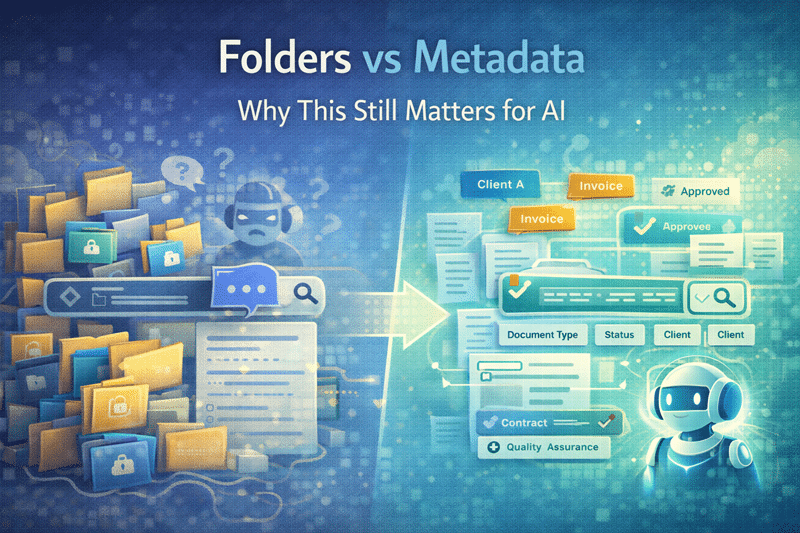
2. Use Metadata Instead of Deep Folder Structures
Traditional folder hierarchies often create navigation challenges.
Deep folder structures can lead to:
- Difficult navigation
- Duplicate documents
- Inconsistent permissions
- Poor search results
Metadata provides a far more flexible approach.
Instead of navigating through multiple folders, users can filter documents using attributes such as:
- Department
- Document type
- Project name
- Status
This approach dramatically improves search performance and document discoverability.
Organizations implementing metadata strategies often combine them with structured SharePoint document management solutions.
Metadata vs. Folders in SharePoint: What Works Best?
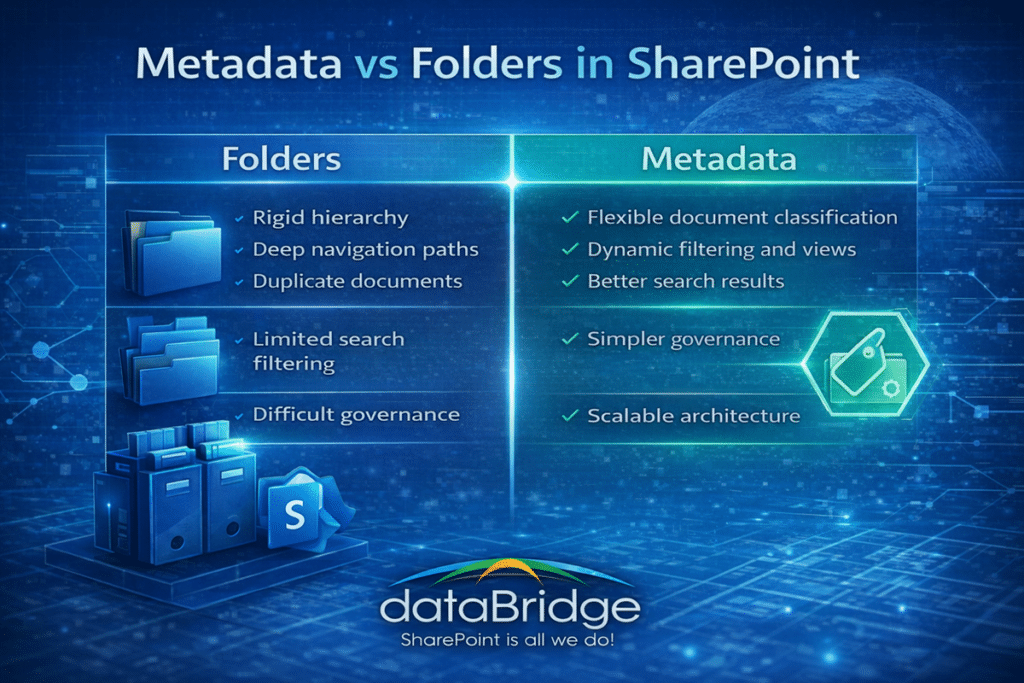
One of the most common questions organizations ask when designing SharePoint architecture is whether they should organize documents using folders or metadata.
The answer is not always one or the other.
However, modern SharePoint architecture increasingly favors metadata-driven classification over complex folder structures.
Folders create rigid hierarchies that often become difficult to maintain. As organizations grow, users frequently create deeper folder paths, duplicate documents across folders, or apply inconsistent naming conventions.
Metadata offers a more flexible approach.
Instead of navigating through a series of nested folders, users can filter documents dynamically based on attributes such as:
- Department
- Document type
- Program area
- Project name
- Document status
For example, a policy document could appear in multiple filtered views without being duplicated across multiple folders.
In our experience, environments that rely heavily on metadata provide significantly better search results and easier long-term governance.
Organizations implementing a structured SharePoint Information Architecture and Metadata strategy often combine metadata with simplified folder structures to create a balanced and scalable architecture.
3. Build a Managed Taxonomy
A taxonomy defines the classification terms used across the organization.
Examples include:
- Departments
- Program areas
- Document categories
- Client classifications
Without a managed taxonomy, organizations often see inconsistent labeling.
For example:
Marketing
Marketing Dept
Marketing Team
Mktg
These variations weaken search performance.
Managed term sets ensure classification terms remain consistent across the environment.
In our experience, organizations that implement structured taxonomy frameworks see immediate improvements in search accuracy.
SharePoint Taxonomy Design Best Practices
A well-designed taxonomy is one of the most powerful tools for organizing information in SharePoint.
However, poorly designed taxonomy structures can create confusion rather than clarity.
When designing taxonomy frameworks, organizations should follow several best practices.
Keep taxonomy simple
Complex taxonomies can be difficult for users to understand. Start with a small number of meaningful classification terms and expand gradually as needed.
Use business language
Taxonomy terms should reflect language employees naturally use. Avoid overly technical labels that users may not recognize.
Establish ownership
Someone should be responsible for maintaining taxonomy structures. Without ownership, taxonomy terms often become inconsistent over time.
Align taxonomy with governance policies
Taxonomy structures should support document classification, compliance policies, and retention rules.
When taxonomy aligns with governance frameworks, organizations gain both improved search results and stronger information management.
These principles are often incorporated into broader SharePoint governance frameworks used to maintain structured collaboration environments.
4. Implement Content Types for Consistency
Content types standardize how documents are created and classified.
They define:
- Required metadata fields
- Document templates
- Workflow processes
- Governance rules
For example, a “Policy Document” content type might include:
- Policy Owner
- Department
- Effective Date
- Review Cycle
When content types are applied consistently, organizations can enforce governance policies much more effectively.
Content types are also a core component of modern SharePoint governance frameworks.
5. Optimize SharePoint Search
Search optimization is one of the most visible benefits of strong architecture.
Several architecture decisions directly influence search performance:
- Metadata usage
- Content type structure
- Taxonomy consistency
- Document naming standards
When these elements align, search results become significantly more reliable.
Employees begin to trust the platform as their primary source for information.
Search is one of the clearest indicators of whether SharePoint architecture is working. When users can consistently find documents within seconds, it is a strong sign that metadata, taxonomy, and governance are aligned correctly.
Practical Architecture Improvements Organizations Can Implement
Many organizations already have a SharePoint environment but need to improve its structure.
Several practical steps can deliver meaningful improvements.
Conduct an Architecture Assessment
Start by evaluating the existing structure.
Key questions include:
- Where is content stored?
- Which sites are actively used?
- Where does duplication occur?
This analysis reveals the architectural gaps that need to be addressed.
Organizations often begin with a structured SharePoint Discovery and Readiness Assessment.
Standardize Metadata Fields
Define a consistent set of metadata fields across document libraries.
Common examples include:
- Document Type
- Department
- Project Name
- Status
- Owner
Standardized metadata dramatically improves both search accuracy and governance capabilities.
Consolidate Redundant Sites
Many organizations accumulate redundant SharePoint sites over time.
This fragmentation spreads information across multiple locations.
Consolidating these sites simplifies architecture and improves discoverability.
Align Permissions with Governance
Permissions should follow a structured governance model.
When permissions are inconsistent, organizations face security risks and administrative overhead.
Structured governance ensures permissions remain manageable as environments grow.
Additional governance and architecture guidance is available through the dataBridge SharePoint and Microsoft 365 Resources hub.
The Connection Between Information Architecture and Copilot
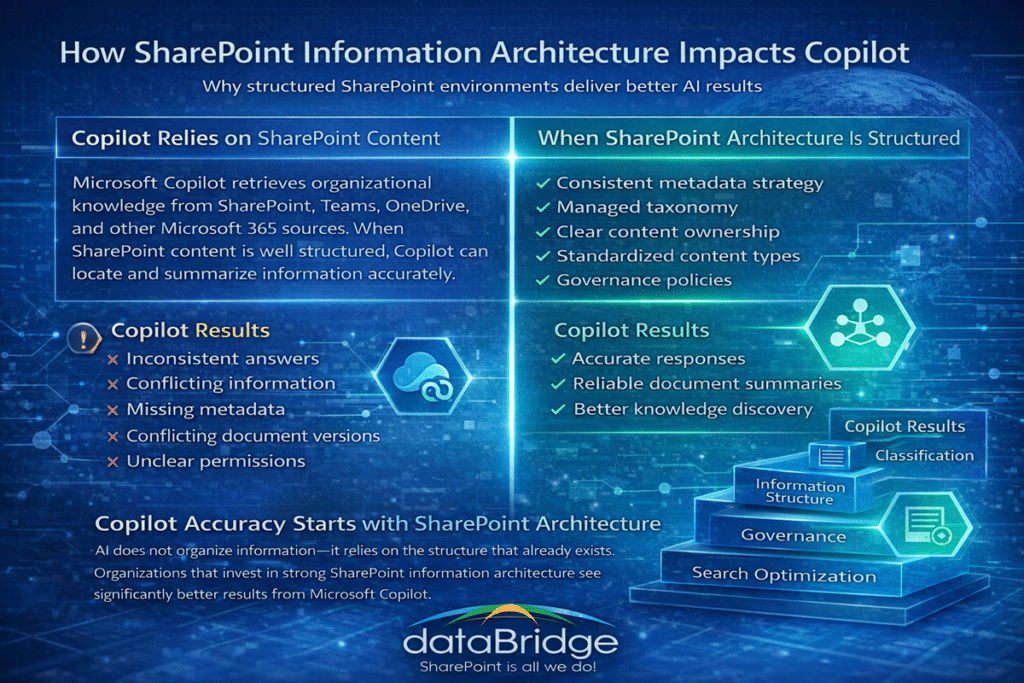
AI tools are rapidly changing how employees interact with information.
However, Copilot’s effectiveness depends heavily on structured content.
When architecture is weak:
- AI retrieves inconsistent documents
- Duplicate content creates conflicting answers
- Critical information remains hidden
When architecture is strong:
- AI retrieves authoritative documents
- Knowledge summaries become more accurate
- Organizational expertise becomes easier to surface
In short, AI amplifies the strengths—or weaknesses—of your information architecture.
Real-World Example: Improving SharePoint Search with Metadata
In one engagement, an organization struggled with document discovery across multiple departments.
Employees frequently reported that important documents were difficult to locate.
After reviewing the environment, several issues became clear:
- Deep folder structures
- No metadata classification
- Duplicate document libraries
The solution involved implementing standardized metadata, introducing content types, and simplifying the folder structure.
Within weeks, search accuracy improved dramatically.
Employees began relying on SharePoint search instead of emailing colleagues to locate information.
We frequently see similar improvements across organizations that move from folder-heavy structures to metadata-driven architecture.
Signs Your SharePoint Architecture Needs Improvement
Several symptoms often indicate architectural issues.
- Employees frequently ask where documents are stored.
- Search results feel unreliable.
- Document duplication occurs frequently.
- Permissions become difficult to manage.
- Departments create isolated repositories of information.
When these patterns appear, organizations typically benefit from a structured architecture review.
Why Information Architecture Should Be Planned Before a SharePoint Migration
Many organizations approach SharePoint migrations as a technical exercise focused on moving files from one environment to another.
However, migrations also represent one of the best opportunities to improve information architecture.
Migrating poorly structured content simply transfers existing problems into the new environment.
For example:
- Deep folder structures remain confusing
- Duplicate documents continue to exist
- Search challenges persist
- Governance issues remain unresolved
Instead, migrations should be treated as an opportunity to modernize architecture.
Organizations can use this transition to:
- Introduce metadata classification
- Consolidate redundant sites
- Standardize content types
- Apply governance policies
When migration planning includes architecture improvements, the resulting environment becomes significantly easier to manage.
Many organizations begin this process through a structured SharePoint Discovery and Readiness Assessment, which evaluates existing content structures and identifies opportunities to improve architecture before migration begins.
The Role of Information Architecture in Modern SharePoint Intranets
SharePoint intranets depend heavily on strong information architecture.
Without structure, intranet portals quickly become cluttered repositories where employees struggle to locate critical resources.
Effective intranet architecture organizes information into logical hubs that reflect how employees work.
Typical intranet architecture includes:
- Department collaboration sites
- Policy and procedure libraries
- Organizational news and communications
- Project workspaces
- Knowledge resource centers
When these elements are supported by metadata, taxonomy, and governance standards, employees can quickly locate the information they need.
Information architecture decisions also vary significantly across industries. Organizations operating in regulated sectors often require additional classification, security, and retention policies.
For this reason, many organizations review architecture patterns within our SharePoint intranet solutions by industry, where intranet requirements differ across healthcare, financial services, government, education, and nonprofit organizations.
Partner with dataBridge
Information architecture decisions influence the long-term success of your SharePoint environment.
Once structures are established, changing them later can become complex.
That is why many organizations work with experienced consultants when designing their architecture frameworks.
At dataBridge, we help organizations build structured SharePoint environments that improve search, strengthen governance, and prepare organizations for modern AI capabilities.
Learn more about our SharePoint consulting services or explore the broader capabilities available through the SharePoint and Microsoft 365 solutions hub.
You can also find additional architecture insights in the SharePoint and Microsoft 365 Resources hub, or review industry-specific approaches through our SharePoint intranet solutions by industry.
Frequently Asked Questions
What is SharePoint information architecture?
SharePoint information architecture is the framework used to organize content, sites, metadata, and taxonomy across a SharePoint environment. It determines how information is structured so employees can easily locate documents, collaborate effectively, and maintain governance standards. A well-designed architecture includes site hierarchy, metadata classification, content types, managed taxonomy, and search configuration. When these elements work together, SharePoint becomes a reliable knowledge platform rather than a disorganized file repository. Organizations that invest in strong information architecture typically see improvements in search accuracy, governance compliance, and overall user adoption.
Why is metadata important in SharePoint information architecture?
Metadata is critical because it allows documents to be classified and discovered without relying on deep folder structures. Instead of navigating through multiple folders, users can filter and search content using attributes such as department, document type, project name, or status. This approach improves search accuracy and simplifies document management. Metadata also enables governance policies, retention rules, and automation workflows. In modern SharePoint environments, metadata-driven architecture is one of the most effective ways to improve usability, search performance, and long-term content governance.
What is the difference between taxonomy and metadata in SharePoint?
Metadata refers to the descriptive fields attached to documents, such as department, document type, or project name. Taxonomy refers to the structured set of terms used within those metadata fields. For example, a metadata field called “Department” might use a taxonomy term set that includes Marketing, Finance, HR, and Operations. Taxonomy ensures these classification terms remain consistent across the environment. When taxonomy and metadata work together, organizations create a structured content framework that improves search accuracy, reduces duplication, and strengthens information governance.
How does SharePoint information architecture improve search?
Search performance in SharePoint depends heavily on structured content signals such as metadata, content types, and taxonomy. When documents include consistent classification data, SharePoint search can identify relationships between content and deliver more accurate results. Without structured architecture, search relies primarily on filenames and document text, which often produces unreliable results. Organizations that implement metadata and taxonomy strategies typically see immediate improvements in document discoverability, which increases user trust in SharePoint as the primary location for organizational knowledge.
How does information architecture impact Microsoft Copilot?
Microsoft Copilot relies on SharePoint content as a primary source of organizational knowledge. If documents are poorly organized or duplicated across multiple locations, Copilot may retrieve incomplete or conflicting information. Strong information architecture improves Copilot accuracy by ensuring documents are properly classified, governed, and searchable. When metadata, taxonomy, and governance policies are aligned, Copilot can retrieve authoritative information from trusted sources within SharePoint. For organizations preparing for AI adoption, improving SharePoint information architecture is often one of the most important foundational steps.