

SharePoint Records Management and Retention Strategy for Microsoft 365
SharePoint records management and retention strategy help organizations control lifecycle, reduce compliance risk, improve content quality, and align Microsoft 365 structure with retention and defensibility needs. dataBridge treats records management as part of architecture and governance, not a disconnected legal or cleanup exercise.
Retention planning is most effective when it is built into the environment from the beginning. When content types, metadata, ownership, and lifecycle rules are left unclear, records decisions become difficult to apply consistently. This page explains how dataBridge approaches records management as a practical part of SharePoint architecture and governance.
This is where many organizations get into trouble.
They launch SharePoint.
They’ve migrated content.
They configure permissions.
They’ve created Teams-connected sites.
They publish intranet pages.
Only later do they realize nobody has fully defined what should be kept, what should be deleted, what should be treated as a record, or how those decisions should work across SharePoint, Teams, OneDrive, and Microsoft 365.
We see that pattern often at dataBridge.
Usually, the platform is not the real problem. More often, lifecycle decisions were never built into the architecture. Records management gets treated like a compliance add-on instead of a core design decision. Over time, that approach creates clutter, weakens trust, and makes cleanup much harder than it should be.
Our view is straightforward: good SharePoint records management should make the environment cleaner, more defensible, and easier to use. It should support the business, not slow it down. Done well, it also strengthens governance, improves information quality, and creates a stronger foundation for AI readiness.
If your organization is trying to reduce content sprawl, improve compliance posture, or connect SharePoint structure to Microsoft Purview controls, this is the work that closes the gap.
Need help designing a lifecycle model that actually works in practice? Contact dataBridge to discuss your SharePoint records management and retention strategy.
Why SharePoint records management needs a modern Microsoft 365 strategy
Too many teams still think about records management in old SharePoint terms.
That mindset creates avoidable problems.
Modern records management is not about a separate records center, a giant archive nobody uses, or a policy document buried in a folder. In Microsoft 365, retention and records decisions sit inside a broader platform model that includes architecture, metadata, ownership, permissions, automation, search, and compliance controls.
That distinction matters.
If the strategy only lives with legal, it becomes too abstract.
Also, if the strategy only lives with IT, it becomes too technical.
If the strategy only lives with site owners, it becomes inconsistent.
A strong model pulls those viewpoints together and turns them into real operating decisions.
That is why this topic belongs in the same strategic conversation as SharePoint governance, SharePoint document management, SharePoint information architecture and metadata, and SharePoint security and compliance.
Those are not separate issues.
They reinforce each other.
When lifecycle governance is designed well, the environment becomes easier to manage over time. Content has clearer meaning. Search results improve. Owners know what they are responsible for. Migration decisions get sharper. AI readiness becomes more credible because the underlying information environment is better governed.
That is the bigger point.
Records management is not just about keeping files longer. It is about designing a Microsoft 365 environment that stays usable and defensible as the organization grows.
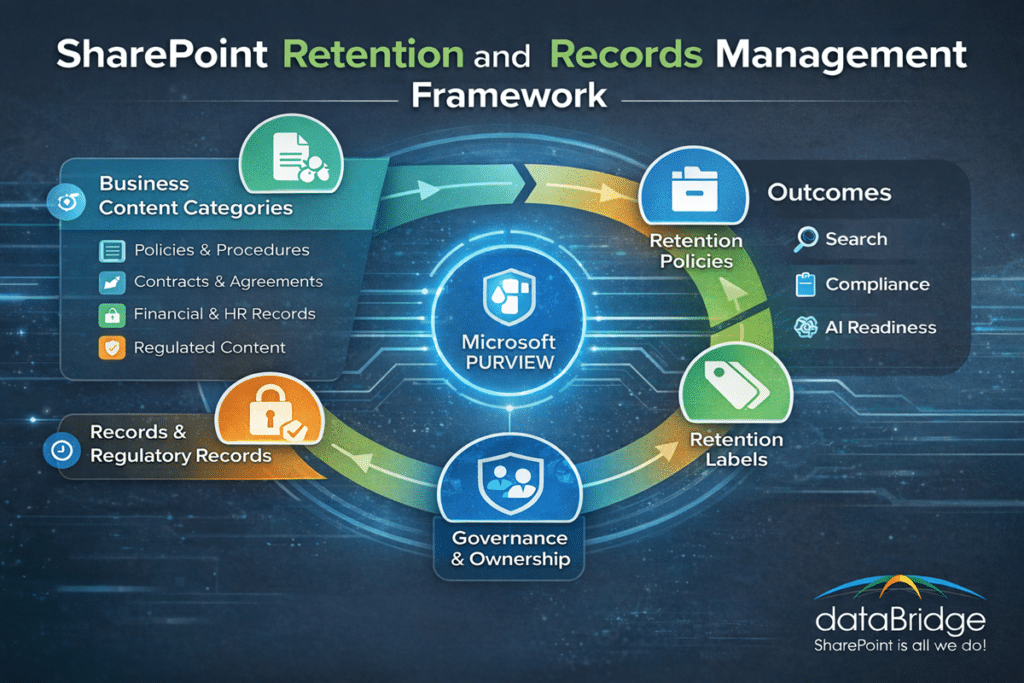
What SharePoint records management actually means
Records management is the discipline of controlling how important content is classified, retained, protected, and disposed of over time.
In practical terms, it means answering questions many organizations leave unresolved for too long:
- What content must be retained?
- What content should be deleted on schedule?
- What content should be declared as a record?
- What content requires stronger control because of legal or regulatory obligations?
- What rules should apply broadly across a site or workload?
- What rules should follow an individual document?
- Who owns the classification logic?
- How should retention decisions connect to search, metadata, permissions, and content design?
Those are architecture questions as much as compliance questions.
That is why this work should never be reduced to a tool configuration exercise.
A records strategy touches:
- Site and library design
- Document types and metadata
- Ownership and accountability
- Permissions and access patterns
- Search quality and findability
- Content lifecycle decisions
- Migration triage
- Microsoft Purview planning
- Governance operating models
- AI readiness and data hygiene
We have seen organizations try to solve records management by just turning on features. That usually creates a false sense of progress. Tools help, but they do not replace structure. A weak architecture with good features is still a weak architecture.
A better approach starts by defining the business logic first. Then the Microsoft 365 controls can support that logic instead of competing with it.
Why retention strategy matters more than most organizations think
Many companies underestimate the downstream impact of poor retention design.
At first, the issue looks small.
Then the environment matures.
More sites appear.
Even more files accumulate.
Departments create their own storage habits.
More duplicate content sticks around.
Even more outdated documents stay searchable.
More people stop trusting what they find.
That is when retention becomes a business problem rather than a policy problem.
Search suffers when stale and active content are mixed together. Governance suffers when nobody knows what should still exist. Migration programs suffer when teams try to move everything because nothing has been classified well enough to separate active content from old content. AI readiness suffers when low-value or poorly governed content stays available indefinitely.
We do not say that lightly.
In practice, lifecycle governance has a real effect on how much people trust the platform. When users constantly see outdated files, duplicate policies, or content with unclear status, they stop believing SharePoint is the source of truth. Once that trust erodes, adoption gets harder.
That is one reason this page connects so closely to SharePoint adoption and change management. People adopt structured systems more easily when those systems feel reliable.
A strong retention strategy improves that trust.
It reduces clutter, supports clarity and helps protect the value of the platform over time.
Retention policies vs retention labels in SharePoint
This is one of the most common areas of confusion.
The difference matters.
Retention policies are generally used when the organization wants to apply lifecycle rules broadly across a location or workload. That may make sense when a whole site, mailbox, or account shares the same retention logic.
Retention labels are more precise. They apply at the item level and are often the better fit when the lifecycle decision needs to follow the document itself rather than the place where it happens to be stored.
That distinction is important because not all content should be governed at the same level.
A broad policy can work well when the content type is relatively consistent.
A label-driven approach works better when documents within the same library need different treatment.
In the real world, the strongest environments often use both.
For example:
- Broad policies can provide baseline lifecycle control
- Retention labels can handle more specific business rules
- Record declaration can be reserved for content that truly needs stronger restrictions
- Automated labeling can support scale when metadata and content patterns are reliable
That is the practical answer most organizations need.
They do not need a theoretical explanation. They need to know when to use which model.
Our opinion is simple: if everything is governed the same way, the design is usually too blunt. If every rule is highly customized, the model is usually too hard to operate. Good strategy lives in the middle.
Record vs regulatory record: do not over-engineer this
Not every important document should be a record.
Not every record should be treated like a regulatory record.
That is where many teams overcomplicate the model.
They worry that stronger control always equals better governance. In reality, over-declaring content as a record can make the environment harder to manage without improving the organization’s actual posture.
A stronger strategy starts with clear business categories.
Typical examples include:
- Final approved policies and procedures
- Signed contracts and legal agreements
- Financial and audit documentation
- Quality and compliance records
- HR documentation with defined retention rules
- Board or executive records
- Regulated business documentation with statutory requirements
That list will vary by organization.
The point is not to make every important file feel official. The goal is to decide which content truly needs stronger lifecycle control and which content simply needs reasonable retention.
That distinction keeps the model sustainable.
We have seen teams try to design for every edge case up front. Usually, that slows progress and creates unnecessary complexity. A better model starts with high-value categories that are easy to define and easy to defend. From there, the organization can mature the framework over time.
Why metadata matters so much in records management
Good records management depends on good classification.
Good classification depends on structure.
That is why metadata matters so much.
If content is poorly named, buried in inherited folder logic, or dropped into oversized libraries with weak context, retention decisions become guesswork. The platform can still store the content, but the organization loses precision.
This is one reason dataBridge puts so much emphasis on SharePoint metadata strategy and broader SharePoint information architecture and metadata. Lifecycle rules work better when documents have meaning beyond a filename and a location.
A practical records-ready structure usually includes:
- Clear document categories
- Consistent content types where appropriate
- Managed metadata where it adds real value
- Defined ownership for libraries and sites
- Searchable fields that support automation and reporting
- A rational content model instead of imported file-share chaos
That does not mean every library needs twenty metadata columns.
It does mean the structure should support the business meaning of the content.
That is the difference between a storage system and a governed information system.
A lot of retention problems are really architecture problems wearing a compliance label. Once that is understood, the solution becomes clearer. Improve the structure, improve the classification, and the lifecycle model becomes far more workable.
How automation improves retention and records accuracy
Manual labeling has a place.
Automation has a place too.
The strongest environments use both.
Some documents can be classified based on clear signals. Others require owner judgment. The right answer is rarely fully manual or fully automated.
A mature approach usually follows this path:
Start with a clear classification model
Before automation can help, the organization needs to define what it is trying to distinguish. Vague categories produce vague results.
Map business rules to usable signals
Metadata, content patterns, document types, departments, and process stages can all support stronger logic when they are structured well.
Validate before broad rollout
This step matters more than many teams realize. A rule that sounds sensible on paper can produce poor results at scale if the underlying content is inconsistent.
Combine automation with ownership
Site owners, business stakeholders, compliance teams, and architects should all have a role. Automation should reduce burden, not replace accountability.
Review and refine over time
Retention strategy is not static. Business processes change. Regulations change. Content patterns change. The model should evolve with them.
Automation should reduce friction.
It should not remove judgment.
The strongest models use automation to handle repeatable patterns while keeping human review in place for edge cases, exceptions, and high-risk content categories.
SharePoint, Teams, and OneDrive: your retention model cannot stop at sites
A modern Microsoft 365 retention strategy cannot be designed only around SharePoint sites.
That view is too narrow.
Documents move across OneDrive, Teams-connected SharePoint sites, formal document libraries, and collaborative workflows. A file may start as a draft in OneDrive, get shared in Teams, then move into a governed SharePoint library later.
If your lifecycle model only covers one stage of that journey, governance becomes inconsistent.
That does not mean every workload needs identical retention treatment.
It does mean the strategy should reflect how people actually work.
Common patterns include:
- Drafting in OneDrive
- Collaboration in Teams
- Formal storage in SharePoint
- Review and approval through Microsoft 365 workflows
- Ongoing reference through intranet or departmental sites
This is why organizations need a broader Microsoft 365 mindset. SharePoint is still central, but lifecycle governance should not be designed in isolation.
That broader view also supports cleaner planning for Microsoft Teams governance and SharePoint and Microsoft 365 integration. The more connected the environment becomes, the more important lifecycle consistency becomes.
Why records management now matters even more for AI readiness
AI readiness is not just a permissions issue.
It is also a content quality issue.
It is also a lifecycle issue.
Organizations often focus on oversharing first. That concern is real. There is another problem that gets less attention, though: stale and poorly governed content creates noise.
That noise matters.
If large amounts of outdated, duplicate, or low-value content remain in the environment, users struggle to find the right answer. AI-driven experiences face the same challenge. Better permissions help with exposure risk, but better lifecycle governance helps with information quality.
That is why this page belongs in the same strategic lane as Copilot readiness for SharePoint and what to archive before Copilot rollout. A clean environment is not only safer. It is more useful.
Our view here is direct: AI does not fix messy information environments. It exposes them faster.
If retention is vague, metadata is inconsistent, and obsolete content remains active forever, AI readiness will be weaker than it looks on paper.
The organizations that handle this well usually do three things:
- They reduce stale content where possible
- They improve classification and ownership
- They connect lifecycle governance to broader architecture decisions
That is what creates a stronger Microsoft 365 foundation for both people and AI tools.
When to use retention policies vs labels in real-world scenarios
This is where strategy needs to get practical.
Most organizations do not need abstract guidance. They need usable decision logic.
Here are common scenarios that help clarify the difference.
Scenario 1: Department-wide baseline retention
A finance or HR site contains mostly content with similar lifecycle needs. In that case, a broader retention policy may be the best starting point because it creates baseline control without asking users to classify every item individually.
Scenario 2: One library with multiple retention needs
A procurement library contains several contract types, each with a different retention requirement. That is a stronger fit for retention labels because the decision needs to follow the document rather than the library itself.
Scenario 3: Final approved policies and procedures
An organization wants the final published version of a policy controlled differently than drafts. That usually points toward a label-driven model, possibly with record declaration for the official version.
Scenario 4: Regulated documentation with heightened obligations
Some industries manage documentation with stronger legal or regulatory requirements. That may require stricter treatment, but only when the category is clearly defined and operationally justified.
Scenario 5: Strong metadata and repeatable patterns
A company has good document categories, reliable metadata, and clear business rules. That environment is usually a better candidate for automation because the signals are more trustworthy.
Scenario 6: Weakly structured legacy content
A company has migrated file shares with limited cleanup. Metadata is weak, folder logic is inconsistent, and ownership is unclear. In that case, broader controls may need to come first while the organization works toward a stronger future-state structure.
These examples reveal something important.
The right answer depends on content maturity, not just tool capability.
That is why consulting-led design matters. It helps organizations avoid overbuilding a model they cannot sustain or under-designing a model that will not hold up as the environment grows.
How records strategy should influence migrations
Retention should shape migration decisions.
It should not follow migration as an afterthought.
This point matters because many organizations still approach migration as a transport exercise. They focus on moving content successfully and assume cleanup can happen later.
That usually creates long-term drag.
If content is old, redundant, obsolete, or poorly governed before migration, moving it into SharePoint does not solve the problem. It simply gives the problem a modern address.
A stronger migration approach asks:
- What content should actually move?
- What content should be archived elsewhere?
- What content should be disposed of?
- What content should be restructured before migration?
- What content needs stronger classification in the future state?
Those decisions help reduce sprawl before it is recreated.
That is one reason this topic should connect directly to SharePoint migrations, SharePoint migration readiness assessment, and SharePoint post-migration checklist. Lifecycle control should begin before cutover, not after users have already repopulated the new environment with old habits.
In our experience, migration projects become much more valuable when they include lifecycle triage. The goal is not just to move content. The real goal is to improve the quality of the destination.
How records strategy should influence document management design
A SharePoint document management system is stronger when lifecycle governance is built into the design.
That may sound obvious, but many environments are still built as digital storage rather than governed document systems.
A better model connects records strategy to:
- Library structure
- Metadata and content types
- Versioning decisions
- Ownership expectations
- Review and approval patterns
- Search behavior
- Permissions and access boundaries
- Retention and disposal rules
That is why SharePoint document management and records strategy should reinforce each other so closely. The document management layer controls how content is created, stored, found, and managed. The records layer controls how content is retained, protected, and disposed of over time.
When those two layers are aligned, the environment becomes much easier to trust.
When they are disconnected, content may be easy to store but hard to govern.
That is not a sustainable model.
How records strategy should influence intranet design
Intranets are often treated as communications experiences only.
That is too narrow.
Many intranets also surface controlled documents, policies, procedures, employee resources, forms, and operational guidance. Some of that content is temporary and some of it is high-value reference material while some of it is formally controlled information that should have clearer lifecycle rules.
That means records thinking still matters.
A strong intranet strategy should distinguish between:
- Temporary communications
- Reference content
- Controlled policies
- Archived announcements
- Departmental resources with review cycles
- Official documents that should not sit unmanaged in page libraries forever
This is where lifecycle design intersects with SharePoint intranet consulting services and SharePoint intranet adoption strategy. Users trust intranets more when the content feels current, governed, and purposeful.
A cluttered intranet weakens confidence quickly.
An intranet with clear ownership and cleaner lifecycle practices becomes a stronger operational tool.
Common mistakes that weaken SharePoint records management
Most failures in this area are not caused by Microsoft 365.
They are caused by weak planning and unclear operating models.
The most common mistakes include:
Treating retention as a legal-only conversation
Legal and compliance teams matter, but the model also needs business input, architecture decisions, and practical operating ownership.
Applying one generic rule to everything
Simple is good. Oversimplified is not. When all content is treated the same way, the design usually loses useful precision.
Over-declaring content as records
Stronger control is not always better control. Overuse of record declaration can make operations harder and reduce long-term sustainability.
Ignoring information architecture
Retention works better when content is structured well. Weak metadata and weak library design make lifecycle rules harder to apply.
Migrating content without lifecycle triage
Old content problems do not disappear during migration. They get imported unless the organization makes better decisions first.
Depending entirely on manual classification
Users play a role, but most organizations need a mix of defaults, automation, and guided decision-making.
Failing to review the model after launch
Lifecycle governance should evolve. Business processes shift. Regulations shift. Ownership shifts. A model that never gets revisited usually starts drifting.
Designing for perfection instead of sustainability
Some teams build beautiful policy models that are too complicated for real-world operations. A good model needs to be defendable, but it also needs to be livable.
That last point matters.
If the organization cannot operate the model consistently, it is not actually mature. It is just ambitious.
What a strong SharePoint records management strategy includes
A strong strategy usually includes several core components.
A business classification framework
The organization needs clear categories for the content that matters most. Those categories should reflect business value, legal exposure, operational needs, and regulatory risk.
A retention decision model
The strategy should define what is kept, how long it is kept, what triggers retention, what qualifies as a record, and what should be disposed of.
Alignment between architecture and lifecycle
Site design, libraries, metadata, permissions, and ownership should support the retention model rather than conflict with it.
A Microsoft Purview planning layer
The organization should understand where broad controls, label-driven controls, record declaration, and automation each make sense.
Governance and ownership clarity
First, someone needs to define rules. Second, someone needs to approve changes. Third, someone needs to manage operations. Fourth, someone needs to review whether the model is working.
Adoption guidance
Users, site owners, and stakeholders need plain-language guidance. A smart strategy that nobody understands is not a strong strategy.
A review and improvement rhythm
Retention design should not freeze at launch. Regular review helps keep the model aligned to business reality.
That combination creates something much more valuable than a policy document. It creates an operating model.
The dataBridge approach to records management and retention strategy
At dataBridge, we start with the business reality of the environment.
We do not start with feature lists.
We want to understand:
- What content the organization creates
- Which content categories carry the most value or risk
- What compliance and regulatory obligations apply
- How collaboration happens today
- Where file-share habits still shape user behavior
- What should migrate
- What should expire
- What should be governed differently in the future state
From there, we connect lifecycle strategy to the broader SharePoint design.
That often includes work related to SharePoint consulting services, SharePoint governance framework, SharePoint permissions guide, SharePoint support, and Copilot readiness for SharePoint.
Our goal is not to create a complicated model that looks impressive in a workshop.
Our goal is to create a lifecycle strategy that the organization can actually use.
That usually includes some combination of:
- Discovery workshops
- Current-state lifecycle assessment
- Content and architecture review
- Metadata and classification planning
- Retention policy and label strategy
- Record decision support
- Governance role definition
- Migration lifecycle triage
- Site owner guidance
- Advisory support after launch
That is the practical side of the work.
The strategic side matters just as much. A strong lifecycle model helps organizations make better long-term decisions about structure, ownership, search, and platform trust.
Want help turning retention from a vague requirement into a workable operating model? Contact dataBridge to talk through your SharePoint and Microsoft 365 environment.
When outside SharePoint expertise makes sense
Some organizations can configure retention settings on their own.
Fewer can design the full strategy well.
Outside expertise is usually most valuable when:
- You are migrating from file shares or legacy platforms
- You work in a regulated environment
- You need stronger alignment between SharePoint and Microsoft 365 governance
- You are preparing for AI initiatives and need better data hygiene
- You have site sprawl and inconsistent ownership
- You need a more defensible model for records, retention, and compliance
- You want to reduce clutter without disrupting the business
Those are not just technical projects.
They are structure and operating model projects.
That is why they often stall internally. Teams understand the tools, but they still struggle to define the right architecture and governance model around them.
The cost of weak lifecycle planning is not always immediate.
That is what makes it dangerous.
An environment can feel usable for years while content quality declines, ownership blurs, and trust weakens slowly. Then a migration, audit, legal issue, or AI rollout exposes the problem all at once.
How this page fits into a stronger SharePoint strategy
Records management should not stand alone.
For the strongest long-term result, it should align with:
- SharePoint governance
- SharePoint governance framework
- SharePoint information architecture and metadata
- SharePoint metadata strategy guide
- SharePoint document management
- SharePoint permissions guide
- SharePoint security and compliance
- SharePoint migrations
- Copilot readiness for SharePoint
That is how authority is built.
A strong site does not create isolated pages. It creates a connected body of expertise where each owner page supports the others and strengthens the larger strategy.
This page should do exactly that.
Final thought: retention should support trust, clarity, and long-term control
Good records management is not just about keeping content longer.
It is about keeping the right content, governing it correctly, and disposing of what no longer belongs.
That improves defensibility.
That reduces clutter.
That strengthens search.
That supports governance.
That gives users more confidence in the platform.
That also creates a stronger foundation for AI.
If your current environment has unclear retention rules, inconsistent classification, or no practical records strategy at all, this is the kind of work that pays off across the whole Microsoft 365 ecosystem.
The longer lifecycle governance is delayed, the harder it becomes to fix later.
If you are ready to build a cleaner, more defensible Microsoft 365 environment, contact dataBridge to talk through your SharePoint records management and retention strategy.
Frequently asked questions
What is the difference between a retention policy and a retention label in SharePoint?
A retention policy usually applies lifecycle rules more broadly across a location or workload. A retention label applies retention at the item level and is often better when different documents in the same area need different treatment.
Can SharePoint documents be declared as records?
Yes. Certain documents can be governed more strictly as records when the business, legal, or compliance need is clearly defined.
Should every important document be treated as a record?
No. A strong strategy distinguishes between content that needs baseline retention, content that needs more specific lifecycle control, and content that truly qualifies as a record.
Does records management in SharePoint also affect Teams and OneDrive?
Yes. A modern Microsoft 365 strategy should account for content movement across SharePoint, Teams, and OneDrive rather than treating each workload as a separate island.
Why does retention matter for AI readiness?
Retention affects data hygiene, content quality, and the amount of stale material in the environment. A cleaner and better-governed content environment supports stronger AI outcomes.
Do users have to apply retention labels manually?
Not always. A mature model often combines manual decisions, structured defaults, metadata, and automation where the underlying signals are reliable.