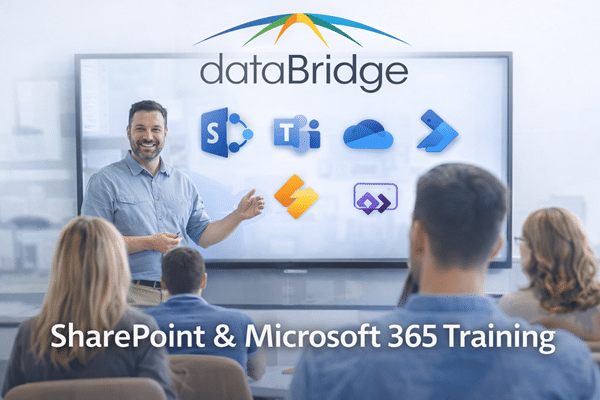
SharePoint & Microsoft 365 Training
SharePoint and Microsoft 365 deliver value only when people know how to use them effectively. As part of our SharePoint Consulting Services, we focus on helping users, site owners, and administrators understand how the platform is meant to be used within your organization. Clearly, consistently, and with confidence.
What Is SharePoint Training?
SharePoint training equips users, power users, site owners, and administrators with the skills to use SharePoint effectively, enforce governance standards, and support long-term Microsoft 365 success.
Rather than focusing only on platform features, structured SharePoint training aligns user behavior with your overall SharePoint adoption strategy, governance framework, and measurable business outcomes.
Practical Training for SharePoint and Microsoft 365
SharePoint and Microsoft 365 deliver value only when people know how to use them effectively. At dataBridge, our SharePoint and Microsoft 365 training focuses on helping users, site owners, and administrators understand how the platform is meant to be used within your organization—clearly, consistently, and with confidence.
Rather than offering generic feature walkthroughs, we deliver role-based, scenario-driven training that reflects your governance model, business processes, and real-world use cases. As a result, participants learn not only how to use the tools, but why they work the way they do.
Training That Drives Adoption Across Microsoft 365
Training is one of the most important—and most overlooked—drivers of Microsoft 365 success. Without it, even well-designed environments struggle with inconsistent usage, poor content quality, and low adoption.
That’s why dataBridge training reinforces:
- Proper SharePoint and Microsoft 365 usage patterns
- Governance, ownership, and security responsibilities
- Metadata, permissions, and sharing best practices
- How SharePoint, Teams, OneDrive, and Power Platform work together
- Confidence in day-to-day collaboration
Our training is often delivered alongside Microsoft 365 Consulting & Strategy initiatives to ensure learning translates into real behavior change.
What We Train
End User SharePoint & Microsoft 365 Training
We help everyday users work more effectively across SharePoint and Microsoft 365.
This includes:
- Navigating modern SharePoint sites and hubs
- Working with documents in SharePoint and OneDrive
- Collaborating through Microsoft Teams
- Understanding metadata, versioning, and search
- Sharing content securely and appropriately
Training emphasizes real scenarios, not abstract features.
Site Owner and Power User Training
Site owners and power users play a critical role in long-term success. We train them to manage SharePoint responsibly within the broader Microsoft 365 ecosystem.
Topics include:
- Managing site settings, permissions, and access
- Applying governance standards consistently
- Maintaining navigation, pages, and content structure
- Using modern pages, layouts, and web parts effectively
- Understanding lifecycle and ownership responsibilities
This training aligns closely with SharePoint Security & Compliance to reinforce accountability and consistency.
Administrator and IT-Focused Microsoft 365 Training
For IT teams and administrators, training focuses on platform health, security, and sustainability across Microsoft 365.
This may include:
- SharePoint and Microsoft 365 administration fundamentals
- Permissions, security groups, and access models
- Monitoring usage, adoption, and governance compliance
- Supporting users without breaking structure
- Preparing for Microsoft 365 updates, Copilot, and AI features
These sessions are often informed by a Copilot Readiness Assessment For SharePoint to tailor content to your environment.
Training That Fits Your Environment
dataBridge training is delivered in the context of your actual SharePoint and Microsoft 365 environment, not a generic demo tenant. This ensures participants immediately understand how training applies to their daily work.
Our training formats include:
- Live virtual or onsite sessions
- Role-based workshops
- Recorded sessions for ongoing reference
- Job aids and supporting documentation
- Post-training Q&A and reinforcement
This flexible approach supports both immediate learning and long-term adoption.
When Training Makes the Biggest Impact
Organizations commonly engage dataBridge training:
- After a SharePoint or Microsoft 365 rollout
- Following a SharePoint Migration
- During a new intranet or collaboration launch
- When usage is inconsistent or adoption has stalled
- Ahead of Copilot or AI feature introductions
In each case, training helps reset expectations and reinforce best practices.
Why Organizations Choose dataBridge for Training
Clients choose dataBridge because we:
- Specialize deeply in SharePoint and Microsoft 365
- Teach the why, not just the how
- Align training to governance and real workflows
- Adapt content to different roles and audiences
- Reinforce long-term platform success
Training becomes more than an event—it becomes part of a sustainable Microsoft 365 strategy.
Get Started with SharePoint & Microsoft 365 Training
If your organization wants training that improves confidence, consistency, and adoption across SharePoint and Microsoft 365, dataBridge can help.
Start with a conversation or pair training with dataBridge SharePoint & Microsoft 365 Support
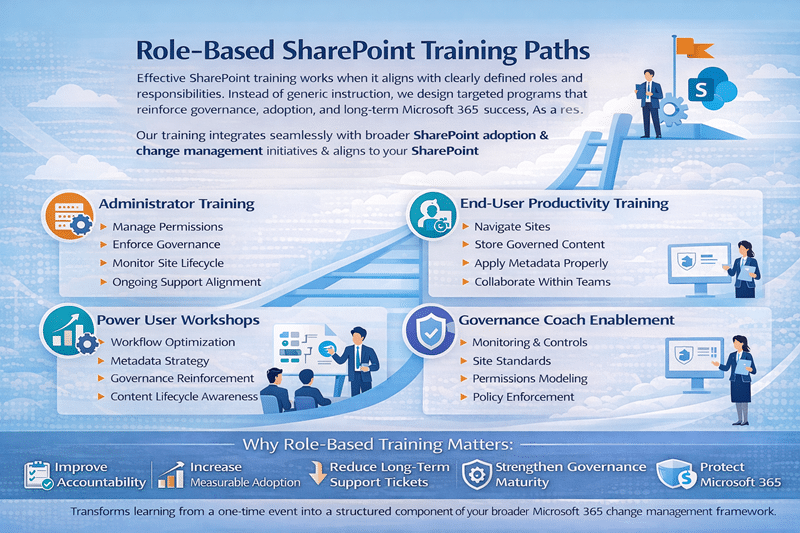
Role-Based SharePoint Training Paths
Effective SharePoint training delivers results only when it aligns with clearly defined roles and responsibilities. Instead of offering generic instruction, we design role-based training programs that reinforce governance, adoption, and long-term Microsoft 365 success. As a result, each audience receives targeted guidance that directly supports operational performance.
Our training approach integrates seamlessly with broader SharePoint adoption & change management initiatives and aligns to your overall SharePoint governance framework, ensuring learning translates into sustainable behavior.
Administrator Training
Strong environments begin with strong administration. Our SharePoint administrator training equips IT teams with the knowledge to manage permissions, enforce governance policies, monitor site lifecycle controls, and maintain structural integrity across Microsoft 365.
In addition, administrators learn how to align training outcomes with ongoing SharePoint support services, reducing reactive troubleshooting and strengthening proactive governance enforcement.
By reinforcing governance standards and monitoring adoption metrics, administrators gain the confidence to scale SharePoint securely and predictably.
End-User Productivity Training
End-user adoption drives platform value. Therefore, our end-user productivity training focuses on practical, real-world use cases rather than feature demonstrations.
Participants learn how to:
- Navigate structured sites
- Store content within governed libraries
- Apply metadata accurately
- Collaborate effectively within Teams and SharePoint
- Support long-term SharePoint adoption strategy goals
As a result, users improve SharePoint user engagement, reduce shadow storage behaviors, and align daily work with governance standards established through your SharePoint strategy & roadmapping efforts.
Power User Workshops
Power users often become informal support resources within departments. To strengthen this role, our Power User workshops provide advanced instruction on:
- Information architecture alignment
- Workflow optimization
- Metadata strategy
- Governance reinforcement
- Content lifecycle awareness
These workshops create internal champions who sustain adoption long after initial training concludes. Furthermore, they bridge the gap between technical administration and business operations, reinforcing outcomes from your Forms & Workflow Readiness Assessment and modernization initiatives.
Governance Coach Enablement
Finally, governance requires ownership. Through governance coach enablement, we train designated stakeholders to oversee site standards, permission modeling, provisioning controls, and policy reinforcement.
This approach ensures governance is actively maintained rather than documented and forgotten. We often pair this work with a SharePoint governance maturity model review so training reinforces the controls that matter most at the organization’s current stage. In turn, it supports long-term compliance objectives and prepares environments for initiatives such as Copilot readiness and AI alignment.
Why Role-Based Training Matters
When training aligns with defined responsibilities, organizations:
- Improve accountability
- Increase measurable adoption
- Reduce long-term support tickets
- Strengthen governance maturity
- Protect Microsoft 365 investment
Ultimately, role-based SharePoint training transforms learning from a one-time event into a structured component of your broader Microsoft 365 change management framework.
That matters because training will not fix low trust in SharePoint by itself; employees also need an environment with dependable structure, clear ownership, trustworthy search, and current content.
Measurable Training Outcomes
Effective SharePoint training produces measurable results—not just attendance metrics. By aligning learning to governance and adoption goals, organizations can track clear performance improvements.
Training Outcomes Dashboard
✔ Increased SharePoint user engagement across departments
✔ Improved metadata accuracy and structured content usage
✔ Reduction in shadow storage and unmanaged file sharing
✔ Decrease in support tickets related to misuse or confusion
✔ Stronger governance compliance and permission consistency
✔ Increased executive confidence in Microsoft 365 investment
Adoption Metrics for SharePoint
We measure training effectiveness using structured adoption metrics for SharePoint, including:
- Active site usage rates
- Metadata application consistency
- Workflow completion and automation participation
- Governance adherence benchmarks
- Reduction in legacy storage reliance
By connecting training to measurable KPIs, organizations transform learning from a one-time event into a sustained component of their broader Microsoft 365 change management framework.
What Our Clients Say