
How to Design SharePoint Information Architecture That Scales
Structure Is What Makes SharePoint Sustainable
SharePoint can support everything from small team collaboration to enterprise-wide knowledge management. However, it only scales when organizations design it intentionally.
Without clear information architecture, SharePoint quickly becomes hard to navigate, difficult to govern, and nearly impossible to prepare for AI tools like Microsoft Copilot. In contrast, strong architecture supports today’s needs while anticipating tomorrow’s growth. That’s why information architecture plays a central role in SharePoint Strategy & Roadmapping.
Start with How People Actually Work
First and foremost, effective SharePoint information architecture starts with understanding real work—not org charts.
Specifically, you need to understand:
- How teams create, update, and consume content
- Which information should be shared broadly
- What content must remain restricted
- How frequently content changes
When organizations design around departments instead of workflows, structure breaks down quickly. Designing around how people work creates clarity that lasts.
To see how architecture and governance frameworks are implemented in real environments, review our SharePoint client success consulting case studies.
Design at the Site Level—Not the Folder Level
Next, scalable architecture focuses on sites, not folders.
Best practices include:
- Creating sites based on purpose, not hierarchy alone
- Using hub sites to group related work
- Avoiding deep site and subsite hierarchies
- Applying consistent site patterns across the environment
When sites are easy to understand, they’re also easier to manage. This approach directly supports long-term governance and aligns with the SharePoint Governance Framework.
Align Libraries to Clear Use Cases
After defining sites, focus on document libraries.
Each library should serve a specific purpose. Well-designed libraries:
- Contain related content with similar security needs
- Use metadata to describe content
- Minimize folders
- Support search and AI discovery
If a library requires constant exceptions, the structure likely needs refinement. Clear library design improves usability today and strengthens SharePoint Online Search tomorrow.
Use Metadata to Enable Scale
While folders feel familiar, metadata enables scale.
With metadata, organizations can:
- Present multiple views of the same content
- Improve filtering and search accuracy
- Provide context for AI tools
- Reduce duplication and confusion
Importantly, good metadata stays simple. When teams apply it consistently, SharePoint becomes easier to navigate and easier to trust. This foundation directly supports SharePoint Information Architecture & Metadata best practices.
Organizations designing scalable architecture often begin by defining how metadata will classify content across sites and libraries. Our SharePoint metadata strategy guide explains how taxonomy, content types, and metadata fields work together to support search, governance, and Microsoft Copilot readiness.
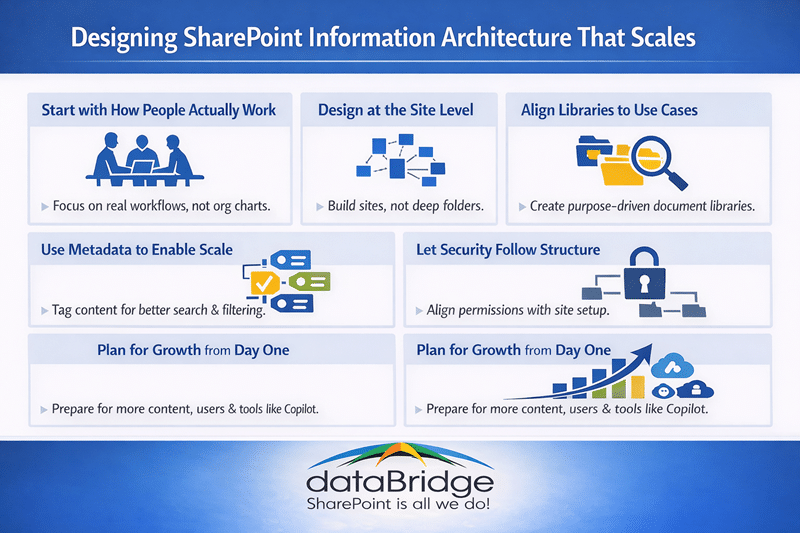
Let Security Follow the Structure
At the same time, security should support architecture—not fight it.
When structure and security align:
- Permission inheritance stays intact
- Access management becomes simpler
- Users understand what they can—and can’t—see
As a result, SharePoint becomes easier to govern and safer to scale. Strong alignment here also prepares the environment for AI-driven scenarios outlined in Copilot Readiness for SharePoint.
Information architecture plays a critical role in mission-driven organizations where staff and volunteers must quickly locate policies, program resources, and grant documentation. A well-designed SharePoint intranet ensures nonprofit teams can access the information they need without relying on disconnected systems.
Learn more about how this applies to mission-driven organizations in our SharePoint Intranet for Non-Profit Organizations guide.
Plan for Growth from Day One
Finally, scalable architecture always plans ahead.
That means anticipating:
- More content
- More users
- New teams
- New tools, including Copilot
By designing for growth early, organizations avoid painful restructures later and protect long-term investments in Microsoft 365.
Why Information Architecture Matters
Poor information architecture is one of the leading causes of SharePoint migration mistakes, particularly when organizations attempt lift-and-shift migrations without redesigning structure and metadata.
This same principle applies to Power Platform solutions, where structure determines success. Without clear data organization and ownership, even well-built automation can fail—an issue we explore further in our Power Apps vs Power Automate comparison.
The Bottom Line
Information architecture isn’t a one-time task—it’s an ongoing design discipline.
Organizations that invest in scalable SharePoint architecture reduce friction, improve adoption, and build a strong foundation for governance, search, and AI readiness. When structure scales, SharePoint scales with it.
Architecture decisions determine how easily users can find content and collaborate across the organization. Structure also influences how access is managed across the environment. When architecture is designed well, permission inheritance becomes easier to maintain and administrators can avoid complex access exceptions. The Complete Guide to SharePoint Permissions explains how architecture and permissions work together to support scalable collaboration.
For more insights on governance, architecture, and Microsoft 365 strategy, explore our SharePoint architecture resources.
Organizations implementing these improvements often engage our SharePoint and Microsoft 365 consulting solutions.