
Trusted SharePoint Migration Expertise
- 20+ years of Microsoft collaboration experience
- Enterprise SharePoint migrations across multiple industries
- Deep expertise in information architecture, governance, and permissions
- SharePoint environments designed for Microsoft 365 and Copilot readiness
Moving Content Is Easy. Getting It Right Is the Hard Part.
Migrating to SharePoint is more than a technical exercise. While many tools can move files from one system to another, successful SharePoint migrations focus on structure, security, governance, and long-term usability—not just speed.
SharePoint Migration Consulting & SharePoint Online Migration Services
SharePoint migration consulting helps organizations move documents, workflows, and collaboration environments into SharePoint Online while improving information architecture, governance, permissions, and long-term Microsoft 365 usability.
Structured SharePoint Migration Consulting for Real Business Results
If your organization needs a secure, predictable move to SharePoint Online, our SharePoint migration consulting and SharePoint migration services help you plan, protect, and perform with confidence. We guide complex migrations by prioritizing governance first — because structure always beats shortcuts.
Trusted by IT leaders to reduce risk, resolve permissions sprawl, and deliver predictable outcomes.
At dataBridge, our SharePoint Consulting Services help organizations migrate to SharePoint and Microsoft 365 in a way that actually improves how people work. Instead of recreating yesterday’s problems in a new platform, we design migrations that clean up content, reduce risk, and prepare your environment for tools like Microsoft Copilot.
Successful migrations rarely stand alone. Many organizations combine migration planning with governance design, architecture improvements, and collaboration strategy. These capabilities are outlined across our SharePoint and Microsoft 365 consulting solutions.
These migration capabilities are part of our broader SharePoint & Microsoft 365 consulting solutions, which bring together governance, information architecture, collaboration strategy, and migration planning to help organizations modernize Microsoft 365 environments without recreating legacy problems.
What Does a SharePoint Migration Consultant Do?
A SharePoint migration consultant helps organizations plan and execute migrations that improve the structure, governance, and long-term usability of their Microsoft 365 environment. Rather than simply moving files from one system to another, experienced consultants analyze information architecture, permissions, metadata, and collaboration patterns to ensure the new SharePoint environment supports secure document management, reliable search, and scalable collaboration.
During a migration, consultants help organizations identify redundant or outdated content, restructure document libraries, align permissions with governance policies, and prepare the environment for emerging capabilities such as Microsoft Copilot. This strategic approach ensures the migration improves the overall health of the Microsoft 365 platform rather than simply relocating existing problems.
Table of Contents
What Is SharePoint Migration Consulting?
SharePoint migration consulting is a structured partnership focused on moving your content, permissions, and business logic to a modern, governed Microsoft 365 environment. In our experience, migrations fail not because of tools — but because strategy, structure, and people were ignored.
We don’t just automate moves. We evaluate content quality, information architecture, and security posture so that your data arrives ready to be managed, found, and trusted.
Organizations that approach migration as a simple file transfer often recreate the same structural problems in the new environment. Many of the most common issues—from duplicate content to broken permissions—are discussed in detail in this guide on SharePoint migration mistakes, which highlights the pitfalls organizations should address before beginning a migration project.
Work With a SharePoint Migration Consultant Who Prioritizes Structure
When organizations search for a SharePoint migration consultant, they are not looking for a migration tool. They are looking for experience, judgment, and strategic oversight.
At dataBridge, our SharePoint migration consulting approach is led by senior architects who understand that migrations rarely fail at the technical layer — they fail at the decision layer. Permissions complexity, governance gaps, and unclear ownership models create long-term problems if not addressed before content moves.
In our experience, successful SharePoint Online migrations require more than automation. They require structured planning, phased validation, and disciplined security alignment. That is why we focus on strategy first — ensuring your SharePoint migration strategy supports long-term platform health, not just short-term cutover.
- Direct access to experienced SharePoint migration consultants
- Architecture-first planning that reduces post-migration remediation
- Governance alignment before execution
- Phased migration waves with validation checkpoints
- Clear accountability for security and ownership
The result is a controlled, defensible migration that strengthens your Microsoft 365 environment instead of simply relocating its problems.
When organizations search for a SharePoint migration consultant, they’re not looking for software. They’re looking for judgment.
If you are planning a migration, reviewing real projects can help clarify the process. Explore our SharePoint migration case studies and client success stories.
SharePoint Migration Services Built for Predictable Success
- Pre-Migration Assessment – Identify risk, compliance gaps, and migration blockers before execution.
- Content & Permissions Rationalization – Reduce clutter, tighten access controls, and prepare structured content models.
- Phased SharePoint Online Migrations – Break complex moves into manageable, validated waves.
- Governance & Ownership Alignment – Define who owns what, so your environment stays healthy post-migration.
- Post-Migration Health & Optimization – Validate permissions, optimize search quality, and lock in adoption gains.
These SharePoint migration services reflect our experience delivering dozens of enterprise migrations across manufacturing, healthcare, finance, and education.
SharePoint Online Migrations That Align With Business Outcomes
Moving to the cloud should be strategic — not just technical. SharePoint Online migrations consolidate legacy data, unify content models, and eliminate risk through structure. We’ve migrated terabytes of content and untangled overly-permissive estates with repeatable, staged approaches that minimize business disruption.
Rather than generic scripts, we design migration waves that map to real business units, security policies, and compliance requirements. This real-world strategy dramatically reduces rework and content reconciliation after cutover.
A SharePoint migration is not a file move
- Content cleanup
- Information architecture redesign
- Permissions rationalization
- Adoption readiness
Why SharePoint Migrations Often Fail
Although SharePoint migrations are common, many fail to deliver lasting value.
Why? Because they focus on moving content—not fixing what’s broken.
Common migration mistakes include:
- Migrating everything “as-is” without cleanup
- Carrying forward broken permissions and oversharing
- Recreating folder sprawl instead of modern structure
- Ignoring metadata, ownership, and governance
- Treating migration as a one-time IT task
As a result, users struggle to find information, security becomes harder to manage, and adoption suffers—sometimes worse than before.
The Cost of a Poor SharePoint Migration
A poorly planned SharePoint migration rarely fails immediately. In many cases, the environment appears functional at first—files are accessible, libraries exist, and teams begin working in the new system.
The real problems often emerge months later.
Without a structured migration strategy, organizations frequently carry legacy issues into their new environment. Duplicate content remains scattered across libraries, permissions become difficult to manage, and search results return too many irrelevant files. Over time, users begin to lose confidence in the platform.
These challenges become even more visible as organizations adopt AI-powered tools such as Microsoft Copilot. AI systems rely on the structure and permissions already present in SharePoint. If content is duplicated, poorly organized, or incorrectly secured, Copilot may surface outdated or misleading information.
Common long-term consequences of poorly executed SharePoint migrations include:
- Duplicate or fragmented content across multiple document libraries
- Broken or inconsistent permissions that expose or restrict information incorrectly
- Declining trust in search and document discovery
- Microsoft Copilot surfacing outdated or low-quality content
- Expensive remediation projects required months or years after the migration
For this reason, successful SharePoint migrations focus not only on moving files, but on improving structure. Information architecture, metadata strategy, governance policies, and lifecycle management must be designed during the migration process—not after it.
When these elements are addressed correctly, organizations gain a SharePoint environment that supports reliable collaboration, governance, and future innovation across Microsoft 365.
A Better Way to Think About SharePoint Migration
Instead of asking “How fast can we move our data?”, better questions are:
- What content should actually be migrated?
- How should it be structured going forward?
- Who owns it—and who should have access?
- How will users find and trust information after migration?
- Is the environment ready for AI and automation?
In other words, migration is an opportunity to reset—not just relocate.
Organizations researching migration strategy, governance planning, and Microsoft 365 architecture in more depth can explore our SharePoint & Microsoft 365 Knowledge Center, which includes detailed guides on migration planning, information architecture, governance frameworks, and Copilot readiness.
Proven SharePoint Migration Strategy That Reduces Risk
A solid SharePoint migration strategy begins with structure, not tools. Our methodology prioritizes discovery, governance alignment, and content lifecycle planning before a single byte moves. Understanding the common SharePoint migration mistakes organizations make can dramatically improve migration outcomes and prevent legacy problems from being recreated in the new environment.
- Discovery & Audit – Map content, permissions, and integrations.
- Architecture Design – Configure secure target models that scale.
- Phased Migration Waves – Migrate in controlled, validated groups.
- Cutover Validation – Confirm access, search quality, and performance.
- Post-Migration Adoption – Enforce governance and sustain results.
In our experience, migrations without strategy leave organizations with permissions sprawl, search confusion, and long-term governance debt. We solve that before migration begins.
Ready to plan a secure, structured migration? Our SharePoint migration specialists help you build a strategy that delivers real business results.
Talk to a Migration ConsultantOur Approach to SharePoint Migrations
We take a foundation-first approach to SharePoint migration.
Rather than starting with tools, we start with understanding:
- How your organization works today
- How information flows across teams and departments
- Where security and governance are breaking down
- What success looks like after go-live
Only then do we design the migration plan.
This approach results in a cleaner, more secure SharePoint environment that users actually adopt. Read The Complete Guide to SharePoint Online Migrations
What We Address Before Anything Is Migrated
Before content moves, we help organizations:
Assess and Rationalize Content
Not all content deserves to be migrated.
We help identify:
- What is active, outdated, or redundant
- What should be archived or retired
- What content needs restructuring
As a result, you migrate less content—but higher-quality content.
Design Modern SharePoint Structure
Instead of recreating file shares, we design:
- Logical site architecture
- Purpose-driven document libraries
- Metadata that improves search and Copilot results
This ensures SharePoint works the way it was intended.
Fix Permissions and Security
Migrations often expose years of permission sprawl.
We help:
- Replace individual permissions with role-based access
- Simplify inheritance models
- Reduce security risk before content is widely exposed
This creates predictability and trust.
Align Migration With Governance
Migration without governance is temporary success.
Therefore, we align migrations with:
- Ownership models
- Site lifecycle rules
- Naming and provisioning standards
So the environment stays clean after migration—not just on day one.
Selecting the right partner can determine whether a migration becomes a smooth transition or a prolonged disruption. Experienced consultants approach migrations differently than tool-driven providers by focusing on information architecture, governance, and user adoption before content is moved. If you are comparing providers, our SharePoint Consulting Firm Guide explains how to evaluate expertise, methodology, and long-term support capabilities.
Risk Mitigation Strategies That Actually Work in SharePoint Migrations
Most migration risks don’t come from tooling — they come from assumptions.
Common risks include:
- Moving content without clear ownership
- Preserving broken permissions structures
- Migrating content that no one actively uses
- Introducing new platforms without changing how people work
Effective risk mitigation starts before migration and continues after cutover.
Key strategies include:
Define ownership before content moves
Every site, library, and major content set should have a clearly identified owner responsible for accuracy, access, and lifecycle decisions — a core principle of effective SharePoint governance.
Design structure before migration begins
Information architecture should be validated before content is mapped. Migrating into an undefined or evolving structure guarantees rework later.
Stage migrations in phases
Breaking migrations into logical phases reduces disruption, allows lessons learned to be applied, and limits the blast radius of issues — especially in complex SharePoint migration projects.
Validate search and permissions early
Issues with SharePoint search and discoverability and access control are often discovered too late. Testing these early prevents trust erosion immediately after go-live.
Plan for post-migration support
Migration is not the finish line. Post-migration support and optimization are what determine long-term adoption and success.
Risk mitigation isn’t about avoiding change — it’s about ensuring the change is intentional and sustainable.
When to Choose a Migration Assessment vs. a Full Migration
One of the most common mistakes organizations make is committing to a full SharePoint migration before they understand what they’re actually moving.
A SharePoint migration readiness assessment is the right starting point when:
- You don’t have a clear inventory of content, sites, or permissions
- Ownership of sites and libraries is unclear or outdated
- File shares or legacy platforms have grown organically for years
- You suspect a large portion of content is obsolete, duplicated, or unused
- You’re planning for Copilot readiness and need confidence in content quality and structure
An assessment provides visibility into what exists, what matters, and what should be left behind. It allows organizations to make informed decisions about scope, sequencing, and risk before any content is moved.
A full SharePoint migration makes sense when:
- Information architecture has already been defined or validated
- SharePoint governance and ownership models are established
- Content has been rationalized and approved for migration
- The business is aligned on priorities, timelines, and outcomes
At dataBridge, we often see migrations succeed when assessments are used to reduce scope — not just plan it. Migrating less content, more intentionally, almost always leads to better adoption and lower long-term cost.
What Good Information Architecture Looks Like During a Migration
Information architecture is where most SharePoint migrations quietly succeed or fail.
Good migration architecture is not a mirror of the past. It’s a translation of how the organization works today — and how it plans to work tomorrow.
Strong migration-focused information architecture typically includes:
Clear site purpose and boundaries
Sites are created with defined intent — not as catch-all’s. Each site answers the question: Who is this for, and what belongs here?
Libraries designed around use, not departments
Libraries support SharePoint document management by reflecting how content is accessed and used, not how the org chart is structured.
Metadata that supports findability and lifecycle
Metadata is applied selectively to improve search, retention, and Copilot accuracy — not added indiscriminately.
Permission models that scale
Permissions are designed to be repeatable and understandable, aligning with long-term SharePoint security and governance practices.
Alignment with governance and Copilot readiness
Architecture supports governance enforcement and ensures Microsoft Copilot for SharePoint surfaces relevant, trustworthy information.
At dataBridge, we approach information architecture as a migration accelerator — not a delay. When structure is designed correctly, migration becomes faster, cleaner, and far more resilient.
How a SharePoint Migration Timeline Should Actually Work
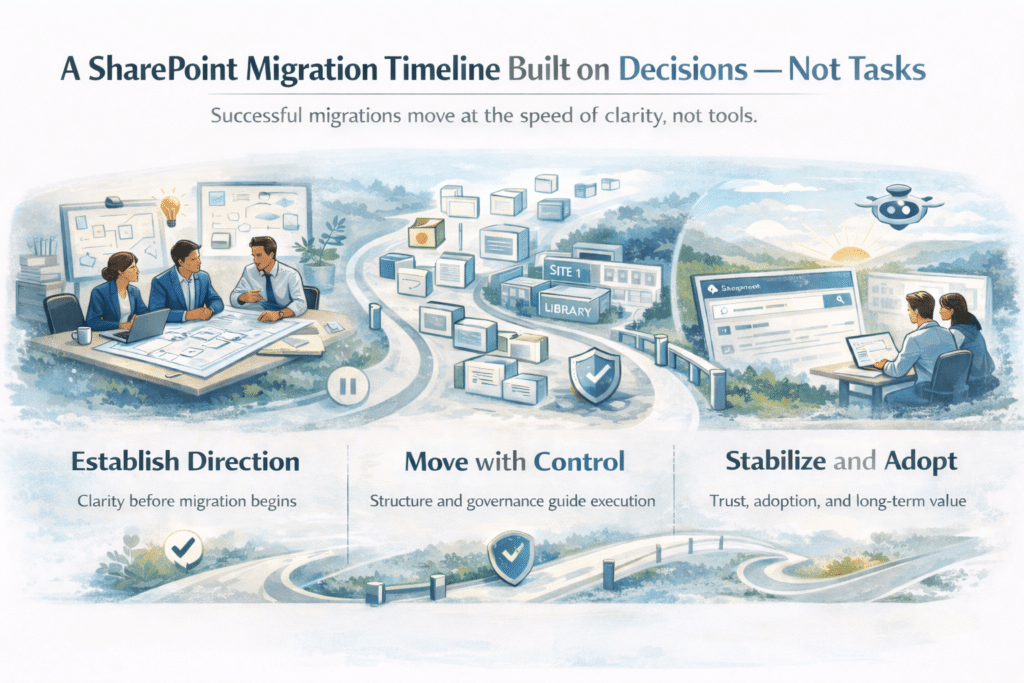
A common misconception about SharePoint migrations is that the timeline is defined by tools and task lists. In reality, successful migrations are paced by decision readiness, not execution speed.
At dataBridge, we view the migration timeline as a sequence of commitment points — moments where clarity matters more than progress.
Early Phase: Establishing Direction Before Movement
The earliest phase of a migration is not technical. It’s about alignment.
Organizations that rush past SharePoint migration readiness assessment work often discover mid-migration that ownership, structure, and governance were never fully agreed upon. This is where scope expands, timelines slip, and confidence erodes.
When direction is clear early, execution becomes predictable later.
Middle Phase: Moving with Intent, Not Momentum
The middle of a migration is where discipline matters most.
Content moves best when it is mapped into a validated information architecture, governed by clear ownership, and supported by consistent SharePoint governance rules. This phase is less about speed and more about control.
Well-designed migrations often move slower than expected — and finish faster than feared — because rework is minimized and surprises are rare.
Late Phase: Stabilization, Trust, and Adoption
The final phase of a migration is where many projects quietly fail.
A technically “complete” migration is not a successful one if users don’t trust search, permissions feel unpredictable, or content quality is inconsistent. This is why post-migration support and optimization must be part of the timeline, not an afterthought.
This phase ensures the environment is stable, understandable, and ready to support long-term initiatives like Copilot readiness and ongoing platform evolution.
Why Timeline Discipline Matters More Than Speed
Organizations that treat migrations as races often win the cutover — and lose adoption.
Organizations that treat migrations as decisions supported by execution build platforms that last. A well-paced timeline creates space for governance enforcement, user confidence, and continuous improvement.
At dataBridge, we don’t measure migration success by how fast content moves — we measure it by how confidently the organization operates afterward.
Planning a SharePoint Migration?
Many organizations begin a SharePoint migration expecting the project to focus primarily on moving files. In practice, successful migrations require careful planning across information architecture, permissions, governance, and long-term Microsoft 365 strategy.
An experienced SharePoint migration consultant can help organizations evaluate existing content, identify structural risks, and design a migration approach that improves collaboration rather than simply relocating files. This often includes restructuring document libraries, aligning permissions with governance policies, and preparing the environment for modern capabilities such as Microsoft Copilot.
If your organization is preparing for a SharePoint migration or evaluating migration options, it can be helpful to discuss the environment with an experienced consultant before beginning the project.
Talk with a SharePoint migration consultant →
SharePoint Migration Scenarios We Support
We support migrations from:
- File shares and network drives
- Legacy SharePoint (on-prem or classic)
- Third-party systems (Box, Dropbox, etc.)
- Mergers and acquisitions
- Tenant-to-tenant consolidations
Each scenario has different risks, and we plan accordingly.
SharePoint Migration and Microsoft 365
SharePoint is the backbone of Microsoft 365.
Because of that, migration decisions directly affect:
- Microsoft Teams file organization
- Copilot accuracy and trust
- Power Platform solutions and automation
- Search, compliance, and retention
A poorly planned migration creates downstream problems across the entire platform.
A well-designed migration enables everything else to work better.
Organizations planning modernization initiatives often research migration strategies alongside governance and architecture improvements. These topics are covered throughout our SharePoint & Microsoft 365 Knowledge Center.
Preparing Your Environment for Copilot
Copilot doesn’t fix messy content—it amplifies it.
That’s why migration is one of the most important Copilot readiness steps. During migration, we help ensure:
- Content has clear ownership
- Permissions reflect intent
- Structure supports discovery
- Metadata improves AI responses
As a result, Copilot surfaces insight instead of noise.
Migration Is Not the End—It’s the Beginning
A successful SharePoint migration isn’t defined by how fast data moves.
It’s defined by what happens after the migration.
When migration is done well:
- Users trust the platform
- Content is easier to find
- Security is predictable
- Adoption increases
- AI delivers better results
That’s the outcome we design for.
How dataBridge Helps With SharePoint Migrations
We help organizations:
- Plan migrations strategically
- Clean up content before it moves
- Design modern SharePoint structure
- Simplify security and permissions
- Align migration with governance
- Prepare for Copilot and automation
We don’t just move data—we fix the foundation.
Thinking About a SharePoint Migration?
If your organization is planning a SharePoint migration—or struggling with the results of a past one—now is the time to step back and do it right.
A well-designed migration sets the stage for collaboration, governance, and AI success across Microsoft 365.
Many organizations also explore our industry-specific SharePoint intranet solutions to understand how migration planning, governance requirements, and Microsoft 365 collaboration models vary across healthcare, financial services, government, education, and other regulated sectors.
SharePoint Migration Strategy Resources
Organizations planning a SharePoint migration often need to evaluate several related areas before moving content into a new environment. Migration success depends not only on the tools used to transfer files, but also on governance planning, information architecture design, and long-term Microsoft 365 strategy.
The following resources provide deeper guidance on important migration planning topics:
- SharePoint Migration Mistakes – Common issues that cause SharePoint migrations to fail and how organizations can avoid them.
- SharePoint Information Architecture That Scales – How to structure sites, libraries, and metadata so migrated content remains organized and discoverable.
- SharePoint Governance Guide – Governance policies that protect permissions, content lifecycle management, and compliance during and after a migration.
- Is Your SharePoint Environment Ready for Copilot? – Why migration quality directly impacts the accuracy and reliability of Microsoft Copilot results.
- SharePoint Consulting Firm Guide – How organizations evaluate and select experienced SharePoint consultants for complex migration projects.
- SharePoint Migration Case Study Organizations evaluating migration strategies often benefit from seeing how these principles apply in real environments. In one recent engagement, dataBridge helped a solar energy provider complete a large-scale SharePoint document migration involving more than 10TB of business-critical content spread across file servers and legacy systems. The migration included designing a scalable SharePoint architecture, implementing enterprise metadata and search improvements, and integrating the platform with Microsoft Dynamics so field teams and operations staff could reliably access project documentation. This case study illustrates how a structured migration approach can improve document discovery, governance, and collaboration across Microsoft 365. Explore the full SharePoint migration case study
These resources expand on key migration planning concepts and help organizations design SharePoint environments that remain scalable, secure, and ready for future innovation.
Common Questions About SharePoint Migrations
Organizations evaluating SharePoint migration consulting often ask practical, risk-focused questions before moving forward. Below are some of the most common concerns we hear from IT leaders and business stakeholders.
How long does a SharePoint migration take?
Timelines vary based on content volume, permissions complexity, integrations, and governance maturity. In our experience, structured SharePoint Online migrations typically move faster — and with fewer disruptions — than reactive, tool-driven approaches.
What are the biggest migration risks?
The most common risks include permissions sprawl, broken inheritance, unmanaged external sharing, metadata loss, and migrating outdated content without rationalization. A clear SharePoint migration strategy dramatically reduces these risks before execution begins.
How do you protect permissions during SharePoint Online migrations?
Protecting access controls requires auditing inheritance, mapping security groups, and validating access during phased cutovers. Without structured planning, organizations often replicate legacy security gaps into the cloud.
What makes a migration strategy successful?
Successful migrations prioritize governance, ownership alignment, content lifecycle planning, and phased validation. In our experience, strategy always outweighs speed when protecting long-term platform health.
What does SharePoint migration consulting cost?
Costs depend on complexity, volume, compliance requirements, and environment health. However, investing in experienced SharePoint migration services often prevents far greater remediation costs after a poorly structured move.
What our clients say

Key SharePoint Strategy Resources
What Our Clients Say
“SharePoint has been a critical tool for our nine-location, six-time-zone firm to operate as a cohesive organization. dataBridge has been the most critical factor in making our SharePoint intranet a success. They consistently apply professionalism, creativity, and responsiveness to every challenge we present. Most importantly, they empower our team with the knowledge to manage and optimize our SharePoint environment internally. The dataBridge team is a pleasure to work with.”
— William Downey
Director of IT Applications, Permal


Our senior SharePoint migration consultants have led 460+ enterprise migrations.

THE SEARCH IS OVER
We're a Microsoft SharePoint partner - everything you need IS right here
For more information about how dataBridge can transform your business with improved corporate communication, collaboration, forms, workflows, and document management, contact us today.