Why SharePoint Adoption Fails (Even with Great Technology)
And How to Design It Right from the Start
SharePoint is one of the most powerful platforms in the Microsoft 365 ecosystem.
It supports document management, collaboration, automation, intranet experiences, and now AI through Microsoft Copilot. On paper, it offers everything organizations need to modernize how work happens.
And yet—adoption still fails.
Not occasionally. Not unpredictably. But consistently.
Most organizations don’t struggle because SharePoint lacks capability. They struggle because the environment wasn’t designed to support how people actually work.
The uncomfortable truth is this: SharePoint adoption rarely fails because of technology. It fails because of design decisions made long before users ever log in.
At dataBridge, we see this pattern across industries. Organizations invest in Microsoft 365, deploy SharePoint, and expect adoption to follow. When it doesn’t, they assume the problem is user resistance or lack of training.
In reality, adoption is already decided by the time users arrive.
First, the Technology Is Rarely the Problem
When SharePoint adoption stalls, the initial reaction is almost always the same:
- SharePoint is too complex
- Users resist change
- The tools don’t match how people work
These assumptions feel logical—but they’re usually wrong.
In most environments, SharePoint is functioning exactly as configured. The issue is that the configuration itself doesn’t align with user behavior.
Most organizations don’t have an adoption problem—they have a design problem they tried to solve with training.
Training cannot fix:
- Poor structure
- Confusing navigation
- Inconsistent permissions
- Lack of clear ownership
If users have to think too hard about where to go, what to do, or whether they can trust the content, they disengage.
That is exactly why employees stop trusting SharePoint in the first place: weak structure, stale content, inconsistent permissions, and unclear ownership make the platform feel harder to rely on than it should.
That disengagement isn’t failure—it’s feedback.
And it’s feedback that should point directly back to SharePoint Strategy & Roadmapping decisions made at the beginning.
The Most Common SharePoint Adoption Failure Patterns
Before diving into root causes, it’s important to recognize what adoption failure actually looks like in real environments.
Across hundreds of SharePoint deployments, the same patterns appear again and again.
Abandoned Sites
Departments launch sites with good intentions—but over time, content becomes outdated, ownership fades, and usage drops off.
Duplicate Content Everywhere
Users don’t trust where the “final version” lives, so they store files in multiple locations.
Teams and SharePoint Misalignment
Documents live in Teams chats, personal OneDrive folders, and SharePoint libraries—with no clear structure connecting them.
Shadow IT Emerges
When SharePoint feels difficult, users turn to tools like Dropbox, Google Drive, or local storage.
Search Becomes Unreliable
When structure and metadata are inconsistent, search results lose relevance—and users stop relying on them.
These are not isolated issues. They are signals of deeper design problems.
When SharePoint doesn’t feel intuitive, users don’t complain—they quietly work around it.
And those workarounds eventually replace the platform entirely.
The 5 Root Causes of SharePoint Adoption Failure
To simplify what often feels complex, most SharePoint adoption issues fall into five core categories.
1. Structure Problems
If users cannot quickly find what they need, they won’t use the system.
Poor structure shows up as:
- Deep, confusing folder hierarchies
- Inconsistent site layouts
- No standard naming conventions
Users don’t follow governance documents—they follow the path of least resistance. SharePoint structure defines that path.
This is why SharePoint Information Architecture & Metadata is not optional—it’s foundational.
2. Governance Gaps
Without governance, SharePoint becomes unpredictable.
Users don’t know:
- Where content should live
- Who owns it
- How long it should be retained
Over time, inconsistency grows—and trust declines.
Strong SharePoint Governance Framework creates clarity, consistency, and long-term sustainability.
3. Lack of Ownership
Every successful SharePoint environment has clear ownership.
Every failing one does not.
When ownership is unclear:
- Content becomes outdated
- Permissions drift
- No one is accountable for quality
Ownership is what turns SharePoint from a system into a reliable resource.
4. Poor User Experience
Even technically correct environments can fail if they feel difficult to use.
Friction shows up as:
- Too many clicks
- Inconsistent navigation
- Confusing layouts
If using SharePoint feels harder than working outside of it, users will choose the easier path every time.
5. No Reinforcement Strategy
Adoption is not a launch event.
Organizations often rely on:
- Training sessions
- Launch communications
- Initial enthusiasm
But without reinforcement, usage declines.
Sustainable adoption requires alignment with SharePoint Adoption & Change Management practices that evolve over time.
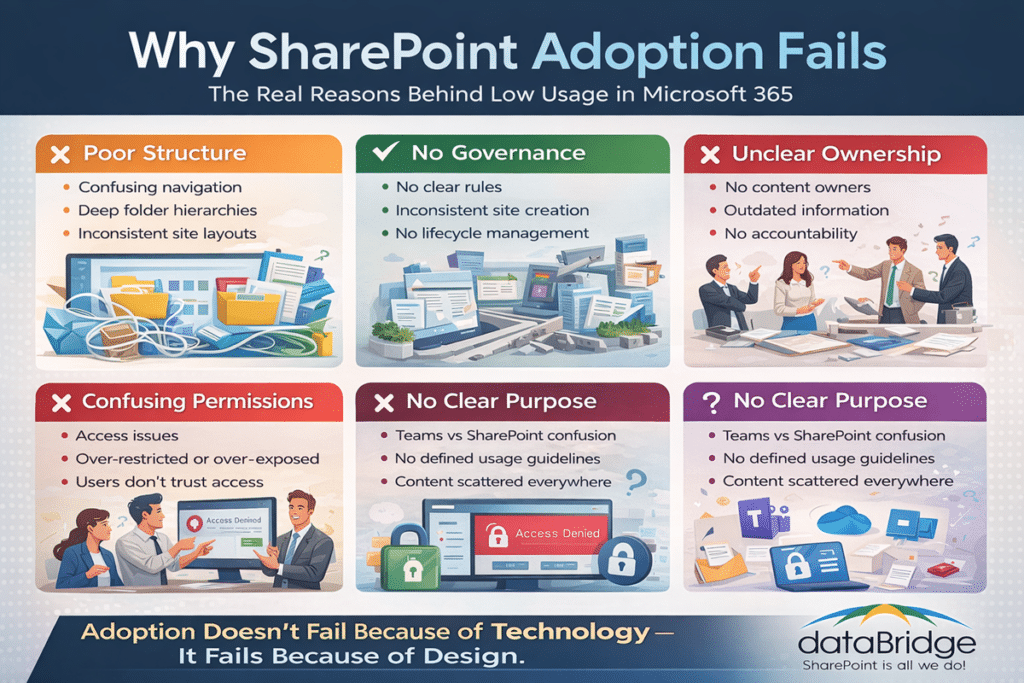
Most organizations don’t realize these issues until adoption has already declined—by then, the cost to fix them is significantly higher.
Why SharePoint Structure Quietly Drives Behavior
Structure is one of the most underestimated drivers of adoption.
Whether intentional or not, users follow the environment placed in front of them.
When SharePoint:
- Makes it easy to find documents
- Reduces cognitive load
- Feels consistent across sites
Adoption happens naturally.
When it doesn’t:
- Users hesitate
- Workarounds emerge
- Trust declines
Structure is not just organization—it’s behavioral design.
This is where SharePoint Information Architecture & Metadata directly influences how people work every day.
Why Governance Determines Long-Term Adoption
Governance is often misunderstood as restriction.
In reality, it’s what enables scale.
Without governance:
- Sites are created inconsistently
- Permissions become unpredictable
- Content lifecycle is unmanaged
With governance:
- Structure remains consistent
- Ownership is clear
- Users know what to expect
Governance is not about control—it’s about creating a predictable experience users can rely on.
Organizations that invest in SharePoint Governance Framework early avoid costly rework later.
Permissions and Trust Go Hand in Hand
Adoption depends on trust.
Users must believe:
- They have access to what they need
- Sensitive information is protected
- Content is accurate and current
Trust breaks down when:
- Permissions feel inconsistent
- Users encounter access issues
- Content appears outdated
If users don’t trust SharePoint, they won’t rely on it—and if they don’t rely on it, adoption disappears.
This is why SharePoint Security & Compliance plays a direct role in adoption—not just risk management.
Why Adoption Fails Without a Clear Purpose
One of the most overlooked causes of adoption failure is a lack of clarity.
Users are often left asking:
- What belongs in SharePoint?
- When should I use Teams instead?
- Where do final documents live?
Without clear answers, SharePoint becomes optional.
And optional tools rarely succeed.
Adoption improves when SharePoint has a clearly defined role within the Microsoft 365 ecosystem.
This alignment starts with SharePoint Strategy & Roadmapping.
Adoption Is Not a One-Time Event—It’s Ongoing Design
Many organizations attempt to “fix” adoption through:
- Training
- Communications
- Launch campaigns
These efforts help—but they are not enough.
Adoption is not something you roll out—it’s something you design into the system.
Sustainable adoption grows through:
- Consistent structure
- Clear ownership
- Evolving governance
- Continuous improvement
Organizations that treat SharePoint as a living system outperform those that treat it as a one-time deployment.
What Drives SharePoint Adoption: Failing vs Successful Environments
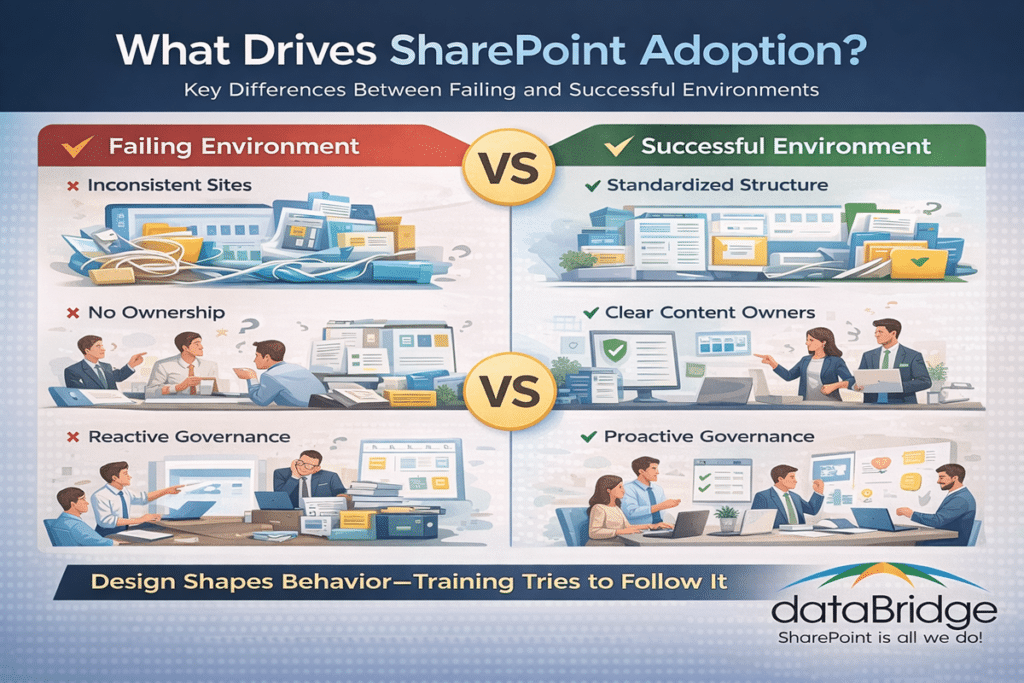
The difference between failing and successful SharePoint environments is rarely technical—it’s almost always structural and intentional.
How to Fix SharePoint Adoption (Practical Steps)
If adoption is struggling, the solution is not more training—it’s better design.
Step 1: Assess the Current Environment
Evaluate:
- Structure
- Navigation
- Permissions
- Content quality
Identify where friction exists. For organizations that already have a live intranet and need a structured way to evaluate those friction points, a SharePoint intranet assessment provides a practical starting point. It helps turn broad adoption frustration into a clear roadmap for improvement.
Step 2: Redesign Structure Around Real Workflows
Align SharePoint with:
- How teams collaborate
- Who uses, and how documents are used
- How information is accessed
Focus on reducing effort—not enforcing rules.
Step 3: Establish Governance and Ownership
Define:
- Who owns content
- Where content lives
- How content is maintained
Use a clear SharePoint Governance Framework to guide decisions.
Step 4: Align SharePoint with Microsoft 365 Tools
Clarify the relationship between:
- SharePoint
- Microsoft Teams
- OneDrive
Ensure users understand when and how to use each.
Step 5: Reinforce Usage Over Time
Support adoption through:
- Ongoing improvements
- Feedback loops
- Incremental enhancements
This aligns with SharePoint Adoption & Change Management best practices.
The dataBridge Perspective on SharePoint Adoption
At dataBridge, we approach SharePoint adoption differently.
We don’t treat it as a training challenge.
We treat it as a design challenge.
Every engagement focuses on:
- Structuring SharePoint around real workflows
- Aligning governance with business needs
- Creating environments users can trust
Adoption is not something we hope for—it’s something we engineer into the platform from the start.
This approach is what separates environments that succeed from those that struggle.
Finally, AI Raises the Stakes for Adoption
With Microsoft Copilot now integrated into Microsoft 365, the importance of SharePoint adoption has increased significantly.
Copilot depends on:
- Structured content
- Reliable permissions
- Consistent data
If SharePoint adoption is weak:
- AI outputs become unreliable
- Users lose confidence
- Copilot usage declines
Copilot doesn’t fix adoption problems—it exposes them.
Organizations preparing for AI must first ensure their SharePoint foundation is strong.
Frequently Asked Questions About SharePoint Adoption
Why do users stop using SharePoint?
Users disengage when SharePoint feels difficult to navigate, inconsistent, or unreliable. Most issues stem from poor structure, unclear governance, or lack of trust in the system.
How do you increase SharePoint adoption?
Adoption improves when SharePoint is designed around real workflows, supported by clear governance, and reinforced over time through continuous improvement.
Is training enough to drive adoption?
No. Training supports adoption, but it cannot fix structural or design issues. Users need an environment that feels intuitive and reliable.
What is the biggest mistake organizations make with SharePoint?
The most common mistake is designing SharePoint around technical or organizational structures instead of user behavior.
How does governance impact adoption?
Governance creates consistency and predictability, which builds trust. Without governance, SharePoint becomes fragmented and difficult to use.
How does Copilot depend on SharePoint adoption?
Copilot relies on well-structured, governed, and trusted content. Poor SharePoint adoption leads to unreliable AI results.
Real-World Example: Turning Around SharePoint Adoption
A mid-sized professional services firm came to us after their SharePoint rollout had stalled.
On paper, everything looked right:
- Sites had been created
- Documents were migrated
- Users had been trained
But in reality:
- Teams were storing files in email and local drives
- Multiple versions of the same documents existed
- Users didn’t trust search results
- Leadership questioned the value of the investment
The issue wasn’t the technology—it was the design.
We started by reassessing how teams actually worked day-to-day. From there, we:
- Simplified site structure and navigation
- Reorganized content around real workflows
- Established clear ownership for each site and library
- Implemented a consistent SharePoint Governance Framework
- Aligned SharePoint with Teams usage
Within weeks, behavior began to shift.
Users stopped asking where documents lived.
Search results became reliable.
Teams began using SharePoint as their primary workspace again.
Adoption didn’t improve because of more training—it improved because the system finally made sense.
Final Thoughts: Adoption Is a Design Decision
SharePoint adoption does not fail because the platform lacks capability.
It fails when:
- Structure does not support user behavior
- Governance does not create consistency
- Ownership is unclear
- Trust is missing
Adoption is not an outcome you hope for. It’s a design decision you make.
Organizations that get this right don’t struggle with adoption.
They create environments where adoption happens naturally.
If you’re evaluating your current environment or planning improvements, explore our SharePoint Consulting Services, review our Client Success Case Studies, or dive deeper into our Microsoft 365 resources to see how successful organizations design SharePoint for long-term adoption.
For more insights on governance, architecture, and Microsoft 365 strategy, explore our Microsoft 365 resources.
Related Resources
Reviewed By