
Site Owners Often Decide Whether SharePoint Stays Useful or Starts Slipping
In many organizations, SharePoint governance gets discussed at the leadership, IT, or architecture level.
That makes sense.
Governance frameworks matter. Permissions models matter. Information architecture matters. However, day-to-day SharePoint success usually rises or falls somewhere more practical: the site-owner level.
Site owners are the people closest to how SharePoint actually gets used. They see the pages people ignore, the libraries that become cluttered, the permission requests that keep piling up, and the content that no longer reflects how teams work. They are often the first line of defense between a well-structured site and a slow slide into disorder.
That is why site ownership should never be treated like a casual assignment. Site ownership should begin before the site is created, which is why a strong SharePoint site provisioning strategy should require named owners, backup owners, purpose, template selection, and lifecycle expectations during the request process.
A site owner is not just someone with extra access. A site owner is a steward of structure, permissions, usability, and content quality. When that role is unclear, governance starts to weaken long before leadership notices.
In our experience, many SharePoint environments do not break down because the original governance model was wrong. They break down because no one consistently maintained it at the site level.
That is also why effective site ownership should align with a broader SharePoint Governance Framework. Governance is not only about policy. It is about who applies the policy in real work.
Why Governance Usually Breaks Down at the Site-Owner Level
SharePoint rarely becomes messy overnight.
The decline is usually gradual.
A few outdated documents stay in place. A page goes untouched for months. Someone grants access quickly instead of correctly. A new folder structure appears because it feels easier in the moment. A site starts serving new purposes without any updates to ownership, navigation, or content standards.
None of those decisions feels catastrophic on its own.
Together, they create drift.
That drift is exactly where governance starts breaking down. Not in the PowerPoint deck. Not in the governance meeting. In the daily operational decisions that happen inside real sites.
This is why the site-owner role matters so much. Site owners sit at the point where governance becomes behavior. If they do not understand what they are responsible for, the site usually becomes harder to manage, harder to trust, and harder to scale.
A simple rule tends to hold up here: unmanaged sites do not stay neutral. They become progressively harder to govern.
What SharePoint Site Owners Are Actually Responsible For
The role of a site owner should be practical, not vague.
Below are the core responsibilities site owners should manage before governance starts slipping.
1. Managing Access the Right Way
Permissions are one of the most important parts of site ownership.
Site owners do not need to own every enterprise security decision, but they do need to understand how access works on their sites, who should have access, and when access changes create risk.
That includes:
- Reviewing who currently has access
- Keeping site membership aligned to real business need
- Avoiding unnecessary one-off permission exceptions
- Escalating unusual or sensitive access requests
- Understanding when inheritance has been broken and why
This is where many sites start getting fragile. Quick permission fixes often feel harmless, especially when someone needs access fast. But over time, those shortcuts create confusion, inconsistent access, and support headaches.
Good site owners know that convenience-based permissions usually become cleanup work later.
For organizations that need a stronger foundation here, the SharePoint Permissions Guide is one of the most important supporting resources to pair with site-owner training.
2. Keeping Content Current, Relevant, and Trustworthy
A site can be technically functional and still fail users.
That usually happens when content is outdated, inconsistent, duplicated, or hard to trust.
Site owners should be responsible for maintaining content quality over time. That means they should know:
- Which pages need regular review
- Which libraries contain active business content
- Which documents are outdated or duplicated
- Which areas of the site no longer reflect current processes
- Who should be accountable for specific sections or content types
This part of site ownership often gets underestimated.
However, users make decisions based on what they find in SharePoint. If the content is outdated or unreliable, confidence erodes quickly. Once trust drops, adoption usually follows.
In our experience, users rarely say, “This site has weak governance.” They say, “I can never find the right version,” or “I do not trust what is on this page.”
That is governance showing up as user frustration.
3. Protecting Structure, Not Just Content
Site owners are also responsible for protecting the structure of the site itself.
That includes maintaining:
- Clear navigation
- Logical page hierarchy
- Consistent document-library usage
- Appropriate metadata or content classification
- Site areas that still match how the team actually works
Without this kind of oversight, SharePoint sites often become patchwork environments. New content gets added wherever there is room. Pages multiply without purpose. Libraries start reflecting convenience instead of design.
A good site owner helps prevent that drift.
They do not need to redesign the entire environment alone. But they do need to recognize when the site is becoming harder to navigate, harder to search, or less aligned to its intended purpose.
That is especially important in organizations that rely on SharePoint as part of a broader document-management or Microsoft 365 collaboration model. Structure is not cosmetic. Structure affects usability, findability, and long-term sustainability.
4. Supporting Metadata, Naming, and Findability
Search problems often start as site-owner problems.
If documents are named inconsistently, uploaded to the wrong library, tagged poorly, or left buried in deep folder structures, users struggle to find what they need. Site owners play a direct role in preventing that.
Their responsibility is not to become full-time records managers. Their responsibility is to support the practical standards that make content easier to find and easier to manage.
That may include:
- Reinforcing naming conventions
- Using the correct libraries for the correct content
- Supporting metadata fields where required
- Reducing unnecessary folder sprawl
- Encouraging consistent content placement across the site
Good search is usually the result of good structure and good habits. Site owners influence both.
5. Managing Sharing and Avoiding Risky Workarounds
Site owners are often the people asked to “just share this quickly.”
That is where trouble starts.
External sharing, guest access, open links, and ad hoc permission changes can all create risk if they are handled without clear standards. Site owners need to know what kinds of sharing are allowed, what kinds need review, and when a request should be escalated.
This is not about making collaboration harder.
It is about making collaboration safer and more supportable.
When sharing practices are inconsistent, it becomes difficult to explain who has access, how that access was granted, and whether the site still reflects the organization’s intended security posture.
For a clearer operating model, site owners should follow SharePoint external sharing governance so guest access, open links, and ad hoc sharing requests are handled with consistent rules instead of workarounds.
That is one reason site ownership should connect directly to SharePoint & Microsoft 365 Support. Site owners should not be left alone to guess through every access, sharing, or structure question. Good support models help owners manage responsibly without becoming bottlenecks.
6. Recognizing When to Escalate
One of the most overlooked site-owner responsibilities is knowing when not to handle something alone.
Strong site owners do not try to solve every issue personally. They know when a request touches broader governance, security, information architecture, or platform design and should be escalated.
That may include:
- Sensitive or unusual permission scenarios
- Requests that affect multiple sites or departments
- Structural changes that impact navigation or search
- Questions about retention, compliance, or lifecycle policies
- Repeated user issues that point to bigger design problems
This matters because not every problem is a site problem. Sometimes it is a platform problem showing up inside a site.
Experienced site owners understand that escalation is not failure. It is part of responsible ownership.
7. Reinforcing Governance Through Daily Decisions
Governance is not enforced only through formal review.
It is reinforced through repeated daily decisions.
Site owners influence whether teams create unnecessary sprawl, whether permissions stay manageable, whether pages stay useful, and whether content remains aligned to how work is actually done.
That means site ownership is operational governance.
When site owners are well trained and well supported, governance becomes more sustainable. When site owners are unclear, underprepared, or overloaded, governance weakens no matter how strong the original framework looked on paper.
This is why role-based SharePoint & Microsoft 365 Training matters so much. Site owners need more than feature demos. They need practical guidance on what they own, what standards apply, and how to make good decisions consistently.
At the site level, strong governance usually comes down to a few repeatable responsibilities.
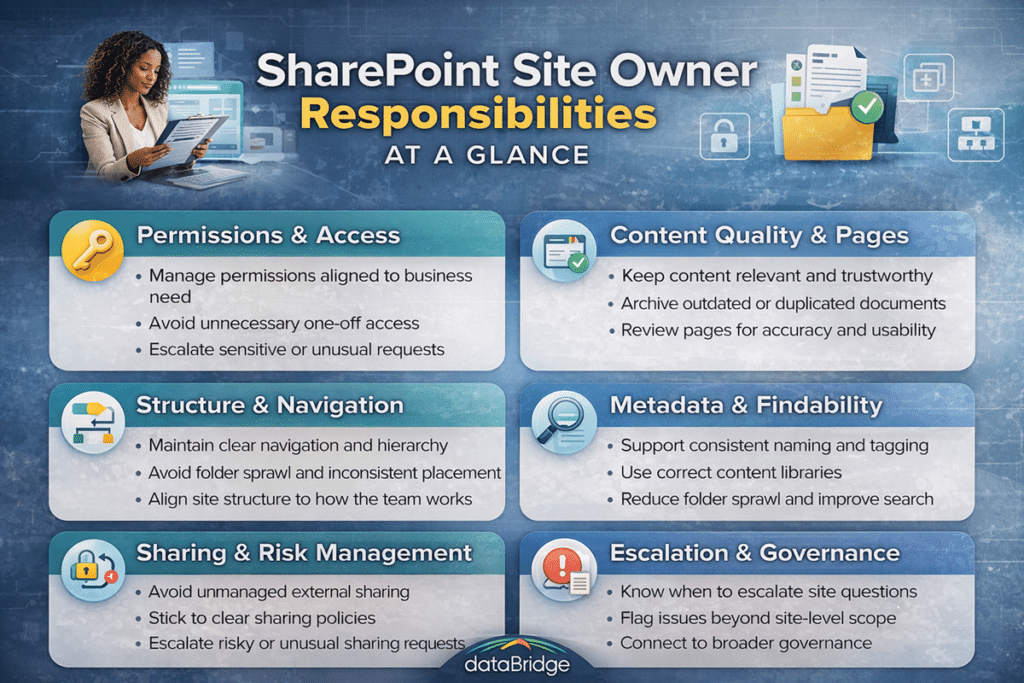
When these responsibilities are unclear or inconsistently managed, governance usually starts breaking down in visible ways.
Common Signs a Site Owner Model Is Not Working
Organizations usually have site owners assigned before they have site ownership working well.
Those are not the same thing.
Warning signs often include:
- Site owners who do not know what they are responsible for
- Permissions being managed reactively instead of intentionally
- Stale pages and duplicated content across team sites
- Inconsistent naming, navigation, or document placement
- Escalations happening too late, after issues have spread
- Site owners who have access but not training
- Governance rules that exist centrally but are not reflected locally
In our experience, one of the clearest warning signs is this: the organization has site owners, but users still do not know who to contact when something is outdated, broken, or unclear.
That usually means ownership is nominal, not operational.
What Good Site Ownership Looks Like in Practice
Good site ownership is not about perfection.
It is about consistency.
A healthy site-owner model usually looks like this:
- Owners know the purpose of the site
- Owners understand the basic permission model
- Owners review content and structure regularly
- Owners know what should be cleaned up, archived, or escalated
- Owners understand the governance standards that apply
- Owners have training and support when issues exceed their scope
This is where a lot of organizations improve quickly. They do not always need a completely new governance model first. Often, they need clearer expectations for the people already closest to the site.
That is a very fixable problem.
The Bottom Line
SharePoint governance rarely fails because policy was missing alone.
More often, it weakens because site-level ownership was never clearly defined, trained, or supported.
Site owners manage the practical details that keep governance alive: permissions, content quality, structure, sharing, and day-to-day consistency. When those responsibilities are unclear, sites gradually become harder to trust and harder to manage.
That responsibility now extends into AI-enabled knowledge experiences too, and our post on how to design SharePoint agents users can trust explains why source approval, access review, and agent ownership should not be left undefined.
The best SharePoint environments treat site owners as a critical operational role, not an afterthought.
If your organization wants governance to hold up in practice, not just in theory, start by aligning site ownership with your SharePoint Governance Framework, strengthening role-based SharePoint & Microsoft 365 Training, reinforcing access standards through the SharePoint Permissions Guide, and giving owners a reliable escalation path through SharePoint & Microsoft 365 Support.
Related Resources
Reviewed By