
How to Keep Search and Copilot Answers Trustworthy
SharePoint search governance is the ongoing discipline of keeping search results accurate, useful, secure, and trusted after the initial setup is complete.
That distinction matters.
Search quality is not just a search setting. It is a governance outcome.
A SharePoint search experience can look strong after a redesign, migration, metadata cleanup, or intranet launch. Then real life happens. Content changes. Owners leave. New sites appear. Pages get copied. Metadata gets skipped. Permissions drift. Old files remain searchable long after they stop helping anyone.
Over time, search starts to feel noisy again.
Copilot makes that problem more visible.
If SharePoint search returns stale, duplicate, or poorly governed content, Copilot and SharePoint agents can inherit the same weakness. The issue is not always the search engine. More often, the issue is the content environment beneath it.
That is why SharePoint search and AI readiness should be planned together, especially when Copilot or SharePoint agents will rely on the same content, permissions, metadata, and ownership model.
At dataBridge, we see this pattern often after organizations invest in SharePoint information architecture, metadata, intranet design, or Copilot readiness. The launch may be much cleaner than the old environment, but one question still determines long-term trust:
Who keeps the search experience healthy after launch?
That is where SharePoint search governance matters.
If your organization needs help improving SharePoint search quality, content trust, and Copilot readiness, contact dataBridge to discuss your SharePoint governance strategy.
Written by Michael Fuchs, Founder and CEO of dataBridge. Reviewed by Barry Turnmeyer, Senior Solution Architect and Director of Client Success, for SharePoint page governance, intranet content ownership, publishing standards, adoption, training, and long-term platform value accuracy.
Published: May 21, 2026
Last reviewed: May 21, 2026
What Is SharePoint Search Governance?
SharePoint search governance is the operating model that keeps search quality healthy over time.
It defines who owns search quality, how content issues get reviewed, which metadata must stay consistent, how stale content is handled, and how users report poor results.
A practical SharePoint search governance model should answer these questions:
- Who owns search quality?
- Which content is supposed to rank well?
- Which pages, libraries, or knowledge areas are authoritative?
- How are stale or duplicate results handled?
- Which metadata fields must be maintained?
- How often are search results tested?
- Who reviews user search feedback?
- How are permission-related search issues investigated?
- Which content should support Copilot answers?
- What happens when search results become less trustworthy?
SharePoint search governance does not replace search optimization.
It sustains it.
For the configuration and relevance side, SharePoint Online Search Optimization explains how metadata, managed properties, permissions, information architecture, and content structure affect search. This article focuses on the operating model that keeps those signals healthy after the initial work is done.
That difference is important.
Search optimization improves the system. Search governance keeps the system from drifting.
Why SharePoint Search Governance Matters
Search is where employees discover whether SharePoint can be trusted.
If users search for a policy and find three versions, trust drops.
When a department page appears above the official service page, trust drops again.
If old project files show up beside current guidance, people start questioning the whole environment.
Once that pattern repeats, users stop searching. They ask coworkers. They reuse old links. They save local copies. Some turn to chat because they trust people more than the platform.
That creates more fragmentation.
A strong SharePoint search governance model helps organizations:
- Keep search results current
- Reduce duplicate and conflicting content
- Improve metadata consistency
- Clarify authoritative content
- Handle stale pages and files
- Align search with permissions
- Support better Copilot answers
- Improve SharePoint agent trust
- Reduce employee frustration
- Strengthen Microsoft 365 governance
Search quality is not only a technical measure.
It is a trust measure.
If employees do not trust the results, the platform becomes less useful no matter how modern the site looks.
SharePoint Search Governance vs. Search Optimization
Search optimization and search governance are related, but they are not the same.
Search optimization focuses on improving how search works.
Search governance focuses on keeping search trustworthy over time.
Search optimization may involve:
- Improving metadata
- Configuring managed properties
- Structuring pages and libraries
- Cleaning navigation
- Improving page titles
- Reviewing search verticals
- Using bookmarks or promoted results
- Fixing content discoverability
Search governance may involve:
- Assigning search ownership
- Reviewing test queries
- Monitoring search analytics
- Escalating duplicate content
- Retiring stale content
- Maintaining metadata quality
- Reviewing authoritative sources
- Handling user feedback
- Aligning search with Copilot readiness
Both are needed.
A search optimization project can improve results for a moment in time. Without governance, the environment may slowly drift back into confusion. If search governance reveals deeper intranet problems such as outdated pages, unclear department ownership, weak navigation, and inconsistent publishing standards, a SharePoint intranet redesign can help reset the structure before those issues continue to compound.
One of the strongest ways to prevent that drift is stale page retirement and ownership, because search quality depends on pages being current, clearly owned, and retired when they no longer represent the trusted answer.
That is also why Why SharePoint Search Results Vary by User belongs in the broader search conversation. Permissions and access boundaries affect what each person sees. Search governance helps teams separate normal security trimming from content, metadata, ownership, or lifecycle problems.
Why Search Governance Matters for Copilot
Copilot depends on the content environment it can access.
If SharePoint contains clear, current, well-owned, and well-structured content, Copilot has a stronger foundation. If the environment contains stale pages, duplicate policies, unclear metadata, and unowned libraries, AI answers become harder to trust.
Copilot does not remove the need for search governance.
It raises the value of it.
A trustworthy AI answer starts with trustworthy retrieval.
That is the key point.
Copilot, search, and SharePoint agents all rely on signals from the same underlying environment. Those signals include content quality, permissions, metadata, ownership, recency, structure, and source authority.
Those signals are much stronger when the organization has a clear SharePoint architecture and governance model for sites, hubs, metadata, permissions, ownership, lifecycle controls, and authoritative content.
A Copilot-Ready SharePoint Information Architecture should include search governance, not only site structure and permissions.
A clean launch helps.
A clean operating model helps more.
To see where search governance fits inside the larger governance ecosystem, use the SharePoint Governance Center as the central map for governance strategy, framework, maturity, permissions, provisioning, lifecycle, records, external sharing, and AI readiness resources.
When search problems point to broader operating issues, the SharePoint governance maturity worksheet helps teams score search maturity alongside ownership, metadata, permissions, lifecycle, records, Copilot readiness, adoption, and support.
Use the Copilot permission review checklist when search governance findings point to access drift, oversharing, broken inheritance, or external sharing that should be reviewed before AI relies on the same content.
The Core SharePoint Search Governance Model
A practical SharePoint search governance model includes eight operating disciplines.
Each one helps keep search results useful after the initial setup is complete.
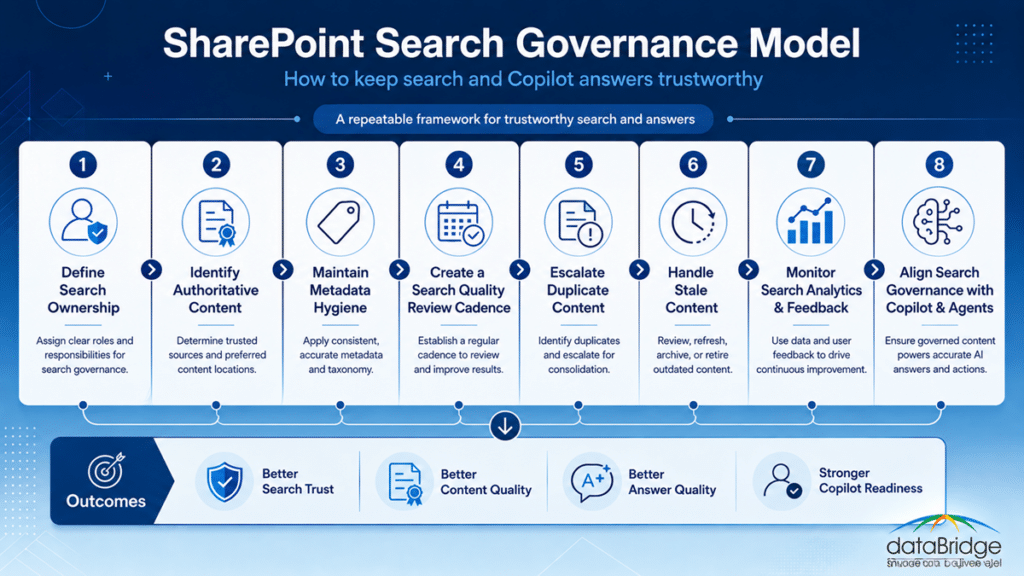
1. Define Search Ownership
Search needs an owner.
That does not mean one person controls every result.
It means someone is accountable for the quality of the search experience and the governance process behind it.
A search governance model may include:
- SharePoint owner
- Search owner
- Knowledge owner
- Intranet owner
- Metadata owner
- Content owner
- Site owner
- Compliance stakeholder
- Microsoft 365 administrator
- Department representative
The right mix depends on the organization.
Still, one rule holds up well: IT should not own search quality alone.
IT can support the platform, settings, indexing, permissions, and reporting. Business owners understand which content should be trusted, which pages are outdated, and which answers matter most to employees.
Search governance works best when technical ownership and business ownership meet.
A search result is not only a technical output.
It is a business signal.
2. Identify Authoritative Content
Search governance should define which content deserves to be treated as authoritative.
That decision matters because SharePoint often contains multiple sources that look similar.
For example:
- A formal policy document
- A plain-language policy summary
- A department FAQ
- A legacy PDF
- A news post announcing a change
- A project file with old guidance
- A Teams document copied from another location
Search can surface all of them if users have access.
Governance should clarify which source should lead.
A SharePoint Source of Truth Model helps organizations decide which content should be treated as authoritative before search, Copilot, or SharePoint agents rely on it. Search governance keeps that decision current after the initial source-of-truth work is done.
A source of truth is not a label people say once.
It is a decision the organization has to maintain.
3. Maintain Metadata Hygiene
Metadata gives SharePoint search important context.
When metadata stays consistent, users can filter, refine, and find content more easily. Search and AI experiences also get stronger signals about what content means.
When metadata decays, search quality decays with it.
Common metadata problems include:
- Required fields ignored
- Old taxonomy terms
- Inconsistent department names
- Missing content owners
- Blank review dates
- Unclear document types
- Duplicate categories
- Metadata that only makes sense to one team
- Fields that users do not understand
- Values that do not match real business language
Metadata hygiene should be reviewed on a schedule.
A SharePoint Metadata Strategy Guide gives the foundation for consistent fields, taxonomy, and content signals. Search governance keeps those metadata decisions useful after launch.
When search governance findings point to weak metadata, unclear owners, or confusing library structure, use the SharePoint findability and metadata planning worksheet to turn those findings into practical planning decisions.
Do not treat metadata as decoration.
Metadata is one of the main ways SharePoint content explains itself.
4. Create a Search Quality Review Cadence
Search quality needs routine review.
Waiting for complaints is not governance.
A review cadence should test whether search still helps users find the right content.
A practical cadence may include:
- Monthly review for high-value intranet or knowledge content
- Quarterly review for policy, procedure, and department content
- Semiannual review for lower-risk content areas
- Event-based review after migrations, reorganizations, policy changes, or Copilot rollout
The review should include real user searches.
Examples may include:
- Travel policy
- Expense reimbursement
- Vendor request
- Remote work policy
- IT support
- New hire onboarding
- Contract template
- Safety procedure
- Benefits enrollment
- Records retention
Do not test only official page titles.
Users search in plain language.
A search governance cadence should compare what users type with what SharePoint returns.
That is where many issues become visible.
5. Create a Duplicate Content Escalation Process
Duplicate content is one of the biggest causes of search distrust.
Some duplicates are harmless. Others create real confusion.
Search governance should define what happens when duplicate or conflicting content appears.
A good process should answer:
- Which version is current?
- Which version is official?
- Who owns the duplicate?
- Should content be merged?
- Should an old page be retired?
- Should a file be archived?
- Should a redirect or link be added?
- Should search results be adjusted?
- Should metadata be updated?
- Does the duplicate reveal a governance gap?
Duplicate content should not sit in limbo.
If two pages answer the same question differently, someone needs to decide what happens next.
A duplicate content issue is rarely just a publishing problem. Often, it reveals an ownership problem.
Search governance turns that discovery into a workflow.
6. Handle Stale Content Before It Damages Trust
Stale content is search’s quiet enemy.
It may still look polished. It may still rank. It may still appear in Copilot-related experiences. If it is outdated, trust suffers.
Stale content may include:
- Old policies
- Outdated procedures
- Former project documents
- Old news posts
- Deprecated forms
- Retired templates
- Unreviewed department pages
- Old training material
- Legacy PDFs
- Superseded guidance
- Inactive knowledge articles
A search governance model should define how stale content is identified and handled.
Common options include:
- Update the content
- Assign a new owner
- Merge it with current content
- Mark it as retired
- Move it to an archive
- Restrict visibility
- Add a replacement link
- Remove it from active navigation
- Delete it when appropriate
Stale content is not always trash.
Some content must be retained.
The key is making sure retained or historical content does not compete with current guidance.
A search result should not make users guess which answer is safe to use.
That problem often starts when organizations skip file share migration cleanup and move stale folders, duplicate documents, weak naming patterns, and unclear ownership directly into SharePoint Online.
7. Monitor Search Analytics and User Feedback
Search analytics can reveal patterns that users may not report.
Useful signals may include:
- Popular queries
- Queries with low click-through
- Queries with no useful results
- Repeated searches for the same topic
- Content that receives high search traffic
- Pages users open and leave quickly
- Topics with frequent support questions
- Search terms that differ from official terminology
Search feedback is just as important.
Employees may say:
- “I cannot find the right policy.”
- “Search gives me too many old results.”
- “I know the page exists, but it does not show up.”
- “Different people see different results.”
- “The file I found was outdated.”
- “Copilot pointed me to the wrong source.”
Those comments should not disappear into chat or helpdesk noise.
They should feed the search governance process.
Search feedback is not just a complaint category.
It is a quality signal.
8. Align Search Governance With Copilot and Agents
Search governance should connect to Copilot readiness and SharePoint agents.
A SharePoint agent should not answer from messy, stale, or unowned source material. Copilot should not become the first moment leaders discover content drift.
Before using content as a source for Copilot planning or agents, ask:
- Is the content current?
- Is the source authoritative?
- Is metadata useful?
- Are permissions appropriate?
- Are duplicates controlled?
- Are stale items retired or labeled?
- Does an owner exist?
- Are review dates visible?
- Can users understand the answer source?
A SharePoint Knowledge Base Design strategy is especially important here because knowledge bases often become high-value answer sources for employees, Copilot, and agents. Search governance helps keep those knowledge areas reliable after launch.
Good AI does not start with a prompt.
It starts with governed content.
SharePoint Search Governance Roles and Responsibilities
Search governance needs clear roles.
Without role clarity, search issues get passed between IT, communications, compliance, site owners, and departments.
A practical model may include the following roles.
Search Governance Owner
The search governance owner oversees the search quality process.
This role may coordinate reviews, track issues, manage escalation, and ensure improvements happen.
They do not need to own every answer.
They need to own the process.
SharePoint Platform Owner
The platform owner supports technical search capabilities, indexing behavior, permissions, managed properties, and Microsoft 365 configuration.
They help determine whether a search issue is technical, structural, or content-related.
Content Owner
The content owner is accountable for the accuracy and freshness of a page, document, library, or knowledge area.
This role confirms whether content should stay active, be updated, be merged, or be retired.
Metadata Owner
The metadata owner maintains taxonomy, required fields, content types, and naming consistency.
This role helps prevent search signals from decaying over time.
Department Owner
The department owner confirms whether search results reflect real business needs.
They help validate which content should be authoritative for their area.
Compliance or Records Stakeholder
Compliance and records teams may need to weigh in on content lifecycle, retention, archive, disposition, and regulated content.
This is especially important when stale content cannot simply be deleted.
Copilot or AI Readiness Owner
This role helps connect search governance to AI readiness.
They review whether content areas are appropriate sources for Copilot, agents, or other AI-enabled experiences.
A good search governance model does not need a large committee.
It needs clear decision paths.
When search results are wrong, someone must know where the issue goes next.
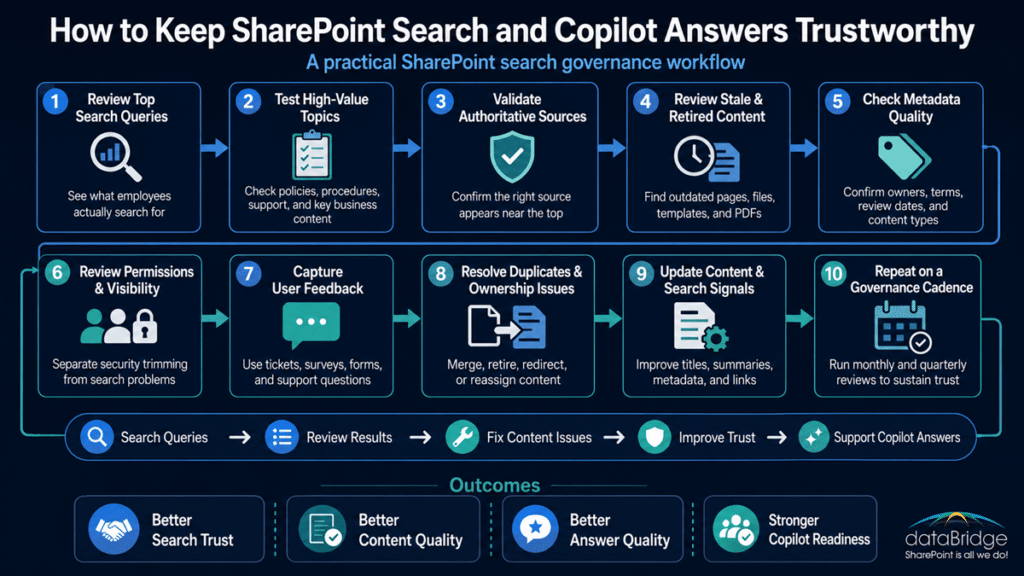
What to Review During a Search Governance Check
A SharePoint search governance check should be practical.
It should not feel like an abstract audit.
Use the review to inspect real search behavior, real content issues, and real owner decisions.
Review Top Search Queries
Start with what users actually search for.
Look for:
- High-volume queries
- Queries with poor results
- Queries with no results
- Queries where users refine repeatedly
- Queries that lead to support tickets
- Queries that reveal confusing terminology
Top queries show what employees need.
They also show where content language and user language do not match.
Review High-Value Topics
Some topics deserve extra attention because they affect many users or carry risk.
Examples include:
- HR policies
- Benefits
- IT support
- Finance processes
- Procurement
- Legal templates
- Safety procedures
- Client delivery standards
- Compliance guidance
- Records retention
- Security procedures
Search governance should treat these topics as higher priority.
A poor result for a lunch menu is annoying.
A poor result for a safety policy is a governance issue.
For example, if employees search for “remote work policy” and see an old PDF, a department FAQ, and a current HR page, the search governance question is not simply which item ranks first. The better question is which source should be trusted, who owns it, how old versions are retired, and how SharePoint should signal the current answer.
Review Authoritative Sources
Check whether the right source appears for important queries.
For each high-value topic, ask:
- What should the authoritative result be?
- Does it appear near the top?
- Is it clearly titled?
- Is the summary useful?
- Is the owner visible?
- Is the review date current?
- Are older versions competing?
- Do users understand which result to trust?
This is where source-of-truth decisions become practical.
If the official answer does not appear clearly, the search experience is weaker than it should be.
Review Stale and Retired Content
Search governance should include a stale-content review.
Look for:
- Pages past review date
- Files not modified in years
- News posts treated like current guidance
- Old PDFs with policy language
- Superseded documents
- Inactive project content
- Duplicate process documents
- Retired templates
Then decide what happens next.
Not all stale content should be deleted. But stale content should not be allowed to compete with current guidance without context.
Review Metadata Quality
Metadata quality should be reviewed against actual use.
Ask:
- Are key fields populated?
- Are values consistent?
- Do users understand the terms?
- Are department names standardized?
- Are content types accurate?
- Are owners and review dates visible?
- Are high-value libraries using the right metadata?
- Are old values still active?
- Are filters useful?
Metadata governance should stay close to search governance.
When metadata quality drops, search relevance often follows.
Review Permissions and Search Visibility
Permissions affect search results.
Users only see content they are allowed to access. That is expected. However, permission drift can create surprising search behavior. Microsoft Search and SharePoint search experiences are shaped by permissions, content access, and security trimming, which is why search governance should review both content quality and visibility. In practice, that means a poor search result may reflect a content issue, a metadata issue, or a permissions issue.
Review:
- Broad access groups
- External access
- Sensitive content visibility
- Broken inheritance
- Direct user permissions
- Old project site access
- Library-level exceptions
- Guest access
- Search results by user role
When users see different results, the cause may be normal security trimming. It may also be poor permission governance.
Search governance should help teams tell the difference. When permission-related search issues are hard to diagnose, SharePoint access governance reports before Copilot rollout can help identify sites where oversharing, external access, sensitive content, or unclear ownership may be affecting search visibility and future AI trust.
Review Search Feedback
User feedback should be part of the review.
Feedback sources may include:
- Helpdesk tickets
- Intranet feedback forms
- Site owner reports
- Department meetings
- Adoption surveys
- Copilot feedback
- Search analytics
- Training questions
Do not wait for perfect analytics.
A few repeated complaints may reveal a real pattern.
If employees keep asking where something is, search governance should investigate.
SharePoint Search Governance Checklist
Use this checklist to keep SharePoint search quality healthy over time.
- Assign a search governance owner.
- Define authoritative content for high-value topics.
- Maintain metadata quality.
- Review top search queries.
- Test plain-language user searches.
- Review stale content.
- Escalate duplicate or conflicting content.
- Confirm content owners.
- Check permissions and visibility by role.
- Review search analytics.
- Capture user feedback.
- Update titles, summaries, and metadata.
- Retire or archive outdated content.
- Link related authoritative content.
- Review knowledge base content.
- Align search governance with Copilot readiness.
- Create a recurring review cadence.
- Document decisions and follow-up actions.
This checklist works because search quality is not a single setting.
It is the result of many small governance habits.
Search Governance Metrics to Track
Search governance should include a few useful metrics.
Do not overcomplicate reporting.
Track measures that lead to action.
Useful metrics may include:
- Top search queries
- Queries with no useful results
- Queries with low click-through
- High-value topics reviewed
- Duplicate issues identified
- Duplicate issues resolved
- Stale content retired
- Pages updated after search review
- Metadata completion rate
- Owner coverage for key content
- Search feedback items resolved
- Copilot source issues identified
- Knowledge articles updated
- Permission-related search issues
Metrics should not become dashboard theater.
A metric is useful only if someone reviews it and makes decisions from it.
Start small.
A few reliable measures are better than a beautiful report nobody uses.
How Search Governance Supports Copilot Trust
Copilot trust depends on content trust.
That does not mean search governance guarantees perfect AI answers.
It means search governance improves the environment Copilot relies on.
A good search governance model helps by:
- Reducing stale source content
- Clarifying authoritative sources
- Improving metadata consistency
- Making ownership visible
- Reducing duplicate answers
- Handling retired content
- Improving permissions awareness
- Creating a feedback loop
- Supporting knowledge base reliability
When users see Copilot cite or summarize a source, they need confidence that the source itself is trustworthy.
If the source is old, unowned, duplicated, or poorly governed, the AI answer becomes harder to trust.
The same problem affects SharePoint agents.
An agent connected to messy content may sound polished and still lead users to weak answers.
Search governance is one practical way to prevent that.
Common SharePoint Search Governance Mistakes
Search governance usually fails for predictable reasons.
Most mistakes are not technical.
They are operating model problems.
1. Treating Search as a One-Time Configuration
Search settings matter, but they are not enough.
Content changes every week.
Search governance has to continue after launch.
2. Leaving Search Ownership Undefined
When nobody owns search quality, issues drift.
Users complain, but no one has the responsibility to investigate patterns and fix root causes.
3. Ignoring Duplicate Content
Duplicate content makes search results harder to trust.
It also weakens Copilot and agent readiness.
4. Letting Metadata Decay
Metadata quality is not permanent.
If no one reviews it, values become inconsistent and less useful.
5. Keeping Stale Content Active
Old content may still rank.
That makes stale content a search problem, not only a storage problem.
6. Testing Only Official Terms
Users search in plain language.
If governance only tests formal page titles, it misses the way employees actually search.
7. Confusing Permission Trimming With Search Failure
Different users may see different results because permissions differ.
That is not always a search problem.
Still, unexpected visibility should be reviewed.
8. Not Connecting Search to Copilot Readiness
Copilot depends on the same content environment.
Search governance should be part of AI readiness planning, not a separate side effort.
A Practical Search Governance Cadence
A search governance cadence should be simple enough to sustain.
Here is a practical model.
Monthly Review
Use monthly reviews for high-value content areas.
Review:
- Top search terms
- Search feedback
- High-risk content issues
- Key knowledge base results
- Recently updated authoritative content
- Urgent stale content concerns
Monthly reviews should stay focused.
The goal is to catch visible issues before users lose trust.
Quarterly Review
Use quarterly reviews for broader governance.
Review:
- Metadata quality
- Duplicate content patterns
- Owner coverage
- Stale content reports
- Search analytics trends
- Permission-related visibility issues
- Copilot source readiness
- Knowledge base health
Quarterly reviews should produce decisions.
If the same issue appears every quarter, the process is not working yet.
Annual Review
Use an annual review to reassess the model.
Review:
- Search governance roles
- High-value topic coverage
- Metadata strategy
- Information architecture changes
- Copilot and agent usage
- Knowledge base performance
- Records and retention alignment
- Governance maturity
Annual reviews should not replace monthly or quarterly habits.
They should improve the operating model.
Search governance works best when it becomes routine.
Not dramatic.
How dataBridge Approaches SharePoint Search Governance
dataBridge approaches SharePoint search governance as a long-term trust and governance discipline.
The goal is not just better search results today.
The goal is a SharePoint environment where employees can keep finding the right answers over time.
Our approach usually focuses on five areas.
1. Search and Content Discovery
We review how users search, what results appear, and where trust breaks down.
This includes high-value queries, stale results, duplicate answers, and content that should be authoritative but does not appear clearly.
In many environments, the problem is not that content is missing. The problem is that the right content is competing with weaker content.
2. Information Architecture and Metadata Review
We evaluate whether sites, hubs, libraries, content types, metadata, and page structure support strong retrieval.
A strong SharePoint Information Architecture Best Practices foundation gives search better signals. Search governance helps preserve those signals after launch.
Architecture creates the structure.
Governance keeps the structure useful.
3. Source-of-Truth and Ownership Design
We identify which content areas should be treated as authoritative.
Then we connect those areas to owners, review cadence, metadata, and retirement rules.
This is where search quality becomes more than relevance. It becomes answer trust.
4. Search Quality Operating Model
We help define the recurring review process.
That includes test queries, analytics review, duplicate escalation, stale-content handling, and owner accountability.
The operating model matters because search issues do not stay fixed forever.
What a SharePoint Search Governance Engagement Should Produce
A practical SharePoint search governance engagement should produce more than recommendations.
It should give your organization a working model for keeping search useful after launch.
Common deliverables may include:
- Search ownership and escalation model
- High-value search query list
- Authoritative content inventory
- Metadata quality review
- Stale and duplicate content findings
- Permissions and visibility review
- Search feedback process
- Monthly and quarterly review cadence
- Copilot and SharePoint agent source-readiness recommendations
- Prioritized improvement roadmap
The goal is not to create governance paperwork.
The goal is to create a repeatable process that keeps search results, knowledge sources, and AI answers trustworthy.
5. Copilot and AI Readiness Alignment
We align search governance with Copilot readiness, knowledge base quality, and SharePoint agent trust.
That helps organizations move from content cleanup to long-term answer quality.
If your organization needs a practical SharePoint search governance model, contact dataBridge to discuss how to keep search and Copilot answers trustworthy.
When to Get Help With SharePoint Search Governance
You may need help if search technically works, but users still do not trust it.
Common signs include:
- Employees cannot find current policies.
- Search returns old documents above current pages.
- Duplicate content appears for important topics.
- Site owners do not know which content should rank.
- Metadata exists but is inconsistent.
- Permissions create confusing search experiences.
- Copilot readiness work reveals stale or weak content.
- Knowledge base articles are duplicated or unowned.
- Search feedback is collected but not acted on.
- Important content has no review cadence.
- Users ask people instead of searching SharePoint.
These issues usually point to an operating model gap.
Adding another search setting will not fix it.
The better answer is a governance model that connects ownership, metadata, content lifecycle, user feedback, analytics, and AI readiness.
If your organization wants search to remain trustworthy after launch, contact dataBridge to build a SharePoint search governance model that supports long-term Microsoft 365 trust.
Frequently Asked Questions About SharePoint Search Governance
What Is SharePoint Search Governance?
SharePoint search governance is the ongoing process of maintaining search quality through ownership, metadata hygiene, content lifecycle rules, duplicate-content handling, search analytics, user feedback, and recurring review.
Why Does SharePoint Search Governance Matter?
SharePoint search governance matters because search quality can decline over time as content changes, owners leave, metadata becomes inconsistent, and stale content remains active. Governance keeps search results more trustworthy.
Is SharePoint Search Governance the Same as Search Optimization?
No. Search optimization improves how search performs through configuration, metadata, information architecture, and content structure. Search governance maintains search quality over time through ownership, review cadence, analytics, and content cleanup.
How Does SharePoint Search Governance Help Copilot?
SharePoint search governance helps Copilot by improving the quality of the content environment. Clear ownership, current content, strong metadata, controlled duplicates, and authoritative sources give Copilot better source material.
Who Should Own SharePoint Search Governance?
SharePoint search governance should usually involve a SharePoint owner, search owner, content owners, metadata owners, department stakeholders, and compliance or records teams when needed. IT can support the platform, but business owners should help define trusted content.
What Should Be Reviewed in a Search Governance Check?
A search governance check should review top queries, high-value topics, authoritative sources, stale content, duplicate results, metadata quality, permissions, user feedback, and Copilot or SharePoint agent source readiness.
How Often Should SharePoint Search Be Reviewed?
High-value search areas may need monthly review, while broader search governance can often be reviewed quarterly. Annual reviews should reassess the operating model, ownership, metadata strategy, and AI readiness alignment.
Why Do Different Users See Different SharePoint Search Results?
Different users may see different SharePoint search results because SharePoint applies security trimming. Users only see content they have permission to access. Governance helps distinguish normal permission behavior from content or metadata problems.
How Does Metadata Affect SharePoint Search Governance?
Metadata affects search governance because it gives SharePoint context about content type, owner, department, status, topic, and lifecycle. Consistent metadata helps users find content and helps search results stay more relevant.
What Is the Biggest SharePoint Search Governance Mistake?
The biggest mistake is treating search as a one-time setup. Search quality changes as content, permissions, owners, and metadata change. Without recurring governance, search results become less trustworthy over time.
Final Thought: Trustworthy Search Requires Ongoing Governance
SharePoint search governance is not about chasing perfect results.
It is about creating a reliable operating model.
Employees need to find current, useful, and trusted content. Copilot and SharePoint agents need strong source material. Site owners need a way to fix content issues before trust breaks down.
That does not happen through settings alone.
It happens through ownership, metadata hygiene, search testing, stale-content handling, duplicate escalation, and recurring review.
Search is where people experience your SharePoint governance.
If the results are current, clear, and trustworthy, the environment feels stronger. If the results are stale, duplicated, and confusing, the environment feels weaker.
The strongest SharePoint environments do not treat search as a launch task.
They treat it as a long-term governance discipline.
If your organization wants to keep search and Copilot answers trustworthy, contact dataBridge to build a SharePoint search governance model that supports better retrieval, stronger content trust, and long-term Microsoft 365 value.
Reviewed By

Author
-

Michael is the Founder and CEO of dataBridge, where he helps organizations approach SharePoint and Microsoft 365 with a stronger focus on strategy, governance, architecture, and long-term business value. His consulting-first perspective shapes how clients plan smarter, avoid costly missteps, and build digital workplaces that hold up over time.