
SharePoint Taxonomy and Term Store Strategy
An enterprise SharePoint taxonomy strategy helps organizations create consistent classification, improve search, support governance, and make metadata more usable across departments, sites, and business processes. dataBridge designs taxonomy frameworks that help Microsoft 365 environments scale without becoming harder to manage.
Taxonomy work is not about creating labels for the sake of organization. It is about building a structure people can use consistently and the business can govern over time. This page explains how dataBridge develops SharePoint taxonomy strategies that strengthen findability, usability, and long-term information control.
For the broader educational framework behind metadata planning, content types, and classification, use the SharePoint Metadata Strategy Guide. For applied architecture and consulting support, use SharePoint Information Architecture & Metadata Consulting Services. This page focuses specifically on taxonomy, managed metadata, enterprise terms, term store design, controlled vocabulary, and term stewardship.
Enterprise SharePoint environments need more than metadata fields. They need a disciplined taxonomy strategy that defines shared language, controlled terms, and classification rules across departments and content types. This page focuses specifically on how taxonomy supports scalability, search consistency, governance, and AI readiness in Microsoft 365.
Most enterprise metadata problems are not caused by a lack of fields. They are caused by inconsistent language. Taxonomy strategy solves that problem by defining shared terms, reducing duplication, and creating a controlled classification structure that can be reused across Microsoft 365.
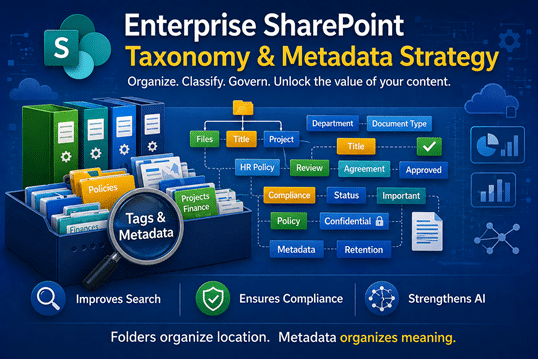
Folders organize location. Metadata organizes meaning.
And meaning is what search engines, compliance engines, and AI engines depend on.
This is why enterprise taxonomy design sits at the center of scalable metadata governance. It creates the shared language layer that supports search consistency, reporting, automation, and AI retrieval across Microsoft 365.
Taxonomy vs. Metadata vs. Term Store
SharePoint metadata describes content. It can include fields such as department, document type, project, region, lifecycle status, sensitivity, or owner.
SharePoint taxonomy defines the controlled language behind those fields. It helps the organization avoid duplicate terms, inconsistent labels, and fragmented search filters.
The SharePoint term store is where managed metadata terms can be centrally organized, reused, governed, and maintained.
This page focuses on taxonomy and term store strategy. It does not replace the broader SharePoint Metadata Strategy Guide or the larger SharePoint Document Management System model.
Why Taxonomy Determines Scalability
Taxonomy is not a technical afterthought. It is structural infrastructure.
Taxonomy is the controlled language layer behind enterprise metadata. It defines how business terms are standardized across sites, libraries, departments, and content types so search, filtering, reporting, and AI retrieval work more consistently at scale.
When taxonomy is unmanaged, term sprawl accelerates quietly. Different teams describe the same concept in different ways, search filters become fragmented, reporting loses consistency, and AI tools have a weaker structural foundation to work from.
Taxonomy strengthens search, compliance, reporting, and AI readiness because it gives SharePoint a consistent language layer. When the same business concepts are labeled consistently across libraries, hubs, and content types, users and systems have clearer signals to work from.
For the broader foundation behind metadata planning, content types, and classification models, use the SharePoint Metadata Strategy Guide.
Assess & Discover
Understand Your Metadata Reality Before Designing the Future
Before redefining taxonomy, structural clarity is essential.
During assessment, we look for:
- How content is distributed across sites and libraries
- Which fields are actively used versus ignored
- Where term duplication has occurred
- Whether naming conventions are consistent
- How governance maturity affects metadata enforcement
- What search behavior reveals about structural gaps
A common failure point emerges quickly: multiple fields describing the same concept under slightly different names. For example, “Department,” “Dept,” and “Business Unit” often coexist in the same environment. Search filtering becomes fragmented as a result.
We’ve seen HR and Finance teams classify identical policy documents under completely different metadata structures. Individually, both made sense. Collectively, search became unreliable.
This discovery phase connects directly to SharePoint Strategy & Roadmapping, ensuring taxonomy design reflects how people actually work—not how org charts are drawn.
Governance maturity scoring at this stage often determines whether metadata is enforceable or merely optional.
Architecture & Governance
Designing a Taxonomy That Scales Enterprise-Wide
Enterprise taxonomy must balance standardization with operational flexibility.
Here’s the catch: over-standardization creates resistance. Under-standardization creates chaos. The structure must be deliberate.
Taxonomy strategy becomes significantly more effective when aligned with structural grouping logic. A disciplined SharePoint hub site architecture framework ensures metadata standards extend consistently across hubs, departments, and business capabilities.
In regulated industries, taxonomy consistency directly impacts audit traceability and retention enforcement. A structured SharePoint architecture for regulated industries ensures classification models align with compliance frameworks, reducing risk exposure and improving reporting clarity.
Enterprise Term Store Design
A centralized term store promotes consistency across hubs, departments, and business functions. Global terms support enterprise reporting and compliance alignment. Local term sets allow operational nuance where appropriate.
Without a defined hierarchy, term sprawl accelerates quietly.
Global vs. Local Term Strategy
Not every term belongs in the global term store. Strategic decisions determine:
- Which terms require enterprise-level consistency
- Which remain localized
- How synonyms are handled
- How retired terms are governed
Global fields tend to drive reporting, automation, and AI consistency. Local fields support specialized workflows.
Both have value. The discipline lies in knowing where each belongs.
Content Type Alignment
Content types should reinforce taxonomy—not compete with it.
When aligned properly, content types:
- Enforce consistent metadata application
- Clarify ownership
- Strengthen retention policies
- Improve filtering precision
- Enhance Copilot summarization accuracy
When content types and taxonomy drift apart, structural clarity erodes. It doesn’t happen immediately. But it happens.
Change Management Controls
Taxonomy changes require stewardship. Without defined ownership, term proliferation becomes inevitable.
Governance reinforcement, aligned with the SharePoint Governance Maturity Model, ensures that metadata evolves responsibly as the organization grows.
Complex taxonomy without governance does not scale. It fragments.
Migration & Implementation
Turning Taxonomy Strategy Into Operational Structure
Designing taxonomy is only part of the work. Implementation determines whether the model is actually used.
A practical taxonomy rollout usually includes:
- Term store design
- Global and local term decisions
- Phased term deployment
- Metadata backfill planning
- Library-level enforcement rules
- Search schema alignment
- Steward training
- Review and change-control processes
Backfill must be strategic. Automated tagging without business validation can create new inconsistency at scale. The goal is not to tag everything quickly. The goal is to classify content in a way that improves search, governance, reporting, and user trust.
For migration-specific planning, use How to Map Legacy Folder Structures to Metadata in SharePoint.
Optimization & Scale
Maintaining Metadata Integrity Over Time
Taxonomy is not static. It evolves alongside the business.
Long-term sustainability requires disciplined term lifecycle management, ongoing governance reinforcement, search refinement monitoring, AI impact evaluation, and usage analytics review across business units.
Interestingly, moderately complex, well-managed taxonomies consistently outperform overly intricate models. Simplicity—when intentional—improves adoption and AI performance.
Consistency beats complexity.
That’s where structure begins paying for itself.
Monitoring Copilot behavior in structured environments reveals an important pattern: when taxonomy aligns with real business processes, AI output becomes more predictable and reliable.
Optimization is not about adding more fields. It is about maintaining clarity.
Taxonomy Strategy Within The dataBridge Way™
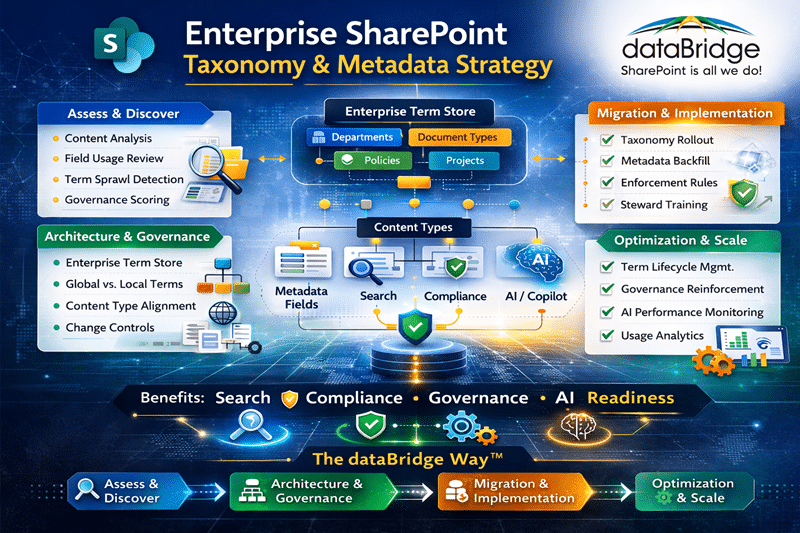
Enterprise taxonomy strategy aligns directly with The dataBridge Way™ methodology:
Assess & Discover — Evaluate field usage, duplication, governance maturity
Architecture & Governance — Design enterprise term store and content type alignment
Migration & Implementation — Normalize metadata, enforce structure, train stewards
Optimization & Scale — Reinforce governance, monitor AI impact, refine taxonomy
Taxonomy is not a configuration task.
It is an architectural discipline that shapes search, compliance, automation, and AI readiness across Microsoft 365.
Strong taxonomy design directly supports:
- SharePoint Information Architecture & Metadata
- SharePoint Governance Maturity Model
- Copilot Readiness for SharePoint
- SharePoint Consulting Services
Structure before customization. Design before deployment.
That is how enterprise SharePoint scales — The dataBridge Way™.
SharePoint Taxonomy Governance Checklist
A taxonomy strategy should define how terms are created, changed, retired, and reviewed.
Use this checklist:
- Who owns the enterprise term store?
- Which terms require enterprise-wide consistency?
- Which terms can remain local to a department or site?
- Who approves new terms?
- How are duplicate or overlapping terms resolved?
- How are retired terms handled?
- How often should term sets be reviewed?
- Which content types depend on managed metadata?
- Which search refiners depend on taxonomy consistency?
- Which terms affect retention, compliance, reporting, or Copilot readiness?
Taxonomy does not stay clean by accident. It needs ownership and review.
Frequently Asked Questions
What is the difference between SharePoint taxonomy and metadata?
SharePoint metadata refers to the fields used to describe content, such as department, document type, project, or policy category. Taxonomy is the structured framework that organizes those metadata fields into a consistent hierarchy across the environment. Metadata captures attributes. Taxonomy defines how those attributes are governed and standardized at scale.
Why does enterprise SharePoint require a centralized term store?
A centralized term store ensures consistent terminology across hubs, departments, and business units. Without it, duplicate or conflicting fields emerge, fragmenting search results and reporting. A structured enterprise term store improves discoverability, compliance alignment, and AI accuracy by enforcing controlled vocabulary and reducing ambiguity.
How does taxonomy impact Microsoft Copilot accuracy?
Microsoft Copilot relies on search indexing and contextual signals to retrieve and summarize content. When taxonomy is consistent and metadata is applied predictably, Copilot delivers more reliable and relevant results. Inconsistent or optional metadata reduces retrieval precision and increases the likelihood of conflicting summaries.
When should metadata fields be global versus local in SharePoint?
Global metadata fields should be used for enterprise-wide reporting, compliance categories, and standardized classifications. Local fields are appropriate for department-specific operational needs. A strategic balance prevents over-standardization while still maintaining structural integrity across the environment.
How do you prevent metadata and term sprawl in large SharePoint environments?
Preventing term sprawl requires governance controls, defined ownership of the term store, lifecycle management for fields and terms, and structured review processes before adding new metadata. Without stewardship, redundant fields and conflicting terminology accumulate quickly, weakening search accuracy and governance enforcement over time.