

SharePoint Consulting Services
dataBridge provides SharePoint consulting services that help organizations improve architecture, governance, migrations, intranets, permissions, adoption, and Microsoft 365 alignment. We focus on fixing structural problems, clarifying ownership, and creating environments that remain secure, usable, and scalable as collaboration and AI usage grow.
SharePoint consulting should do more than configure sites or move files. It should help organizations define how content is structured, how permissions scale, how governance works, and how Microsoft 365 supports real business workflows.
This page is the main dataBridge overview of our SharePoint consulting capabilities. Use it to understand the major ways we help. For deeper guidance on a specific topic, follow the links to the dedicated service pages and guides below.
How This Page Fits With Related dataBridge Resources
This page is the primary dataBridge resource for broad SharePoint consulting services. It explains the major ways dataBridge helps organizations plan, structure, govern, migrate, modernize, secure, support, and improve SharePoint and Microsoft 365 environments.
Use the related resources this way:
- Use SharePoint & Microsoft 365 Consulting Solutions when you want an executive overview of the full dataBridge solution portfolio.
- Use the SharePoint Governance Center when the main issue is governance strategy, ownership, permissions, provisioning, lifecycle controls, search governance, external sharing, records, or AI readiness.
- Use the SharePoint Document Management System page when the main issue is document libraries, metadata, taxonomy, permissions, search, lifecycle, records, document control, and adoption.
- Use the SharePoint Migration Center when the main issue is migration readiness, file share migration, cleanup, destination architecture, permissions, validation, adoption, or post-migration optimization.
- Use the SharePoint Intranet Center when the main issue is employee communication, navigation, page ownership, intranet redesign, search, adoption, or digital workplace structure.
- Use the SharePoint AI Readiness Center when the main issue is preparing SharePoint content, permissions, metadata, governance, source authority, and lifecycle controls for Copilot or SharePoint agents.
- Use the SharePoint & Microsoft 365 Knowledge Center when you want educational guides, articles, FAQs, checklists, webinars, and practical planning resources.
Together, these pages separate the broad consulting-services overview from the deeper authority centers, service pages, assessments, frameworks, and supporting resources that explain each SharePoint planning area in more detail.
Written by Michael Fuchs, Founder and CEO of dataBridge. Reviewed by Andrea Skinner, Director of Operations, for SharePoint consulting process, client engagement, project coordination, and Microsoft 365 delivery accuracy.
Published: January 21, 2026
Last reviewed: May 29, 2026
Table of Contents
What Are SharePoint Consulting Services?
SharePoint consulting services help organizations plan, design, govern, modernize, and optimize SharePoint and Microsoft 365 environments so they support real business workflows, secure collaboration, and long-term scalability.
A strong consulting engagement does not start with configuration alone. It starts by understanding how information moves through the organization, where collaboration breaks down, how permissions are managed, which content needs structure, and how SharePoint should support the business over time.
dataBridge SharePoint consulting typically connects several disciplines:
- Strategy and roadmapping
- Information architecture
- Governance planning
- Migration strategy
- Permissions and security design
- Intranet planning
- Adoption and training
- Microsoft 365 alignment
- Copilot readiness
Teams that are still defining their starting point can use the SharePoint planning tools and assessment resources hub to review practical scorecards, worksheets, and checklists before choosing a consulting path.
For organizations comparing all dataBridge service areas, the SharePoint & Microsoft 365 Consulting Solutions page provides a broader portfolio view. For educational guides and practical planning resources, use the SharePoint & Microsoft 365 Knowledge Center.
SharePoint Consulting Services Map
Most SharePoint problems connect across architecture, governance, migration, content, permissions, adoption, and Microsoft 365 alignment. Use this map to choose the right consulting path before work turns into disconnected fixes.
SharePoint Consulting Services
Structure-first consulting for SharePoint, Microsoft 365, Teams, Power Platform, search, governance, and Copilot readiness.
Start Here
Strategy and Roadmapping
Use this when the organization needs direction, priorities, sequencing, and a practical SharePoint improvement plan.
Explore strategy services → FoundationArchitecture and Governance
Use this when sites, hubs, permissions, ownership, lifecycle rules, and governance decisions need a clearer model.
Explore architecture and governance → DocumentsDocument Management
Use this when libraries, metadata, version control, retention, search, records, or document ownership need structure.
Explore document management → ModernizationSharePoint Migrations
Use this when file shares, legacy SharePoint, or older repositories need to move without carrying forward old problems.
Explore migration consulting → Employee ExperienceSharePoint Intranets
Use this when communication, navigation, page ownership, search, adoption, or intranet redesign needs improvement.
Explore intranet consulting → AI ReadinessCopilot and AI Readiness
Use this when SharePoint permissions, content quality, metadata, ownership, and source authority need to support AI.
Explore AI readiness resources → CollaborationTeams Governance
Use this when Teams, channels, guests, files, SharePoint-backed workspaces, and lifecycle controls need alignment.
Explore Teams governance → AutomationPower Platform Consulting
Use this when forms, workflows, apps, approvals, and automation need structure, ownership, and support planning.
Explore Power Platform consulting → SustainmentSupport and Optimization
Use this when the environment needs ongoing support, governance reinforcement, user help, and continuous improvement.
Explore SharePoint support →
What Does a SharePoint Consultant Do?
A SharePoint consultant helps organizations design, structure, govern, and improve SharePoint so the platform supports real work instead of becoming another unmanaged file repository.
In practice, a SharePoint consultant helps answer questions such as:
- How should sites, libraries, hubs, and navigation be structured?
- Which content should live in SharePoint, Teams, OneDrive, or another system?
- How should permissions be designed so access is secure and manageable?
- What governance model will keep sites, content, and ownership from drifting?
- How should migrations improve the environment instead of recreating old problems?
- What training, adoption, and support model will help users trust the platform?
- How should SharePoint be prepared for Microsoft 365 Copilot and future AI use?
A strong SharePoint consultant brings the business, technical, governance, and adoption decisions together. That is the difference between simply configuring SharePoint and building a sustainable Microsoft 365 environment.
When a project requires deeper topic-specific guidance, dataBridge routes the work to the right service path, such as SharePoint Governance Framework, SharePoint Migration Consulting, SharePoint Information Architecture & Metadata Consulting Services, SharePoint Intranet Consulting Services, or Copilot Readiness for SharePoint.
What a SharePoint Consulting Engagement Looks Like
A structured SharePoint consulting engagement usually begins before configuration. The first step is understanding the current environment, the business workflows it supports, and the problems users experience every day.
dataBridge typically evaluates:
- Existing SharePoint and Microsoft 365 structure
- Site architecture and hub relationships
- Document libraries, metadata, and taxonomy
- Permission models and access patterns
- Governance maturity and ownership gaps
- Migration, modernization, or intranet needs
- Adoption, training, and support requirements
- Copilot readiness and AI-related content risks
From there, we define a practical path forward. Some organizations need a roadmap. Others need governance, migration planning, an intranet redesign, permission cleanup, metadata structure, or post-launch support.
When the main issue is an existing intranet that employees no longer trust, existing SharePoint intranet redesign gives that need its own focused service path, separate from broader consulting, migration, governance, or adoption work.
The point is not to force every client into the same project model. The point is to identify the structural decisions that will make SharePoint easier to use, easier to govern, and easier to improve over time.
What This Looks Like in Practice
A SharePoint consulting request often starts with one visible problem. During discovery, that problem usually connects to deeper architecture, governance, ownership, or adoption issues.
That is why dataBridge does not treat every SharePoint request as a one-off configuration task. We identify the structural decisions behind the request, then route the work to the right consulting path.
Scenario 1: “SharePoint feels messy”
An organization may contact dataBridge because SharePoint feels cluttered, but the actual issue is broader than one site or one library. Discovery may reveal overlapping team sites, inconsistent naming, unclear owners, weak metadata, direct sharing, duplicate documents, and an intranet employees no longer trust.
In that situation, the right starting point is often SharePoint Discovery and Readiness Assessment or SharePoint Architecture and Governance Consulting. The goal is to clarify the structure before adding more sites, pages, libraries, workflows, or AI capabilities.
Scenario 2: “We need to migrate our files”
A company may begin with a migration request, but the file share may contain years of abandoned folders, duplicated files, broken ownership, inconsistent permissions, and content no one wants to validate.
In that case, dataBridge does not recommend moving everything as-is. We use SharePoint Migration Consulting to define what should move, what should be archived, what should be restructured, and what should be excluded. When the source is a network drive or file server, File Share to SharePoint Migration Services provides a more focused path.
A migration should create a better SharePoint environment, not a cloud version of the same old file share.
Scenario 3: “Our intranet needs a redesign”
A leadership team may ask for a new intranet design because the current site looks dated. Once discovery begins, the larger issue may be content ownership, outdated department pages, inconsistent navigation, weak search, stale policies, and no publishing standards.
That work belongs in SharePoint Intranet Consulting Services or SharePoint Intranet Redesign Services, depending on whether the organization needs a new intranet model or a rebuild of the existing one.
A better intranet is not just easier to look at. It is easier to own, easier to update, easier to search, and easier for employees to trust.
Scenario 4: “We want to prepare for Copilot”
An organization may want Microsoft 365 Copilot, but SharePoint may not be ready. Broad-access sites, sensitive documents, old project content, inconsistent metadata, unclear policy ownership, and unreliable search can all create AI-readiness risk.
dataBridge starts with the SharePoint foundation. That may lead to Copilot Readiness for SharePoint, the SharePoint AI Readiness Center, or the SharePoint Permission Review Checklist.
Copilot readiness is not only an AI project. It is a SharePoint trust, access, content quality, and governance project.
Scenario 5: “Support requests keep repeating”
A support issue may look tactical at first. A page breaks, search returns confusing results, a workflow stops, or a permission request becomes difficult to explain. Repeated issues usually point to a missing operating model.
In that case, SharePoint and Microsoft 365 Support should not only fix the immediate issue. It should also identify the governance, ownership, training, or architecture decision that would prevent the same problem from returning.
Good SharePoint consulting solves the visible problem and the pattern behind it.
Related Client Success Proof
The scenarios above are common because SharePoint problems rarely stay inside one category. A migration can reveal governance weakness. An intranet redesign can expose ownership gaps. A Copilot readiness request can uncover permission, metadata, and source-of-truth issues.
For real examples of how dataBridge applies this consulting-first approach, review the Client Success Case Studies. They show how structured SharePoint and Microsoft 365 work can support document migration, compliance rollout, intranet modernization, process automation, document control, and long-term platform improvement.
Why SharePoint Projects Fail Without Structured Consulting
Although SharePoint is powerful, many initiatives lose momentum because structure is introduced too late. In most cases, failure does not stem from the platform itself—it stems from a lack of architectural clarity and governance discipline.
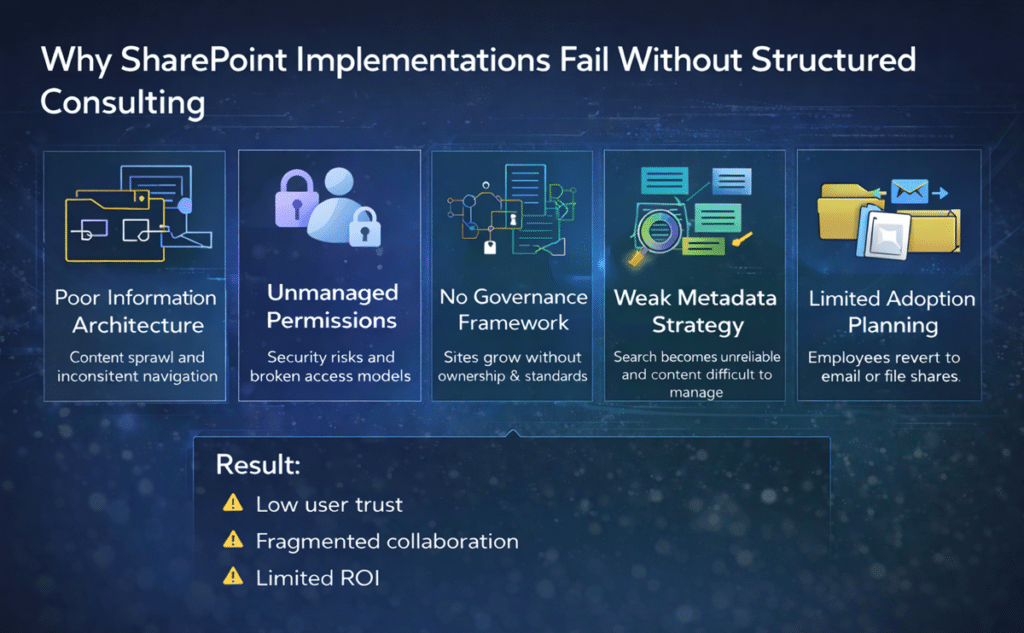
For example, organizations often:
- Implement without governance
- Migrate without redesign
- Automate without structured architecture
- Train without an adoption strategy
- Deploy without measurable accountability
Consequently, environments grow unpredictably. Permissions sprawl, metadata becomes inconsistent, workflows break, and search results lose reliability. Over time, these small gaps compound into operational friction.
Permission design is one example. When access decisions are made ad hoc, SharePoint becomes harder to secure, harder to audit, and harder for users to trust. For deeper guidance, use The Complete Guide to SharePoint Permissions.
Effective SharePoint consulting ensures structure precedes configuration and governance precedes growth.
The Cost of Unstructured SharePoint Environments
Unstructured SharePoint environments create problems that grow slowly at first and then become difficult to unwind.
Common symptoms include:
- Duplicate content across sites and libraries
- Inconsistent permissions and unclear access decisions
- Weak metadata and unreliable search
- Site sprawl and unclear ownership
- Confusing intranet navigation
- Migration rework
- Low adoption and reduced trust
- Poor readiness for Copilot and AI-assisted work
These issues are rarely caused by one setting. They usually come from missing architecture, unclear governance, weak ownership, and limited adoption planning.
That is why dataBridge treats SharePoint consulting as a structure-first engagement. When the foundation is clear, the dedicated service areas become easier to plan: SharePoint Document Management, SharePoint Governance, SharePoint Migrations, SharePoint Intranets, and Copilot Readiness for SharePoint.
Before those dedicated service areas move forward, SharePoint architecture and governance consulting helps define the site model, hub relationships, permissions approach, ownership structure, metadata expectations, and lifecycle controls that make the broader SharePoint consulting work easier to sustain.
Which SharePoint Consulting Service Should You Start With?
Organizations often know SharePoint needs attention, but they do not always know which service path fits the problem. That confusion is normal. Most SharePoint issues overlap across architecture, governance, migration, permissions, search, adoption, and Microsoft 365 strategy.
Use this guide to choose the right starting point.
When SharePoint feels disorganized
Start with SharePoint Strategy and Roadmapping when leaders need a clear plan before committing to a larger project. This path helps prioritize architecture, governance, migration, adoption, support, and Copilot readiness work in the right order.
Use SharePoint Discovery and Readiness Assessment when the first step is understanding the current environment. This is useful when the organization has unclear ownership, inconsistent permissions, duplicate sites, weak metadata, or competing stakeholder priorities.
When governance and ownership are the main problems
Start with SharePoint Architecture and Governance Consulting when sites, hubs, libraries, permissions, ownership, lifecycle controls, and governance decisions need to work together.
Use the SharePoint Governance Center when your team needs a deeper resource path across governance guides, frameworks, permissions, provisioning, lifecycle management, records, search governance, external sharing, and AI readiness.
When documents are difficult to manage or trust
Start with SharePoint Document Management when the main issue is document libraries, metadata, version control, permissions, records, retention, document control, or search.
Use SharePoint Information Architecture and Metadata Consulting when the problem is findability, inconsistent naming, folder sprawl, weak taxonomy, or unclear content structure.
When migration is creating risk
Start with SharePoint Migration Consulting when legacy content needs to move into SharePoint Online without recreating old folder, permission, and ownership problems.
Use File Share to SharePoint Migration Services when the source environment is a file server, network drive, or shared drive with years of accumulated content.
When the intranet is not helping employees
Start with SharePoint Intranet Consulting Services when the main issue is communication, navigation, employee experience, content ownership, page standards, search, or adoption.
Use SharePoint Intranet Redesign Services when the organization already has an intranet, but employees do not trust it, use it, or know where to find current information.
When Copilot or AI readiness is the concern
Start with Copilot Readiness for SharePoint when your organization wants to understand whether SharePoint content, permissions, metadata, ownership, lifecycle controls, and search are ready for Microsoft 365 Copilot.
Use the SharePoint AI Readiness Center when stakeholders need a broader resource map for Copilot, SharePoint agents, trusted retrieval, source authority, permissions, content cleanup, and AI-safe governance.
When Teams, automation, or support need stronger structure
Start with Microsoft Teams Consulting and Governance when Teams growth has created unclear workspaces, guest access concerns, file confusion, or lifecycle issues.
Use Microsoft Power Platform Consulting when forms, workflows, approvals, apps, and automation need to connect back to SharePoint structure and governance.
Start with SharePoint and Microsoft 365 Support when the environment is live but needs ongoing help, optimization, troubleshooting, governance reinforcement, and user support.
The best starting point is the one that addresses the root cause. A migration problem may really be an information architecture problem. An intranet problem may really be an ownership problem. A Copilot concern may really be a permissions and source authority problem.
Our SharePoint Consulting Services
We deliver structured, enterprise-focused SharePoint consulting services designed to support long-term scalability and operational clarity.
SharePoint Strategy & Roadmapping
Before configuration begins, we define a clear direction. Through structured discovery, we evaluate your current environment, business workflows, governance gaps, and long-term objectives.
This strategic foundation ensures your SharePoint architecture aligns with business operations and supports sustainable growth.
→ Explore our SharePoint Strategy & Roadmapping services.
SharePoint Governance Framework
Successful SharePoint environments need governance that is practical enough to follow and structured enough to sustain. dataBridge helps organizations define ownership, lifecycle standards, permission models, site provisioning controls, and review cadence.
→ Learn more about our SharePoint Governance Framework approach.
SharePoint Migration Services
Migration is not simply a file transfer. It is an opportunity to improve structure, permissions, ownership, governance, and long-term adoption.
During migration engagements, dataBridge helps assess legacy environments, reduce redundant content, redesign information architecture, plan migration waves, and validate the environment after go-live.
→ View our SharePoint Migration Services.
Forms & Workflow Readiness Assessment
Legacy InfoPath forms and SharePoint Designer workflows often represent hidden operational risk. Therefore, we conduct structured readiness assessments to evaluate automation logic, governance alignment, and integration dependencies before modernization begins.
As a result, workflow modernization reduces technical debt rather than recreating it.
→ Explore our Forms & Workflow Readiness Assessment.
When workflow modernization becomes a larger Power Platform initiative, dataBridge helps organizations connect automation decisions back to SharePoint structure, ownership, governance, and long-term support.
When the work also requires custom web parts, list and library interfaces, SPFx components, or SharePoint solution modernization, SharePoint development and customization services provide the technical build path while keeping governance and supportability in view.
SharePoint Adoption & Change Management
Technology alone does not guarantee success. For this reason, we implement structured SharePoint adoption strategies aligned with measurable KPIs and long-term governance objectives.
Through a defined Microsoft 365 change management framework, we reinforce governance standards, strengthen SharePoint user engagement, and ensure behavioral alignment across departments. As adoption matures, organizations gain visibility, accountability, and measurable performance improvement.
→ Learn about our SharePoint Adoption & Change Management services.
SharePoint Training
Effective training aligns learning to defined responsibilities. We deliver role-based SharePoint training for administrators, power users, site owners, governance coaches, and end users.
By connecting training to adoption metrics and governance standards, organizations transform knowledge into measurable performance improvement.
→ Explore our SharePoint Training programs.
SharePoint & Microsoft 365 Support
After deployment, structure must be reinforced. Our ongoing SharePoint support services provide governance reinforcement, optimization cycles, and proactive risk monitoring.
This ensures your Microsoft 365 environment remains stable, secure, and scalable.
→ Learn more about SharePoint & Microsoft 365 Support.
Copilot and AI Readiness
Microsoft 365 Copilot depends on structured, secure, and well-governed SharePoint content. If permissions are too broad, metadata is weak, ownership is unclear, or outdated content remains active, AI-assisted experiences become harder to trust.
dataBridge helps organizations prepare SharePoint for Copilot by reviewing content quality, permissions, source authority, metadata, search behavior, lifecycle governance, external sharing, and adoption readiness.
Start with Copilot Readiness for SharePoint.
Use the SharePoint AI Readiness Center when your team needs a broader resource path for Copilot, SharePoint agents, trusted retrieval, source authority, permissions cleanup, content lifecycle, and AI-safe governance.
For technical architecture planning, see Copilot-Ready SharePoint Information Architecture.
How SharePoint Consulting Connects the Microsoft 365 Ecosystem
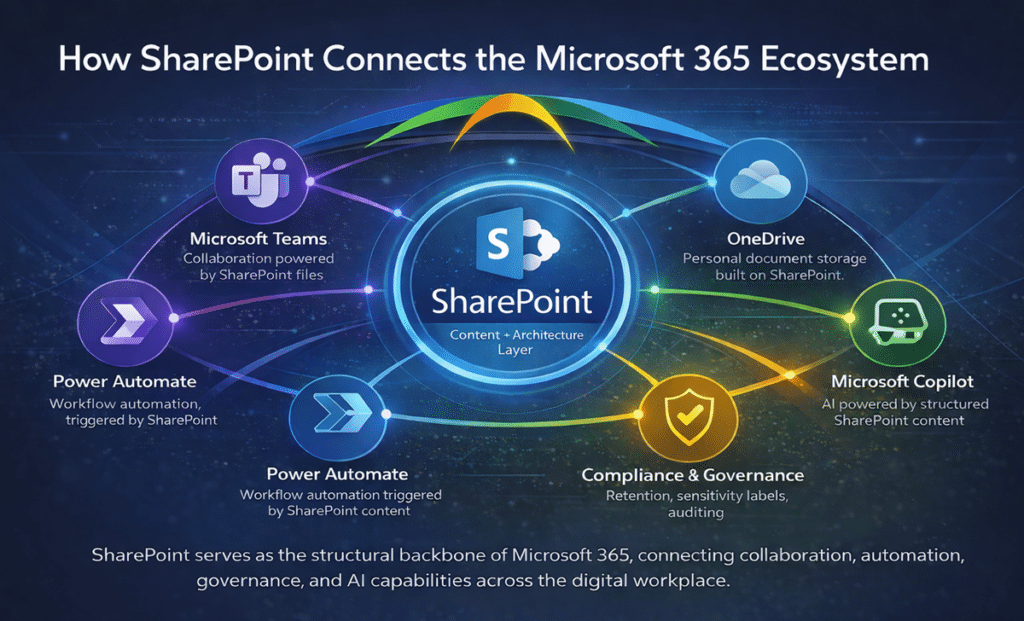
SharePoint is not isolated from the rest of Microsoft 365. It supports documents in Teams, files shared through OneDrive, automation built with Power Automate, apps that use SharePoint lists, compliance processes, search experiences, and Copilot readiness.
That means SharePoint consulting often affects more than SharePoint alone.
When SharePoint architecture is clear, Microsoft 365 works better around it. When SharePoint structure is weak, the surrounding ecosystem starts to show the same problems: inconsistent search, unclear permissions, duplicate workspaces, fragile workflows, and unreliable AI outputs.
dataBridge helps organizations connect SharePoint decisions to the broader Microsoft 365 environment without turning every project into a disconnected tool implementation.
For adjacent service areas, use:
- Microsoft Teams Consulting & Governance
- Microsoft Power Platform Consulting
- Power BI Consulting & Reporting Services
- Microsoft 365 Consulting & Strategy
The dataBridge Way™ Framework
All engagements follow our structured methodology:
- Assess & Discover – Evaluate architecture, governance, workflows, and business objectives.
- Architecture & Governance – Design scalable information architecture and enforceable governance models.
- Migration Strategy & Modernization – Phase migrations and modernize automation responsibly.
- Implementation & Alignment – Deploy structured solutions aligned with operational workflows.
- Validation & Measurement – Confirm permissions, search performance, and adoption metrics.
- Ongoing Reinforcement – Maintain governance maturity and support long-term scalability.
This phased approach reduces risk while increasing predictability and executive confidence.
While many organizations engage us for a specific SharePoint initiative, those projects often expand into broader Microsoft 365 architecture, governance, and collaboration strategy. You can explore our full range of SharePoint and Microsoft 365 consulting solutions to see how these services work together.

Measurable Outcomes of Structured SharePoint Consulting
When organizations align governance, architecture, adoption, and modernization strategically, they achieve measurable results:
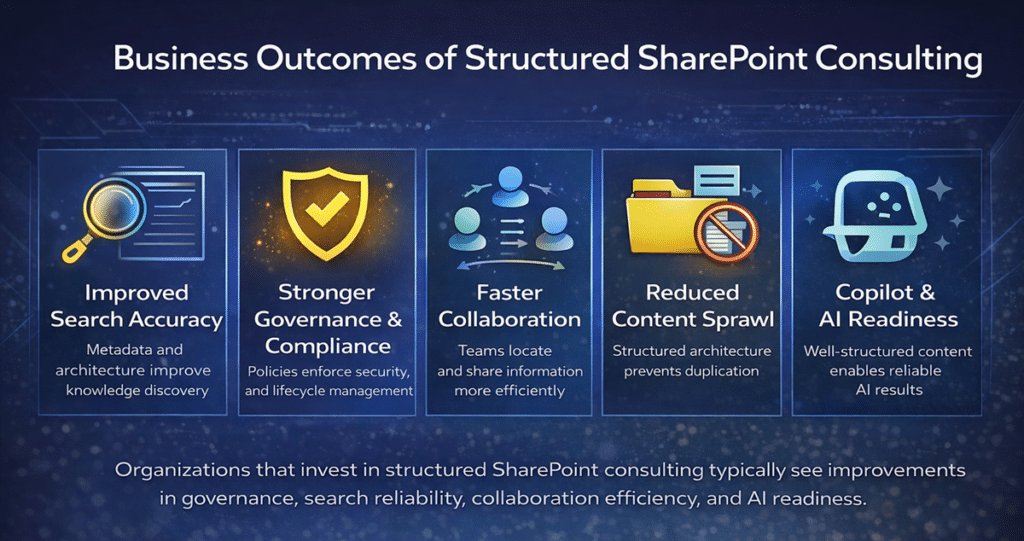
✔ Reduced compliance risk and permission sprawl
✔ Improved search accuracy through structured metadata
✔ Increased SharePoint user engagement
✔ Reduced technical debt from legacy workflows
✔ Stronger governance enforcement across departments
✔ Improved Copilot and AI performance
✔ Increased executive confidence in Microsoft 365 ROI
Ultimately, structured SharePoint consulting transforms the platform from a file repository into a governed digital workplace.
Migration is often the moment when compliance gaps become visible. Organizations in regulated industries should align modernization efforts with a formal SharePoint architecture for regulated industries strategy to ensure retention policies, audit trails, and classification standards are preserved.
Many consulting engagements begin by defining how documents will be classified across the environment. Our SharePoint metadata strategy guide explains the architecture model organizations use to support scalable search, governance, and AI readiness.
The Strategic Role of SharePoint in Modern Digital Workplaces
SharePoint has become more than a place to store documents. In a modern Microsoft 365 environment, it supports collaboration, intranet publishing, knowledge management, document management, automation, compliance, search, and AI readiness.
That is why SharePoint consulting should focus on structure before features. The more connected Microsoft 365 becomes, the more important it is for SharePoint architecture, governance, metadata, permissions, and ownership to work together.
For deeper planning around specific areas, use the dedicated pages for SharePoint Document Management, SharePoint Intranet Consulting, SharePoint Governance, and Copilot Readiness for SharePoint.
Industries We Serve
We support organizations across:
- Healthcare
- Financial Services
- Manufacturing
- Professional Services
- Education
- Non-Profit
- Government
- Construction
Each industry brings different governance, compliance, document management, communication, and adoption requirements. dataBridge adapts SharePoint consulting services to fit those operational realities while keeping the core model consistent: structure first, governance built in, and adoption supported after launch.
For industry-specific intranet needs, explore our industry SharePoint intranet solutions. For regulated document and compliance environments, see SharePoint Architecture for Regulated Industries.
Proof Across Real SharePoint Consulting Scenarios
SharePoint consulting becomes most valuable when the request is broader than the first symptom. A migration may reveal governance gaps. An intranet redesign may uncover ownership problems. A Copilot readiness initiative may expose permission risk and stale content. A support issue may show that site owners need clearer standards.
That is where dataBridge brings practical experience. We help organizations connect the visible request to the structure underneath it: architecture, governance, information management, permissions, adoption, and long-term support.
These patterns show up across the types of work featured in our Client Success Case Studies, including governance improvement, intranet modernization, document management, migration planning, Microsoft 365 compliance, and platform optimization.
The common thread is not just SharePoint implementation. It is helping organizations make SharePoint easier to trust, govern, support, and improve.
Why Choose dataBridge Over Other SharePoint Consulting Firms?
Many firms offer SharePoint services; however, few specialize in structured SharePoint consulting.
One of the most important outcomes of strategic SharePoint consulting is avoiding rework. Whether the initiative involves migration, governance, intranet modernization, Copilot readiness, or document management, the same principle applies: structure should be designed before implementation accelerates.
dataBridge focuses exclusively on architecting, governing, and modernizing SharePoint and Microsoft 365 environments through a defined methodology. Unlike general IT providers or tool-first vendors, we prioritize architecture, governance, adoption, and long-term scalability before implementation begins.
Organizations evaluating SharePoint expertise often struggle to distinguish between implementation vendors and true strategic partners. A SharePoint consulting firm focuses on architecture, governance, adoption, and long-term business outcomes—not just deployment. If you are evaluating partners, our SharePoint Consulting Firm Guide explains what to look for, the questions to ask, and the capabilities that separate experienced consulting firms from general Microsoft service providers.
Many organizations begin by researching best practices before engaging consulting support. Our SharePoint & Microsoft 365 Knowledge Center contains guides covering governance, architecture, migrations, and collaboration strategy.
What Sets dataBridge Apart:
✔ 20+ years focused on SharePoint and Microsoft 365 consulting
✔ Deep specialization in governance, information architecture, and migration strategy
✔ Structured methodology (The dataBridge Way™) applied across every engagement
✔ Proven experience supporting complex, regulated industries
✔ Emphasis on measurable outcomes—not just deployment
✔ Alignment with Copilot and AI readiness from the start
While other firms implement, we architect.
Where others migrate, we modernize.
While others train, we align behavior with governance.
Ultimately, this difference protects your Microsoft 365 investment and reduces long-term operational risk.
Organizations evaluating SharePoint consulting partners often want to see real-world results. Visit our Client Success stories and case studies to see how dataBridge helps organizations modernize collaboration and governance.
Proven Across Complex SharePoint Environments
Over the past two decades, we have supported hundreds of SharePoint engagements across enterprise, mid-market, and regulated environments. From multi-terabyte migrations to governance redesign initiatives and Copilot readiness alignment, our consulting approach consistently emphasizes structure, scalability, and measurable outcomes.
When consulting makes the most impact
- When structure and governance are unclear
- When migrations have failed or stalled
- When Copilot outcomes are unpredictable
- When Teams governance is chaotic
We may not be the right fit if
- You only need tactical implementation without strategy
- Speed of delivery is more important than long-term governance
- You treat SharePoint as basic file storage
How to Evaluate a SharePoint Consulting Partner
Selecting the right SharePoint consulting partner can significantly influence the long-term success of a Microsoft 365 initiative. While many firms offer SharePoint services, the depth of expertise and consulting methodology can vary widely.
Organizations evaluating consulting partners should look beyond implementation capabilities and focus on architectural expertise, governance experience, and long-term operational alignment.
A qualified SharePoint consulting firm should demonstrate expertise in several critical areas.
First, consultants should understand information architecture and governance design, not just platform configuration. Architecture decisions influence everything from search performance to compliance enforcement and collaboration scalability.
Second, consultants should bring experience supporting complex migrations and modernization initiatives. SharePoint environments often evolve over many years, and effective consulting requires understanding how legacy systems, document repositories, and collaboration patterns interact.
Organizations preparing modernization initiatives should evaluate whether a consulting partner can address architecture, governance, migration planning, adoption, permissions, and long-term support as connected decisions rather than separate tasks.
Third, consulting firms should provide a structured methodology that connects architecture, governance, migration strategy, and user adoption into a unified engagement model. Without a clear framework, SharePoint projects often drift into disconnected technical tasks rather than strategic transformation initiatives.
Finally, organizations should evaluate whether consulting partners prioritize long-term scalability or short-term deployment speed. Firms that focus only on implementation may deliver working systems, but those systems may require costly remediation later if governance and architecture were not designed carefully.
These evaluation criteria help organizations distinguish between implementation vendors and true consulting partners who can guide long-term Microsoft 365 collaboration strategy.
When Organizations Should Engage a SharePoint Consulting Firm
Many organizations begin exploring SharePoint consulting services only after operational challenges become difficult to ignore. In many cases, the platform itself continues functioning as expected, but the surrounding architecture, governance model, and collaboration patterns have evolved without clear structure.
When this happens, even well-intentioned SharePoint environments begin to show signs of strain.
Common consulting indicators include:
- Search results returning inconsistent or outdated content
- Permission structures becoming difficult to audit or manage
- Rapid site growth without governance ownership
- Duplicate content appearing across multiple libraries
- Teams and SharePoint collaboration becoming fragmented
- Legacy workflows introducing technical debt
- Uncertainty around Copilot readiness and AI governance
These issues rarely originate from a single configuration decision. Instead, they typically develop gradually as organizations expand their Microsoft 365 environments without consistent architectural guidance.
At this stage, organizations often benefit from structured consulting support focused on clarifying architecture, strengthening governance policies, and aligning collaboration practices across departments.
Consulting engagements frequently begin during moments of organizational transition, such as:
- Planning a major SharePoint migration
- Redesigning intranet architecture
- Preparing Microsoft 365 environments for AI and Copilot
- Addressing governance challenges in regulated industries
- Modernizing legacy workflows and automation
During these transitions, consulting provides a structured framework for evaluating architecture, governance responsibilities, and long-term collaboration strategy.
Rather than simply implementing new tools, experienced SharePoint consultants focus on building environments that remain manageable as collaboration needs evolve. This architectural clarity improves search reliability, strengthens governance enforcement, and increases executive confidence in Microsoft 365 investments.
Organizations evaluating broader collaboration strategy often begin by exploring SharePoint consulting services, which outline the architectural, governance, migration, and modernization capabilities required to support long-term Microsoft 365 success.
Related SharePoint Consulting Resources
- SharePoint & Microsoft 365 Consulting Solutions
- SharePoint Strategy & Roadmapping
- SharePoint Governance Framework
- SharePoint Document Management System
- SharePoint Migration Consulting
- SharePoint Intranet Consulting Services
- Copilot Readiness for SharePoint
- SharePoint & Microsoft 365 Support
- SharePoint Training
- SharePoint & Microsoft 365 Knowledge Center
What our clients say

Frequently Asked Questions
SharePoint consulting services vary based on scope, complexity, and organizational maturity. Strategic engagements such as governance framework design, migration planning, or adoption strategy typically require phased consulting rather than hourly troubleshooting. We structure engagements to align with measurable outcomes and long-term scalability rather than short-term fixes.
Timelines depend on organizational size, content volume, governance maturity, and modernization requirements. Strategy engagements may take several weeks, while migration and modernization initiatives often follow phased implementation over multiple months. A structured discovery phase defines realistic expectations early and reduces downstream delays.
Implementation-only firms typically focus on configuration and deployment. By contrast, dataBridge begins with architecture, governance alignment, workflow evaluation, and adoption planning.
Because we prioritize structure before configuration, we prevent technical debt, reduce compliance risk, and create scalable SharePoint environments designed for sustained performance.