
How to Structure FAQs, SOPs, and Policies for Better Search and Copilot Answers
A SharePoint knowledge base should do more than hold useful content.
It should give employees one trusted place to find answers, follow procedures, understand policies, and act with confidence.
That takes more than a page library or a collection of links. A strong SharePoint knowledge base needs structure, templates, metadata, ownership, review cadence, permissions, and a clear way to retire stale content.
Search depends on that structure. Copilot depends on it even more.
Quick answer: A SharePoint knowledge base works best when FAQs, SOPs, policies, and how-to articles are structured as governed knowledge assets. The strongest models use templates, metadata, ownership, review dates, publishing rules, search-friendly summaries, and stale-content retirement so employees, Copilot, and SharePoint agents can rely on trusted answers.
When knowledge content is duplicated, outdated, poorly owned, or scattered across sites, answers become harder to trust. People may still find information, but they cannot always tell whether it is current, approved, or authoritative.
That is where SharePoint knowledge base design becomes important.
At dataBridge, we often see this after an organization has already invested in an intranet, a migration, or a Copilot readiness project. The platform looks better, but FAQs, SOPs, policies, and help articles still behave like scattered content instead of managed knowledge.
A common example is an organization with HR policies stored as PDFs, IT FAQs published on pages, department SOPs buried in libraries, and onboarding guidance linked from several different sites. Each piece may be useful on its own. However, users and AI tools struggle when ownership, review dates, approval status, and authoritative sources are inconsistent.
A knowledge base without ownership does not stay useful for long. It becomes a content graveyard with a search box.
Strong knowledge base design should therefore include SharePoint search and content governance so high-value answers remain searchable, current, owned, and easier for employees, Copilot, and SharePoint agents to trust.
For the broader model behind trusted knowledge retrieval, the trusted SharePoint content for AI hub shows how knowledge base design connects to source authority, permissions, metadata, lifecycle governance, SharePoint agents, and adoption.
If your organization needs a SharePoint knowledge base that supports better search, better employee self-service, and better Copilot answers, contact dataBridge to discuss your knowledge architecture.
This article focuses on knowledge base structure: FAQs, SOPs, policies, how-to articles, templates, ownership, review cadence, publishing rules, and stale-content retirement. For the broader document platform, use the SharePoint Document Management System page. For authority decisions that tell users and AI which content to trust first, use the SharePoint Source of Truth Model for Copilot Readiness.
Written by Michael Fuchs, Founder and CEO of dataBridge. Reviewed by Barry Turnmeyer, Senior Solution Architect and Director of Client Success, for SharePoint knowledge base planning, content structure, intranet usability, adoption, training, and long-term information quality accuracy.
Published: May 9, 2026
Last reviewed: May 9, 2026
What Is a SharePoint Knowledge Base?
A SharePoint knowledge base is a structured collection of trusted information that helps employees answer questions, follow processes, and find guidance without chasing people through email, chat, or disconnected folders.
It may include:
- FAQs
- SOPs
- Policies
- How-to articles
- Troubleshooting guides
- Process documentation
- Employee service guides
- Department knowledge
- IT support content
- HR guidance
- Compliance resources
- Training references
- Decision trees
- Templates and forms
A basic SharePoint site can host this content.
A well-designed SharePoint knowledge base governs it.
That difference matters. A knowledge base should help users understand what content is current, who owns it, when it was reviewed, and whether it applies to their situation.
Without that clarity, employees may follow outdated instructions or rely on informal answers. Copilot and SharePoint agents may also pull from weaker source content.
The strongest knowledge bases treat articles, SOPs, FAQs, and policies as managed knowledge assets. They do not treat them as random pages.
Why SharePoint Knowledge Base Design Matters
Knowledge base design matters because employees do not search the way content owners write.
They ask questions. Most of the time they use plain language. They look for outcomes. Most of the time, they want the answer now.
That creates a practical design challenge.
A department may publish a page called “Operational Process Alignment.” Employees may search for “how to submit a vendor request.” If the title, metadata, summary, and headings do not support that language, the answer stays hidden.
Search is not only a technology problem.
It is a content design problem.
A strong SharePoint knowledge base helps your organization:
- Reduce repeated questions
- Improve employee self-service
- Make policies easier to find
- Standardize SOPs and how-to content
- Support better search results
- Improve Copilot answer quality
- Reduce outdated or conflicting guidance
- Clarify content ownership
- Keep review cycles visible
- Retire stale content before it creates risk
Templates beat tribal knowledge. When every article follows a consistent pattern, people find answers faster and owners maintain content with less friction.
SharePoint can support excellent knowledge management, but it needs a deliberate model. A page library full of helpful content is still not the same as a governed knowledge base.
SharePoint Knowledge Base vs. SharePoint Intranet
A SharePoint knowledge base is often part of an intranet, but it should not be treated as the same thing.
An intranet helps employees navigate the organization. It supports communication, news, resources, departments, and digital workplace access.
A knowledge base helps employees solve specific problems and find authoritative answers.
The two should work together.
For broader intranet planning, see How to Design and Build a Modern SharePoint Intranet. That guide explains how navigation, communication, governance, and adoption shape the larger intranet experience.
A knowledge base sits inside that experience as a focused knowledge layer.
In practical terms, the intranet may answer, “Where do I go?”
The knowledge base should answer, “What should I do?”
That distinction helps keep the site clean. News pages, department landing pages, and resource hubs should not compete with structured knowledge articles.
When they compete, search gets noisier. For the broader intranet publishing layer around those articles, use page governance for knowledge content to define which pages need owners, review dates, templates, publishing controls, and retirement rules.
If the broader intranet around the knowledge base is already cluttered or inconsistent, SharePoint intranet redesign planning can help separate news, department pages, resource hubs, policies, and knowledge content into a clearer structure.
SharePoint Knowledge Base vs. Document Library
Many organizations try to build a knowledge base with documents alone.
That approach can work for some SOPs and formal policies. It usually fails for FAQs, help articles, and employee guidance.
Documents are useful when content needs formal version control, approval, or a specific file format. Pages are often better when the goal is fast reading, search visibility, and answer extraction.
A SharePoint knowledge base may use both.
Use SharePoint pages for:
- FAQs
- How-to articles
- Service guides
- Troubleshooting content
- Employee help content
- Short policy explanations
- Process summaries
Use document libraries for:
- Formal policies
- SOPs
- Controlled procedures
- Legal documents
- Forms and templates
- Regulated documentation
- Approved reference materials
The best model connects pages and documents with metadata, links, and clear ownership. For controlled SOPs, policies, procedures, and regulated documents, a defined SharePoint document control model helps clarify versioning, approvals, review dates, ownership, permissions, and retention alignment.
Do not force every answer into a PDF.
PDFs still have a place, especially for formal controlled documents. They often make everyday knowledge harder to scan, maintain, and reuse in answer experiences.
Formal documents matter. Not every knowledge article needs to become one.
SharePoint Knowledge Base vs. Source of Truth
A SharePoint knowledge base organizes trusted answers so employees can find and use guidance quickly.
A SharePoint source of truth model defines which content should be treated as authoritative when multiple pages, documents, SOPs, policies, or department resources could answer the same question.
The two should work together.
A knowledge base may make answers easier to read, search, and maintain. The source-of-truth model tells employees, search, Copilot, and SharePoint agents which answer should be trusted first.
That distinction matters when formal documents, knowledge articles, intranet pages, and department libraries all cover the same topic.
The Core Blueprint for a SharePoint Knowledge Base
A SharePoint knowledge base should be designed around how people ask questions and how content stays trustworthy over time.
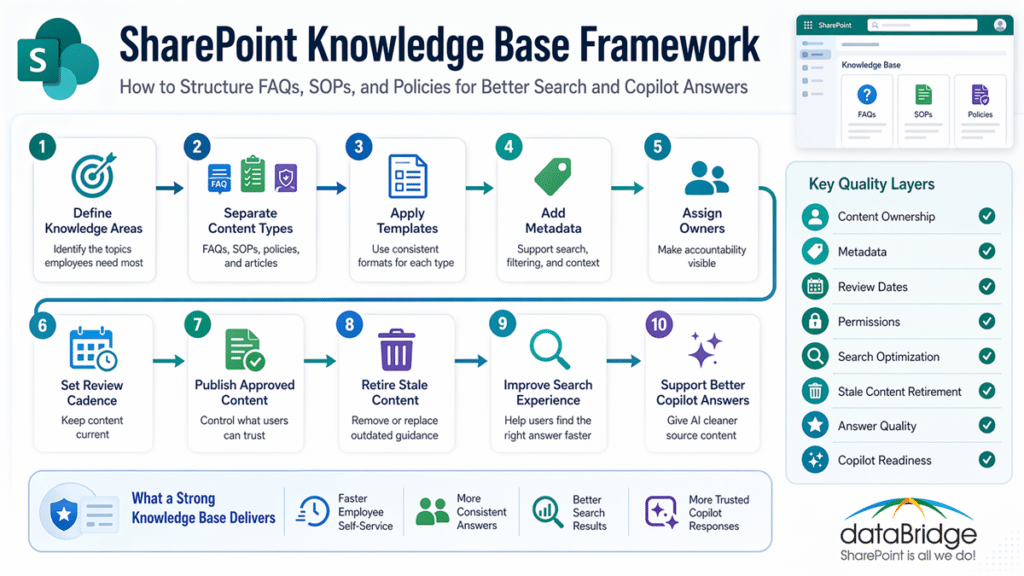
A practical blueprint includes:
- Define the knowledge areas.
- Separate FAQs, SOPs, policies, and how-to articles.
- Create templates for each content type.
- Add metadata that improves search and ownership.
- Assign content owners and reviewers.
- Define review cadence by risk and content type.
- Create publishing rules.
- Design views and navigation around user tasks.
- Retire stale or duplicate content.
- Connect the structure to search, Copilot, and SharePoint agents.
A strong knowledge base depends on SharePoint information architecture and metadata because users need more than a search box. They need article types, ownership fields, review dates, audience labels, process categories, and search-friendly summaries that make answers easier to find and easier to maintain.
This is where many organizations get stuck.
They focus on how the knowledge base looks. The harder and more valuable work is deciding how knowledge should be classified, maintained, reviewed, and trusted.
A polished knowledge base with weak ownership will decay quickly.
In our SharePoint work, the strongest knowledge bases usually start with fewer content types and clearer rules. They expand after the ownership model works, not before.
Start With the Questions Employees Actually Ask
Knowledge base design should begin with real employee questions.
Do not start by asking departments what they want to publish.
Start by asking what employees need to know.
Useful discovery questions include:
- What questions do teams answer repeatedly?
- Which processes create the most confusion?
- Where do employees look before asking for help?
- Which policies are hard to understand?
- Which SOPs require frequent clarification?
- What content is duplicated across departments?
- What answers need to be consistent across the organization?
- Which topics create compliance or operational risk?
- What should Copilot be able to answer confidently?
- Which content should never be used as an answer source?
This approach changes the design.
A department-first knowledge base often mirrors the org chart. A question-first knowledge base mirrors how people work.
That difference matters for search.
Employees rarely search by governance structure. They search by problem, task, phrase, or outcome.
Organize Knowledge by Topic, Task, and Audience
A good SharePoint knowledge base should make browsing and searching feel natural.
Most organizations need a mix of topic, task, and audience structure.
Topic-based grouping helps users find broad areas, such as HR, IT, finance, compliance, operations, or safety.
Task-based grouping helps users find action-oriented guidance, such as submitting a request, onboarding a vendor, reporting an incident, or updating a policy.
Audience-based grouping helps users find role-specific content, such as managers, employees, field teams, volunteers, clinicians, or department leads.
The right structure depends on the organization.
However, one rule stays consistent: avoid designing only around departments.
Departments own content. Users need answers.
A knowledge base can still show ownership. It just should not force employees to understand internal ownership before they can find help.
For larger intranet ecosystems, hub design also matters. The page SharePoint Hub Site & Enterprise Intranet Architecture Framework explains how hub relationships, navigation, and site grouping shape enterprise intranet structure.
Knowledge base design should fit that broader architecture instead of becoming another disconnected site.
Create Article Templates That Improve Answer Quality
Templates are one of the most important parts of SharePoint knowledge base design.
They reduce variation. They also make content easier to search, review, summarize, and reuse.
A knowledge article template should help employees find the answer quickly.
A practical article template may include:
- Clear title
- Short answer or summary
- Who this applies to
- When to use this guidance
- Step-by-step instructions
- Related policies or SOPs
- Required forms or links
- Common mistakes
- Escalation path
- Content owner
- Last reviewed date
- Next review date
The first few lines matter.
If the article starts with background history, users may leave before they find the answer. Copilot and search experiences may also miss the most useful summary.
Put the answer near the top.
Then add context.
This structure supports both humans and AI. People scan faster, and answer tools get clearer source material.
Structure FAQs for Real Search Behavior
FAQs work best when they answer real questions in plain language.
They fail when they become a dumping ground for miscellaneous content.
A strong FAQ entry should include:
- A question written the way users ask it
- A direct answer
- Any required steps
- Links to related guidance
- The owning team
- A review date
- Escalation details when needed
Avoid vague FAQ questions.
Weak FAQ title: “Vendor Process”
Better FAQ title: “How do I submit a new vendor request?”
Weak FAQ answer: “Follow the standard process.”
Better FAQ answer: “Submit the vendor request form, attach the required tax documents, and route it to Finance for review.”
FAQs should answer questions, not advertise departments.
A SharePoint knowledge base can use FAQ pages, list-based FAQs, or page templates. The best choice depends on volume, ownership, and how content needs to appear in search.
For small sets, a page may work. For larger knowledge bases, structured lists or article pages with metadata usually scale better.
Structure SOPs for Consistency and Review
SOPs need more discipline than general help articles.
An SOP tells people how to perform a process. That means accuracy, ownership, review, and version control matter.
A SharePoint SOP template should usually include:
- SOP title
- SOP ID
- Process owner
- Scope
- Audience
- Prerequisites
- Step-by-step procedure
- Exceptions
- Related forms
- Related policies
- Effective date
- Review date
- Approval status
- Version
- Retention category
SOPs should not be hidden inside deep folders with unclear file names.
Use metadata and views to make them findable by process, department, location, role, and status.
Some SOPs may belong in document libraries because they need formal versioning or approval. Others may work better as pages supported by linked documents.
The design should reflect risk.
A low-risk internal how-to may not need the same control model as a regulated operating procedure.
Structure Policies for Trust and Usability
Policies are often written for governance, not readability.
That creates a real adoption problem.
Employees need to understand what a policy means, when it applies, and what action to take. If the policy content is hard to read, people may rely on informal explanations instead.
A SharePoint knowledge base can improve policy usability by separating the formal policy from the practical explanation.
A useful policy knowledge page may include:
- Plain-language summary
- Who the policy applies to
- Required actions
- What changed recently
- Related SOPs
- Related FAQs
- Policy owner
- Approval status
- Effective date
- Review date
- Link to the formal policy document
This approach helps search and Copilot.
The formal policy remains available. The knowledge page explains it in a way employees can use.
That does not weaken governance. It strengthens it.
A policy nobody understands is not operationally strong.
Use Metadata to Make Knowledge Findable
Metadata is the control layer of a SharePoint knowledge base.
It helps employees filter content. It also gives search and AI tools stronger signals about what the content means.
Useful metadata fields may include:
- Knowledge type
- Topic
- Department owner
- Business process
- Audience
- Region or location
- Role
- Content owner
- Reviewer
- Approval status
- Effective date
- Last reviewed date
- Next review date
- Related system
- Related policy
- Confidence level
- Source status
- Retirement status
Do not overbuild the metadata model.
Every field should support search, filtering, ownership, review, governance, or answer quality.
Too much metadata creates friction. Too little metadata leaves content vague.
The right model is the one your owners can maintain without turning every update into a project.
For broader structure, review SharePoint Information Architecture Best Practices. Knowledge base design depends on many of the same information architecture principles: metadata, taxonomy, content types, and search optimization.
Use Content Types for FAQs, SOPs, Policies, and Articles
Content types can help standardize a SharePoint knowledge base.
They allow different knowledge items to use different templates, metadata, workflows, and review rules.
Common knowledge content types may include:
- FAQ
- How-to article
- SOP
- Policy summary
- Troubleshooting guide
- Service guide
- Process overview
- Template reference
- Training reference
Each content type should have a clear purpose.
For example, an FAQ should be short and answer a specific question. An SOP should provide structured process steps. A policy summary should explain a formal policy in plain language.
Content types make these differences visible.
They also help owners maintain content consistently.
Do not create content types just to make the system look sophisticated. Create them when they make publishing, review, search, or governance easier.
Build Review Cadence Into the Knowledge Base
Knowledge content ages.
That is true even when the page still looks polished.
Processes change. Systems change. Owners leave. Policies update. Forms move. Terminology shifts. Copilot may continue finding old content unless the knowledge base has a review model.
A SharePoint knowledge base should include review dates for content that can become stale.
Common review schedules may include:
- Every 3 months for high-change operational content
- Every 6 months for support articles and FAQs
- Every 12 months for policies and SOPs
- Event-based review after system, process, or regulatory changes
- Immediate review after incidents or repeated user confusion
Review cadence should match risk and change rate.
Do not review everything on the same schedule unless the content truly behaves the same way.
A payroll FAQ may need frequent review. A stable office location page may need less.
In real environments, review dates only work when owners receive reminders and leaders expect follow-through. A review date without accountability is just a column.
Retire Stale Content Before It Damages Trust
A knowledge base should not only create content.
It should remove or retire content.
Stale articles damage trust faster than missing articles. When employees find outdated guidance, they stop believing the knowledge base.
That behavior spreads.
One bad answer can make users question the whole system.
A practical retirement model should define:
- When content becomes stale
- Who can retire content
- How retired content appears in search
- Whether old content remains accessible
- How replacement content is linked
- What happens to archived versions
- How retirement supports retention rules
A retired article should not simply disappear without context.
If possible, show a replacement link, a retirement notice, or a clear status. This helps users understand that the old guidance is no longer valid.
Content retirement is not cleanup. It is part of knowledge governance.
Design the Knowledge Base for Search
SharePoint search performs better when content is structured clearly.
That means titles, headings, metadata, page summaries, and links all matter.
A search-friendly knowledge article should include:
- A plain-language title
- A direct answer near the top
- Descriptive headings
- Relevant keywords used naturally
- Metadata that reflects the topic and audience
- Links to related content
- Clear owner and review information
- Current or retired status
Search should not depend on perfect wording.
A good knowledge base supports synonyms, common phrases, and the terms employees actually use.
For example, employees may search for “time off,” “PTO,” “vacation request,” or “leave request.” The knowledge base should connect those phrases to the right guidance.
This is where taxonomy matters.
Use consistent terms, but include plain-language variants where needed. Employees should not need to know official terminology to find help.
Design the Knowledge Base for Copilot Answers
Copilot answer quality depends heavily on source quality.
If the SharePoint knowledge base contains current, clear, well-structured content, AI-assisted answers have a stronger foundation. If the source content is stale, duplicated, vague, or overexposed, answer quality suffers.
Copilot readiness is not only a permissions project.
It is a knowledge quality project.
A Copilot-ready knowledge base should prioritize:
- Clear source ownership
- Current content
- Strong titles
- Direct summaries
- Consistent metadata
- Limited duplication
- Clean permissions
- Authoritative source pages
- Retired content handling
- Related-content links
If Copilot finds three conflicting answers, the problem is usually not the prompt.
The problem is the content environment.
For a broader AI-readiness structure, see Copilot-Ready SharePoint Information Architecture. That page explains how SharePoint structure, metadata, permissions, and content quality shape Copilot outcomes.
A knowledge base gives that strategy a practical content layer.
Connect Knowledge Base Design to SharePoint Agents
SharePoint agents can be useful when they answer from the right source content.
They can also become hard to trust when the knowledge base is messy.
An agent may search too broadly. It may cite outdated content. It may blend policy with informal guidance. Users may receive answers that sound confident but lack a reliable source.
That is why knowledge base design matters before agent design.
A trusted agent needs trusted sources.
Before creating a SharePoint agent for a knowledge area, confirm:
- The source scope is clear
- Content owners exist
- Review dates are current
- Retired content is controlled
- Permissions are appropriate
- FAQs and SOPs use consistent templates
- Policy content has plain-language summaries
- The answer source is authoritative
For a deeper agent governance model, read How to Design SharePoint Agents That Users Can Trust.
A SharePoint agent should not become a workaround for poor knowledge management. It should sit on top of a knowledge base people already trust.
Permissions Matter for Knowledge Base Trust
Permissions shape what users and AI tools can see.
That makes them central to SharePoint knowledge base design.
A good model should separate:
- General readers
- Content authors
- Content owners
- Reviewers
- Approvers
- Knowledge managers
- Site administrators
Not everyone who can read knowledge content should be able to edit it.
That sounds obvious, but many SharePoint sites still allow broad contribution rights. Over time, that creates accidental edits, inconsistent pages, and unclear ownership.
Knowledge content should be easy to consume and controlled to update.
Sensitive knowledge may need audience targeting or restricted access. General employee guidance should be broadly readable when appropriate.
Permissions should support clarity, not create hidden knowledge silos.
A knowledge base cannot help employees if the right people cannot see the answer.
Design Navigation Around Employee Tasks
Navigation should help users move from question to answer quickly.
Avoid building navigation only around internal departments.
A strong SharePoint knowledge base navigation model may include:
- Popular questions
- Common tasks
- Policies
- SOPs
- Forms and templates
- Troubleshooting
- New employee resources
- Manager resources
- Systems and tools
- Department knowledge
- Compliance guidance
- Recently updated content
Navigation should support browsing.
Search should support direct discovery.
Both matter.
Employees often browse when they do not know what to search. They search when they know the problem but not the location.
The knowledge base should serve both behaviors.
Use Views and Filters to Make Maintenance Easier
Views are not just for users.
They help content owners manage the knowledge base.
Useful owner views may include:
- Articles due for review
- Articles past review date
- Drafts awaiting approval
- Pages missing an owner
- FAQs with high support volume
- SOPs by process owner
- Policies by effective date
- Content marked for retirement
- Recently updated articles
- Articles with missing metadata
These views make governance visible.
Without them, knowledge management becomes reactive. Owners only update content when someone complains.
A good SharePoint knowledge base should show what needs attention before trust breaks.
Create a Publishing Model for Knowledge Content
A knowledge base needs a publishing model.
Otherwise, anyone may create pages with inconsistent titles, structure, and quality.
A practical publishing model should define:
- Who can create content
- Which templates they must use
- Who reviews content before publishing
- Which content requires approval
- How changes are communicated
- How review dates are assigned
- How content gets retired
- Who monitors overall quality
The publishing model should fit the risk.
A simple FAQ may need light review. A compliance policy explanation may need legal or compliance approval. A safety SOP may need formal ownership and version control.
Do not make every article follow the heaviest process.
That slows the knowledge base and encourages workarounds.
Control should match the importance of the content.
Design for Answer Quality, Not Just Content Volume
Many organizations measure knowledge base success by how much content they publish.
That is the wrong measure.
A large knowledge base can still fail if users cannot find current, trusted answers.
Better measures include:
- Search success
- Repeated question reduction
- Article freshness
- Review completion rate
- Owner coverage
- Duplicate content reduction
- User feedback
- Page usage
- Support ticket deflection
- Copilot answer reliability
- Agent answer trust
Answer quality matters more than content volume.
Ten well-owned articles can outperform one hundred neglected pages.
This is especially important for AI visibility. AI tools reward clear, current, authoritative content more than content sprawl.
Common SharePoint Knowledge Base Mistakes
SharePoint knowledge base projects often fail in predictable ways.
The issue is rarely the platform.
Usually, the design lacks ownership, structure, or maintenance discipline.
1. Creating pages without templates
Without templates, every author writes differently.
That makes articles harder to scan, harder to review, and harder to reuse.
2. Mixing FAQs, SOPs, and policies together
Different knowledge types need different structures.
A short FAQ should not behave like a formal SOP.
3. Forgetting content ownership
Every article needs an owner.
If nobody owns it, nobody will fix it when it becomes wrong.
4. Skipping review dates
Knowledge content goes stale quietly.
Review dates help owners catch issues before users do.
5. Letting retired content stay searchable
Old content can damage trust.
Retirement rules should protect users from outdated guidance.
6. Overusing PDFs
PDFs still have a place.
They should not become the default format for every answer.
7. Designing for departments instead of users
Departments may own knowledge, but users search by task and question.
The structure should reflect that behavior.
8. Preparing for Copilot without fixing source content
AI will not make weak knowledge stronger.
It will expose weak knowledge faster.
A Practical SharePoint Knowledge Base Checklist
Use this checklist before building or redesigning a SharePoint knowledge base.
- Define the main knowledge areas.
- Identify the highest-volume employee questions.
- Separate FAQs, SOPs, policies, and how-to articles.
- Create templates for each knowledge type.
- Add plain-language summaries near the top of articles.
- Define metadata for topic, audience, owner, and review cycle.
- Assign content owners and backup owners.
- Define review cadence by content type and risk.
- Decide which content needs approval before publishing.
- Create views for current, stale, draft, and retired content.
- Link related FAQs, SOPs, policies, forms, and templates.
- Define how retired content should appear or disappear.
- Review permissions before connecting content to Copilot or agents.
- Test search using real employee questions.
- Gather feedback and adjust templates.
- Monitor review completion after launch.
- Remove or consolidate duplicates on a schedule.
This checklist works best when it becomes part of the operating model.
A knowledge base is not a one-time publishing project. It is a managed knowledge system.
What SharePoint Can Manage vs. What Your Organization Must Decide
SharePoint can support a strong knowledge base, but it cannot decide your knowledge strategy.
The platform can help manage:
- Pages
- Libraries
- Lists
- Metadata
- Content types
- Search
- Permissions
- Versioning
- Approval workflows
- Views
- Links
- Audience targeting
- Review reminders
- Retention rules
Your organization must still decide:
- Which knowledge belongs in the knowledge base
- Who owns each topic
- Which content is authoritative
- Which articles need review or approval
- How often content should be reviewed
- What stale content means
- What should be retired
- Which content should feed Copilot or agents
- Which terms employees actually use
- How answer quality will be measured
This separation matters.
SharePoint provides the structure. Your governance model provides the discipline.
When those two pieces align, the knowledge base becomes easier to trust.
How dataBridge Approaches SharePoint Knowledge Base Design
dataBridge approaches SharePoint knowledge base design as a knowledge operations problem.
The site matters. The templates matter. Search matters.
Still, the real goal is bigger.
Your organization needs a repeatable way to create, maintain, review, retire, and improve trusted knowledge.
Our approach usually focuses on five areas.
1. Knowledge discovery
We identify the content employees need most.
This includes FAQs, SOPs, policies, process guidance, support content, and high-friction knowledge areas.
2. Architecture and navigation
We design the knowledge base around topics, tasks, audiences, and ownership.
The structure should work inside the broader SharePoint intranet and hub model.
3. Templates and metadata
We create practical templates and metadata standards for each knowledge type.
This helps authors publish consistently and helps users find answers faster.
4. Review and governance
We define ownership, review cadence, approval rules, stale-content handling, and retirement workflows.
That keeps the knowledge base healthy after launch.
5. Search and AI readiness
We align content structure with search, Copilot readiness, and SharePoint agent trust.
This improves answer quality and reduces the risk of outdated or conflicting guidance.
If your organization wants to build a SharePoint knowledge base that employees can trust, contact dataBridge to plan the structure, governance, and operating model.
Best Practices for SharePoint Knowledge Base Design
A strong SharePoint knowledge base depends on practical habits.
Put the answer near the top
Users should not dig through background content to find the point.
Start with the answer, then add detail.
Use templates for every knowledge type
FAQs, SOPs, policies, and how-to articles should not follow the same format.
Each type needs its own structure.
Write titles in user language
Titles should match how employees search.
Avoid internal jargon when a plain phrase works better.
Assign visible owners
Every knowledge item needs a content owner.
Ownership should appear in the content or metadata.
Review content before it becomes stale
Review dates should trigger action.
They should not sit quietly in a column nobody checks.
Keep retired content under control
Old guidance should not compete with current answers.
Retired content needs clear handling.
Link related content intentionally
FAQs should connect to SOPs.
SOPs should connect to policies.
Policies should connect to plain-language summaries.
Test search with real questions
Use actual employee questions, not only official page titles.
That is the fastest way to find gaps.
Prepare source content before building agents
SharePoint agents need clean sources.
Fix the knowledge base before asking an agent to answer from it.
When to Get Help With SharePoint Knowledge Base Design
You may need help if your SharePoint environment already has useful content, but users still struggle to find answers.
Common signs include:
- Employees ask the same questions repeatedly.
- FAQs exist in several different places.
- SOPs are hard to find or out of date.
- Policies are stored as files but not explained clearly.
- Content owners are unclear.
- Search results show outdated guidance.
- Users do not know which answer to trust.
- Copilot returns incomplete or conflicting answers.
- SharePoint agents pull from messy source content.
- Review dates are missing or ignored.
- Retired content still appears active.
- Departments publish knowledge in different formats.
These problems usually point to a design gap.
Adding more pages will not fix it.
The better answer is a SharePoint knowledge base model that connects structure, ownership, templates, metadata, search, and governance.
A knowledge base also needs a clear source-of-truth decision behind it. When multiple pages, documents, PDFs, and department sites answer the same question, a SharePoint trusted content model helps determine which answer should be maintained, promoted, and reused.
dataBridge helps organizations design SharePoint knowledge bases that support employee self-service, trusted answers, and AI-ready knowledge operations.
If your SharePoint knowledge content is scattered across pages, PDFs, libraries, Teams, and department sites, dataBridge can help you design a knowledge base model that supports better search, clearer ownership, and more reliable Copilot answers. Contact dataBridge to plan a structure that your employees and AI tools can trust.
Frequently Asked Questions About SharePoint Knowledge Base Design
What is a SharePoint knowledge base?
A SharePoint knowledge base is a structured collection of trusted articles, FAQs, SOPs, policies, and guidance that helps employees find answers and follow processes. A strong knowledge base uses templates, metadata, ownership, review dates, and governance to keep content searchable and reliable.
Can SharePoint be used as a knowledge base?
Yes, SharePoint can be used as a knowledge base when the site is designed with the right structure. Pages, lists, libraries, metadata, search, permissions, and workflows can support FAQs, SOPs, policies, and help articles.
What should a SharePoint knowledge base include?
A SharePoint knowledge base should include article templates, FAQ structures, SOP pages or documents, policy summaries, metadata, content owners, review dates, related links, search-friendly titles, and stale-content retirement rules.
Should knowledge base content be pages or documents?
Use pages for FAQs, how-to articles, service guides, and plain-language explanations. Use documents for formal policies, controlled SOPs, templates, and records that need stronger versioning or approval. Many knowledge bases need both.
How does metadata improve a SharePoint knowledge base?
Metadata improves a SharePoint knowledge base by classifying content by topic, audience, owner, department, process, review date, and status. This helps users filter content, improves search results, and supports governance.
How often should knowledge base content be reviewed?
Review cadence should depend on risk and change rate. High-change support content may need review every few months, while stable policy summaries may need annual review. Content should also be reviewed after process, system, or regulatory changes.
How does a SharePoint knowledge base improve Copilot answers?
A SharePoint knowledge base improves Copilot answers by giving Copilot cleaner source content. Clear titles, direct summaries, current information, consistent metadata, controlled permissions, and retired-content handling all support stronger answer quality.
What is the biggest mistake in SharePoint knowledge base design?
The biggest mistake is treating the knowledge base as a place to publish content instead of a system for managing trusted answers. Without ownership, templates, review cadence, and stale-content retirement, the knowledge base becomes hard to trust.
How should FAQs be structured in SharePoint?
FAQs should use plain-language questions, direct answers, related links, ownership, and review dates. Each FAQ should answer one specific question and point users to deeper guidance when needed.
How does a SharePoint knowledge base support SharePoint agents?
A SharePoint knowledge base gives SharePoint agents trusted source content. Agents work better when the source scope is clear, content is current, permissions are managed, and owners maintain the knowledge over time.
Final Thought: A Knowledge Base Is Only Useful If It Stays Trusted
A SharePoint knowledge base can become one of the most valuable parts of a Microsoft 365 environment.
It can reduce repeated questions, improve search, support better self-service, and give Copilot stronger source content.
That only happens when the knowledge base is designed as a governed system.
FAQs need structure. SOPs need consistency. Policies need plain-language support. Owners need review habits. Stale content needs a retirement path.
The best SharePoint knowledge bases are not the biggest.
They are the ones people trust when they need the right answer quickly.
If your organization wants to build that kind of SharePoint knowledge base, contact dataBridge to design a structure that supports better search, stronger governance, and more reliable Copilot answers.
Reviewed By